Authorized-lab note: use these concepts only within an explicitly scoped red-team engagement or your own isolated home lab. “Evasion” here means understanding and measuring defensive visibility - not disabling security controls or applying these techniques to systems without permission.
Quick reference: what to remember next time
The central rule
Do not ask only “How do I bypass this detection?” Ask:
What exact artifact or behavior was detected, where was it observed, and what change would alter that observation without breaking the payload?
AV/EDR detection is a moving target. A payload that is clean today may be detected tomorrow, and a payload that passes a static scan may still be detected when it executes.
The four visibility layers
File and reputation: filename, hash, publisher, prevalence, and reputation.
Static content: PE headers, sections, imports, strings, resources, entropy, and recognizable code or byte patterns.
Runtime behavior: process creation, script execution, memory allocation, injection, module loading, network activity, and the sequence of events.
OS and security telemetry: process/thread callbacks, image loads, file and registry activity, network telemetry, AMSI, ETW, and correlated EDR events.
Artifact arrives
      │
      ├─ reputation / signature / static inspection
      │
      ▼
Execution allowed?
      │
      ▼
Runtime monitoring
      │
      ├─ process and thread behavior
      ├─ memory and module mapping
      ├─ scripts and command lines
      ├─ file, registry, and network activity
      └─ security-provider telemetry
      │
      ▼
Behavioral correlation → alert, block, or allow
Cobalt Strike-specific map
Area
What it changes
What it does not guarantee
Artifact Kit
Compiled EXE/DLL artifact templates and their loading behavior
A clean artifact after one scan
Resource Kit
Script artifacts such as PowerShell templates
That decoded or executed content will be clean
Malleable C2 stage
How Beacon is represented and loaded in memory
That memory is invisible to EDR
Malleable C2 process-inject
Allocation, transformation, and execution choices for injected content and BOFs
That injection becomes benign
Malleable C2 post-ex
Some post-exploitation process, pipe, and cleanup behavior
That a legitimate-looking process makes the behavior legitimate
Command choice
The implementation path and observable child processes
That a Beacon command hides its underlying Windows actions
The practical workflow
Identify whether the detection is static, AMSI/content-based, memory-based, process-based, network-based, or correlated behavior.
Reproduce it in the authorized lab with the smallest possible test artifact or action.
Change one variable at a time.
Rescan and rerun the test; record both the result and the new telemetry.
Check that the change did not merely move the detection to runtime, memory, or a child process.
Treat “ThreatCheck clean” as not detected by that test at that stage, not as proof of operational safety.
The most important memory and process ideas
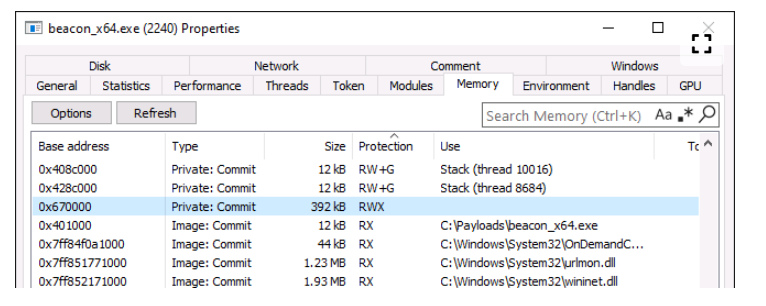
RWX memory can be unusual because many ordinary applications do not need pages that are simultaneously readable, writable, and executable. Changing to RW and later RX may alter one signal, but it does not remove all memory telemetry.
PE headers help a loader map an image, but their presence in an in-memory Beacon region can make that region easier to recognize. Removing headers changes one memory characteristic; it does not make the code invisible.
Module stomping can make a memory region appear associated with a legitimate module, but defenders can compare memory with the image on disk or inspect other inconsistencies.
Process injection is a chain: obtain a process handle → allocate memory → write content → arrange execution. Every step can be observable.
BOFs execute inside Beacon and are not automatically “free” from detection. Their allocator, memory reuse, and execution path are influenced by process-inject settings and by the BOF itself.
Fork and run usually means a temporary or sacrificial process, injected capability, and a return channel such as a named pipe. More mechanisms mean more telemetry and more opportunities for detection.
PPID spoofing and spawnto are not the same: one changes the apparent parent relationship for a created process; the other selects a process used for execution or injection. Neither makes an implausible process tree legitimate.
Service execution can produce high-integrity execution, but service creation, the service binary, its parent/child relationships, and its command line remain observable.
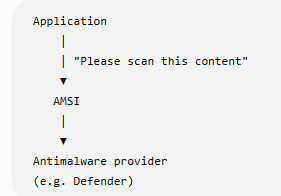
AMSI is an interface, not the detector: an AMSI-aware application submits content to an antimalware provider, which makes the detection decision.
Static script scanning is not execution scanning: PowerShell may decode, decompress, or transform content and expose intermediate representations during execution.
A clean result is scoped: clean from a particular scanner, at a particular stage, with a particular artifact, on a particular date.
What not to memorize
Do not memorize a fixed list of commands, filenames, bypasses, or “safe” settings. Cobalt Strike versions, endpoint products, policies, and detections change. Memorize the reasoning pattern:
Technique → implementation path → Windows observations → defender telemetry → test result
Detailed notes
The sections below preserve the original explanations, diagrams, lab notes, screenshots, and unresolved questions. They are now grouped by the defensive layer they help explain.
1. AV and EDR mental model
Antivirus and endpoint detection response: defensive evasion is a tactic where adversaries attempt to avoid detection during an operation. It is not something done only at the beginning or end; it affects decisions throughout the operation.
Defensive evasion is not something done only at the start or end; it is a consideration throughout the operation.
Most antivirus products use two broad detection strategies.
The first is static analysis: signatures and other rules inspect known or recognizable portions of a payload.
For the Cobalt Strike ecosystem, this can include raw Beacon content, the prepended loader, and compiled artifacts that contain or deliver them.
The second is dynamic or behavioral analysis: the product observes execution and applies heuristics or behavioral rules.
Examples include running shell commands, creating unusual child processes, remote process injection, and running third-party post-exploitation tools.
This raises the practical question: does a red-team operator still need to understand how to modify payloads and post-exploitation behavior to avoid these detections?
The goal for this chapter is to understand and test those detection surfaces: remove or change known indicators in an authorized lab, and understand how post-exploitation behavior changes what AV/EDR can observe.
The Artifact Kit to remove known indicators from the compiled artifacts (the .exe and .dll).
The Resource Kit to remove known indicators from the script artifacts (the .ps1).
Malleable C2 to modify how the prepended loader loads Beacon into memory.
Malleable C2 to modify post-exploitation behaviours.
A major caveat for this defensive-evasion chapter is that antivirus and EDR are moving targets. Vendors continuously update signatures, models, and behavioral detections.
What works today may not work tomorrow.
The durable skill is the methodology: identify the detection surface, test it, and understand what changed.
This way you can investigate future detections on your own.
I want to go deeper into how anti virus media works so here is the primary
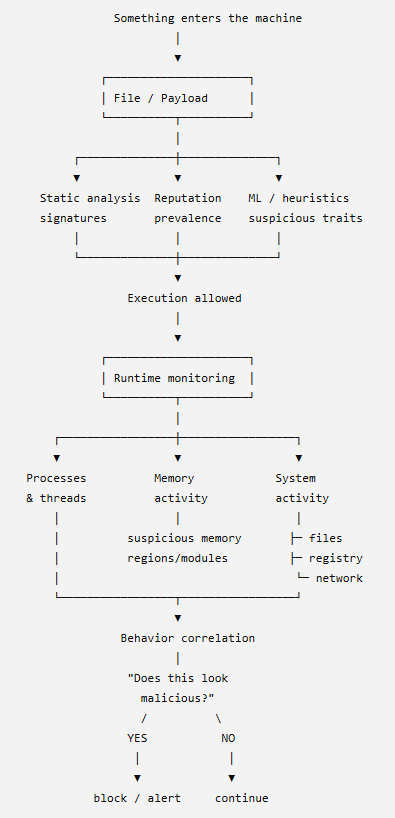
this is a mental model of the defender
So for everything that enters the machine either a followed it does the static analysis it checks if execution is allowed and then it comes if execution is allowed then it monitors the the process entrance for the program during execution and then decides whether it's malicious or not
So it's important for us to realize that antivirus is not just a database of malware hashes anymore which used to be the case
Fig. 1. Pasted image 20260918135954.png
We know that there's many there's a few layers now to how antiviruses work so file detection Basically the name of the file and then it does static analysis of the actual program and then which is probably the most important concept is the 3rd layer which is the runtime behavior This is especially important for programs that has not been seen yet.. And for the level level 4 layer 4 is the O operating system telemetry this is the ability for the end point products to obtain information from several places in the operating system So that means it uses to be able to see where there's weird stuff happening
so when it comes to studying AV and Edrs in order to bypass them
don't just ask how does this loader work
also ask what does the window observe while this loader runs and which of those observations could an A or endpoint detection response used to recognize malicious behavior
that allows you to connect both of your renting and Bluetooth together
At the highest level, modern endpoint security is roughly:
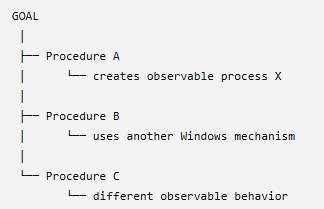
Process A
   │
   ├── interacts with Process B
   │
   ├── causes memory changes
   │
   └── execution appears in unusual memory
                    │
                    ▼
            suspicious telemetry
Same event, completely different mental model.
That's the perspective I recommend learning.
1.5 Learning path
Rather than studying "antivirus bypass" as one giant subject, build these concepts in order:
How classic antivirus works - hashes, signatures, YARA-like pattern matching, reputation and static PE analysis.
How Windows executes programs - PE loading, virtual memory, processes, threads, DLLs and permissions.
How modern EDR observes Windows - process trees, memory events, ETW, AMSI, callbacks and behavioral telemetry.
How detections are constructed - individual indicators versus sequences of behavior, behavioral rules and correlation.
Then revisit offensive techniques - process injection, reflective loading, shellcode and C2 frameworks, but ask what observable artifacts does each technique create?
That last question is extremely valuable.
For example, when you next study a Cobalt Strike loader, don't only ask:
"How does this loader work?"
Also ask:
"What does Windows observe while this loader runs, and which of those observations could an AV/EDR use to recognize malicious behavior?"
That connects your red-team knowledge directly to blue-team knowledge.
A particularly useful next lesson would be to take one completely ordinary Windows executable from double-click → PE loading → process creation → memory → execution, and mark every point where Defender/EDR can potentially observe it. Once that model clicks, things like AMSI, ETW, process injection detection, reflective loading and Cobalt Strike become substantially easier to understand.
2. Artifact Kit: compiled artifacts
All right, now we'll proceed with the Artifact Kit from Cobalt Strike.
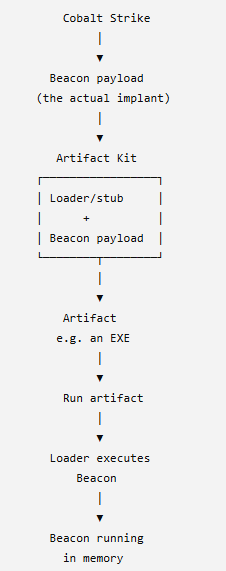
Beacon is the payload. The Artifact Kit is a source framework for generating executable and DLL artifacts that host or load that payload. It is not the Beacon itself.
The Artifact Kit contains stage-zero artifact templates and supporting source code. The templates are not merely inert wrappers: they include the selected loading, allocation, and execution logic used to start the Beacon content.
All Strike generates a beacon shell code which is then patched into one of these templates
The templates take Beacon shellcode and arrange for it to be loaded or executed in memory. Their behavior can include allocation, decoding, cleanup, and selected environment checks, so their observable behavior matters as much as their static bytes.
because these are templated Antivirus companies typically look at these and add them as signatures
and because they're typically the same across multiple CS deployments unless they are changed by the operator the artifact kits Typically it will be seen by the anti viruses
however we can actually modify the artifact
The architect kit contains source codes for these templates
Operators can modify source portions that are known to be recognized by a particular antivirus product, but this is a version- and vendor-specific experiment - not a general bypass guarantee.
Fig. 2. Pasted image 20260918140744.png
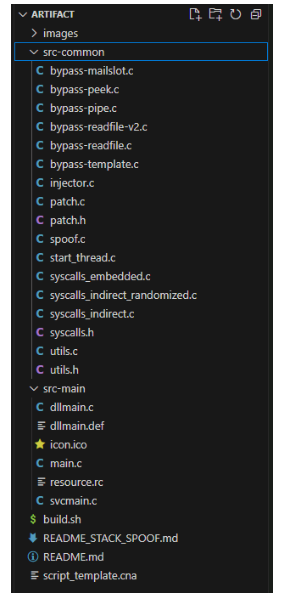
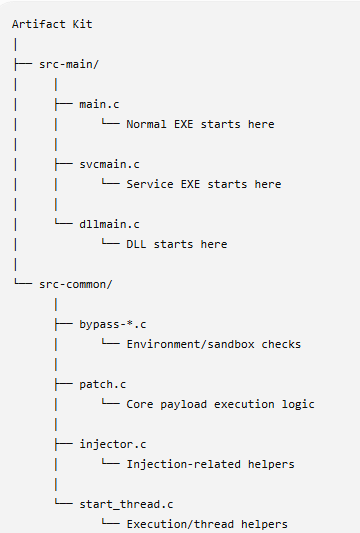
A layout of the kit can be overwhelming if you're not fluent in C but it's actually simple
This is the layer of the artifact kit
Fig. 3. Pasted image 20260918140920.png
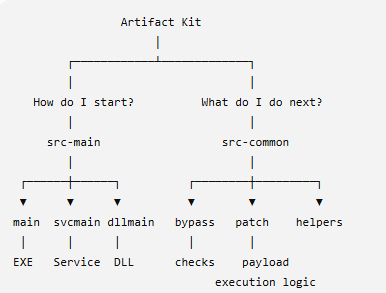
The easiest way to about this layout is to stop thinking it of it is a pile of C files instead think about as who is responsible for what
The artifact kit is essentially building a wrapper around the a payload
Fig. 4. Pasted image 20260918141029.png
You can see here that this their source It's not it's actually just three different doors into the same machinery It's three different entry points
2.1 main.c, svcmain.c, dllmain.c - "How did Windows start me?"
Windows programs can be launched in different ways, so the Artifact Kit needs different entry points.
Think of these as three different front doors into essentially the same machinery.
Normal EXE
   │
   ▼
 main.c ─────┐

Windows      │
Service      │
   │         │
   ▼         ├──► common Artifact Kit logic
svcmain.c ───┤
             │
DLL loaded   │
   │         │
   ▼         │
dllmain.c ───┘
If you build:
artifact.exe
Windows starts the normal executable entry path represented by main.c.
If you build something intended to run as a Windows service:
artifact.svc.exe
the service-oriented entry path uses svcmain.c.
And if you're building:
artifact.dll
the DLL's entry path is represented by dllmain.c.
So don't think:
"Why are there three different versions of the malware?"
Think:
"There are three different ways Windows might enter this program."
2.2 bypass-*.c - "Should I continue running?"
And then there's the there's the bypass.C -- This is the logic the answers should I continue running
It basically checks which environments it's in and checks if the environment looks suitable or unsuitable for one
you have seen in the previous picture there's different kinds of bypasses The reason for this is you wanna make it modular instead of having an entire bypass file that describes all the different bypasses
Techniques is a space separated list of bypass templates that you want to build.
Allocator sets which API is used to allocate memory for the shellcode. The default options are HeapAlloc, VirtualAlloc, and MapViewOfFile.
Stage Size is used to set the reserved space needed for the Beacon shellcode.
RDLL Size is used to validate the stage size. When not using a custom loader, keep this set to 0.
When set to true, the Resource File is used to change properties of the artifact, such as the CompanyName, FileDescription, ProductName, etc. This information is defined in src-main/resource.rc.
When set to true, Stack Spoof enables a stack spoofing technique to hide the fact the shellcode is executing from an unbacked region of memory.
Syscalls sets the system call method. Valid options are none, embedded, indirect, and indirect_randomized.
Output Directory is the directory to save the generated artifacts.
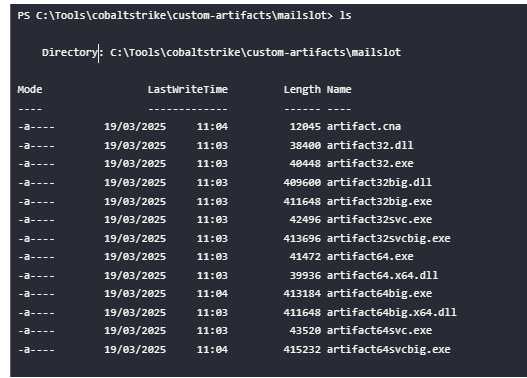
After you've created the stage your new artifacts will look like this
Fig. 6. Pasted image 20260918141838.png
Before plugging this new template into Cobalt it's useful to How do you stand up against antivirus before any weaponized shell code is patched into them
This is so that your templates I first checked and they don't trigger any signatures for the static checks
It's not ideal to recommend your templates to Virus Total because you're just giving away your artifacts to antivirus for for antivi virus vendors to analyze instead
you should check within your own sandbox
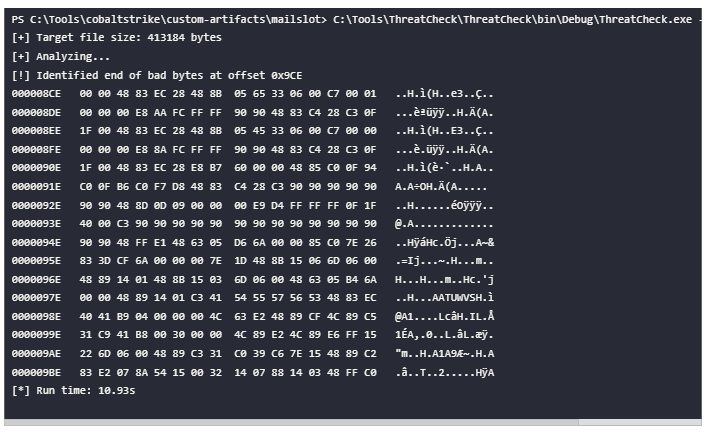
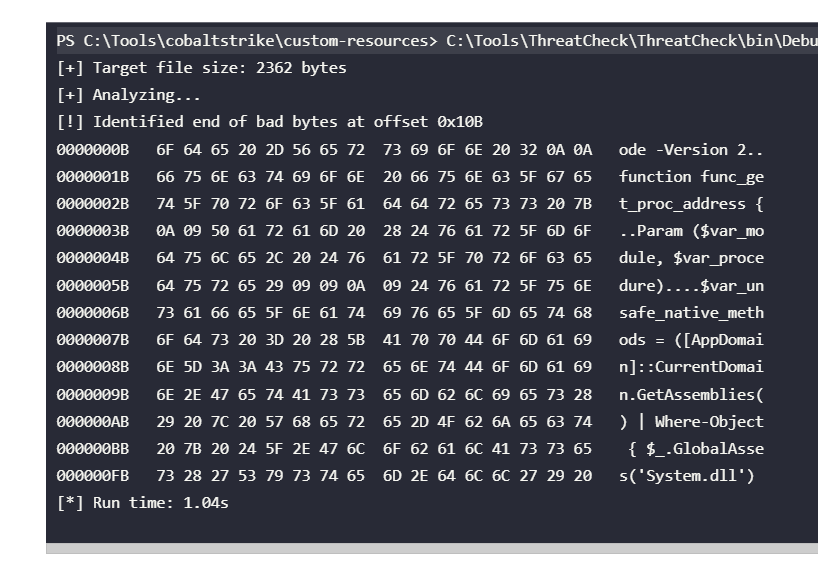
Tools such as ThreatCheck can help localize a static detection by testing portions of a file and reporting the smallest region that still triggers the selected scanner. This is a diagnostic result for that file and scanner, not proof that the behavior is safe or that the detection has been defeated.
Fig. 7. Pasted image 20260918142048.png
First analyze which part of the program I was actually seen as malicious you got to check it out in in ghidra so use to find out which assembly program it's It's called is being detected as malicious
The steps Where is Gidra you'll be able to see the decompiled function in instead of reading assembly language which is almost It's very hard to read
First student wants to navigate to What if the section was seen as malicious
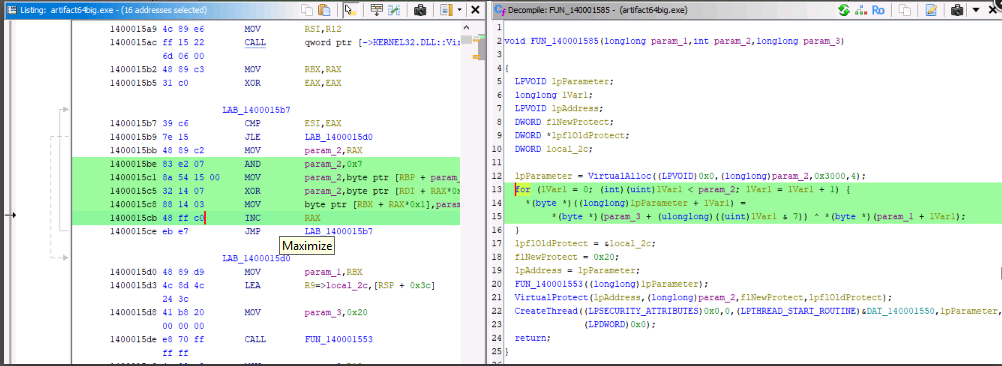
To find the offending code, we can use ghidra to jump to the offset given by ThreatCheck. Select Navigation > Go To and enter file(0x9ce) (or whatever offset ThreatCheck gave), and click OK. This will jump us to an 'unknown' function called FUN_140001585. To narrow down the search a bit more, we can go back to ThreatCheck's output and start looking at the specific byte sequences that it reported. In this particular example, the last line of output were the hex values 83 E2 07 8A 54 15 00 32 14 07 88 14 03 48 FF C0, and we can match these exactly in Ghidra.
Highlighting these bytes in the assembly (on the left) will also highlight the corresponding lines in the decompilation (on the right).
Fig. 8. Pasted image 20260918142636.png
Then after this you go back into the actual to the artifact source code defined by the loop the loop exist
Now we can see that this byte sequence relates to a for loop.
The next step is to go back to the artifact source code and find where this loop exists. We can clearly see its within a function that takes three parameters, and contains calls to VirtualProtect and CreateThread. This turns out to be the spawn function in patch.c, and based on the comments, is responsible for decoding the Beacon shellcode and copying it into memory. The loop itself is on lines 115-117.
Fig. 9. Pasted image 20260918142724.png
Alright so we need to bypass this
One way to test a static signature is to modify the source so that it compiles to different machine code while preserving the intended lab functionality. This may change one signature without changing the runtime behavior that an EDR observes.
Simply changing variable names is usually insufficient for compiled code because source names are often not retained in the release binary. The generated machine code and surrounding structure are what matter to the static signature.
Changing the variable names May may change will change the source representation but executable it's still the same so we probably detected by the A
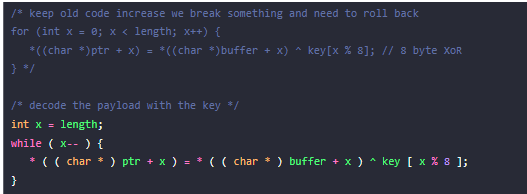
a cheeky way to rework this is replacing the for loop with a while loop that runs backwards
In this way it still runs the same code both in a different way
Fig. 10. Pasted image 20260918143022.png
Once you've made your change go and build the script again and then and then check if the template is still detected as a malicious
Fig. 11. Pasted image 20260918143054.png
Once you are sure these templates are no longer seen as malicious You can load them so that this new template will be used -- This is just you hooking the new templates into Cobalt Strike
There's a nice demo of how to use artifact kits here but you can also just find it online
It basically just runs through what we've just covered
Oh so the artifact kit is used to modify the compiled templates compiled templates meaning like EXE DLL does been a files those kind of things
while Resourcekit is used to modify script templates
AMSI (Antimalware Scan Interface) is especially relevant to PowerShell because PowerShell can submit content to an antimalware provider while it is being interpreted. AMSI is not itself the detection engine and is not limited to scripts that are already “running in memory.”
What is AMS and how does it work
It's basically made by Windows and is a standard that allows application and services to integrate with the antivirus product on the machine That means it's not just Windows Defender that can access AMSI
Any 3rd party developer can submit and scan requests from the application which is done using the AMSI DLL
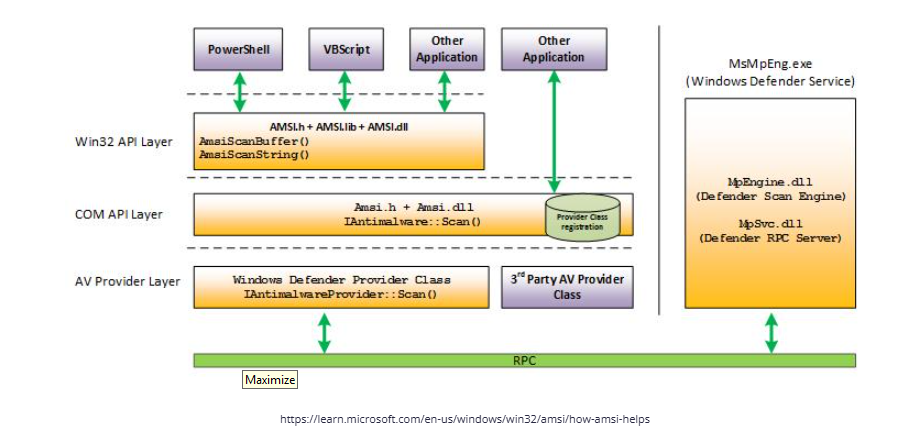
AMSI is essentially the bridge between the application and the security product. Oh
This is how the AMSI architecture looks like
Fig. 12. Pasted image 20260918151949.png
Native Windows components that are amsi aware --- What does it mean to be AMS I aware
components like User Account Control
Powershell scripts
Windows Script Host (wscript.exe and cscript.exe)
Javascript
VBS script
and VBA might macros
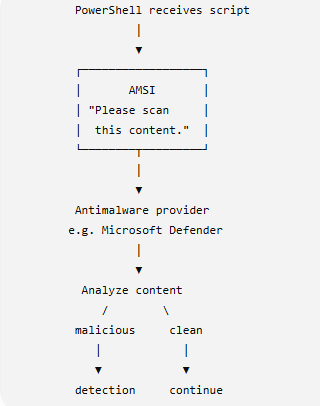
Note that the AMSI is not the one that determines whether or not the data is malicious It's the antivirus product itself that determines whether the AMSI is malicious
Fig. 13. Pasted image 20260918153700.png
AMSI is simply a vehicle which data can be submitted to an antivirus for analysis
So it's just an interface for which data can be submitted to an antivirus it's not the one that actually do does the DE detecting
The phrase “bypass AMSI” can refer to two different ideas and should not blur them together:
interfering with the AMSI submission path or its result; or
changing the content so that the antimalware provider does not recognize it.
The first category can itself be detected and can leave indicators. The second is better described as content or representation evasion, and a clean result from one scan does not establish that execution is safe. In a controlled lab, analyze PowerShell content the same way as compiled artifacts: identify what is detected, change one variable, and rescan and execute only within scope.
This is typically the the command to build resource kit
When investigating a content-based AMSI detection in a lab, possible changes include:
renaming functions and variables
refactoring to break it down to into multiple sub steps
using classical Powershell obfuscation techniques
my suggestion is to start with simple ones and saving the changes and rescanning threat check as you go and move up to more complex changes if needed
You can see here it's flag It's flagging this as malicious
Fig. 15. Pasted image 20260918152759.png
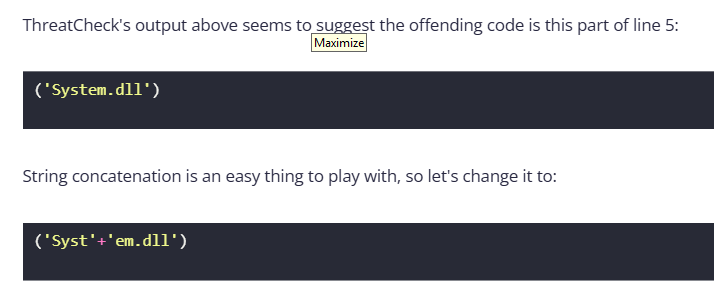
and we've determined that it's because of the word system.Dll So you simply just use Trinkon caffeination to change it
Fig. 16. Pasted image 20260918152816.png
then after that you rescan it again to see if you have a different result and and we did And if there is you have to manually change all of this to bypass all of the changes
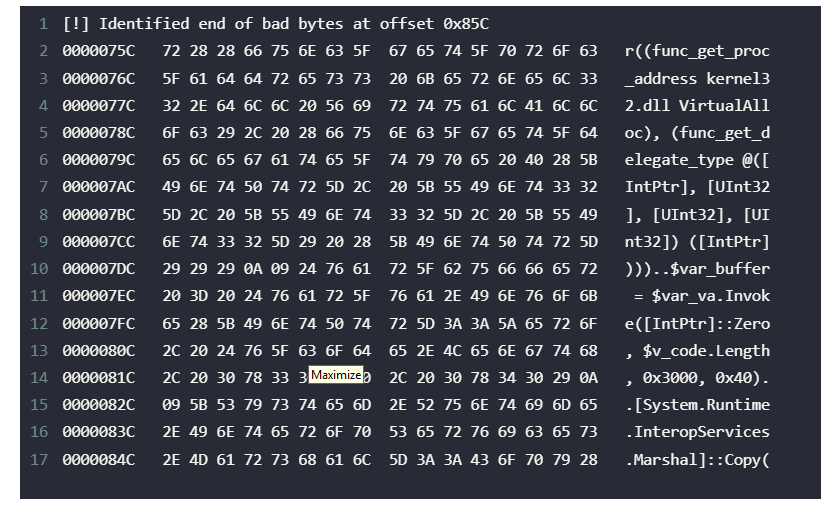
Another one that was found is this this is found to be malicious the marshall copy method from the net library
Fig. 17. Pasted image 20260918152937.png
The way around this is to find a different API that does the same function
We were able to use write process memory API to do the same task
does this process of changing it and using threat check to do it until there's no more threat found
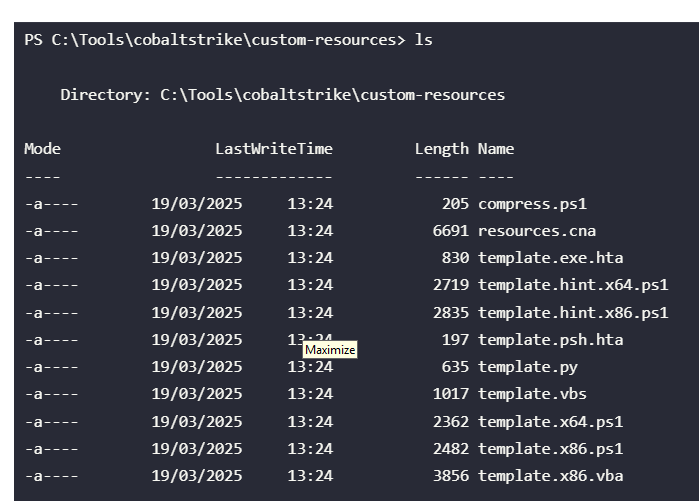
Once your artifact kit is ready you need to load the resources.cna as the new road resources so that it will be used
All right what about compressed.PS1 what is this???
Alright So what this does is it's it's a script used in several places including hosting a Powershell payload via Cobalt Strike scripted web delivery
It would basically take a ps1 fikle and then compress it with G zip and then base 64 encodes it and then patches it into compressed PS1
Interestingly this script is malicious but threadcheck is not able to detect it
but when the script is run it will be detected
Fig. 18. Pasted image 20260918153524.png
The reason is Powershell submits samples to MSI in layers as the code is evaluated
For example, PowerShell can evaluate one representation and submit content to AMSI before later decoding or constructing another representation.
This means you may trigger antivirus alerts within different parts of the code evaluation
what does this mean this means that instead of OK what's different between thread check and amsi
ThreatCheck tests supplied content through a selected scanning path; it does not necessarily reproduce the entire behavior of PowerShell executing and transforming that content.
but for M let's just say there's an encoded content that's hidden there At first it will not be seen but as the decoder the codes that encoded text it becomes recorded content and at at different stages amsi we'll scan it and it will be seen by
That's why amsi scanning is a bit different It's more real time because it uh does it in layers
Yes. The important distinction is scanning a fixed piece of text versus watching PowerShell progressively transform that text while executing it.
Think about a simplified, benign example where a script contains encoded data:
There's no contradiction. The AV was effectively presented with different content in the two situations.
That's the bigger lesson from this example: when testing AMSI detections, "does the source file scan clean?" and "does the complete PowerShell execution remain undetected?" are fundamentally different questions. An interpreter can progressively reveal content that wasn't plainly visible in the original artifact.
So the more precise description is not “disable AMSI.” It is testing whether the antimalware provider recognizes a particular representation submitted through AMSI, while remembering that runtime behavior and other telemetry remain visible.
Again no because AMSI is not the one actually detecting us it's the Defender or the detection engine or the antivirus software that's actually trying to detect us
With an obfuscation or refactoring technique, the representation may change enough that a particular static or content rule does not match. That does not imply that the resulting execution will evade behavioral or memory detections.
This is more like a trial and error but you need to keep doing because Existing AMSI base detection gets updated all the time
That means for the Defender's side choosing Powershell string as as AMSI base detection is not good not good enough
they should be they should be looking at script telemetry process behavior memory activity correlated events and decoded content
In short, when studying AMSI-related detection, distinguish the interface from the provider's decision: the experiment may change the representation of PowerShell content so that a particular provider rule does not recognize it, but the interface and other defensive sensors still exist.
Also note Power AMSI is not only for Powershell AMSI is a general interface where you can submit an application it will scan the document and then it will pass the data to the anti Miller provided
what am I can do is you can submit a buffer or string of content for scanning so that doesn't necessarily have to be ppowershjell
Fig. 19. Pasted image 20260918154841.png
4. Beacon memory and in-memory visibility
All right now we'll talk about Beacon memory
Each of the pilot artifacts EXE files DLL files or PS1 files They a
They inject beacon shell code
which is the loader plus a DLL package
The lord settles the airline into memory results process your locations and calls the DLL entry point so that it starts running in memory so that the beacon starts running in memory
However many antivirus products have memory scanning capabilities
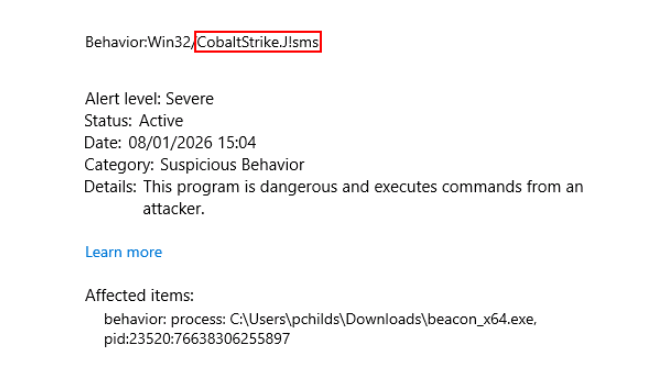
which can lead to the detection of beacon after it has been loaded into memory
The following is an example from Defender where SMS postfix indicates it wasn't identified by memory scan
Fig. 20. Pasted image 20260918155309.png
Memory scans can be performed as a routine thing or it can be triggered by suspicious activities
The default loader behavior and the exact memory layout depend on the Cobalt Strike version and selected allocator. A Beacon stage may produce memory with read, write, and execute permissions during part of its loading process. Broad RWX regions can attract attention because many ordinary applications do not need them, although legitimate runtimes can also use dynamic executable memory.
Fig. 21. Pasted image 20260918155419.png
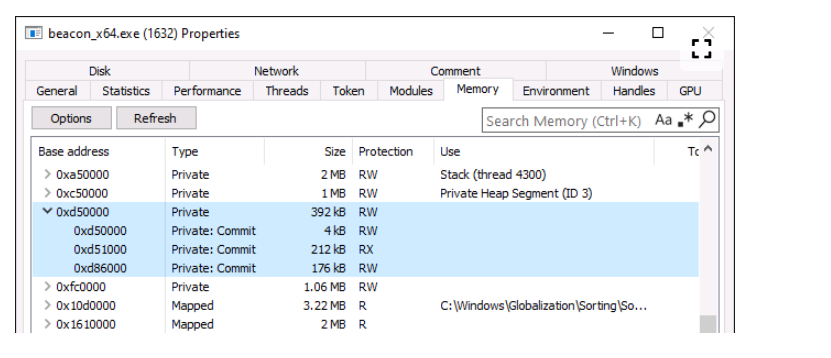
Setting stage.userwx to false asks the loader to avoid leaving the Beacon stage with writable-and-executable final permissions. The exact allocation and protection transitions depend on the loader and allocator; do not reduce this setting to “it allocates RW only.” The resulting behavior still needs to be checked in the target version.
So beacon properties looks like this
Fig. 22. Pasted image 20260918155613.png
Note that when we talk about malleable C2 it's just the Cobalt or the command controls configuration er profile system
what are DLL headers
To understand what deal headers are is to understand what happens when Windows loads a normal EXE or DLL file
A PE a portable executable is more than just executable phone it also has metadata that is required for the executable code to happen
Think of the headers as construction manual describing the portable executable rather than the main logic of the program
It will describe things like where is the main logic which is typically the dot TXT file What is the architecture of the binary what section exists how large is it
A PE file is more than just executable code
A Windows .exe or .dll has a structure roughly like:
PE FILE
┌──────────────────────────┐
│ DOS Header               │  ← "MZ..."
├──────────────────────────┤
│ DOS Stub                 │
├──────────────────────────┤
│ NT / PE Headers          │  ← "PE..."
│                          │
│ architecture             │
│ entry point              │
│ section information      │
│ sizes / offsets          │
│ etc.                     │
├──────────────────────────┤
│ Section Table            │
├──────────────────────────┤
│ .text                    │  ← executable code
├──────────────────────────┤
│ .data                    │  ← writable data
├──────────────────────────┤
│ .rdata / other sections  │
└──────────────────────────┘
Think of the headers as the instruction manual describing the PE, rather than the program's main executable logic.
For example, they help a loader determine things such as:
Where is .text? How large is it? Where should execution begin? What architecture is this binary? What sections exist?
Why does the loader need them The loader needs the meta meta data to use it to construct the appropriate in memory representation of of so DLL headers are useful because they have the metadata for the executable O the headers are useful for loading the achievable code
Fig. 23. Pasted image 20260918160147.png
Once the relevant parts have been mapped and initialization is complete the CP primarily cares about the executable instructions and the data those it operates on it doesn't need it doesn't need the headers anymore
When the prepended loader loads Beacon into memory, it may copy Beacon's PE headers by default. The headers help describe the image during loading but are generally not needed for the Beacon code's normal runtime behavior. Their presence can make a PE-like memory region easier for an analyst or security product to recognize.
The reason why we don't actually want these headers to be there is With these headers it's more obvious that there's actually the portable executable is running in that region
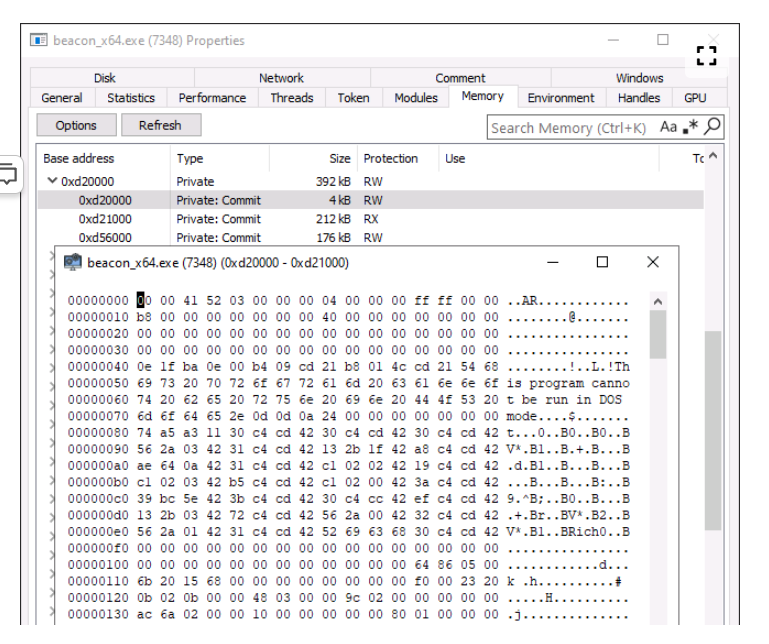
So this is how it actually looks like then the properties when you're looking at the headers area there's that 4KB of size
Fig. 24. Pasted image 20260918160350.png
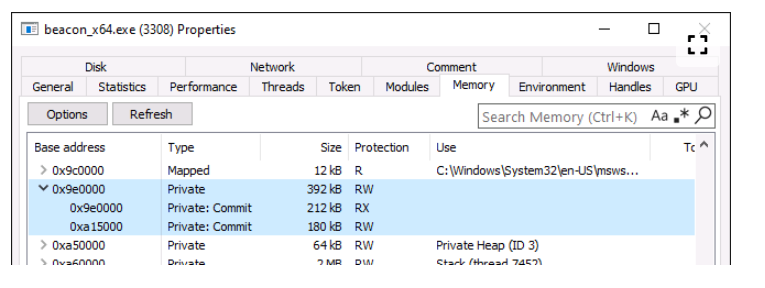
because we don't really need this in the portable executable especially in a in a prepended loader we can actually remove this by setting the stage dot copy PE header to false
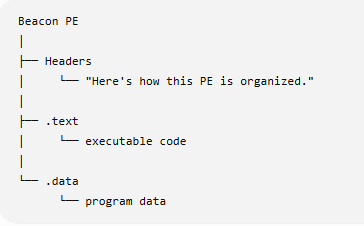
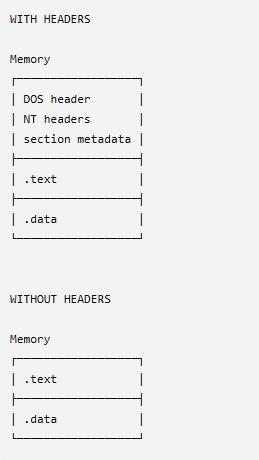
This changes the copied-header behavior; it does not mean that only .text and .data exist in memory. Other sections and loader-created structures may still be present.
Setting stage.copy_pe_header to false asks the loader not to copy the PE headers to the final Beacon memory location. This changes one recognizable characteristic; it does not make the image unidentifiable or remove all metadata.
Essentially your portable executable will look like this
Fig. 25. Pasted image 20260918160502.png
All right let's learn a bit about module module stomping now
Oh OK so for Beacon portable executables typically there will module on disk because it was loaded from memory
So this is another thing that can stand out
Thus we actually need to provide some kind of module in these regions so that it looks like it's real
So there's an option in Malibu in uh money control called Stage Module which tells the beacon to pretend it which tells the beacon's prepended loader to perform a technique notice module stomping or module overloading
This is where loader maps the specified what will execute the ball from disk but then overwrite his memory with a beacon later I see so we use a specified portable executable so we need to choose one and then it will over we will override that memory later on and the result is the beacon's portable executable appears to be backed by a legit legitable legitimate module
Also note we need to choose a module that must be large enough to accommodate the beacon
The module must be large enough for the Beacon payload. The vendor guidance describes choosing a module roughly twice the size of the payload; a fixed “512 KB” rule is not universal.
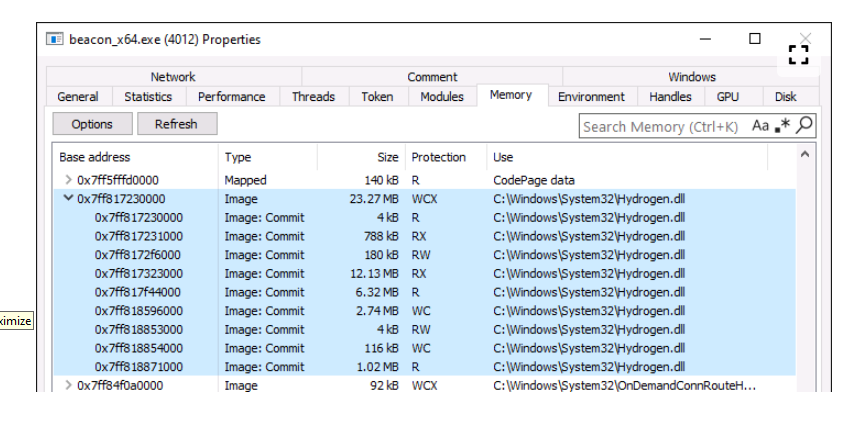
Note that the module must be large enough to accommodate Beacon, and the selected DLL must not be needed by the process in which it is loaded. For example, set module_x64 "Hydrogen.dll"; configures the x64 module-stomping target; the exact path and suitability depend on the target system and profile.
Most of the original portable executable will remain but the beacon will be mapped somewhere over the various sections
Fig. 26. Pasted image 20260918160859.png
just to go deeper into model stomping
You need to go back to how a legitimate application is loaded from this
And then understand that typical legitimate applications have modules that are associated with That's why we have to act as if we are a typical normal file back module
then of course a new defense opportunity rises here which is if you used that DLL it looked very different from the normal DLL so that will be seen as malicious
4.1 What normally happens
Suppose a legitimate application loads example.dll from disk.
DISK                              PROCESS MEMORY

C:\...\example.dll
        │
        │ Windows loads it
        ▼
                               ┌──────────────┐
                               │ example.dll  │
                               │ .text   RX   │
                               │ .data   RW   │
                               └──────────────┘
                                      │
                                      ▼
                              backed by:
                              example.dll
If a tool such as System Informer examines that RX region, Windows can associate it with the DLL that was mapped there.
That's normal:
Executable memory
      ↓
Which module owns it?
      ↓
C:\...\example.dll
4.2 Why an in-memory Beacon can look unusual
Beacon can be loaded without Windows loading a corresponding Beacon DLL from disk in the normal way.
You can therefore get something conceptually like:
That doesn't automatically mean malicious - JIT runtimes and other legitimate software can create executable memory too - but it's an interesting anomaly.
A defender might ask:
"Why is there executable code here when there isn't a normal file-backed module associated with it?"
4.3 Module stomping changes that appearance
Instead of creating an obviously separate memory-resident image, the technique starts with a legitimate module mapping.
Conceptually:
Step 1

Hydrogen.dll on disk
        │
        ▼
Windows maps it
        │
        ▼
┌─────────────────────┐
│ Hydrogen.dll        │
│                     │
│ original code       │
└─────────────────────┘
So Windows has legitimate bookkeeping saying:
this memory region
      ↓
Hydrogen.dll
Then comes the "stomping" part.
Some of the mapped module's in-memory contents are overwritten:
BEFORE

Hydrogen.dll mapping
┌──────────────────────┐
│ Hydrogen code        │
│ Hydrogen code        │
│ Hydrogen code        │
└──────────────────────┘


AFTER

Hydrogen.dll mapping
┌──────────────────────┐
│ some original data   │
├──────────────────────┤
│ Beacon-related code  │ ← overwritten memory
│ Beacon-related code  │
├──────────────────────┤
│ other original data  │
└──────────────────────┘
But the important part is that the memory mapping may still be associated with:
C:\Windows\System32\Hydrogen.dll
Hence the name module stomping: content belonging to a mapped module has effectively been stomped over.
4.4 Why the course says "Beacon appears backed by a legitimate module"
IF executable_memory
AND no_backing_module
THEN suspicious
becomes less useful.
But importantly, this doesn't make the code invisible.
4.5 The new anomaly: memory does not match the mapped module
A defender can instead ask:
"Does the memory actually contain what the DLL on disk says it should contain?"
Imagine:
ON DISK
Hydrogen.dll

0x1000  AA BB CC DD EE FF ...


IN MEMORY
"Hydrogen.dll"

0x1000  AA BB CC DD EE FF ...
0x2000  48 89 5C ...          ← different
0x3000  ...
If portions of executable memory differ unexpectedly from the corresponding mapped image, that's another potentially useful detection signal.
So you're seeing a recurring theme in this chapter:
Detection:
"Executable memory isn't file-backed"

             ↓

Technique:
Use a legitimate module mapping

             ↓

New detection opportunity:
"Why doesn't this module's memory
match what should be there?"
That's a much better way to study these techniques than thinking of them as magic invisibility tricks.
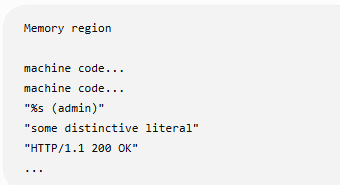
All right now let's move to strings hardcod hard coded strings portable executables data section
This is a common area for memory based detection
This is really just talking about white strings inside an in memory portable executable can become detection signals
Why does it matter for memory deflection why do strings matter
Because when those strings get mapped into memory those strings may come along with it
So imagine an endpoint security product scanning process memory and finding this
that will highlight it as malicious or at least trigger some kind of detection
But also we have to take note that it's not just strings it's also caught by its in surrounding structure that can contribute to identifying a non implementation sort of combinations of these things can become seen as malicious
But sufficiently distinctive combinations of constants, strings, code bytes, and surrounding structure can contribute to identifying a known implementation.
Alright so what's the what is the aggressor script really doing
The aggresor script script is used to inspect the original beacon DLM
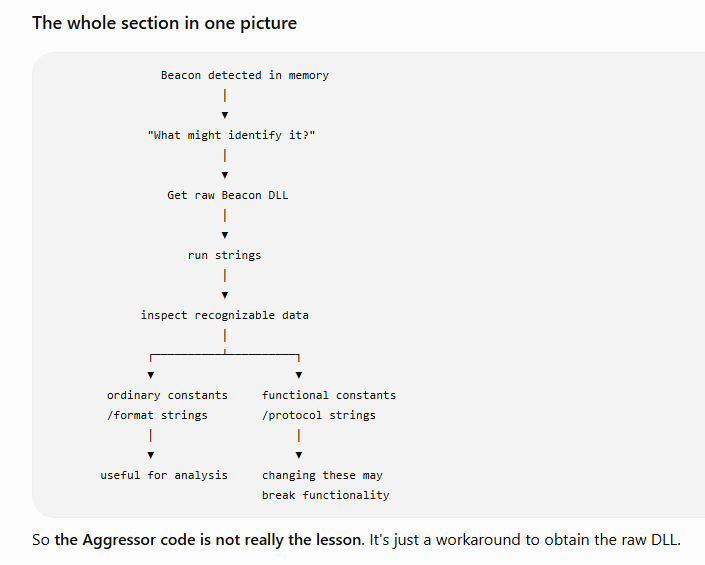
All right I definitely do not fully understand the strings section although I saw it was gonna be a lot simpler
It's really just saying that the strings can be culprits for detection
The authors essentially saying that the memories can even recognize beacon from distinctive bytes or strings inside the beacon DLL I therefore want to inspect the road here that I understand what's recognizable content
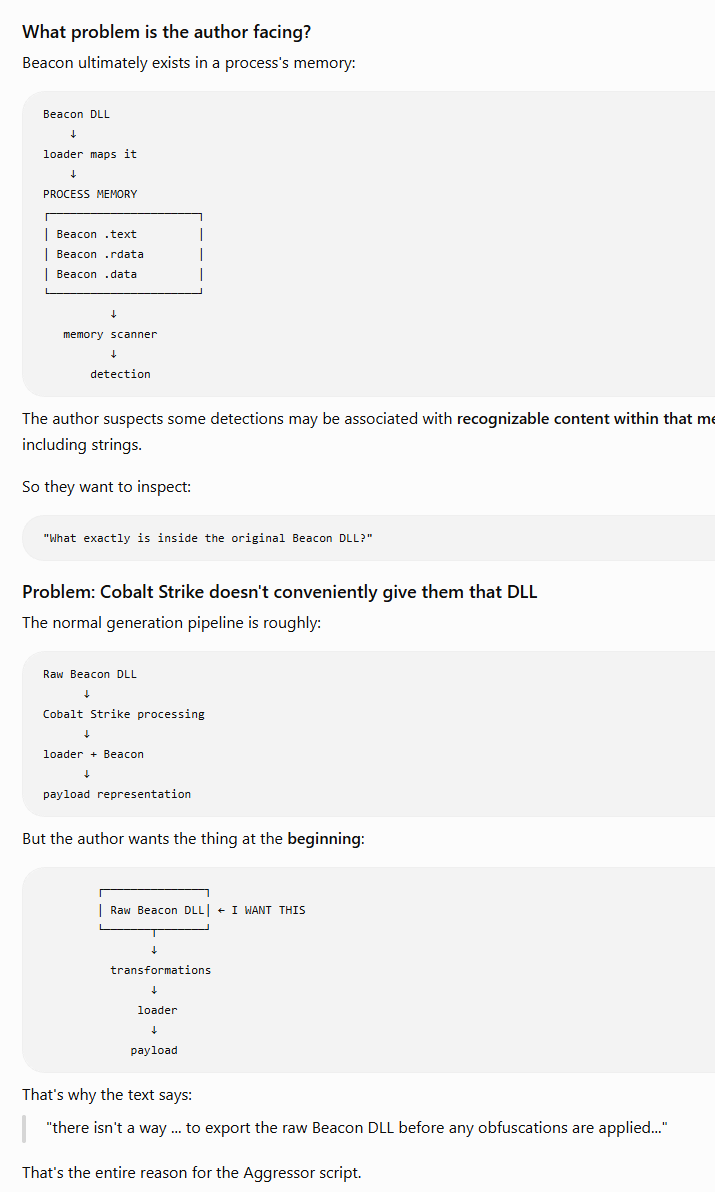
but the problem that the author was facing is Cobalt Strike doesn't conveniently give them the DLL
The main problem that the writer is facing is that the beacon ultimately exist in process memory so that's why it cannot you cannot just see it You cannot just use strings and then you'll see the results be because it will be different in memory
But the user wants to do is they want to see what's exactly inside the original Beacon DLL but the original Bicondyla was not provided by Cobalt Strike
--- So that whole thing about about using the Aggressor script it's really just to get the raw Beacon DNL
Fig. 27. Pasted image 20260918162542.png
Note that the aggressor code is not really the lesson the lesson is that there's a work around to obtain the raw DLL that will be processed in memory
This is the actual lesson that we need to learn from strings
The actual lesson is:
"Beacon contains recognizable data in memory. Extract the original DLL so you can study those features, understand which ones contribute to detections, and recognize that changing binary content can also break the program."
5. Beacon command behavior
DO NOT MEMORIZE COMMANDS - IT WILL CAHNGE WITH DIFFERENT c2 - WHATS MORE IMPROTANT IS THE CONCEPT
Beacon is Cobalt Strike Post exploitation agent
therefore provides a lot of different commands to the operator
All right for this we just need to know some of the commands we don't need to memorize any of them because it's just about knowing some of them
Fig. 28. Pasted image 20260918172340.png
House-keeping commands
These commands generally exist to set a configuration option Beacon or perform other house-keeping tasks. Common ones include:
help displays command help text.
checkin instructs Beacon to send its metadata.
sleep changes Beacon's sleep interval and jitter %.
clear clears the current Beacon console.
downloads shows downloads in progress.
cancel stops a download.
jobs shows running post-exploitation jobs.
note sets a custom note about the current Beacon.
powershell-import imports a PowerShell script into Beacon.
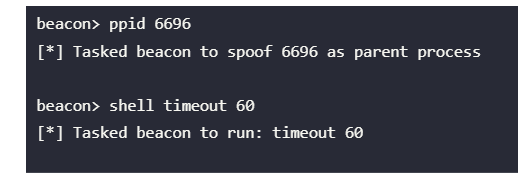
ppid sets an alternate parent for supported created processes; it does not affect every Beacon command or execution path.
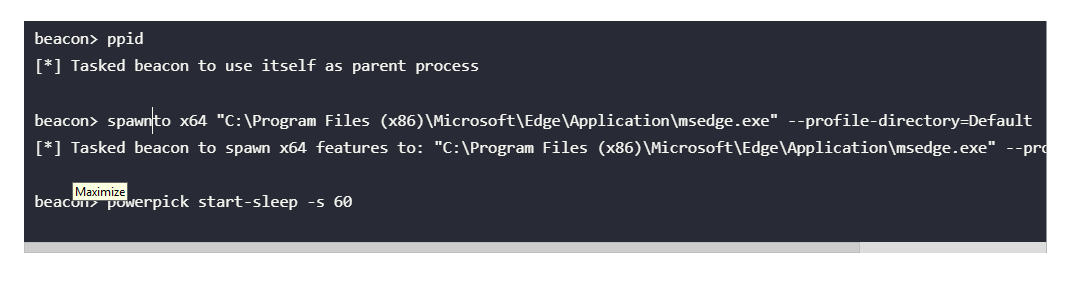
spawnto changes the temporary process used for supported post-exploitation jobs.
Some of them (checkin, sleep, cancel, powershell-import, spawnto, and ppid) work by sending a task to Beacon to carry out; whilst others (help, clear, downloads, jobs, and note) do not, and are handled client-side instead.
API-only commands
These commands are built into Beacon and only rely on native Windows APIs to function. Common ones include:
pwd prints Beacon's current working directory.
cd changes Beacon's current working directory.
download transfers a file from the target to the team server.
upload transfers a file from the attacker's machine to the target.
ls list files and directories.
getuid gets the username of the current user.
make_token creates and impersonates an access token.
steal_token duplicates and impersonates an access token from another process.
rev2self drops token impersonation.
kill terminates a target process.
exit instructs Beacon to terminate.
These are someone new to me with our inline commands
clipboard monitors the user's clipboard content gets system use OK
Inline commands
These commands are implemented as Beacon Object Files (BOFs), which are compiled C programs that execute within the Beacon session. The BOF and command arguments are sent to Beacon as tasking data. Cobalt Strike cleans up the BOF capability after it finishes where the implementation permits, but “cleared” should not be treated as a guarantee that no memory or telemetry remains. Common commands that are implemented as BOFs include:
Or did the beacon object falls which means it's uh commands that actually exist in the
clipboard monitors a user's clipboard content.
getsystem elevates the Beacon session to SYSTEM privileges.
jump psexec is a lateral movement technique.
kerberos_ticket_use imports a Kerberos ticket into the Beacon session.
reg queries the registry.
runasadmin uac-cmstplua is a UAC bypass technique.
BOFs are compiled object files that execute inside the Beacon process and use Beacon's internal APIs. They are a popular way to add custom commands, but they are not ordinary external programs. Their memory behavior is influenced by the process-inject block or by a user-defined loader. TrustedSec's Situational Awareness BOF is an example.
Here are some operational security considerations
thjsiis is really about how the beacon object files are laoded and cleareed from memeory --- this is controlled byh the process inejct block in the malleable C2 profile
6. Fork and run commands
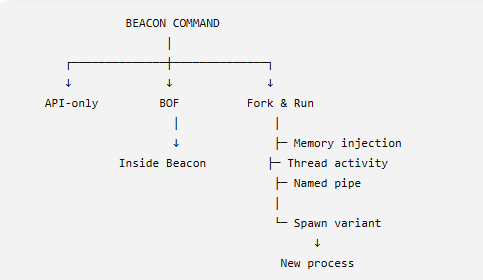
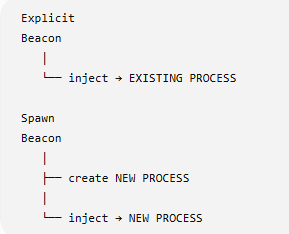
Many of Beacon's post-exploitation features are implemented as Windows DLLs. To execute these DLLs, they are appended to a loader (much like Beacon is) to produce a shellcode package, which is then injected into a target process. Output is provided to Beacon over an SMB named pipe. There are two sub-categories to this pattern, called 'explicit' and 'spawn'.
Explicit injects the post-ex capability into a target process that already exists.
Spawn starts a new process and injects the post-ex capability into it.
Some fork & run commands support both variants, while some only support one or the other.
Fig. 29. Pasted image 20260918172101.png
Spawn only
execute-assembly runs a .NET (Framework) assembly in memory.
powerpick runs PowerShell via an unmanaged runspace.
Explicit only
psinject is same functionality as powerpick.
Both
portscan scans open ports and fingerprints services on the network.
keylogger logs the keystrokes within the desktop session it's injected into.
printscreen takes a screenshot of the desktop session it's injected into.
desktop injects a full VNC session.
mimikatz requires no explanation 🙂
OPSEC considerations
The OPSEC question isn't simply:
“Which executable should I use?”
The deeper question is:
“Does the resulting process behavior make sense?”
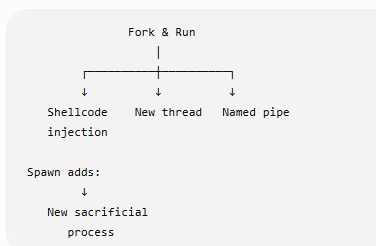
These commands carry the heaviest OPSEC burden because they must inject shellcode, start a new thread, and start a new named pipe. The spawn variant must also start a new sacrificial process. As with BOFs, Malleable C2's process-inject block can influence how the shellcode is injected.
this process inejct config --- is very imfportatnt --- it will infue4lce hwop the shell code is injected
Fig. 30. Pasted image 20260918172130.png
This is the key idea:
More mechanisms = more opportunities for detection.
A defender doesn't necessarily need to recognize “Cobalt Strike.”
They can potentially recognize the behavioral chain produced by the technique.
Fig. 31. Pasted image 20260918172258.png
Process execution commands
There are several commands that are used to run an arbitrary program on disk. These include:
execute runs a program without returning output.
run executes a program but does return output.
runas executes a program using alternate credentials.
runu is like run but attempts to spoof its parent PID.
shell passes the provided arguments via cmd.exe.
powershell passes the provided arguments via powershell.exe. Other commands also rely on this, including jump winrm and remote-exec winrm.
Service creations
The following Beacon commands create a service (either on the current machine or a remote one) to run a command or Beacon.
elevate svc-exe is used to elevate from high-integrity to SYSTEM privileges.
jump psexec, psexec64, & psexec_psh are lateral movement techniques.
remote-exec psexec runs an arbitrary command.'
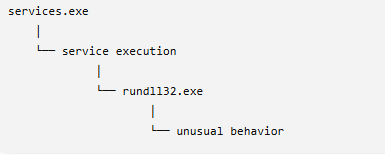
The built-in service executable uses rundll32.exe as its default temporary process in the documented behavior; treat this as version- and implementation-specific rather than a universal rule for every service-based payload.
tghghe main lessonm here is that even though services are run with high priviletes --- this does not mean that they cannjot be tagged as malicious
context and behaviour of where you run things matters
Using a legitimate Windows executable doesn't automatically make activity inconspicuous. Context and behavior matter.
this will still be tagged as malcviisiou
Fig. 32. Pasted image 20260918172748.png
the main thing here is that the AK settigns in tghe artifact kid provides a comamnds that calles the AK settings which allow syou to send the spawn tto an expliocit path instead
the service binary will use the post.ex spaw to directin in the confdig --- but we need to change that as the win dire is not valid in system context --- thus we need to change in in the Ak SETTINGS
THE MAIN THING TO TKA WAWY HERE IIS THAT --
DIFFERENT BEACION EXUCTUION MECHANSIM, HAVE DIFF CONFIG PATHJS
THJE SPAWN TO SEETIGN THAT AFFECTS the oridinary odfrk and run does not necessarity affect the service based payload
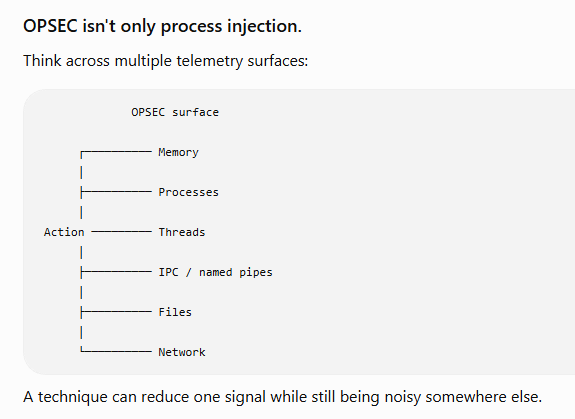
From an OPSEC perspective, reason backward from what Windows and the blue team can observe. The relevant question is always: what telemetry does this execution path create?
Fig. 33. Pasted image 20260918173228.png
7. Blending post-exploitation behavior
here we will learnn how to blend post explootation techniquies that spawn new priocess in tot he surrounding environment
its good pratice to have your egresss(going otu data) ebacon to br running inside a process that c2 channel ebuign used!
for exampelsl, -=-- For example in HTTP beacon should run in a process that legitimately makes a bond HDB request It doesn't make sense to put it in a process that does DNS
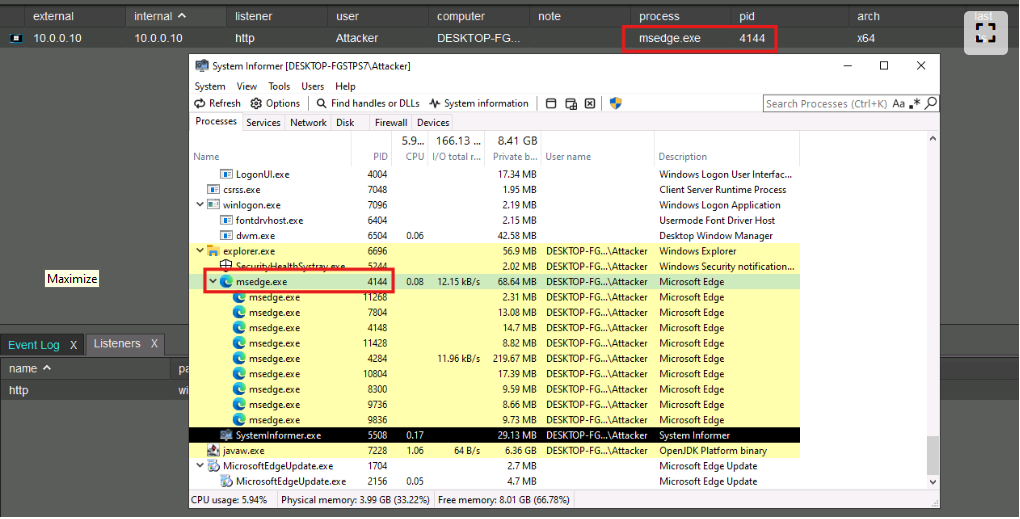
you can see in the image below that we have attached an HTTP beacon into Microsoft Edge application
Fig. 34. Pasted image 20260918173523.png
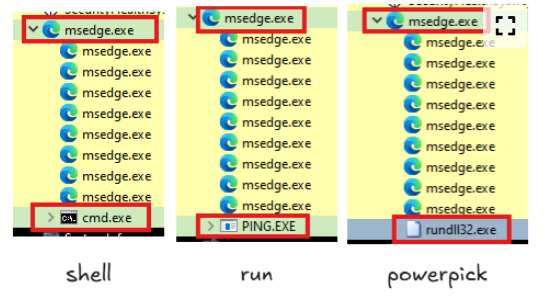
This is how it will look like when we run commands or post exploitation commands in those in the legitimate process
you can see that it will be seen as a children of those process
Fig. 35. Pasted image 20260918173647.png
the operational security considerations here is obviously seeing Microsoft Edge spawn processes like this it there is very weird and will definitely be like this malicious
The ppid command can change the apparent parent relationship of supported processes. This is process-tree manipulation, not a way to hide all activity; command lines, tokens, handles, memory, and other telemetry can still expose the operation.
To do this to do this TPID command you simply need to use PS command for that process to get the process ID or you can use the process browser to find out the process of that application
Fig. 36. Pasted image 20260918173953.png
Then after that you can change the beacon to spoof a disparate process
Fig. 37. Pasted image 20260918174015.png
Uh the same thing is happening with for blending your fork and run commands the and the for the spawn in explicit command
the same thing look for the The same thing for the command you can control where you want to run the process which process do you want to run executable also post expectation capabilities
Fig. 38. Pasted image 20260918174437.png
Umm I don't fully understand the ppid command here II understand the spawn to command
You cannot just rely on settings in your C 2 profile So post exploitation defensive as every command you run was blend in based on where your kind beacon is running and what commands you want to run
PPID spoofing changes the reported or associated parent relationship for a created process; it does not change the process's entire execution history or make an implausible relationship legitimate.
8. Command-line and process-creation detections
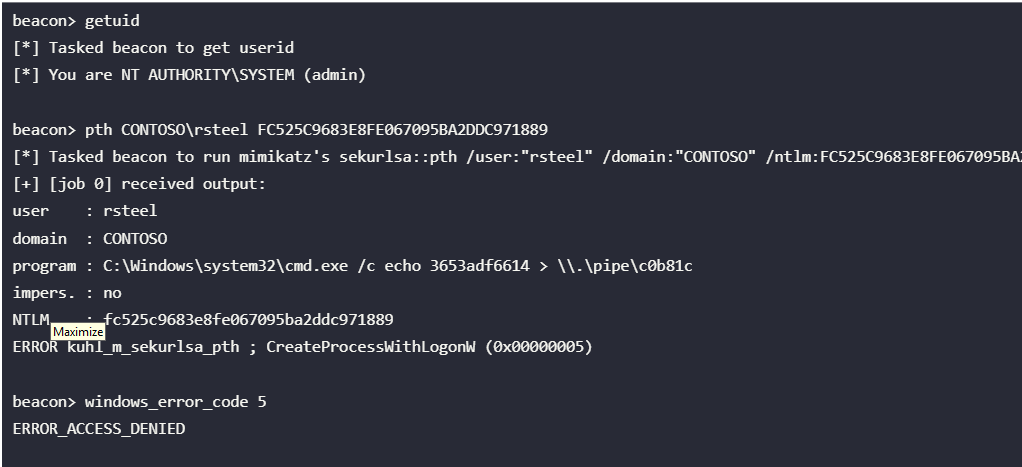
As we know from the beacon human behavior lesson we know that many of the commands work by running a new process
and these are typically using the CREATE PROCESS API
In the example below we run beacons built in past the hash command which is a rapper of mini cats pasta has you can see that even though it was run as be resi re receive an access denied errors
Fig. 39. Pasted image 20260918175253.png
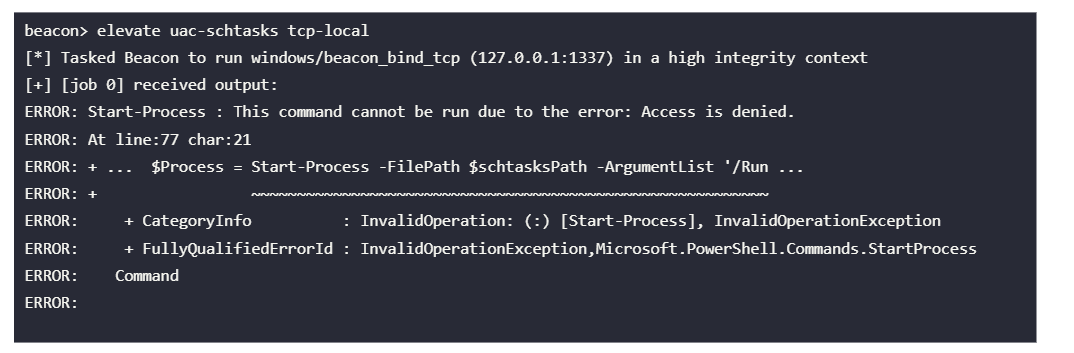
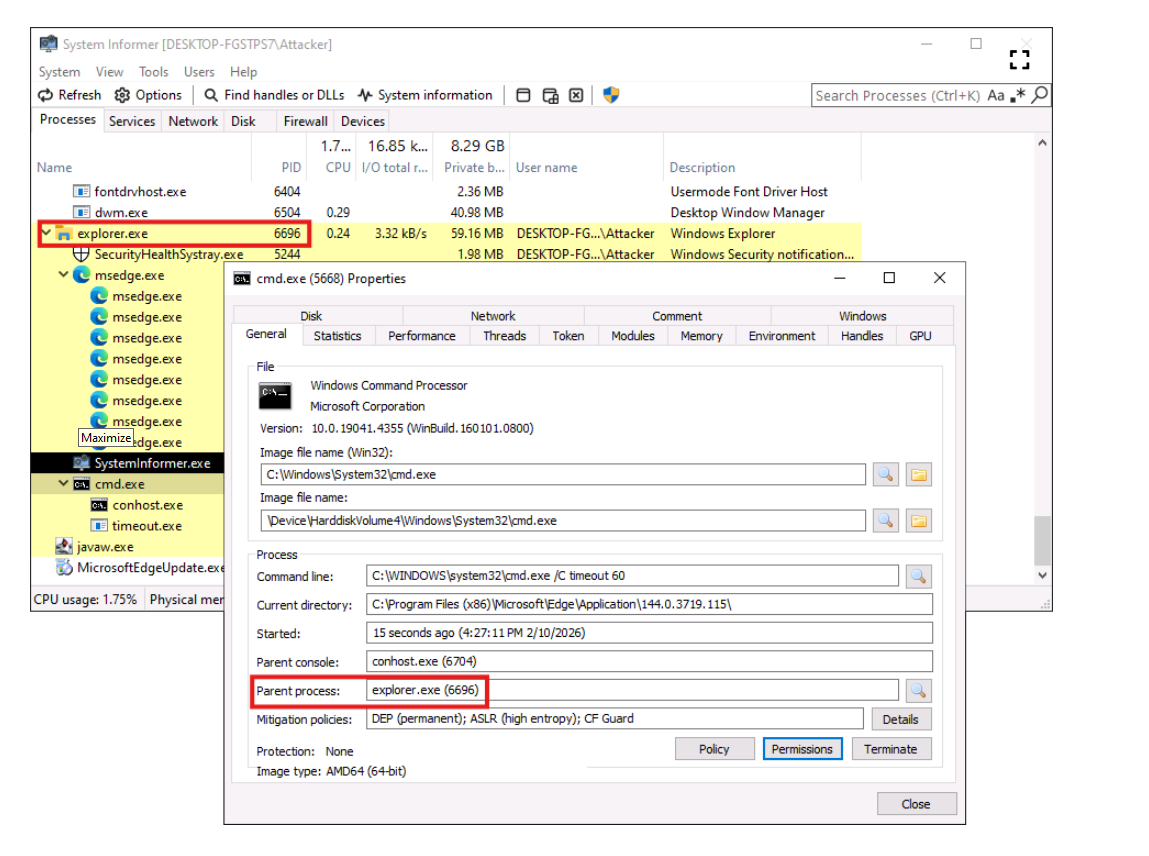
The same thing with this command we are calling UAC schedule task which is a bypass technique that's provided by the Cobalt Strike elevate kit
Its purpose is to elevate from medium integrity sessions to high integrity sessions
but you can see that it wasn't allowed to run due to access denied errors
Reading the kids aggressor script is a good place to understand what's happening under the field here
Fortunately the author has already given us what's actually happening in using the aggressor script
Again note that the aggressor script really is just looking at what's being run in memory
And it wasn't saying that Defender has blocked this
The result is not automatically evidence that Defender blocked the command. Windows and security products can observe process creation through kernel-supported callbacks and other telemetry. For example,
PsSetCreateProcessNotifyRoutineEx that allow drivers to register a callback routine when events of interest occur, such as a process being started.
PsSetCreateProcessNotifyRoutineEx registers a driver callback for process creation and exit notifications. The callback provides visibility; the API itself is not a general-purpose explanation for an Access denied result.
Are there bypasses for this? User-mode code should not assume it can remove or disable security-driver callbacks. Whether a process is allowed to run depends on privileges, policy, security products, and the operation being attempted. Kernel tampering is outside the scope of this note and is not required to understand the defensive lesson.
So the lesson here is instead of running schedule tasks with silent cleanup on the command line look for other ways to do it
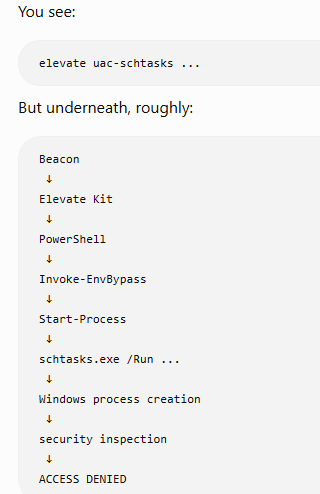
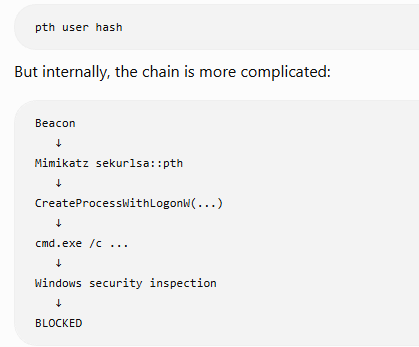
The biggest lesson from this command line detection uh is that sometimes it's not the tool that fails it's what's actually underneath So the DE the DE the detection may actually happen several layers below the beacon command
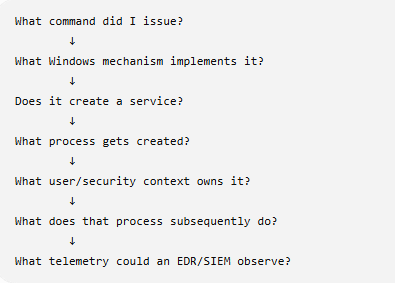
This is the main idea we need to take away from here you need to think about the behavior in the implementation path
when a commander is located what are the different things that gets done after it
What is observable
Fig. 42. Pasted image 20260918180127.png
From a defense perspective this means luckily one from monstrous does not necessarily eliminate the underlying capability
Also note that Access denied does not automatically mean “Defender detected it”; it can reflect insufficient privileges, an ACL, a token or session boundary, or a security-control decision. Identify the actual failing operation before drawing a conclusion.
9. Defense Evasion lab notes
In the defaulted profile of Cobalt Strike we added this stage
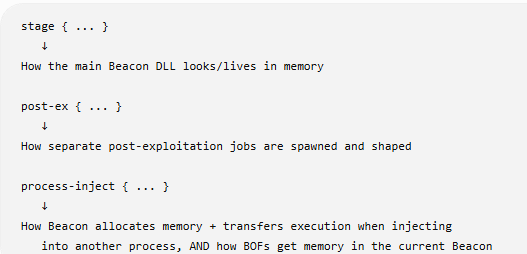
The stages for the main beacon looks and lives in memory
Fig. 43. Pasted image 20260918181703.png
No the the three blocks that we added are different layers of the beacon behavior
this is regarding the Where does Stage pillow will be served at what is the permission that it has was the cleanup process and then for the because this is a preloaded uh DLL also removing the headers and then we're using the hydrogen DLL as the target or I'm not sure I think it should be for model stamping
we need to double check our understanding what does this stage uh configuration do??
again for the stage stage setting this is how the beacon will live in memory
stage {
set userwx "false";
set cleanup "true";
set copy_pe_header "false";
set module_x64 "Hydrogen.dll";
Then we also added another uh malleable profile which is the POST exploitation block
I believe this is trying to control where uh the forging will be done to That means we are using wherefault.Exe That means any commands that we will run will be run on this
Most expectation is where jobs are spawned and shaped
post-ex {
set spawnto_x64 "%windir%\\sysnative\\werfault.exe";
set cleanup "true";
set pipename "dotnet-diagnostic-#####, ########-####-####-####-############";
set thread_hint "ntdll.dll!RtlUserThreadStart+0x2c";
set amsi_disable "true";
transform-x64 {
    strrep "This program cannot be run in DOS mode." "This is totally not a PE.";
    strrepex "PowerPick" "CLRCreateInstance failed w/hr 0x%08lx" "CLRCreateInstance failed: 0x%08lx";
    strrepex "PowerPick" "Failed to get default AppDomain w/hr 0x%08lx" "Failed to get default AppDomain: 0x%08lx";
    strrepex "ExecuteAssembly" "Invoke_3 on EntryPoint failed." "Unhandled exception.";
    strrepex "ExecuteAssembly" "Failed to load the assembly w/hr 0x%08lx" "Failed to load the assembly: 0x%08lx";
}
}
In this lab profile, amsi_disable "true" is a version-specific Beacon setting that changes how selected post-exploitation content interacts with AMSI. It should not be described as a universal AMSI bypass: the setting may be unsupported, behave differently, or itself be relevant to detection depending on the Cobalt Strike version and endpoint.
Then we also added another process-inject block. What is this process-inject block for? This is the part that controls selected memory allocation and execution behavior for injected content and BOFs.
so I believe this is for the BE This for the beacon object files so that we can change the necessary block
Processing jet is how beacon allocates memory and transfers execution when ejecting into another process and beacon object files gets memory into current
process-inject {
set allocator "VirtualAllocEx";
set bof_allocator "VirtualAlloc";
set bof_reuse_memory "true";
set min_alloc "8192";
set startrwx "false";
set userwx "false";
I have a feeling that doing the labs and the I mean doing the theory it's not as connected as I would like I don't actually have to do evasion itself or creating doing the research for how to bypass they're just literally giving me the answers it's like spoon feeding so the labs are French is a good way to to get a feeling of how it is but instead in terms of actual execution in live operations is not ideal yet
it's good for navigating Cobalt shark
I'm doing the labs now and I can see why eventually if I wanna when I want to start testing these things I need to have my own home lab
With this lab we were able to create artifact kits resource kits and eventually use that as a payload that can then be run and then eventually we were able to use command to do later lateral movement with the jump command
the exact commands that were used you can looked at the lab again for that
This is a living study note. Sources and understanding may change as it is reviewed.
Simply curious about the world, constantly building and breaking things for fun.







 The same thing with this command we are calling UAC schedule task which is a bypass technique that's provided by the Cobalt Strike elevate kit