Cobalt Strike Primer
Cobalt Strike Primer
These notes are for authorized red-team training and lab environments only. Cobalt Strike is dual-use software. The concepts below should be applied only within an explicitly scoped engagement.
1. The basic mental model
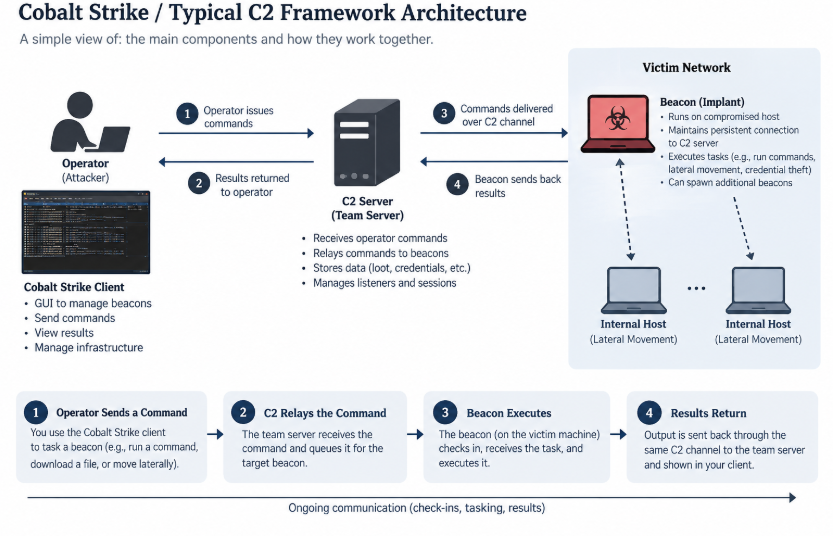
Cobalt Strike is a platform for controlling Beacon, an asynchronous post-exploitation agent. In a simplified model:
Operator
   │
   │ Cobalt Strike client
   ▼
Team Server
   │
   │ C2 listener / tasking channel
   ▼
Beacon on a target
Beacon periodically checks in, receives queued jobs, executes them on the endpoint, and returns the results. It is not the same thing as the Cobalt Strike client or Team Server.
The original notes described Cobalt Strike as a tool for maintaining stealthy, long-term access. That is a useful description of the capability, but it should not be read as a guarantee: Beacon traffic, process behavior, payload artifacts, and infrastructure can all be detected.
1.1 The three main components
Beacon
- Beacon is the post-exploitation agent running on the target endpoint.
- It fetches tasks from the Team Server, executes them locally, and sends results back.
- It is commonly represented as a Windows PE/DLL payload internally, although Cobalt Strike can package it into different artifact types.
- Beacon is asynchronous: the operator queues work and Beacon performs it on a later check-in rather than maintaining an interactive shell for every task.
Team Server
- The Team Server is the central controller for Beacon payloads.
- It hosts or coordinates the relevant listener infrastructure, stores engagement data, and manages logging.
- It is the service that needs to remain available for connected clients and Beacons.
- A listener is configured on or associated with a Team Server, but not every listener means that the Team Server itself owns the final network connection. SMB and TCP peer-to-peer listeners are important exceptions.
Cobalt Strike client
- The client is the operator interface used to connect to one or more Team Servers.
- It displays Beacon sessions, queues commands, shows logs and engagement data, and manages much of the operator workflow.
- The client is not the persistent controller. The Team Server is the component that remains online and handles Beacon communication.
1.2 Can there be multiple Team Servers?
Yes. Cobalt Strike does not require multiple Team Servers, but its client/server architecture allows an organization to use them when operational separation is useful.
Possible reasons include:
- separate authorized engagements;
- different teams, regions, or infrastructure boundaries;
- separating operational phases or risk domains; and
- limiting the impact of a server or channel being discovered.
                 RED TEAM

        ┌──────────┼──────────┐
        ▼          ▼          ▼
      TS #1      TS #2      TS #3
        │          │          │
     Client A   Client B   Client C
The important distinction is:
Cobalt Strike does not need multiple Team Servers. Its architecture permits multiple separately managed Team Servers when the engagement requires them.
An operation may also use dedicated infrastructure for different phases, but that is an operational design choice, not a requirement of Beacon.
2. Listeners and communication paths
2.1 What is a listener?
A listener is a Beacon communication configuration. It defines how a particular Beacon should communicate, including the protocol, destination information, and other C2 parameters.
The listener is selected when generating a payload. The resulting Beacon carries the configuration needed to use that communication path.
Different listener types exist because different targets and network segments have different connectivity and monitoring conditions. The objective in an authorized assessment is to model or test realistic communication paths - not simply to make traffic “look normal.”
Common listener families in these notes are:
- HTTP or HTTPS;
- DNS;
- SMB; and
- TCP.
Do not confuse:
Listener = communication configuration
Beacon   = agent that uses the configuration
Multiple Beacons can use the same listener. Multiple listeners are useful when Beacons need different C2 configurations, not merely because there are many Beacons.
2.2 HTTP/S Beacon
An HTTP/S Beacon communicates through HTTP GET and POST requests. In a simplified flow:
Beacon ── HTTP/S request ──► Team Server or redirector
       ◄─ HTTP/S response ───
The Beacon may use one request pattern to retrieve tasks and another to return results. The Team Server provides the server-side handling for the configured listener.
HTTP hosts
An HTTP host is a domain name or IP address to which the Beacon sends requests. It may resolve directly to the Team Server or to an intermediary such as a redirector.
Redirectors
A redirector is an intermediary between the public-facing C2 address and the Team Server:
Beacon ──► public host / redirector ──► Team Server
The redirector can provide infrastructure separation and routing control. It does not make the operation invisible, and it introduces another system that must be configured, monitored, and included in the engagement scope.
Host rotation
When a listener has multiple HTTP hosts, a host rotation strategy determines how the Beacon chooses among them. The notes identify these conceptual strategies:
- Round robin: use hosts sequentially from top to bottom.
- Random: select a host unpredictably.
- Failover: continue using one host until a failure condition occurs, then move to another.
- Rotation: change hosts according to a time- or cycle-based rule.
Host rotation can provide resilience, but it can also create a distinctive pattern. It should be understood as a traffic-management choice, not automatically as an OPSEC improvement.
HTTP staging host
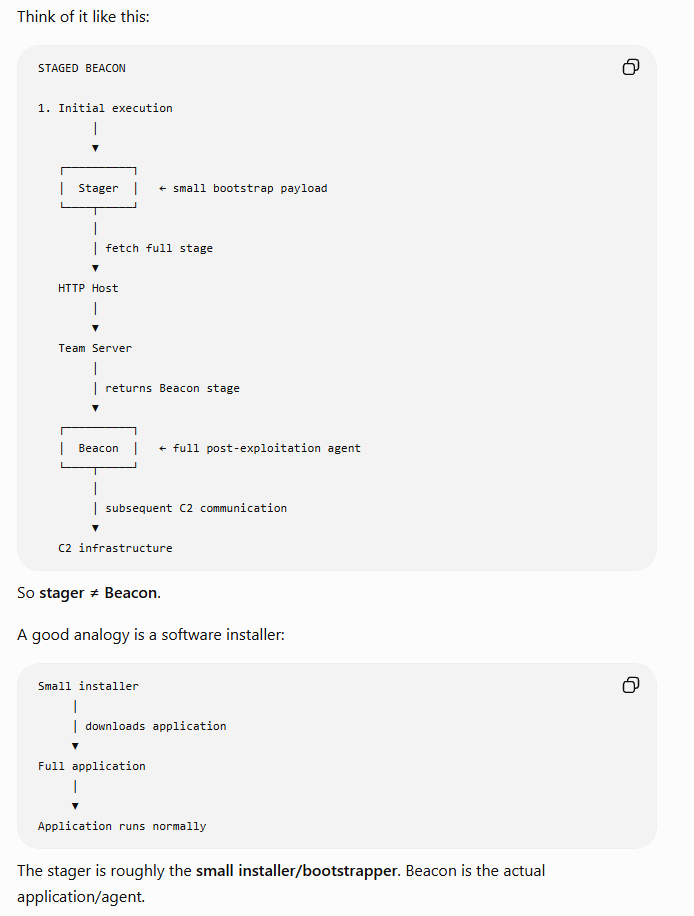
A stager is a small bootstrap program that retrieves the larger payload stage and transfers execution to it. The stager is not Beacon itself.
Small stager ── retrieves ──► full Beacon stage
This is useful when an initial delivery or exploitation path imposes a size limit. It also means the initial network request may retrieve a payload from the staging infrastructure before normal Beacon C2 behavior begins.
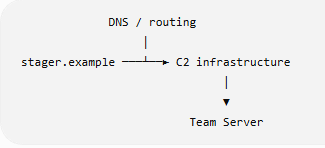
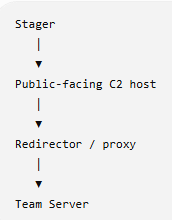
When a staging host “resolves back to the Team Server,” the path may be direct or indirect:
Direct:   Beacon/stager ──► Team Server
Indirect: Beacon/stager ──► redirector ──► Team Server
HTTP C2 port and bind port
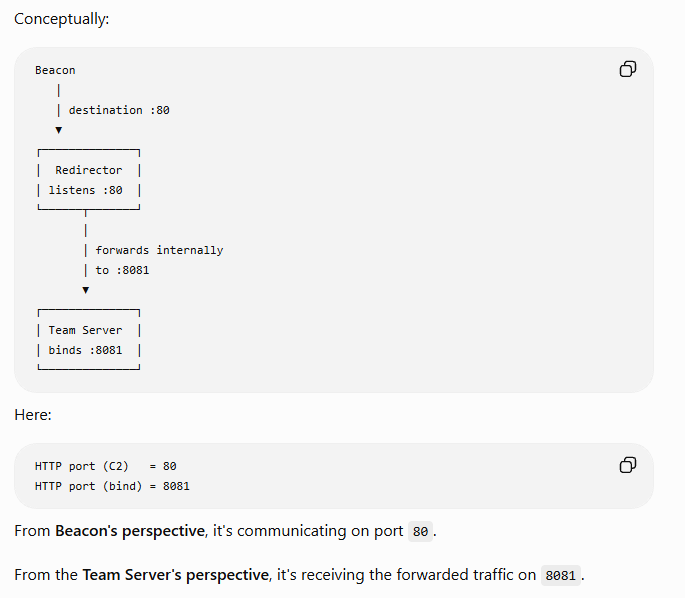
- HTTP C2 port: the external or destination port the Beacon attempts to connect to.
- HTTP bind port: the local port on which the Team Server's built-in web service listens.
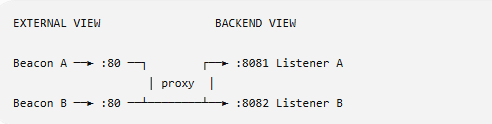
They are often the same, but they do not have to be. A redirector or other front-end can accept traffic on one external port and forward it to a different port on the Team Server. This can allow multiple services or listeners to coexist, but it adds routing complexity.
The notes refer to this as “port bending”; the clearer mental model is simply external destination port versus backend listening port.
HTTP Host header and domain fronting
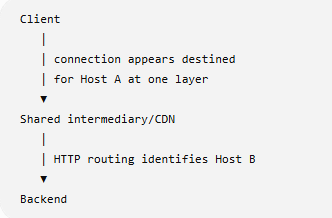
The HTTP Host header identifies the host requested at the HTTP layer:
GET /some-path HTTP/1.1
Host: app.example.com
Domain fronting historically relied on a difference between a visible outer connection destination and an HTTP host name used by intermediary infrastructure. It is not universally available today: modern CDNs and cloud providers commonly prevent or restrict it. Treat it as a historical concept and a platform-dependent behavior, not a generally reliable technique.
HTTP proxy behavior
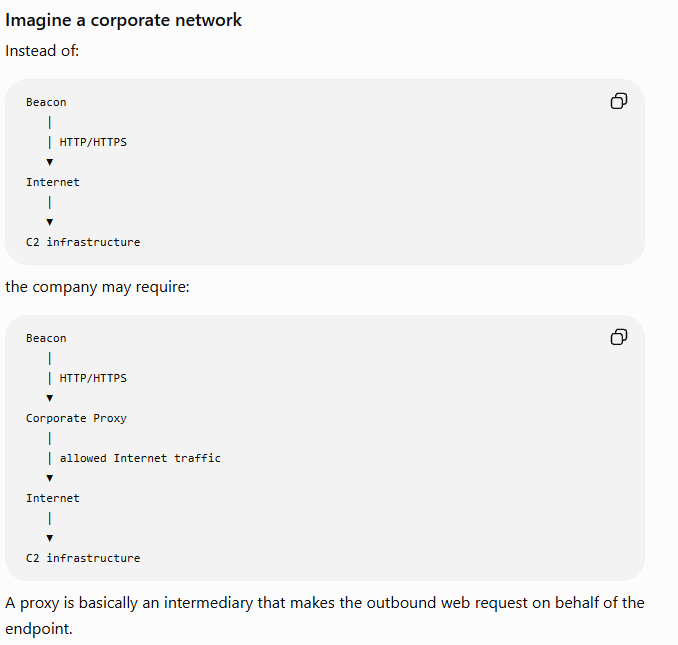
Beacon may use the system's proxy settings by default. Depending on the payload and configuration, explicit HTTP or SOCKS proxy information can also be supplied. The notes correctly flag that proxy handling for Beacon traffic and proxy handling for an initial payload stager are separate concerns; configuring one does not automatically configure the other.
A proxy can be relevant when a host has no direct Internet route, but proxy use is also visible to defenders through proxy logs and endpoint behavior.
2.3 DNS Beacon
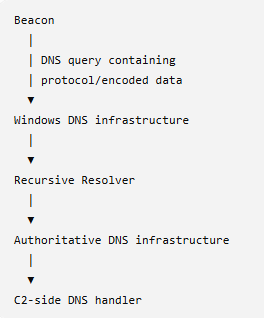
A DNS Beacon uses DNS queries and responses as its communication channel. The controlled domain's authoritative DNS infrastructure receives queries, and changing subdomain labels can carry encoded data:
<encoded-small-message>.controlled-domain.example
Ordinary lookup:  www.example.com?
Beacon-style:    <encoded-data>.controlled-domain.example?
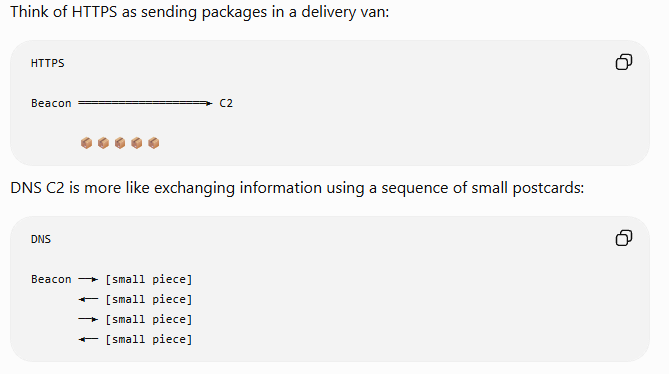
DNS is highly constrained compared with HTTP/S. Data is split into small chunks and transferred over multiple queries. This provides a different network path, not a high-bandwidth replacement for HTTPS.
The initial metadata behavior can also differ. Because DNS has limited bandwidth, a DNS Beacon may initially appear as a “ghost” session until the operator interacts with it and requests enough information for the client to populate the session.
Domain Name System
2.4 SMB Beacon
An SMB Beacon is a peer-to-peer Beacon. It does not normally communicate directly with the Team Server over SMB. Instead, it communicates with another Beacon over SMB, often through a named pipe, and the parent Beacon has the route to the Team Server.
Computer B ── SMB ──► Computer A ── HTTPS ──► Team Server
 child                  parent
This is useful conceptually when Computer B cannot reach the external C2 infrastructure but can reach Computer A over the internal network.
                         C2
                          ▲
                          │ HTTPS
                          │
                     Beacon A
                     (parent)
                          ▲
                          │ SMB / named pipe
                          │
                     Beacon B
                     (child)
The key distinction from HTTP/S is that the SMB listener is a payload-generation configuration. The Team Server is not simply waiting for the child Beacon on an SMB socket in the same way that it handles an egress HTTP/S listener.
Target A                         Target B
┌──────────────┐               ┌──────────────┐
│ parent       │◄── SMB/445 ───│ child        │
│ SMB Beacon   │               │ SMB Beacon   │
└──────┬───────┘               └──────────────┘
       │ normal C2
       ▼
  Team Server
Server Message Block
2.5 TCP Beacon
A TCP Beacon is also a peer-to-peer Beacon. It uses a TCP connection to communicate through a parent Beacon rather than directly to the Team Server.
                         Team Server
                              ▲
                              │ HTTPS
                              │
                          Beacon A
                          (parent)
                              ▲
                              │ TCP
                              │
                          Beacon B
                          (child)
The choice between SMB and TCP depends on the connectivity and allowed protocols in the authorized network. It is not simply a matter of one being “better.” SMB may fit an existing Windows named-pipe path; TCP may fit a permitted socket path.
3. Payloads, loaders, and artifacts
These terms are easy to mix together. Keep them separate:
Beacon
  actual post-exploitation agent
      │
Beacon configuration
  how this Beacon communicates and behaves
      │
Loader
  prepares and starts the Beacon image
      │
Artifact / payload format
  EXE, DLL, raw position-independent code, script, and so on
      │
Execution
  the resulting Beacon process, thread, or in-memory agent
Staging is a separate dimension:
Staged:   small stager → retrieve full Beacon → run it
Stageless: full Beacon already present → run it
“Staged versus stageless” describes how the Beacon content is delivered. “EXE versus DLL versus raw shellcode” describes how the content is packaged. They are related, but they are not the same choice.
3.1 Beacon as a PE/DLL
Windows executables and DLLs normally use the PE (Portable Executable) format. A PE is a structured executable image, not merely a sequence of CPU instructions:
┌─────────────────────────┐
│ PE headers              │
├─────────────────────────┤
│ .text: executable code  │
├─────────────────────────┤
│ .data: program data     │
├─────────────────────────┤
│ imports and metadata    │
├─────────────────────────┤
│ relocations / sections  │
└─────────────────────────┘
When Windows loads a DLL normally, the Windows loader maps the image, resolves dependencies, applies relocations where necessary, sets memory protections, and transfers control to the appropriate entry point. If Beacon bytes are already in memory but have not gone through the normal DLL-loading path, some component must perform the equivalent preparation.
3.2 What the loader does
The loader is not Beacon. Conceptually, its responsibilities are:
Loader
  ├─ prepare memory
  ├─ map or load the Beacon image
  ├─ resolve required dependencies
  ├─ perform other PE-loading work
  └─ transfer execution to Beacon
This is why the notes distinguish the agent from the loading mechanism. In-memory execution also has detection and stability consequences; “in memory” does not mean “undetectable” or “safe.”
3.3 Reflective loading
In a normal loading path:
DLL on disk → Windows loader → DLL running
Reflective loading broadly refers to loading an image from a memory representation using a loader associated with the payload or supplied separately:
PE/DLL bytes already in memory
          │
          ▼
   reflective/external loader
          │
          ▼
   mapped image running
The phrase “reflective loading means the DLL loads itself” is a useful historical shorthand, but it is too absolute. The exact loader design depends on the artifact and framework version.
3.4 Stomped versus prepended loaders
The older mental model is a Beacon image containing specialized self-loading machinery:
┌────────────────────────┐
│ Beacon PE              │
│ ├─ bootstrap mechanism │
│ ├─ ReflectiveLoader    │
│ └─ Beacon code         │
└────────────────────────┘
A prepended loader places a separate loader before the PE:
┌──────────────────────────┐
│ PREPENDED LOADER         │
│ knows how to load a PE   │
└────────────┬─────────────┘
             ▼
┌──────────────────────────┐
│ BEACON PE                │
│ actual agent             │
└──────────────────────────┘
“Prepended” literally means placed in front:
[ LOADER ][ ORIGINAL PE ]
The useful architectural insight is separation of concerns:
Old:  PE/payload ── contains or depends on its own loading machinery
New:  Loader ──► PE/payload
That separation can make the loading component more reusable and can preserve more of the underlying PE representation. It does not automatically make the result stealthier; the loader, memory permissions, execution behavior, and artifact all remain subject to detection.
The IKEA analogy from the original notes is helpful:
Reflective/self-loading design:
  every table contains its own assembly robot

Prepended-loader design:
  one assembly robot knows how to assemble the table
The next technical layer to study is why PE loading is non-trivial: sections, imports, relocations, memory permissions, and entry points.
4. Staged and stageless payloads
4.1 Staged payloads
A staged payload is split into at least two parts:
- a small stager or bootstrap; and
- the larger stage, which contains the full Beacon payload.
Stager executes
      │
      ├─ retrieves the stage
      ├─ places/prepares it in memory
      └─ transfers execution
                       ▼
                    Beacon
Staging is useful where an exploit or delivery method imposes a size limit. It also creates an additional retrieval step and a staging infrastructure that may expose payload information.
4.2 Stageless payloads
A stageless payload contains the full Beacon payload in the generated artifact and does not need to retrieve a separate stage before Beacon starts. The official documentation describes this as exporting Beacon without a stager.
The trade-off is not simply “stageless is better.” A stageless artifact can be larger, while staging adds a network retrieval step. The appropriate choice depends on the authorized test scenario, delivery constraints, and detection hypotheses.
4.3 Payload staging and exposure
The vendor documentation notes that staging can expose the payload configuration to anyone who can request the stage from the staging server. That is why host_stage and similar options should be treated as an OPSEC and exposure decision, not just a convenience setting.
5. Payload security and guardrails
5.1 Beacon-to-Team-Server trust
The Team Server uses cryptographic material associated with generated payloads. In simplified terms, the payload is configured so that Beacon metadata and communication are protected and tied to the server that generated it. This helps prevent a Beacon from simply accepting tasking from an unrelated Team Server.
This should not be summarized as “the communication is magically secure.” The initial connection, infrastructure, endpoint, staging path, and operator authentication still matter. The exact cryptographic behavior is implementation-specific and should be verified against the version being used.
5.2 Guardrails
Guardrails are conditions that can prevent a stageless payload from running unless the expected environment matches. The original notes list examples such as:
- IP address;
- username;
- hostname;
- domain membership; and
- other target-environment criteria.
The purpose is to reduce the chance that a payload forwarded outside the authorized environment or opened in a sandbox will execute. Guardrails are not a substitute for access controls, and they should never be treated as a guarantee that a payload cannot be analyzed.
6. Artifact generation
Cobalt Strike takes the configured Beacon and listener information, then packages the result into an artifact suitable for the selected delivery or execution context.
Generic Beacon
      │
      ▼
Add listener/C2 configuration
      │
      ▼
Configured Beacon
      │
      ▼
Apply loader and artifact-generation process
      │
      ▼
Raw payload representation
      │
      ├───────────────┬───────────────┬───────────────┐
      ▼               ▼               ▼
     EXE             DLL          raw code/script
The exact pipeline varies by package, architecture, and Cobalt Strike version. It is better to think of EXE/DLL/PowerShell/VBA/HTA as output formats or delivery wrappers around the configured Beacon than as different Beacons.
The notes mention several categories in the Payloads menu:
- staged payload generators, which produce a small stager;
- stageless payload generators, which include the full Beacon;
- Windows executable/DLL outputs; and
- source or script-oriented outputs such as PowerShell or other supported formats.
6.1 Exit function
The generated artifact may need an exit behavior appropriate to how it runs:
- Process: terminate the whole process when the artifact exits.
- Thread: terminate only the current thread, which can be appropriate when the Beacon was injected into an existing process.
This is an execution-context choice, not a universal rule. The artifact, injection method, host process, and desired lifetime all matter.
6.2 OPSEC is a set of hypotheses
Operational security is not just “avoid being found.” It means considering what defenders can observe: files, process ancestry, network traffic, memory allocation, permissions, proxy logs, authentication, and timing.
For example, memory protection patterns such as broadly writable-and-executable memory can be anomalous, but changing one permission pattern does not make an artifact safe or undetectable. Any OPSEC claim should be tied to a specific defensive sensor or test hypothesis.
7. Interacting with Beacon
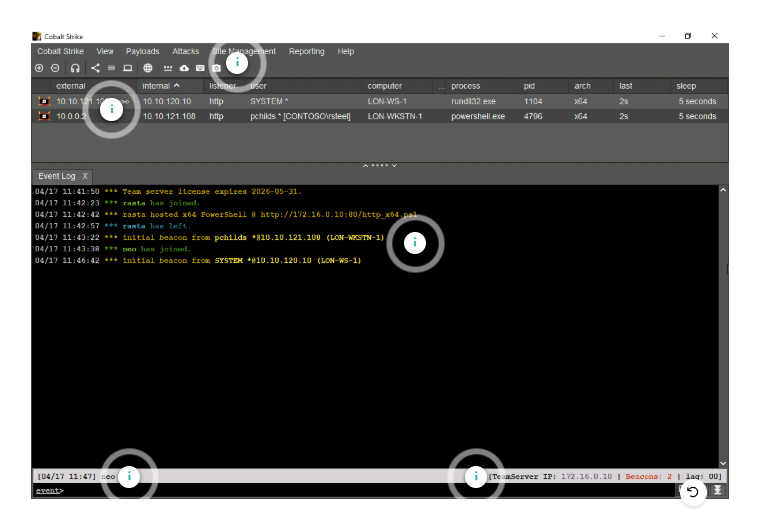
7.1 A Beacon check-in
When a new Beacon checks in, the client can show an event-log entry and a new session in the table or graph view.
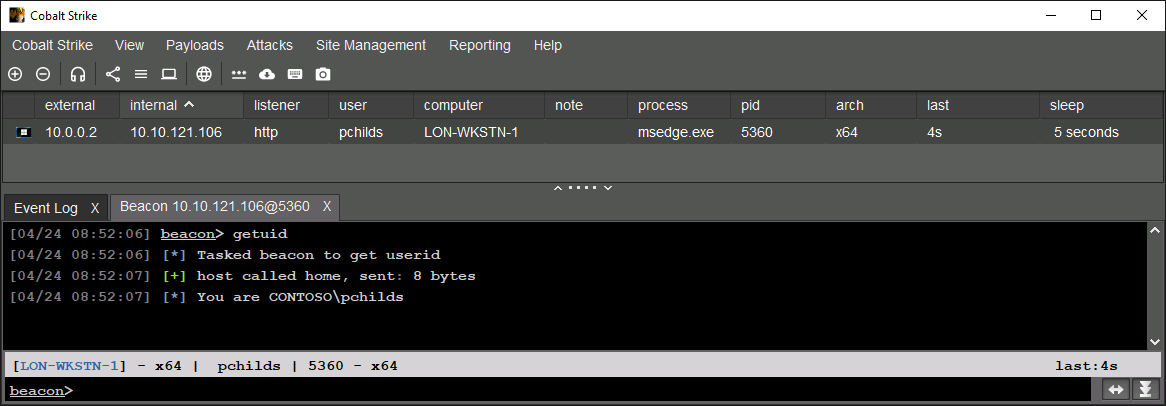
Beacon metadata is carried within the configured C2 protocol. For HTTP/S, it may be represented in parts of the request such as the URI, headers, or cookies. The exact location depends on the listener configuration. DNS Beacons may show less metadata initially because of their constrained bandwidth.
7.2 Session table fields
- external: external address observed by the Cobalt Strike web service; this is not necessarily an address Beacon independently reported.
- internal: internal address associated with the target computer.
- listener: the egress listener used by the Beacon.
- user: user account under which the Beacon process runs.
- computer: target hostname.
- note: operator-supplied note.
- process: process hosting Beacon.
- PID: process identifier.
- arch: Beacon architecture, such as x86 or x64.
- last: time since the last Beacon communication.
- sleep: configured Beacon sleep interval.
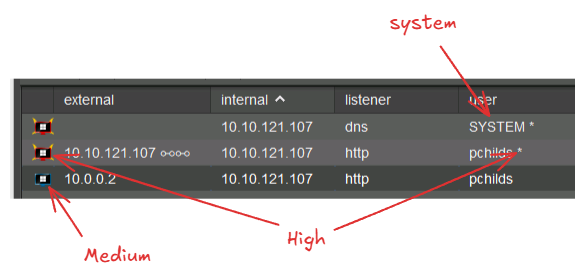
The monitor icon represents an integrity context in the client. The original notes describe blue as medium integrity and red as high integrity, with an asterisk appended for an elevated account. Treat these UI indicators as client metadata, not as a complete privilege or access assessment.
7.3 Tasking and the job queue
Double-clicking a Beacon or selecting Interact opens its interaction tab. help lists commands, and help <command> provides help for one command.
beacon> help
beacon> help getuid
When a command is entered, the client places a job in the Beacon's queue. Multiple jobs can be queued while waiting for the next check-in. When Beacon checks in, the Team Server sends available jobs in the response; Beacon processes them and returns results.
Conceptually:
Operator queues task
        │
        ▼
Team Server stores task
        │
        ▼
Beacon checks in and receives task
        │
        ▼
Beacon executes task and returns result
        │
        ▼
Client displays result
Example from the original notes:
[02/26 15:52:55] beacon> getuid
[02/26 15:52:55] [*] Tasked beacon to get userid
[02/26 15:52:59] [+] host called home, sent: 8 bytes
[02/26 15:52:59] [*] You are DESKTOP-FGSTPS7\Attacker
The example is a lab transcript. It should not be interpreted as a recommendation to run commands outside an authorized environment.
8. Session graph view
The table view shows session metadata. The graph view is useful for understanding parent/child Beacon relationships, especially when peer-to-peer Beacons are involved.

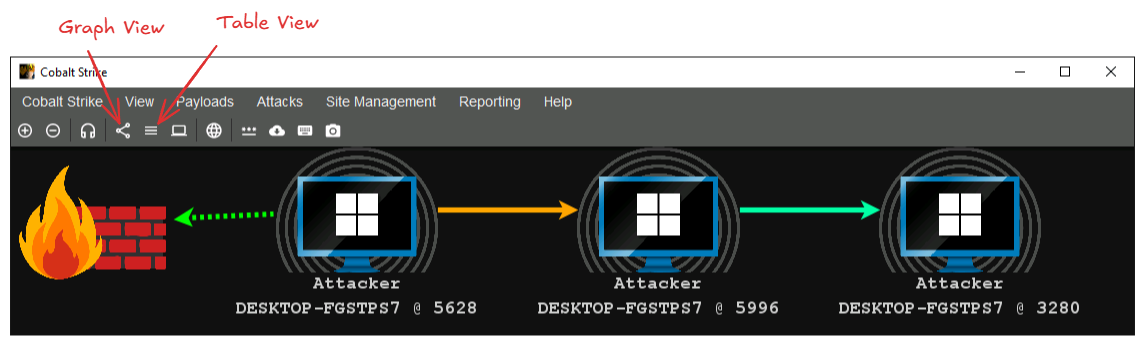
In the original course material, the graph conventions are:
- dashed green: HTTP/S egress;
- solid yellow: SMB peer-to-peer;
- dashed yellow: DNS egress; and
- solid green: TCP peer-to-peer.
The exact colors are a UI convention. The important relationship is whether a Beacon communicates directly with the Team Server or through a parent Beacon.
9. Review prompts and remaining gaps
These are the questions I still want to be able to answer confidently:
- Which parts of a listener are generated into Beacon, and which are supplied by the Team Server at runtime?
- What exact metadata is visible for each protocol in the version used for the CRTO lab?
- How does a redirector change the observable network path and logs?
- Which payloads in the current Cobalt Strike version are staged by default, and which post-exploitation actions deliver full payloads?
- What PE-loading work is performed by the selected artifact or user-defined loader?
- What evidence would a defender see for each artifact type: file, process, memory, DNS, proxy, and C2 logs?
- What changes when a Beacon is an egress Beacon versus an SMB or TCP peer?
The shortest version to remember
Client   = operator interface
Server   = controller, logging, and infrastructure
Beacon   = post-exploitation agent
Listener = Beacon communication configuration
Stager   = small program that retrieves a stage
Stage    = full Beacon payload
Loader   = prepares the Beacon image to run
Artifact = package/wrapper used to deliver or execute it
This is a living study note. Sources and understanding may change as it is reviewed.